
Entity Framework Code-First(14):From Existing DB
Code-First from an Existing Database:
Here, you will learn how to generate code-first context and entity classes for an existing database.
Entity Framework provides an easy way to use code-first approach for an existing database. It will create entity classes for all the tables & views in your existing database and configure it with DataAnnotations attributes and Fluent API.
To use code-first for an existing database, right click on your project in Visual Studio -> Add -> New Item..
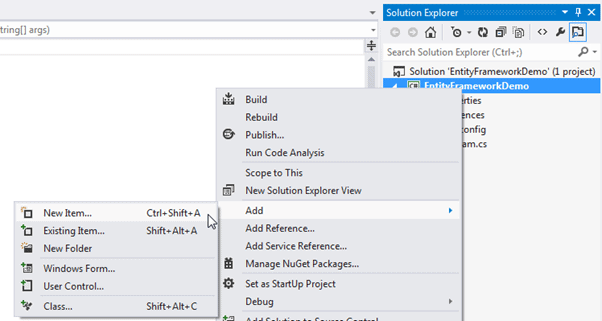
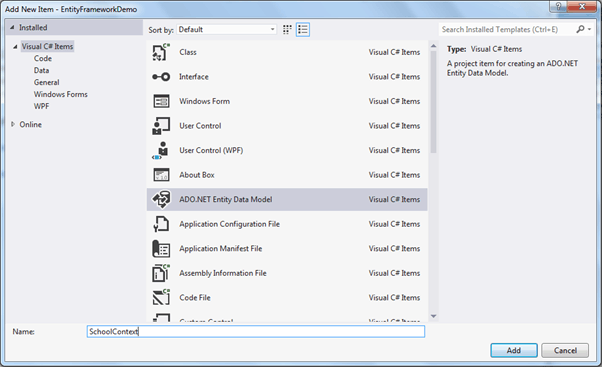
Select ADO.NET Entity Data Model in the Add new item dialog box and specify model name (This will be a context class name) and click on Add.
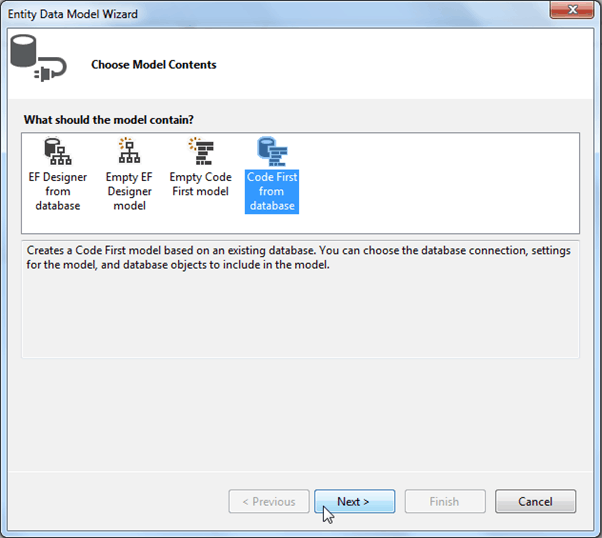
This will open Entity Data Model wizard as shown below. Select Code first from database option and click Next.
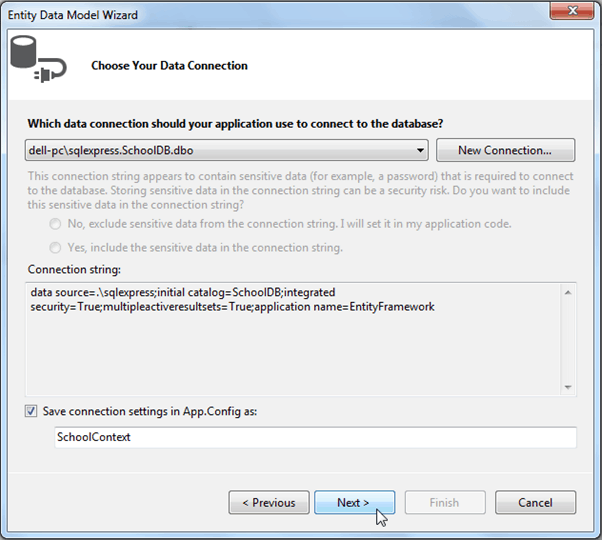
Now, select data connection for existing database. Create new connection for your database if dropdown does not include connection to your existing database. Click Next to continue.
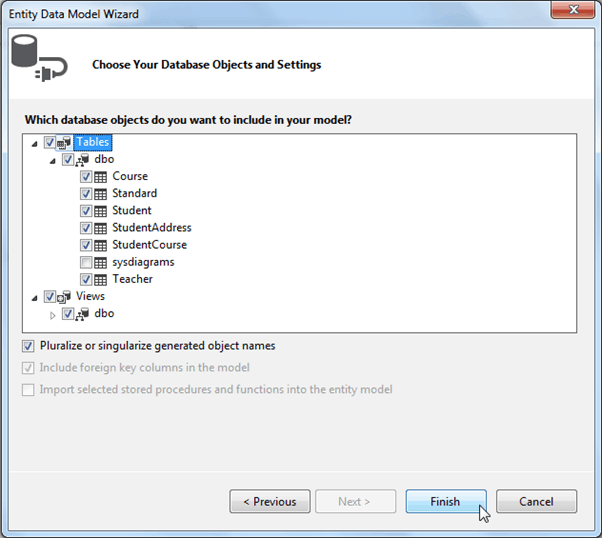
Now, choose tables and views for which you want to generate classes and click on Finish.
This will generate all the entity classes for your DB tables and views as shown below.
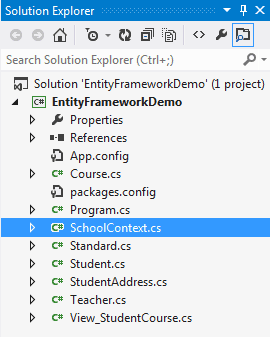
For example, it will create following context class which uses Fluent API to configure entity classes as per your database.
namespace EFDemo

{

    using System;

    using System.Data.Entity;

    using System.ComponentModel.DataAnnotations.Schema;

    using System.Linq;

    public partial class SchoolContext : DbContext

    {

        public SchoolContext()

            : base("name=SchoolContext2")

        {

        }

        public virtual DbSet<Course> Courses { get; set; }

        public virtual DbSet<Standard> Standards { get; set; }

        public virtual DbSet<Student> Students { get; set; }

        public virtual DbSet<StudentAddress> StudentAddresses { get; set; }

        public virtual DbSet<Teacher> Teachers { get; set; }

        public virtual DbSet<View_StudentCourse> View_StudentCourse { get; set; }

        protected override void OnModelCreating(DbModelBuilder modelBuilder)

        {

            modelBuilder.Entity<Course>()

                .Property(e => e.CourseName)

                .IsUnicode(false);

            modelBuilder.Entity<Course>()

                .HasMany(e => e.Students)

                .WithMany(e => e.Courses)

                .Map(m => m.ToTable("StudentCourse").MapLeftKey("CourseId").MapRightKey("StudentId"));

            modelBuilder.Entity<Standard>()

                .Property(e => e.StandardName)

                .IsUnicode(false);

            modelBuilder.Entity<Standard>()

                .Property(e => e.Description)

                .IsUnicode(false);

            modelBuilder.Entity<Standard>()

                .HasMany(e => e.Students)

                .WithOptional(e => e.Standard)

                .WillCascadeOnDelete();

            modelBuilder.Entity<Standard>()

                .HasMany(e => e.Teachers)

                .WithOptional(e => e.Standard)

                .WillCascadeOnDelete();

            modelBuilder.Entity<Student>()

                .Property(e => e.StudentName)

                .IsUnicode(false);

            modelBuilder.Entity<Student>()

                .Property(e => e.RowVersion)

                .IsFixedLength();

            modelBuilder.Entity<Student>()

                .HasOptional(e => e.StudentAddress)

                .WithRequired(e => e.Student)

                .WillCascadeOnDelete();

            modelBuilder.Entity<StudentAddress>()

                .Property(e => e.Address1)

                .IsUnicode(false);

            modelBuilder.Entity<StudentAddress>()

                .Property(e => e.Address2)

                .IsUnicode(false);

            modelBuilder.Entity<StudentAddress>()

                .Property(e => e.City)

                .IsUnicode(false);

            modelBuilder.Entity<StudentAddress>()

                .Property(e => e.State)

                .IsUnicode(false);

            modelBuilder.Entity<Teacher>()

                .Property(e => e.TeacherName)

                .IsUnicode(false);

            modelBuilder.Entity<Teacher>()

                .HasMany(e => e.Courses)

                .WithOptional(e => e.Teacher)

                .WillCascadeOnDelete();

            modelBuilder.Entity<View_StudentCourse>()

                .Property(e => e.StudentName)

                .IsUnicode(false);

            modelBuilder.Entity<View_StudentCourse>()

                .Property(e => e.CourseName)

                .IsUnicode(false);

        }

    }

}
Entity Framework Code-First(14):From Existing DB的更多相关文章
- Entity Framework Tutorial Basics(14):Choose development approach
Choose development approach with Entity Framework: We have seen Code-first, Model-first and Database ...
- Entity Framework Code first(转载)
一.Entity Framework Code first(代码优先)使用过程 1.1Entity Framework 代码优先简介 不得不提Entity Framework Code First这个 ...
- Entity Framework Code First (三)Data Annotations
Entity Framework Code First 利用一种被称为约定(Conventions)优于配置(Configuration)的编程模式允许你使用自己的 domain classes 来表 ...
- Entity Framework Code First (二)Custom Conventions
---------------------------------------------------------------------------------------------------- ...
- Entity Framework Code First (一)Conventions
Entity Framework 简言之就是一个ORM(Object-Relational Mapper)框架. Code First 使得你能够通过C#的类来描述一个模型,模型如何被发现/检测就是通 ...
- Entity Framework Tutorial Basics(31):Migration from EF 4.X
Migration from Entity Framework 4.1/4.3 to Entity Framework 5.0/6.0 To migrate your existing Entity ...
- Entity Framework Tutorial Basics(11):Code First
Code First development with Entity Framework: Entity Framework supports three different development ...
- Entity Framework Code First (八)迁移 Migrations
创建初始模型和数据库 在开始使用迁移(Migrations)之前,我们需要一个 Project 和一个 Code First Model, 对于本文将使用典型的 Blog 和 Post 模型 创建一个 ...
- Entity Framework Code First (七)空间数据类型 Spatial Data Types
声明:本文针对 EF5+, Visual Studio 2012+ 空间数据类型(Spatial Data Types)是在 EF5 中引入的,空间数据类型表现有两种: Geography (地理学上 ...
随机推荐
- 326 集合 ,数据类型的补充 ,copy , 编码之间的转换
一.数据类型补充1,对于元组:如果只有一个元素,并且没有逗号,此元素是什么数据类型,改表达式就是什么数据类型. tu = () tu1 = (,) print(tu,type(tu)) #1 < ...
- 剑指offer——和为s的两个数字VS和为s的连续正数序列
两种方法都类似于快排的变形. #include <iostream> #include <string> using namespace std; bool FindNumbe ...
- 算法(Algorithms)第4版 练习 1.3.31
双向链表实现: //1.3.31 package com.qiusongde.linkedlist; public class DoublyLinkedList<Item> { priva ...
- sqoop job从创建到执行
在学习sqoop job之前,最好先学习一下sqoop命令的导入导出 sqoop 使用 import 将 mysql 中数据导入到 hive sqoop 使用 import 将 mysql 中数据导入 ...
- ConcurrentHashMap以及HashMap,HashTable的区别
ConcurrentHashMap与HashMap,和HashTable 的区别? ConcurrentHashMap是一个线程安全的key-value数据结构,而HashMap不是.Concurre ...
- Luogu P1196 [NOI2002]银河英雄传说:带权并查集
题目链接:https://www.luogu.org/problemnew/show/P1196 题意: 有30000个战舰队列,编号1...30000. 有30000艘战舰,编号1...30000, ...
- 数据库的join查询
假设我们有两张表. Table A 是左边的表. Table B 是右边的表. 其各有四条记录,其中有两条记录是相同的,如下所示: id name id name -- ---- -- ---- 1 ...
- python中zip()函数基本用法
zip()函数接受一系列可迭代对象作为参数,将不同对象中相对应的元素打包成一个元组(tuple),返回由这些元组组成的list列表,如果传入的参数的长度不等,则返回的list列表的长度和传入参数中 ...
- cocos2dx & cocostudio 实现模态对话框
用cocos2dx实现模态对话框 http://www.cnblogs.com/mrblue/(转自于) ui部分使用了cocoStudio,注意这里没有实现怎么屏蔽其他的输入事件,其他的文档已经太多 ...
- 洛谷【P1303】A*B Problem
题目传送门:https://www.luogu.org/problemnew/show/P1303 高精度乘法板子题,灵性地回忆一下小学时期列竖式的草稿纸即可. 时间复杂度:\(O(len^2)\) ...