
OZ customize windows iamge
1、之前通过修改auto文件和windows.py文件可实现自动安装OS,但是disk bus只能以IDE模式启动,进入系统自动下载运行bat文件,安装cloudbase-init和qga,及清理日志等操作
2、winodws2008.tdl无法定义file注入系统
3、通过Oz官方社区了解到,之前有人奉献过部分代码但是未合并,按照官方社区修改代码,测试报错
参考链接:https://github.com/clalancette/oz/pull/54/commits
4、找到Oz的windows的branch,代码比较老,2011年的。在物理机上搭建virtualenv测试,缺少各种包的依赖。
按照提示按照各种依赖包,再进行测试报console port和key的问题,修改windows.py和Guest.py部分代码,修改disk bus在hd模式下为virtio启动。
现在能够跑起来,但是卡在应答文件这块。修改windows2008.atuo也无济于事。
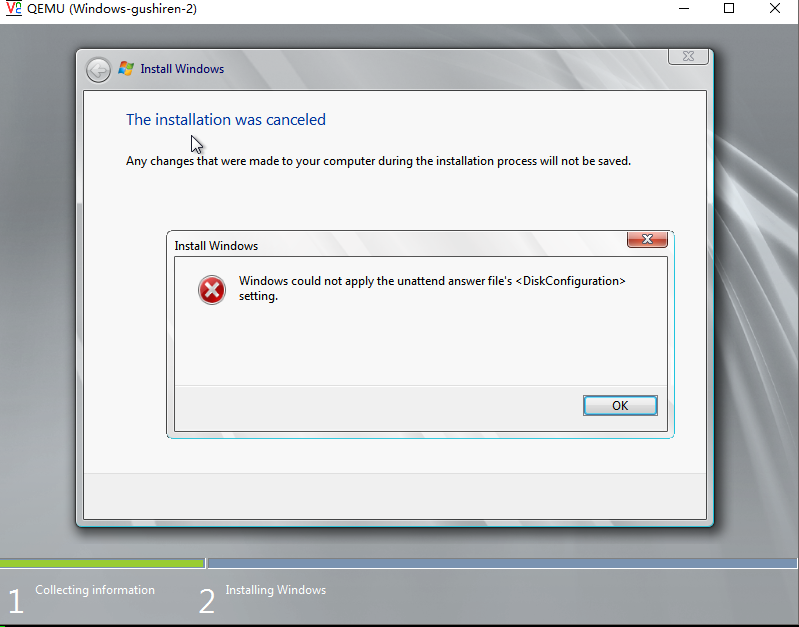
附上安装输出的日志
(oz-w2k8)[root@10e131e69e14 oz-win2k8customize]# oz-install -p -u -d3  win2008.tdl

libvirt bridge name is virbr0, host_bridge_ip is 192.168.122.1

Name: Windows-gushiren-2, UUID: 717e7faa-5e5a-4ffa-b886-c4bfbf6771fd

MAC: 52:54:00:98:d0:80, distro: Windows

update: 2008, arch: x86_64, diskimage: /data/nvme0n1/oz/images/Windows-gushiren-2.dsk

nicmodel: rtl8139, clockoffset: localtime

mousetype: usb, disk_bus: virtio, disk_dev: hda

icicletmp: /var/lib/oz/icicletmp/Windows-gushiren-2, listen_port: 14028

Original ISO path: /var/lib/oz/isos/Windows2008x86_64-iso.iso

Modified ISO cache: /var/lib/oz/isos/Windows2008x86_64-iso-oz.iso

Output ISO path: /data/nvme0n1/oz/images/Windows-gushiren-2-iso-oz.iso

ISO content path: /var/lib/oz/isocontent/Windows-gushiren-2-iso

Cleaning up guest named Windows-gushiren-2

Generating install media

Fetching the original media

Original install media available, using cached version

Copying ISO contents for modification

Setting up guestfs handle for Windows-gushiren-2

Adding ISO image /var/lib/oz/isos/Windows2008x86_64-iso.iso

Launching guestfs

Mounting ISO

Checking if there is enough space on the filesystem

Extracting ISO contents

Modifying ISO

/data/nvme0n1/oz-w2k8/lib/python2.7/site-packages/oz/Guest.py:969: RuntimeWarning: overflow encountered in ushort_scalars

  s = numpy.uint16(numpy.uint16(s) + numpy.uint16(w))

Generating new ISO

Cleaning up old ISO data

Generating 10GB diskimage for Windows-gushiren-2

Running install for Windows-gushiren-2

Generate XML for guest Windows-gushiren-2 with bootdev cdrom

Generated XML:

<?xml version="1.0"?>

<domain type="kvm">

  <name>Windows-gushiren-2</name>

  <memory>1048576</memory>

  <currentMemory>1048576</currentMemory>

  <uuid>717e7faa-5e5a-4ffa-b886-c4bfbf6771fd</uuid>

  <clock offset="localtime"/>

  <vcpu>1</vcpu>

  <features>

    <acpi/>

    <apic/>

    <pae/>

  </features>

  <os>

    <type>hvm</type>

    <boot dev="cdrom"/>

  </os>

  <on_poweroff>destroy</on_poweroff>

  <on_reboot>destroy</on_reboot>

  <on_crash>destroy</on_crash>

  <devices>

    <graphics port="-1" type="vnc" listen="0.0.0.0"/>

    <interface type="bridge">

      <source bridge="virbr0"/>

      <mac address="52:54:00:98:d0:80"/>

      <model type="virtio"/>

    </interface>

    <input type="tablet" bus="usb"/>

    <console type="pty">

      <target port="0"/>

    </console>

    <disk device="disk" type="file">

      <target dev="hda" bus="virtio"/>

      <source file="/data/nvme0n1/oz/images/Windows-gushiren-2.dsk"/>

    </disk>

    <disk type="file" device="cdrom">

      <source file="/data/nvme0n1/oz/images/Windows-gushiren-2-iso-oz.iso"/>

      <target dev="hdc"/>

    </disk>

  </devices>

</domain>

Waiting for Windows-gushiren-2 to finish installing, 6000/6000

Waiting for Windows-gushiren-2 to finish installing, 5990/6000

Waiting for Windows-gushiren-2 to finish installing, 5980/6000

Waiting for Windows-gushiren-2 to finish installing, 5970/6000

Waiting for Windows-gushiren-2 to finish installing, 5960/6000

Waiting for Windows-gushiren-2 to finish installing, 5950/6000

Waiting for Windows-gushiren-2 to finish installing, 5940/6000

^CCleaning up guest named Windows-gushiren-2

Cleaning up after install

Removing modified ISO

^CTraceback (most recent call last):

  File "/data/nvme0n1/oz-w2k8/bin/oz-install", line 140, in <module>

    guest.cleanup_install();

  File "/data/nvme0n1/oz-w2k8/lib/python2.7/site-packages/oz/Guest.py", line 1084, in cleanup_install

    os.unlink(self.output_iso)

KeyboardInterrupt
https://github.com/clalancette/oz/tree/win2k8customize
OZ customize windows iamge的更多相关文章
- 黑科技抢先尝(续) - Windows terminal中WSL Linux 终端的极简美化指南
目录 修改默认源,为apt-get安装提速 安装python 和 python pip 安装 zsh 安装powerline-font中的特定字体 安装powerline-shell 修改~目录下的配 ...
- 程序员的 Ubuntu 19.10 配置与优化指南
原文地址:程序员的 Ubuntu 19.10 配置与优化指南 0x00 环境 CPU: Intel Core i9-9900k GPU: GeForce RTX 2070 SUPER RAM: DDR ...
- Windows远程连接Linux
目录 xrdp方式 vnc方式 xrdp方式 ----------------------------------------------------------------------------- ...
- Android学习——windows下搭建Cygwin环境
在上一篇博文<Android学习——windows下搭建NDK_r9环境>中,我们详细的讲解了在windows下进行Android NDK开发环境的配置,我们也讲到了在NDk r7以后,我 ...
- Android学习——windows下搭建NDK_r9环境
1. NDK(Native Development Kit) 1.1 NDK简介 Android NDK是一套允许开发人员使用本地代码(如C/C++)进行Android APP功能开发的工具,通过这个 ...
- eclipse安装ADT后在windows菜单下找不到android SDK and AVD Manager
eclipse安装ADT后在windows菜单下找不到android SDK and AVD Manager选项的解决办法 - zhjr1220的专栏 - 博客频道 - CSDN.NET http: ...
- Windows Azure HandBook (2) Azure China提供的服务
<Windows Azure Platform 系列文章目录> 对于传统的自建数据中心,从底层的Network,Storage,Servers,Virtualization,中间层的OS, ...
- 如何优雅地使用 Windows 10 ?
身为一个伪电脑Geek,就算不懂电脑,也要把那些更不懂电脑的人给唬住. 1.入门级别: 当然就是让别人从视觉上感觉你的电脑不一般啦 第一步:桌面要干净,干净到什么程度呢,要像这样 当别人第一眼看到你的 ...
- Windows网络驱动、NDIS驱动(微端口驱动、中间层驱动、协议驱动)、TDI驱动(网络传输层过滤)、WFP(Windows Filtering Platform)
catalog . 引言 . Windows 2000网络结构和OSI模型 . NDIS驱动 . NDIS微端口驱动编程实例 . NDIS中间层驱动编程实例 . NDIS协议层驱动编程实例 . TDI ...
随机推荐
- 2017.10.3 JDBC访问数据库的建立过程
1·JDBC访问数据库,其访问流程: (1)注册驱动 (2)建立连接(Connection) (3)创建数据库操作对象用于执行SQL语句 (4)执行语句 (5)处理执行结果 (6)释放资源 2·注册驱 ...
- 配置SSIS 包部署
包配置是干嘛滴! 使用包配置可以从开发环境的外部设置运行时属性和变量. 把用户变量转换成Config文件 步骤: 准备工作 把第一个例子中的userinfo.txt复制两份,放到同一个 ...
- python 生成器与迭代器(yield 用法)
背景 首先,我不会解释这两个名词,我看过很多遍解释,可还是看不懂,还是直接看使用情景吧. 我们以佩波拉契数列为例,当我们不知道迭代器的情况下,我们写出来的代码可能是这样子的: '''这种方式计算fib ...
- CocoaAsyncSocket使用
代理的.h文件 #import <Foundation/Foundation.h> #import "GCDAsyncSocket.h" typedef void(^S ...
- activemq启动闪退/失败 (Illegal character in hostname at index 5: ws://****:61614?maximumConnections=1000&wireFormat.maxFrameSize=104857600)
java.net.URISyntaxException: Illegal character in hostname at index 5: ws://****:61614?maximumConnec ...
- 爬虫学习(十二)——bs4实践案例
实践项目————诗词名句网<三国演义>小说爬取 import osimport reimport timeimport urllib.requestimport urllib.parsef ...
- motto - Express 4.x Request对象获得参数方法
本文搜索关键字:motto express node js nodejs javascript request body request.body 1. req.param() 该方法获得参数最为方便 ...
- Docker自学纪实(四)搭建LNMP部署wordpress
我们在工作中最常用的就是LNMP网站平台 这个架构呢,是整个公司网站的核心 如果对于访问量较小的网站,可以直接在服务器上面部署 而如果是访问量很大的网站,那负载就是个很大的问题. 要么需要再买很多服务 ...
- CSS设置背景透明字体不透明
写CSS时给容器设置透明度的时候如果使用background-color: #000000; opacity: 0.5;这时会出现容器里的文字也跟着透明.解决办法是不用十六进制的色值和透明度分开写,使 ...
- OpenStack Grizzly版本部署(离线)
参考原版地址:https://github.com/mseknibilel/OpenStack-Grizzly-Install-Guide 图转自原版地址 部署拓扑: 部署环境:vmware stat ...