
MVVM模式下WPF动态绑定展示图片
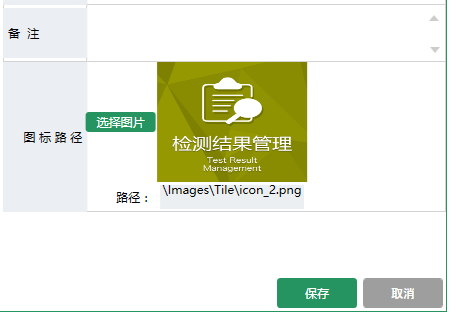
MVVM模式下WPF动态展示图片,界面选择图标,复制到项目中固定目录下面,保存到数据库的是相对路径,再次读取的时候是根据数据库的相对路径去获取项目中绝对路径的图片展示。
首先在ViewModel中
//属性定义

       BitmapImage _ImageSource;

        /// <summary>

        /// 显示的图标

        /// </summary>

        public BitmapImage ImageSource

        {

            get { return _ImageSource; }

            set

            {

                _ImageSource = value;

                NotifyOfPropertyChange("ImageSource");

            }

        }

        string _ImagePath;

        /// <summary>

        /// 显示的图标路径

        /// </summary>

        public string ImagePath

        {

            get { return _ImagePath; }

            set

            {

                _ImagePath = value;

                NotifyOfPropertyChange("ImagePath");

            }

        }
//初始化数据
//编辑的时候绑定数据
public GroupInfoViewModel(sys_Right_Group groupInfo, OperType type)

        {

            if (type == OperType.Edit || type == OperType.Show)

            {

                IsAdd = false;

                TitleName = "编辑分组";

                RightGroup = groupInfo;

                ImagePath = groupInfo.ImagePath;

                GetImgData(groupInfo.ImagePath);

            }

        }

        /// <summary>

        /// 获取图片数据

        /// </summary>

        /// <param name="imgPath">相对路径</param>

        private void GetImgData(string imgPath)

        {

            if (string.IsNullOrEmpty(imgPath)) return;

            try

            {


                string fileName = System.Environment.CurrentDirectory + imgPath; //获取文件的绝对路径

                byte[] buf;

                if (!PathToByte(fileName, out buf))

                {

                    MessageHelper.ShowAutoCloseWarning("获取图标失败");

                    return;

                }

                ImageSource =ByteToImage(buf);

            }

            catch (Exception ex)

            {

                throw ex;

            }

        }
//界面选择图片按钮事件

     /// <summary>

        /// 修改图片

        /// </summary>

        public void ChangedIcon()

        {

            try

            {

                OpenFileDialog open = new OpenFileDialog();

                open.Filter = string.Format("照片|*.jpg;*.jpeg;*.png;*.gif;*.bmp");

                if (open.ShowDialog() == true)

                {

                    var path = open.FileName;

                    //检查图标目录,绝对路径下面

                    string NewPath = System.Environment.CurrentDirectory + @"\Images\Tile\Group\";

                    string newFile = NewPath + Path.GetFileName(path);

                    if (!System.IO.Directory.Exists(NewPath))

                    {

                        System.IO.Directory.CreateDirectory(NewPath);

                    }

                    File.Copy(path, newFile, true); //复制文件到目录绝对路径文件夹

                    FileInfo info = new FileInfo(newFile); //新文件

                    if (info.Length > MenuViewModel.UserImageMaxLength)

                    {

                        MessageHelper.ShowAutoCloseWarning(string.Format("图标不能大于{0}M",

                            MenuViewModel.UserImageMaxLength /  / ));

                        return;

                    }

                    byte[] buf;

                    if (!PathToByte(path, out buf))

                    {

                        MessageHelper.ShowAutoCloseWarning("修改失败");

                        return;

                    }

                    ImageSource = ByteToImage(buf);

                    ImagePath = @"\Images\Tile\Group\" + Path.GetFileName(path); //显示相对路径

                }

            }

            catch (Exception ex)

            {

                throw ex;

            }

        }
点击保存的时候再把相对路径保存到数据库RightGroup.ImagePath = ImagePath;
//公共帮助方法

//把图片文件转换为byte数组

 public static bool PathToByte(string path, out byte[] buffer)

        {

            FileStream fs = new FileStream(path, FileMode.Open, FileAccess.Read);

            try

            {

                buffer = new byte[fs.Length];

                fs.Read(buffer, , (int)fs.Length);

                return true;

            }

            catch (Exception ex)

            {

                buffer = null;

                return false;

            }

            finally

            {

                if (fs != null)

                {

                    //关闭资源

                    fs.Close();

                }

            }

        }

//把byte数组转化为BitmapImage

        public static BitmapImage ByteToImage(byte[] buf)

        {

            BitmapImage bmp = new BitmapImage();

            bmp.BeginInit();

            bmp.StreamSource = new MemoryStream(buf);

            bmp.EndInit();

            return bmp;

        }
View 界面绑定代码:
                    <Button  Grid.Row="" Grid.Column="" Content="选择图片" cm:Message.Attach="[Click]=[ChangedIcon()]" Style="{StaticResource BtnOperationStyle}" Height="" Width=""></Button>

                    <Grid Grid.Row="" Grid.Column="" Background="LightGray">

                        <Image  Height="" Width="" Stretch="Fill" Source="{Binding ImageSource,Mode=TwoWay, UpdateSourceTrigger=PropertyChanged}"></Image>

                    </Grid>

                    <Label  Grid.Row="" Grid.Column="" Style="{StaticResource GridColumnLabelStyle}" Content="路径:"></Label>

                    <TextBox Grid.Row="" Grid.Column="" Style="{StaticResource StyleForTextBox}" Text="{Binding ImagePath,Mode=TwoWay,UpdateSourceTrigger=PropertyChanged}" Height=""  TextAlignment="Center" IsReadOnly="True"></TextBox>
界面效果:
MVVM模式下WPF动态绑定展示图片的更多相关文章
- WPF中在MVVM模式下,后台绑定ListCollectionView事件触发问题
问题:WPF中MVVM模式下 ListView绑定ListCollectionView时,CurrentChanged无法触发 解决方案: 初期方案:利用ListView的SelectionChang ...
- WPF实战案例-MVVM模式下在Xaml中弹出窗体
相信很多学习和开发wpf项目的同学都了解过mvvm模式,同样,在mvvm模式下会有一个不可忽视的问题,就是怎么在xaml中弹出窗体,而不破坏MVVM本身的结构. 关于弹出窗体的方式还是很多的,本文先讲 ...
- mvvm模式下在WPF项目中动态加载项目的程序集和类
在mvvm模式的wpf项目中有个需求需要去加载解决方案的程序集,并且根据程序集去动态加载当前程序集的类,做成下拉框形式. 效果: //全局定义 private ComboBox abList= nul ...
- wpf mvvm模式下CommandParameter传递多参
原文:wpf mvvm模式下CommandParameter传递多参 CommandParameter一般只允许设置一次,所以如果要传递多参数,就要稍微处理一下.我暂时还没找到更好的方案,下面介绍的这 ...
- WPF MVVM模式下ComboBox级联效果 选择第一项
MVVM模式下做的省市区的级联效果.通过改变ComboBox执行命令改变市,区. 解决主要问题就是默认选中第一项 1.首先要定义一个属性,继承自INotifyPropertyChanged接口.我这里 ...
- 企业级架构 MVVM 模式指南 (WPF 和 Silverlight 实现) 译(2)
本书包含的章节内容 第一章:表现模式,以一个例子呈献给读者表现模式的发展历程,我们会用包括MVC和MVP在内的各种方式实现一个收费项目的例子.沿此方向,我们会发现每一种模式的问题所在,这也是触发设计模 ...
- Silverlight中在MVVM模式下对DatagridRow选择控件封装
在项目中,凡是涉及到表格的地方用的最多的控件,自然少不了DataGrid的身影,它明了的展示各种数据让人十分喜欢.现在要实现一个功能,使DataGrid具有全选和项选中的功能,如果在传统后台代码中完成 ...
- MVVM模式下弹出窗体
原地址:http://www.cnblogs.com/yk250/p/5773425.html 在mvvm模式下弹出窗体,有使用接口模式传入参数new一个对象的,还有的是继承于一个window,然后在 ...
- js架构设计模式——MVVM模式下,ViewModel和View,Model有什么区别
MVVM模式下,ViewModel和View,Model有什么区别 Model:很简单,就是业务逻辑相关的数据对象,通常从数据库映射而来,我们可以说是与数据库对应的model. View:也很简单,就 ...
随机推荐
- 详解Top命令 输出命令行选项及代码
Linux中的top命令显示系统上正在运行的进程.它是系统管理员最重要的工具之一.被广泛用于监视服务器的负载.在本篇中,我们会探索top命令的细节.top命令是一个交互命令.在运行top的时候还可以运 ...
- What makes an inferred latch? how To avoid creating inferred latches? when do you know you need latches?
What makes an inferred latch?For combinatorial logic, the output of the circuit is a function of inp ...
- HDU1584(蜘蛛牌)
蜘蛛牌 Time Limit: 10000/5000 MS (Java/Others) Memory Limit: 32768/32768 K (Java/Others)Total Submis ...
- Day3(2)bash的特性
bash的基础特性: (1)命令历史 history 环境变量: HISTSIZE:命令零食记录的条数: HISTFILE:~/.bash_history: HISFILESIZE:命令历史文件记录历 ...
- linux 学习2 常用命令
1.显示日期的指令: date 2. [Tab]按键---具有『命令补全』不『档案补齐』的功能 3: su和 sudo su用于用户之间的切换. su在不加任何参数,默认为切换到root用户 ...
- 装饰器api
import hashlib import time from django.http import HttpResponse key="qwrwertyuiop" visited ...
- Struts旅程(六)Struts页面转发控制ActionForward和ActionMapping
转自:https://blog.csdn.net/lovesummerforever/article/details/19125933
- DAY19-Django之form组件补充
问题1:注册页面输入为空,报错:keyError:找不到password def clean(self): print("---" ,self.cleaned_data) # if ...
- [Python Study Notes]七彩散点图绘制
''''''''''''''''''''''''''''''''''''''''''''''''''''''''''''''''''''''''''''''''''''''''''''''''''' ...
- TCP/IP 笔记 7 Ping
lenovo-myc@lenovomyc-Lenovo-Product:~$ ping www.baidu.com PING www.a.shifen.com (() bytes of data. 这 ...