
docker教程之从一头雾水到不一头雾水(2)
运行镜像
先查看下本地有哪些镜像
[root@ichz ~]# docker images

REPOSITORY          TAG                 IMAGE ID            CREATED             SIZE

docker.io/centos    latest              49f7960eb7e4         days ago           MB
运行镜像,在刚刚pull的centos镜像里输出一行hello world,可以使用REPOSITORY,也可以使用IMAGE ID
[root@ichz ~]# docker run 49f7960eb7e4 echo helloe world

helloe world

[root@ichz ~]# docker run centos echo helloe world

helloe world
各个选项说明:
REPOSITORY:表示镜像的仓库源
TAG:镜像的标签
IMAGE ID:镜像ID
CREATED:镜像创建时间
SIZE:镜像大小
同一仓库源可以有多个 TAG,代表这个仓库源的不同个版本,如ubuntu仓库源里,有15.10、14.04等多个不同的版本,我们使用 REPOSITORY:TAG 来定义不同的镜像。
所以,我们如果要使用版本为15.10的ubuntu系统镜像来运行容器时,命令如下:
runoob@runoob:~$ docker run -t -i ubuntu:15.10 /bin/bash
查找镜像
我们可以从 Docker Hub 网站来搜索镜像,Docker Hub 网址为: https://hub.docker.com/
我们也可以使用 docker search 命令来搜索镜像。比如我们需要一个httpd的镜像来作为我们的web服务。我们可以通过 docker search 命令搜索 httpd 来寻找适合我们的镜像。
runoob@runoob:~$ docker search httpd
更新镜像
我们可以通过命令 docker commit来提交容器副本。
runoob@runoob:~$ docker commit -m="has update" -a="runoob" e218edb10161 runoob/ubuntu:v2

sha256:70bf1840fd7c0d2d8ef0a42a817eb29f854c1af8f7c59fc03ac7bdee9545aff8
各个参数说明:
-m:提交的描述信息
-a:指定镜像作者
e218edb10161:容器ID
runoob/ubuntu:v2:指定要创建的目标镜像名
我们可以使用 docker images 命令来查看我们的新镜像 runoob/ubuntu:v2:
runoob@runoob:~$ docker images

REPOSITORY          TAG                 IMAGE ID            CREATED             SIZE

runoob/ubuntu       v2                  70bf1840fd7c         seconds ago      158.5 MB

ubuntu              14.04               90d5884b1ee0         days ago           MB

ubuntu              15.10               4e3b13c8a266         weeks ago         136.3 MB

hello-world         latest              690ed74de00f         months ago         B
使用我们的新镜像 runoob/ubuntu 来启动一个容器
runoob@runoob:~$ docker run -t -i runoob/ubuntu:v2 /bin/bash

root@1a9fbdeb5da3:/#
构建镜像
1、基于已有的镜像的修改,创建一个新的镜像
[root@206 ~]# docker run -ti ubuntu:17.10 /bin/bash

root@23a9ebc23cc5:/#
23a9ebc23cc5是容器的id
我们在运行的这个容器中进行修改
root@23a9ebc23cc5:/# mkdir test
然后退出
root@23a9ebc23cc5:/# exit
[root@206 ~]# docker commit -m "this is a new images" -a "root" 23a9ebc23cc5 newubuntu:8888
查看镜像,发现多了一个
[root@206 ~]# docker images

REPOSITORY          TAG                 IMAGE ID            CREATED             SIZE

newubuntu           8888                036d21b62a12        2 minutes ago       89.6 MB

ubuntu              17.10               073e7b409b9b        37 hours ago        89.6 MB
2、使用本地模版导入镜像
[root@206 ~]# wget http://download.openvz.org/template/precreated/suse-13.1-x86-minimal.tar.gz
生成镜像
[root@206 ~]# cat suse-13.1-x86-minimal.tar.gz | docker import - newsuse:99999
看一下,又多了一个
[root@206 ~]# docker images

REPOSITORY          TAG                 IMAGE ID            CREATED             SIZE

newsuse             99999               7e4ff5f67461        4 seconds ago       156 MB

newubuntu           8888                036d21b62a12        19 minutes ago      89.6 MB

ubuntu              17.10               073e7b409b9b        37 hours ago        89.6 MB
3、使用Dockerfile
我们使用命令 docker build , 从零开始来创建一个新的镜像。为此,我们需要创建一个 Dockerfile 文件,其中包含一组指令来告诉 Docker 如何构建我们的镜像。
新建Dockerfile文件
[root@ichz ~]# touch Dockerfile
写入内容
[root@ichz ~]# cat Dockerfile
FROM alpine:latest
MAINTAINER xbf
CMD echo "Helloe Docker!"
每一个指令都会在镜像上创建一个新的层,每一个指令的前缀都必须是大写的。
第一条FROM,指定使用哪个镜像源,镜像alpine是专门为Docker准备的一个小巧的环境。
MAINTAINER xbf是告诉别人该镜像共享给别人是谁创建的。
然后,我们使用 Dockerfile 文件,通过 docker build 命令来构建一个镜像。
[root@ichz ~]# docker build -t hello_docker .
Sending build context to Docker daemon 8.842 MB
Step 1/3 : FROM alpine:latest
Trying to pull repository docker.io/library/alpine ...
latest: Pulling from docker.io/library/alpine
ff3a5c916c92: Pull complete
Digest: sha256:e1871801d30885a610511c867de0d6baca7ed4e6a2573d506bbec7fd3b03873f
Status: Downloaded newer image for docker.io/alpine:latest
---> 3fd9065eaf02
Step 2/3 : MAINTAINER xbf
---> Running in 9445777fca4c
---> 4e250ecc7557
Removing intermediate container 9445777fca4c
Step 3/3 : CMD echo "Helloe Docker!"
---> Running in d5b5ad566ad1
---> 65d690c9d782
Removing intermediate container d5b5ad566ad1
Successfully built 65d690c9d782
参数说明:
-t :指定要创建的目标镜像名
. :Dockerfile 文件所在目录,可以指定Dockerfile 的绝对路径,这里的.指的是当前目录
[root@izchz ~]# docker images

REPOSITORY                                           TAG                 IMAGE ID            CREATED             SIZE

hello_docker                                         latest              65d690c9d782         minutes ago       4.15 MB

docker.io/centos                                     latest              49f7960eb7e4         days ago          MB

docker.io/stephenreed/jenkins-java8-maven-git        latest              3670d4afa617         months ago         MB

docker.io/alpine                                     latest              3fd9065eaf02         months ago        4.15 MB

docker.io/stephenreed/java8-jenkins-maven-git-nano   latest              508ef553bf1a         years ago         1.5 GB
运行下刚刚创建的hello_docker镜像
[root@iz2zeh5mjwg5u2vl2fawchz ~]# docker run hello_docker

Helloe Docker!
更多docker创建镜像示例
dockerfile+ubuntu+nginx搭建web环境
设置镜像标签
我们可以使用 docker tag 命令,为镜像添加一个新的标签。
runoob@runoob:~$ docker tag 860c279d2fec runoob/centos:dev
docker tag 镜像ID,这里是 860c279d2fec ,用户名称、镜像源名(repository name)和新的标签名(tag)。
删除镜像
[root@206 test]# docker rmi newubuntuutu1
没有指定tag的时候,删除的是tag为latest的镜像,如果有个名为newubuntuutu1但是tag是其他的时候,这个镜像是不能删除的,除非删除的时候指定tag
[root@206 test]# docker rmi newsuse:99999
[root@206 test]# docker run -ti newubuntuutu1:latest /bin/bash
然后删除这个镜像,提示不能删除
[root@206 test]# docker rmi  newubuntuutu1:latest

Error response from daemon: conflict: unable to remove repository reference "newubuntuutu1:latest" (must force) - container e9a6eeb12f6e is using its referenced image 3d077336fcf6
我们需要先关闭容器 容器id为e9a6eeb12f6e我们只需要写前四位
[root@206 test]# docker rm e9a6
然后再执行docker rmi newubuntuutu1:latest即可
镜像的存出(导出、备份)与载入(导入、恢复)
备份
[root@206 test]# docker save -o ubuntu-bak.tar ubuntu:17.10

[root@206 test]# ls

Dockerfile  ubuntu-bak.tar
删除这个镜像
[root@206 test]# docker rmi ubuntu:17.10
载入
[root@206 test]# docker load --input ubuntu-bak.tar

Loaded image: ubuntu:17.10
写时复制机制
写时复制机制(copy-on-write),是一种在Linux中引入的只有进程空间的各段内容要发生变化时,才把父进程的内容复制给子进程的一种处理机制。
要创建一个子进程,通常的做法是
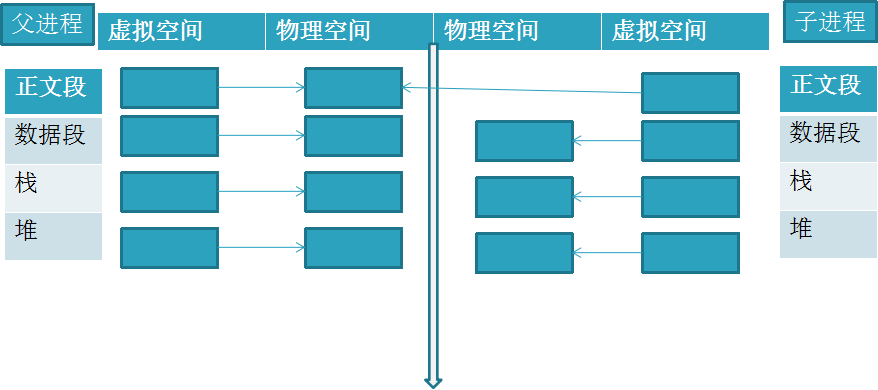
写时复制机制(copy-on-write)中,通常情况的做法是(只要父进程相应段不改变,就这么做):
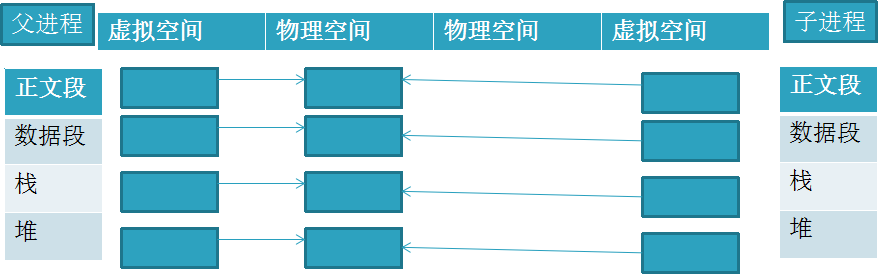
写时复制机制(copy-on-write)中,当父进程相应段要更改,才:
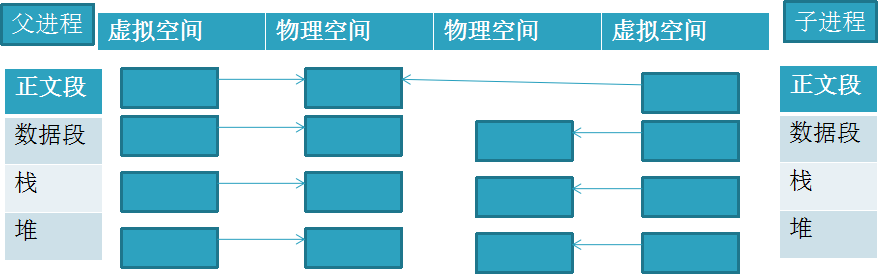
Docker中,采用写时复制机制来创建根文件系统,这样的话不会导致庞大的内存的开销,所以可以节省大量内存和硬盘空间,可以让Docker的部署更方便快捷。
docker hub

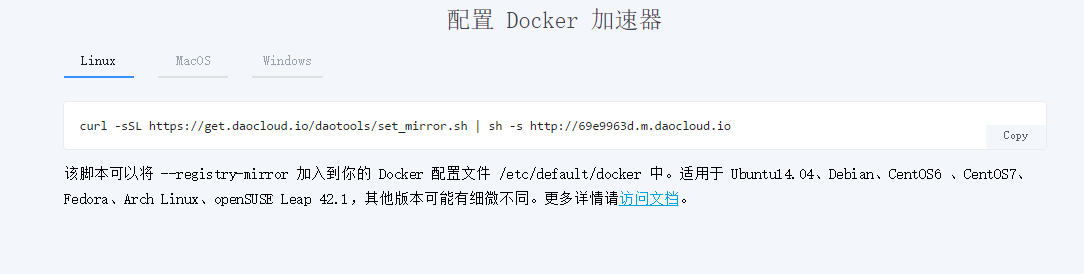
[root@206 test]# curl -sSL https://get.daocloud.io/daotools/set_mirror.sh | sh -s http://69e9963d.m.daocloud.io
镜像分发
安装git,并配置密钥
[root@206 test]# yum -y install git

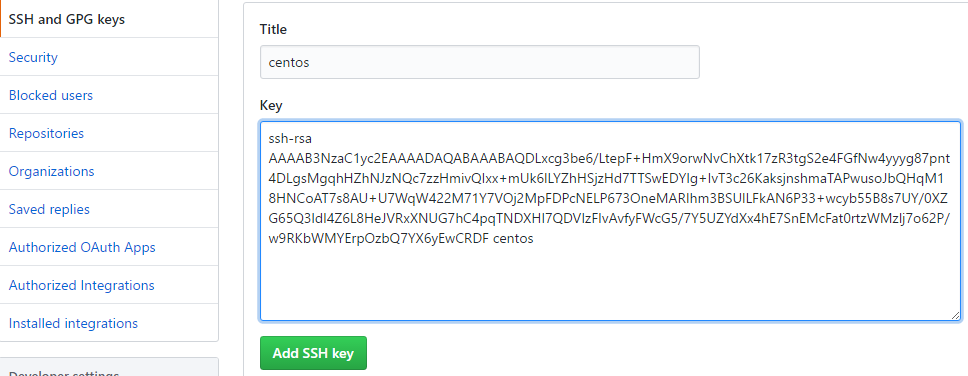
[root@206 test]# ssh-keygen -t rsa -C "centos"

[root@206 test]# cd ~/.ssh/

[root@206 .ssh]# ls

id_rsa  id_rsa.pub
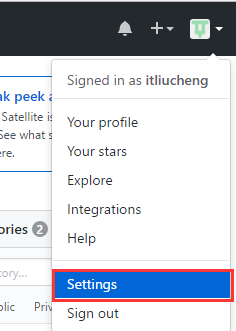
复制id_rsa.pub的内容,并打开github 的setting配置
github新建一个仓库,拉取到本地
[root@206 /]# git clone git@github.com:itliucheng/docker-test1.git
将之前save的tar文件放入
[root@206 /]# cp /test/ubuntu-bak.tar docker-test1/
提交到github
[root@206 docker-test1]# git add ubuntu-bak.tar

[root@206 docker-test1]# git commit -m "add a images"

[root@206 docker-test1]# git push origin master
之后别人可以下载该文件并恢复为镜像
docker教程之从一头雾水到不一头雾水(2)的更多相关文章
- Docker教程:docker machine的配置和命令
http://blog.csdn.net/pipisorry/article/details/50921335 安装virtualbox 如果要使用virtualbox,首先要安装virtualbox ...
- Docker教程:dokcer machine的概念和安装
http://blog.csdn.net/pipisorry/article/details/50920982 Docker machine介绍 做为Docker容器集群管理三剑客之一的Docker ...
- Docker教程:使用docker配置python开发环境
http://blog.csdn.net/pipisorry/article/details/50808034 Docker的安装和配置 [Docker教程:docker的安装] [Docker教程: ...
- Docker教程:docker的概念及安装
http://blog.csdn.net/pipisorry/article/details/50754385 Why docker 对于运维来说,Docker提供了一种可移植的标准化部署过程,使得规 ...
- 简明Docker教程
Docker基础 这篇基础文章是方便用户在使用cSphere平台之前,了解docker基础知识. 针对已经有一定的Linux基础知识的用户. Docker是什么 Docker是一个改进的容器技术.具体 ...
- Docker 教程
转自:http://www.runoob.com/docker/docker-tutorial.html Docker 教程
- Linux--CentOS 安装 Docker 教程
本文主要介绍 CentOS 系统安装 Docker 的流程. 前提条件 OS 要求 CentOS7: The centos-extras repository must be enabled. Thi ...
- 小D课堂 - 新版本微服务springcloud+Docker教程_汇总
小D课堂 - 新版本微服务springcloud+Docker教程_1_01课程简介 小D课堂 - 新版本微服务springcloud+Docker教程_1_02技术选型 小D课堂 - 新版本微服务s ...
- docker教程之从一头雾水到不一头雾水(3)
本文主要是介绍Docker容器的相关内容 容器创建 我们已经知道,镜像是只读的,而基于镜像创建出来的容器是可读写的,所以,一般我们实际中,会经常使用对应镜像创建容器并且使用这些容器.同样,如果我们想要 ...
随机推荐
- 打印控件Lodop的使用
前些天发现一个不错的打印的控件Lodop,下面就来介绍一下具体使用! 首先到官网:http://www.lodop.net/download.html 下载最新版,文档的话官网中有很详细的介绍,这里演 ...
- 中矿大新生赛 A 求解位数和【字符串】
时间限制:C/C++ 1秒,其他语言2秒空间限制:C/C++ 32768K,其他语言65536K64bit IO Format: %lld 题目描述 给出一个数x,求x的所有位数的和. 输入描述: 第 ...
- H. Fake News (medium)
H. Fake News (medium) 题意 以前是给出 S T 串,问在 S 中有多少个子串为 T 的个数,子串可以不连续,保持位置相对一致. 现在给出 n ,要你构造 S T 串. 分析 这种 ...
- codevs 2837 考前复习——01背包
时间限制: 1 s 空间限制: 128000 KB 题目等级 : 黄金 Gold 题解 查看运行结果 题目描述 Description Aiden马上要考试了,可他还没怎么复习,于是他 ...
- POJ 2763 Housewife Wind(树链剖分)(线段树单点修改)
Housewife Wind Time Limit: 4000MS Memory Limit: 65536K Total Submissions: 10378 Accepted: 2886 D ...
- disable enable 所有其他表关联的外键
Disable: begin for i in (select constraint_name, table_name from user_constraints where constraint_n ...
- 分享Kali Linux 2017年第24周镜像文件
分享Kali Linux 2017年第24周镜像文件 Kali Linux官方于6月11日发布2017年的第24周镜像.这次维持了11个镜像文件的规模.默认的Gnome桌面的4个镜像,E17.KD ...
- 【CodeForces 830C】奇怪的降复杂度
[pixiv] https://www.pixiv.net/member_illust.php?mode=medium&illust_id=60638239 description 有n棵竹子 ...
- Bean的实例化--构造器
1,编写Bean对象 package com.songyan.ico; public class Bean1 { } 2,配置xml <?xml version="1.0" ...
- etcd集群日常维护
配置文件和启动参数说明 命令行 | 配置文件 | 说明 data-dir | ETCD_DATA_DIR | 指定节点的数据存储目录,包括节点ID,集群ID,集群初始化配置,Snapshot文件,若未 ...