
spring-springmvc-jdbc小案例
此案例是为ssm作铺垫的。
创建一个银行账户和基金账户,然后通过银行账户购买基金。由spring、springmvc、spring自带的c3p0实现。
废话不多说。如下
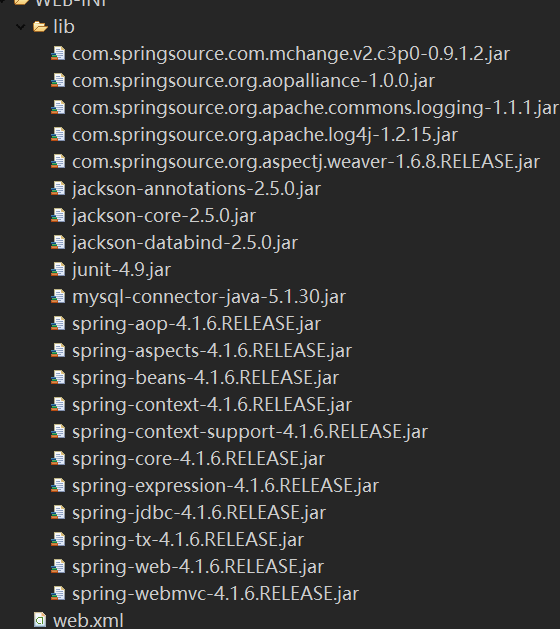
涉及到的 jar包(多了):
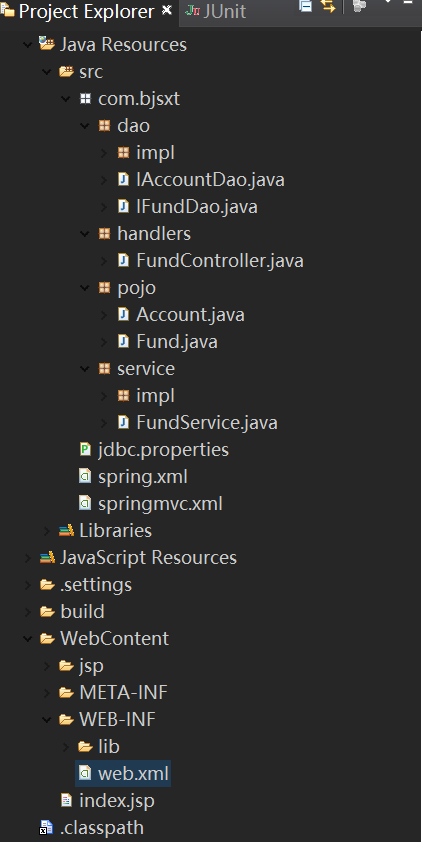
dao层:
package com.bjsxt.dao;

import com.bjsxt.pojo.Account;

public interface IAccountDao {

    //新增

    void insertAccount(String aname,double balance);

    //更新

    void updateAccount(Account account);

}
package com.bjsxt.dao;

import com.bjsxt.pojo.Fund;

public interface IFundDao {

    //新增

    void insertFund(String fname,int amount);

    //更新

    void updateFund(Fund fund);

}
package com.bjsxt.dao.impl;

import org.springframework.jdbc.core.support.JdbcDaoSupport;

import org.springframework.stereotype.Repository;

import com.bjsxt.dao.IAccountDao;

import com.bjsxt.pojo.Account;

@Repository

public class AccountDaoImpl extends JdbcDaoSupport implements IAccountDao {

    //新增

    @Override

    public void insertAccount(String aname, double balance) {

        String sql="insert into account(aname,balance) values(?,?)";

        this.getJdbcTemplate().update(sql, aname,balance);

    }

    //更新

    @Override

    public void updateAccount(Account account) {

        String sql="update account set balance=balance-? where aname=?";

        this.getJdbcTemplate().update(sql, account.getMoney(),account.getAname());

    }

}
package com.bjsxt.dao.impl;

import org.springframework.jdbc.core.support.JdbcDaoSupport;

import org.springframework.stereotype.Repository;

import com.bjsxt.dao.IFundDao;

import com.bjsxt.pojo.Fund;

@Repository

public class FundDaoImpl extends JdbcDaoSupport implements IFundDao {

    //新增

    @Override

    public void insertFund(String fname, int amount) {

        String sql="insert into fund(fname,amount) values(?,?)";

        this.getJdbcTemplate().update(sql, fname,amount);

    }

    //更新

    @Override

    public void updateFund(Fund fund) {

        String sql = "update fund set amount=amount+? where fname=?";

        this.getJdbcTemplate().update(sql, fund.getCount(),fund.getFname());

    }

}
handlers层:
package com.bjsxt.handlers;

import org.springframework.beans.factory.annotation.Autowired;

import org.springframework.context.annotation.Scope;

import org.springframework.stereotype.Controller;

import org.springframework.web.bind.annotation.RequestMapping;

import com.bjsxt.pojo.Account;

import com.bjsxt.pojo.Fund;

import com.bjsxt.service.FundService;

//后端控制器

@Controller

@Scope("prototype")

@RequestMapping("/springmvc")

public class FundController{

    @Autowired

    private FundService fundService;

    public FundService getFundService() {

        return fundService;

    }

    public void setFundService(FundService fundService) {

        this.fundService = fundService;

    }

    @RequestMapping("/buyFund")

    public String  buyFund(Account account,Fund fund){

        fundService.modify(account, fund);

        return "welcome";

    }

}
pojo层:
package com.bjsxt.pojo;

public class Account {

    private String aname;

    private double money;

    public String getAname() {

        return aname;

    }

    public void setAname(String aname) {

        this.aname = aname;

    }

    public double getMoney() {

        return money;

    }

    public void setMoney(double money) {

        this.money = money;

    }

    public Account() {

        super();

        // TODO Auto-generated constructor stub

    }

    public Account(String aname, double money) {

        super();

        this.aname = aname;

        this.money = money;

    }

    @Override

    public String toString() {

        return "Account [aname=" + aname + ", money=" + money + "]";

    }

}
package com.bjsxt.pojo;

public class Fund {

    private String fname;

    private int count;

    public String getFname() {

        return fname;

    }

    public void setFname(String fname) {

        this.fname = fname;

    }

    public int getCount() {

        return count;

    }

    public void setCount(int count) {

        this.count = count;

    }

    public Fund() {

        super();

        // TODO Auto-generated constructor stub

    }

    public Fund(String fname, int count) {

        super();

        this.fname = fname;

        this.count = count;

    }

    @Override

    public String toString() {

        return "Fund [fname=" + fname + ", count=" + count + "]";

    }

}
service层:
package com.bjsxt.service;

import com.bjsxt.pojo.Account;

import com.bjsxt.pojo.Fund;

public interface FundService {

    //新增银行账户

    void addAccount(Account account);

    //新增基金账户

    void addFund(Fund fund);

    //更新(购买基金)

    void modify(Account account,Fund fund);

}
package com.bjsxt.service.impl;

import org.springframework.beans.factory.annotation.Autowired;

import org.springframework.stereotype.Service;

import com.bjsxt.dao.IAccountDao;

import com.bjsxt.dao.IFundDao;

import com.bjsxt.pojo.Account;

import com.bjsxt.pojo.Fund;

import com.bjsxt.service.FundService;

@Service

public class FundServiceImpl implements FundService {

    @Autowired

    private IAccountDao accountDao;

    @Autowired

    private IFundDao fundDao;

    public IAccountDao getAccountDao() {

        return accountDao;

    }

    public void setAccountDao(IAccountDao accountDao) {

        this.accountDao = accountDao;

    }

    public IFundDao getFundDao() {

        return fundDao;

    }

    public void setFundDao(IFundDao fundDao) {

        this.fundDao = fundDao;

    }

    //新增银行账户

    @Override

    public void addAccount(Account account) {

        accountDao.insertAccount(account.getAname(), account.getMoney());

    }

    //新增基金账户

    @Override

    public void addFund(Fund fund) {

        fundDao.insertFund(fund.getFname(), fund.getCount());

    }

    //购买基金(更新)

    @Override

    public void modify(Account account, Fund fund) {

        accountDao.updateAccount(account);

        fundDao.updateFund(fund);

    }

}
src下的配置文件:
jdbc.driver=com.mysql.jdbc.Driver

jdbc.url=jdbc:mysql:///test

jdbc.username=root

jdbc.password=victor
<?xml version="1.0" encoding="UTF-8"?>

<beans xmlns="http://www.springframework.org/schema/beans"

    xmlns:xsi="http://www.w3.org/2001/XMLSchema-instance"

    xmlns:context="http://www.springframework.org/schema/context"

    xmlns:mvc="http://www.springframework.org/schema/mvc"

    xmlns:tx="http://www.springframework.org/schema/tx"

    xmlns:aop="http://www.springframework.org/schema/aop"

    xsi:schemaLocation="

        http://www.springframework.org/schema/beans

        http://www.springframework.org/schema/beans/spring-beans.xsd

        http://www.springframework.org/schema/tx

        http://www.springframework.org/schema/tx/spring-tx.xsd

        http://www.springframework.org/schema/aop

        http://www.springframework.org/schema/aop/spring-aop.xsd

        http://www.springframework.org/schema/mvc

        http://www.springframework.org/schema/mvc/spring-mvc.xsd

        http://www.springframework.org/schema/context

        http://www.springframework.org/schema/context/spring-context.xsd">

    <!-- 加载jdbc属性文件 -->

    <context:property-placeholder location="classpath:jdbc.properties"/>

    <!-- c3p0数据源 -->

    <bean id="dataSource" class="com.mchange.v2.c3p0.ComboPooledDataSource">

        <property name="driverClass" value="${jdbc.driver}"></property>

        <property name="jdbcUrl" value="${jdbc.url}"></property>

        <property name="user" value="${jdbc.username}"></property>

        <property name="password" value="${jdbc.password}"></property>

    </bean>

    <!-- 注册dao -->

    <bean id="accountDaoImpl" class="com.bjsxt.dao.impl.AccountDaoImpl">

        <property name="dataSource" ref="dataSource"/>

    </bean>

    <bean id="fundDaoImpl" class="com.bjsxt.dao.impl.FundDaoImpl">

        <property name="dataSource" ref="dataSource"/>

    </bean>

    <!-- 注册组件扫描器 -->

    <context:component-scan base-package="com.bjsxt.dao.impl"></context:component-scan>

    <context:component-scan base-package="com.bjsxt.service.impl"></context:component-scan>

</beans>
<?xml version="1.0" encoding="UTF-8"?>

<beans xmlns="http://www.springframework.org/schema/beans"

    xmlns:xsi="http://www.w3.org/2001/XMLSchema-instance"

    xmlns:context="http://www.springframework.org/schema/context"

    xmlns:mvc="http://www.springframework.org/schema/mvc"

    xmlns:tx="http://www.springframework.org/schema/tx"

    xmlns:aop="http://www.springframework.org/schema/aop"

    xsi:schemaLocation="

        http://www.springframework.org/schema/beans

        http://www.springframework.org/schema/beans/spring-beans.xsd

        http://www.springframework.org/schema/tx

        http://www.springframework.org/schema/tx/spring-tx.xsd

        http://www.springframework.org/schema/aop

        http://www.springframework.org/schema/aop/spring-aop.xsd

        http://www.springframework.org/schema/mvc

        http://www.springframework.org/schema/mvc/spring-mvc.xsd

        http://www.springframework.org/schema/context

        http://www.springframework.org/schema/context/spring-context.xsd">

    <!-- 注册组件扫描器 -->

    <context:component-scan base-package="com.bjsxt.handlers"></context:component-scan>

    <!-- 注册注解驱动 -->

    <mvc:annotation-driven/>

    <!-- 注册视图解析器 -->

    <bean class="org.springframework.web.servlet.view.InternalResourceViewResolver">

        <property name="prefix" value="/jsp/"></property>

        <property name="suffix" value=".jsp"></property>

    </bean>

    <!-- 静态资源无法访问第三种解决方案 -->

    <mvc:resources location="/images/" mapping="/images/**"></mvc:resources>

    <mvc:resources location="/js/" mapping="/js/**"></mvc:resources>

</beans>
web.xml
<?xml version="1.0" encoding="UTF-8"?>

<web-app xmlns:xsi="http://www.w3.org/2001/XMLSchema-instance" xmlns="http://java.sun.com/xml/ns/javaee" xsi:schemaLocation="http://java.sun.com/xml/ns/javaee http://java.sun.com/xml/ns/javaee/web-app_2_5.xsd" id="WebApp_ID" version="2.5">

  <display-name>springmvc--primary</display-name>

  <welcome-file-list>

    <welcome-file>index.jsp</welcome-file>

  </welcome-file-list>

  <!-- 指定spring配置文件的路径及名称 -->

  <context-param>

      <param-name>contextConfigLocation</param-name>

      <param-value>classpath:spring.xml</param-value>

  </context-param>

  <!-- 注册 ContextLoaderListener:监听ServletContext,当其初始化时,创建spring容器对象-->

  <listener>

      <listener-class>org.springframework.web.context.ContextLoaderListener</listener-class>

  </listener>

  <!-- 注册字符编码过滤器 -->

  <filter>

      <filter-name>CharacterEncodingFilter</filter-name>

      <filter-class>org.springframework.web.filter.CharacterEncodingFilter</filter-class>

      <init-param>

          <param-name>encoding</param-name>

          <param-value>utf-</param-value>

      </init-param>

      <init-param>

          <param-name>forceEncoding</param-name>

          <param-value>true</param-value>

      </init-param>

  </filter>

  <filter-mapping>

      <filter-name>CharacterEncodingFilter</filter-name>

      <url-pattern>/*</url-pattern>

  </filter-mapping>

  <!-- 注册springmvc前端控制器(中央调度器) -->

  <servlet>

      <servlet-name>springmvc</servlet-name>

      <servlet-class>org.springframework.web.servlet.DispatcherServlet</servlet-class>

      <!-- 指定springmvc配置文件的路径以及名称 -->

      <init-param>

          <param-name>contextConfigLocation</param-name>

          <param-value>classpath:springmvc.xml</param-value>

      </init-param>

  </servlet>

  <servlet-mapping>

      <servlet-name>springmvc</servlet-name>

      <url-pattern>/</url-pattern>

  </servlet-mapping>

</web-app>
index.jsp
<%@ page language="java" contentType="text/html; charset=UTF-8"

    pageEncoding="UTF-8"%>

<!DOCTYPE html PUBLIC "-//W3C//DTD HTML 4.01 Transitional//EN" "http://www.w3.org/TR/html4/loose.dtd">

<html>

<head>

<meta http-equiv="Content-Type" content="text/html; charset=UTF-8">

<title>Insert title here</title>

</head>

<body>

    <form action="${pageContext.request.contextPath}/springmvc/buyFund" method="POST">

        银行账户名称:<input type="text" name="aname"><br/>

        金额:<input type="text" name="money"><br/>

        基金账户名称:<input type="text" name="fname"><br/>

        数量:<input type="text" name="count"><br/>

        <input type="submit" value="提交"><br/>

    </form>

</body>

</html>
spring-springmvc-jdbc小案例的更多相关文章
- Spring+SpringMVC+Hibernate小案例(实现Spring对Hibernate的事务管理)
原文地址:https://blog.csdn.net/jiegegeaa1/article/details/81975286 一.工作环境 编辑器用的是MyEclipse,用Mysql数据库,mave ...
- Spring+springmvc+Mybatis整合案例 annotation版(myeclipse)详细版
Spring+springmvc+Mybatis整合案例 Version:annotation版 文档结构图: 从底层开始做起: 01.配置web.xml文件 <?xml version=&qu ...
- Spring+springmvc+Mybatis整合案例 xml配置版(myeclipse)详细版
Spring+springmvc+Mybatis整合案例 Version:xml版(myeclipse) 文档结构图: 从底层开始做起: 01.配置web.xml文件 <?xml version ...
- spring boot入门小案例
spring boot 入门小案例搭建 (1) 在Eclipse中新建一个maven project项目,目录结构如下所示: cn.com.rxyb中存放spring boot的启动类,applica ...
- Spring+SpringMVC+JDBC实现登录
Spring+SpringMVC+JDBC实现登录 有一位程序员去相亲的时候,非常礼貌得说自己是一名程序员,并解释自己是做底层架构的,于是女方听到"底层"两个字,就一脸嫌弃:什么时 ...
- Eclipse使用JDBC小案例
JDBC(Java Database Connectivity:Java访问数据库的解决方案)定义一套标准接口,即访问数据库的通用API,不同数据库厂商根据各自数据的特点去实现这些接口. JDBC是J ...
- 模拟用户登录-SpringMVC+Spring+Mybatis整合小案例
1. 导入相关jar包 ant-1.9.6.jarant-launcher-1.9.6.jaraopalliance.jarasm-5.1.jarasm-5.2.jaraspectj-weaver.j ...
- spring + springmvc + jdbc + quartz + maven整合
个人搭建框架: pom.xml: <project xmlns="http://maven.apache.org/POM/4.0.0" xmlns:xsi="htt ...
- spring+springmvc+hibernate架构、maven分模块开发样例小项目案例
maven分模块开发样例小项目案例 spring+springmvc+hibernate架构 以用户管理做測试,分dao,sevices,web层,分模块开发測试!因时间关系.仅仅測查询成功.其它的准 ...
- ssm框架(Spring Springmvc Mybatis框架)整合及案例增删改查
三大框架介绍 ssm框架是由Spring springmvc和Mybatis共同组成的框架.Spring和Springmvc都是spring公司开发的,因此他们之间不需要整合.也可以说是无缝整合.my ...
随机推荐
- Python学习(四十)—— Djago之认证系统
一.COOKIE 与 SESSION 概念 cookie不属于http协议范围,由于http协议无法保持状态,但实际情况,我们却又需要“保持状态”,因此cookie就是在这样一个场景下诞生. cook ...
- rpm 安装、卸载软件命令 ——以nginx为例
1.安装 命令:rpm -ivh nginx-1.14.0-1.el7_4.ngx.x86_64.rpm 2.查看安装结果 命令:rpm -qa | grep nginx 3.升级 ...
- [Python]sort与sorted高级技巧
与其他语言不同,python 3.0之后,弃用了其他语言中常见的cmp方法,在sort方法中改用key实现. 之前一直疑惑自定义对象的排序如何写comparator,最后发现还是通过内部的__cmp_ ...
- NEO GUI 多方签名使用
众所周至,NEOGUI是一个开发者演示用钱包,使用体验是非常的不友好的. 今天本来打算使用多方签名账户,发现和想象的不一样,请教了小伙伴也不行.遂调试了一下原因,发现踩进坑里了. 把这个问题记 ...
- saprfc
PHP在使用saprfc的时候,首先需要安装 saprfc 拓展,然后在引入saprfc.php类库,最后在使用. 一.PHP saprfc拓展的安装(Linux): 安装方法: 安装时需 ...
- 【自动化测试】robot framwork的一点小发现
我们在搭建完robotframwork框架并开始打开火狐浏览器的时候,总会碰到打不开浏览器的问题.这次,分享一个常见的小问题. 这个问题呢,是因为火狐的版本更新频繁,导致selenium的版本跟不上导 ...
- Unity 和android 交互 记录
参考文章 http://www.jianshu.com/p/c06063a403c6 趟坑如下 icon 冲突问题: 设置不了unity icon,显示的是默认的 android 小人 解决方法: 在 ...
- 解析数学表达式 代码解析AST语法树
2019年2月20日09:18:22 AST语法树自己写代码解析的话就比较麻烦,有现成的库可以解析PHP,就像webpack就是自己解析js的语法代码,编译成各种版本的可用代码 github http ...
- 关于python列表和元组的基本操作
一.列表 列表是python中最常出现的一种数据存储形式,掌握列表的基本操作可以快速而有效的提高我们的代码书写效率.列表中存放的数据有如下基本操作:如增.删.改.查,掌握了这四个操作,就基本掌握了列表 ...
- 微信小程序调用高德地图
index.wxml: longitude:经度 latitude:维度 地图所定位的区域 index.js 地图所定位的点