
Scapy
1、UDP scanning with Scapy
Scapy is a tool that can be used to craft and inject custom packets into a network ,in this specific recipe, Scapy will be used to scan for active UDP services ,This can be done by sending empty UDP packet to destionation ports and then identifying the ports that do not respond with an ICMP port-unreachable response .whether a service is running on a give UDP port ,the technique that we will use with Scapy is to identify closed UDP port with ICMP port-unreachable replies ,to send a UDP request to any given port ,so we need to build layer of taht the request , the first layer that we will need to construct is the IP layer
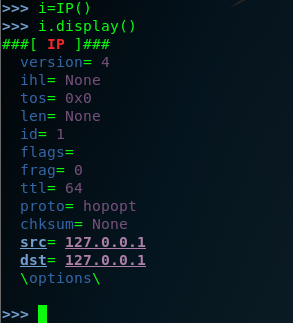
step one : we used the command Scapy to invoking the tool .you don't sent the ip.src ,because the source the ip will automatically updates associated with the default interface . after each setup , you need to check and confirm it by youself . we can you the command (.display) .we should do in lab envrionment , I use the metasploitable2 and , the metasploitable2 system can used as remote service over UDP . so let's see the following option :
step two : view the metasploitable2 ip address . so the ip.dst=192.168.142.170
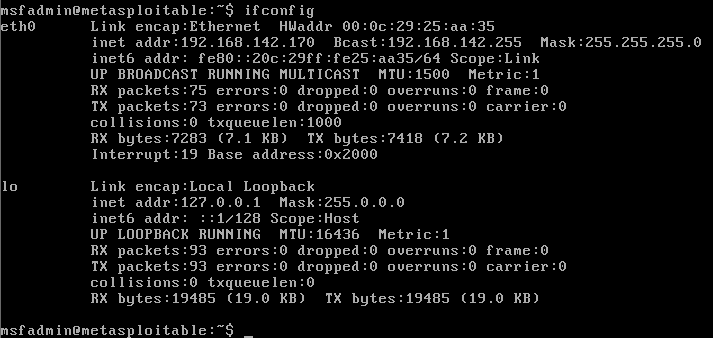
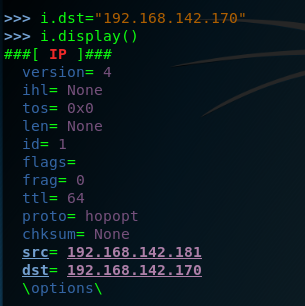
step three :start-up the Scapy and construct the ip layer ,and set the dst ip is 192.168.142.170 . .but hte DNS is a comman service that can often be discovered on network systems , so we can modified by setting the attribute equal to the new port destination value set the dport =123
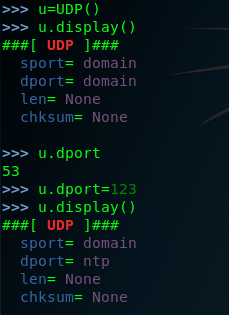
setp four: we have created both the IP layers ,so here we need to construct the request by the stacking these layers by request=(i/u)
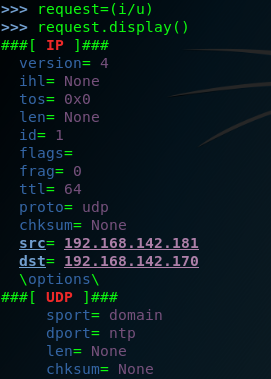
and then send the request to the remote service

finally we can look the response.display ()
>>> response.display()
###[ IP ]###
version= 4
ihl= 5
tos= 0xc0
len= 56
id= 64015
flags=
frag= 0
ttl= 64
proto= icmp
chksum= 0xe144
src= 192.168.142.170
dst= 192.168.142.181
\options\
###[ ICMP ]###
type= dest-unreach
code= port-unreachable
chksum= 0x9bc7
reserved= 0
length= 0
nexthopmtu= 0
###[ IP in ICMP ]###
version= 4
ihl= 5
tos= 0x0
len= 28
id= 1
flags=
frag= 0
ttl= 64
proto= udp
chksum= 0xdc1f
src= 192.168.142.181
dst= 192.168.142.170
\options\
###[ UDP in ICMP ]###
sport= domain
dport= ntp
len= 8
chksum= 0x607d
in fact the request can be performed without independently building and stacking each layer ,we can use a single one-line command by calling the function directly and passing them the approprite argument as following . of couse wen scan set the timeout and the verbose .
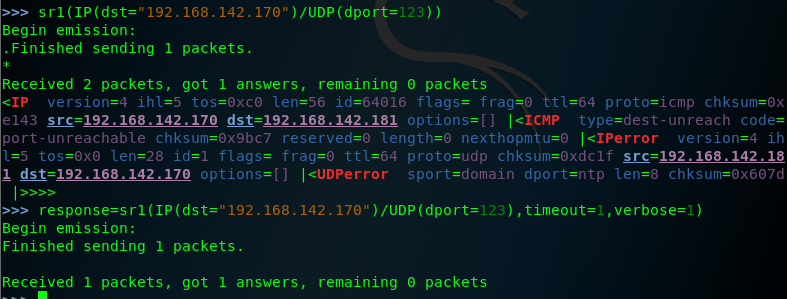
note that the response for these requests includes an ICMP packet that type indicating that the host is unreachable and code indicating that the port is unreachable this response is commonly if the UDP oprt is closed ,so we should attempt to modify the request so that it is sent to the destination port that correspond to an actual service on teh remote system , let's change the destination port back to port 53 and then send the request again .as follows:

when the same request is sent to an actual aervice ,no replay is received , this is beacuse the DNS service running on the system's UDP port 53, will only respond to service-specific request ,this discrepancy can be used to scan for ICMP host-unreachable replies .
so we can identify potential service by flagging the noresponsive ports. edit a script to scan the port.
Scapy的更多相关文章
- python脚本执行Scapy出现IPv6警告WARNING解决办法
安装完scapy,写了脚本执行后执行: WARNING: No route found for IPv6 destination :: (no default route?) 原因是用 from sc ...
- Windows下使用scapy+python2.7实现对pcap文件的读写操作
scapy在linux环境中对pcap文件进行操作非常方便,但在windows下,特别是在python2.7环境下却会碰到各种各样的依赖包无法使用的问题,最明显的可能就属dnet和pcap的pytho ...
- 使用它tshark分析pcap的例子以及scapy下载地址
转一篇cisco工作人员使用tshark分析pcap的文章,以及scapy的下载地址 http://blogs.cisco.com/security/finding-a-needle-in-a-pca ...
- 安装scapy遇到的问题
1. Mac平台 在mac上安装scapy可以说是困难重重,一来因为scapy实在有些小众和老旧,再加上安装说明文档都是python2.5 也没有详细说明一些安装问题. 折腾了大概三个小时之后终于解决 ...
- scapy 安装及简单测试
关于scapy Scapy的是一个强大的交互式数据包处理程序(使用python编写).它能够伪造或者解码大量的网络协议数据包,能够发送.捕捉.匹配请求和回复包等等.它可以很容易地处理一些典型操作,比如 ...
- Python模块(scapy)
scapy scapy相当于linux的tcpdump的功能
- 小白日记9:kali渗透测试之主动信息收集(二)四层发现:TCP、UDP、nmap、hping、scapy
四层发现 四层发现的目的是扫描出可能存活的IP地址,四层发现虽然涉及端口扫描,但是并不对端口的状态进行精确判断,其本质是利用四层协议的一些通信来识别主机ip是否存在. 四层发现的优点: 1.可路由且结 ...
- 小白日记7:kali渗透测试之主动信息收集-发现(一)--二层发现:arping/shell脚本,Netdiscover,scapy
主动信息收集 被动信息收集可能不准确,可以用主动信息收集验证 特点:直接与目标系统交互通信,无法避免留下访问痕迹 解决方法:1.使用受控的第三方电脑进行探测,使用代理 (做好被封杀的准备) 2 ...
- 小白日记8:kali渗透测试之主动信息收集(二)三层发现:ping、traceroute、scapy、nmap、fping、Hping
三层发现 三层协议有:IP以及ICMP协议(internet管理协议).icmp的作用是用来实现intenet管理的,进行路径的发现,网路通信情况,或者目标主机的状态:在三层发现中主要使用icmp协议 ...
- scapy流量嗅探简单使用
官方文档:http://scrapy-chs.readthedocs.io/zh_CN/latest/index.html 参考链接:http://blog.csdn.net/Jeanphorn/ar ...
随机推荐
- 第六章· Redis高可用sentinel
sentinel介绍 sentinel实战及配置讲解 sentinel介绍 什么是sentinel? Redis-Sentinel是Redis官方推荐的高可用性(HA)解决方案,当用Redis做Mas ...
- Python——socketserver编程(客户端/服务器)
一.socketserver是标准库中的高级模块,它的目标是简化很多多样板代码,是创建网络客户端和服务器所必须的代码.(事件驱动) 二.模块类 BaseServer :包含核心服务器功能和mix-in ...
- bzoj3277-串
Code #include<cstdio> #include<iostream> #include<cmath> #include<cstring> # ...
- Scrapy 框架 配置文件
配置文件 基本配置 #1.项目名称,默认的USER_AGENT由它来构成,也作为日志记录的日志名 BOT_NAME = 'Amazon' #2.爬虫应用路径 SPIDER_MODULES = ['Am ...
- File相关操作
文件操作 流关闭方法 public static void closeQuietly(Closeable closable) { if (null == closable) { return; } t ...
- MySQL数据目录(data)迁移
因为系统分区的空间不足,添加了一块硬盘,挂载到/data目录下,把MySQL的数据目录(data)迁移过去. 1.停止MySQL服务: [root@zabbix mysql]# service mys ...
- xadmin+django2.0删除用户报错,get_deleted_objects() takes 3 positional arguments but 5 were given
解决方法:将xadmin/plugins/actions.py中的 if django_version > (2, 0): #deletable_objects, model_count, pe ...
- MySQL 导入导出数据库、表
使用 GUI 软件很好操作,下面介绍命令行操作. 导出 cmd 命令 # 1.1 导出整个数据库 mysqldump -hlocalhost -uroot -p student_db > C:\ ...
- JavaEESSM框架配置文件
SSM框架理解 最近两星期一直在学JavaEE的MVC框架,因为之前学校开的JavaEE课程就一直学的吊儿郎当的,所以现在真正需要掌握就非常手忙脚乱,在此记录下这段时间学习的感悟,如有错误,希望大牛毫 ...
- MapReduce-序列化(Writable)
Hadoop 序列化特点 Java 的序列化是一个重量级序列化框架(Serializable),一个对象被序列化后,会附带很多额外的信息(各种校验信息,Header,继承体系等),不便于在网络中高效传 ...