
Scapy
1、UDP scanning with Scapy
Scapy is a tool that can be used to craft and inject custom packets into a network ,in this specific recipe, Scapy will be used to scan for active UDP services ,This can be done by sending empty UDP packet to destionation ports and then identifying the ports that do not respond with an ICMP port-unreachable response .whether a service is running on a give UDP port ,the technique that we will use with Scapy is to identify closed UDP port with ICMP port-unreachable replies ,to send a UDP request to any given port ,so we need to build layer of taht the request , the first layer that we will need to construct is the IP layer
step one : we used the command Scapy to invoking the tool .you don't sent the ip.src ,because the source the ip will automatically updates associated with the default interface . after each setup , you need to check and confirm it by youself . we can you the command (.display) .we should do in lab envrionment , I use the metasploitable2 and , the metasploitable2 system can used as remote service over UDP . so let's see the following option :
step two : view the metasploitable2 ip address . so the ip.dst=192.168.142.170
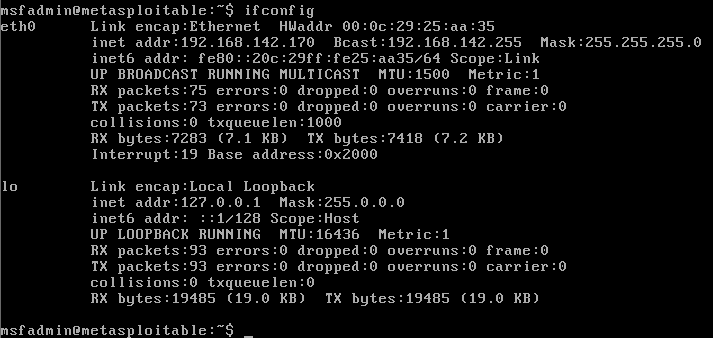
step three :start-up the Scapy and construct the ip layer ,and set the dst ip is 192.168.142.170 . .but hte DNS is a comman service that can often be discovered on network systems , so we can modified by setting the attribute equal to the new port destination value set the dport =123
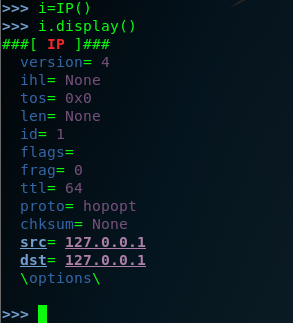
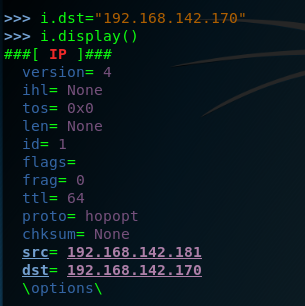
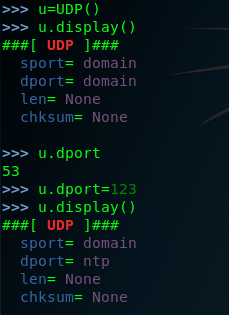
setp four: we have created both the IP layers ,so here we need to construct the request by the stacking these layers by request=(i/u)
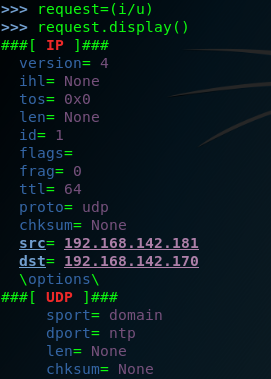
and then send the request to the remote service

finally we can look the response.display ()
>>> response.display()
###[ IP ]###
version= 4
ihl= 5
tos= 0xc0
len= 56
id= 64015
flags=
frag= 0
ttl= 64
proto= icmp
chksum= 0xe144
src= 192.168.142.170
dst= 192.168.142.181
\options\
###[ ICMP ]###
type= dest-unreach
code= port-unreachable
chksum= 0x9bc7
reserved= 0
length= 0
nexthopmtu= 0
###[ IP in ICMP ]###
version= 4
ihl= 5
tos= 0x0
len= 28
id= 1
flags=
frag= 0
ttl= 64
proto= udp
chksum= 0xdc1f
src= 192.168.142.181
dst= 192.168.142.170
\options\
###[ UDP in ICMP ]###
sport= domain
dport= ntp
len= 8
chksum= 0x607d
in fact the request can be performed without independently building and stacking each layer ,we can use a single one-line command by calling the function directly and passing them the approprite argument as following . of couse wen scan set the timeout and the verbose .
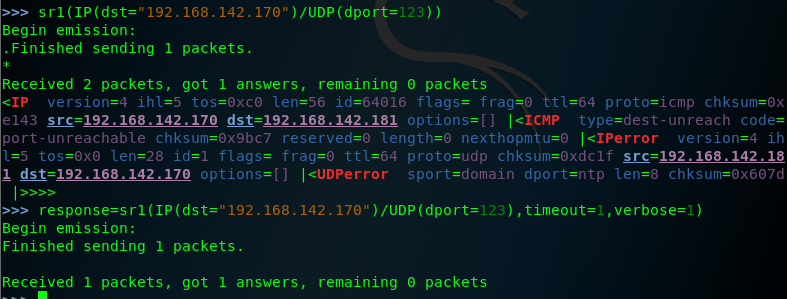
note that the response for these requests includes an ICMP packet that type indicating that the host is unreachable and code indicating that the port is unreachable this response is commonly if the UDP oprt is closed ,so we should attempt to modify the request so that it is sent to the destination port that correspond to an actual service on teh remote system , let's change the destination port back to port 53 and then send the request again .as follows:

when the same request is sent to an actual aervice ,no replay is received , this is beacuse the DNS service running on the system's UDP port 53, will only respond to service-specific request ,this discrepancy can be used to scan for ICMP host-unreachable replies .
so we can identify potential service by flagging the noresponsive ports. edit a script to scan the port.
Scapy的更多相关文章
- python脚本执行Scapy出现IPv6警告WARNING解决办法
安装完scapy,写了脚本执行后执行: WARNING: No route found for IPv6 destination :: (no default route?) 原因是用 from sc ...
- Windows下使用scapy+python2.7实现对pcap文件的读写操作
scapy在linux环境中对pcap文件进行操作非常方便,但在windows下,特别是在python2.7环境下却会碰到各种各样的依赖包无法使用的问题,最明显的可能就属dnet和pcap的pytho ...
- 使用它tshark分析pcap的例子以及scapy下载地址
转一篇cisco工作人员使用tshark分析pcap的文章,以及scapy的下载地址 http://blogs.cisco.com/security/finding-a-needle-in-a-pca ...
- 安装scapy遇到的问题
1. Mac平台 在mac上安装scapy可以说是困难重重,一来因为scapy实在有些小众和老旧,再加上安装说明文档都是python2.5 也没有详细说明一些安装问题. 折腾了大概三个小时之后终于解决 ...
- scapy 安装及简单测试
关于scapy Scapy的是一个强大的交互式数据包处理程序(使用python编写).它能够伪造或者解码大量的网络协议数据包,能够发送.捕捉.匹配请求和回复包等等.它可以很容易地处理一些典型操作,比如 ...
- Python模块(scapy)
scapy scapy相当于linux的tcpdump的功能
- 小白日记9:kali渗透测试之主动信息收集(二)四层发现:TCP、UDP、nmap、hping、scapy
四层发现 四层发现的目的是扫描出可能存活的IP地址,四层发现虽然涉及端口扫描,但是并不对端口的状态进行精确判断,其本质是利用四层协议的一些通信来识别主机ip是否存在. 四层发现的优点: 1.可路由且结 ...
- 小白日记7:kali渗透测试之主动信息收集-发现(一)--二层发现:arping/shell脚本,Netdiscover,scapy
主动信息收集 被动信息收集可能不准确,可以用主动信息收集验证 特点:直接与目标系统交互通信,无法避免留下访问痕迹 解决方法:1.使用受控的第三方电脑进行探测,使用代理 (做好被封杀的准备) 2 ...
- 小白日记8:kali渗透测试之主动信息收集(二)三层发现:ping、traceroute、scapy、nmap、fping、Hping
三层发现 三层协议有:IP以及ICMP协议(internet管理协议).icmp的作用是用来实现intenet管理的,进行路径的发现,网路通信情况,或者目标主机的状态:在三层发现中主要使用icmp协议 ...
- scapy流量嗅探简单使用
官方文档:http://scrapy-chs.readthedocs.io/zh_CN/latest/index.html 参考链接:http://blog.csdn.net/Jeanphorn/ar ...
随机推荐
- ABP中的拦截器之AuditingInterceptor
在上面两篇介绍了ABP中的ValidationInterceptor之后,我们今天来看看ABP中定义的另外一种Interceptor即为AuditingInterceptor,顾名思义就是一种审计相关 ...
- Python pip Unable--
It is possible that pip does not get installed by default. One potential fix is: python -m ensurepip ...
- Nginx 容器
L39-40
- Flask websocket
websocket 概念 是一套协议,协议规定了: - 连接时需要握手 - 发送数据进行加密 - 连接之后不断开 意义 实现长轮询等操作 框架支持 - flask,gevent-websocket - ...
- BSGS+exBSGS POJ2417+POJ3243
a^x=b(mod p)求x,利用分块的思想根号p的复杂度求答案,枚举同余式两端的变量,用hash的方法去找最小的答案(PS:hash看上去很像链式前向星就很有好感).然后如果p不是质数时,就利用同余 ...
- Vue的指令系统、计算属性和表单输入绑定
指令系统 指令 (Directives) 是带有 v- 前缀的特殊特性.指令特性的值预期是单个 JavaScript 表达式 (v-for 是例外情况,稍后我们再讨论).指令的职责是,当表达式的值改变 ...
- Mysql SQL注入漏洞
学习网址:http://www.cnblogs.com/rush/archive/2011/12/31/2309203.html https://www.cnblogs.com/sdya/p/4568 ...
- Django的admin视图的使用
要现在admin.py文件中将你要视图化操作的类进行注册: from django.contrib import admin from api import models # Register you ...
- DirectX11 With Windows SDK--16 流输出阶段
前言 在上一章,我们知道了如何使用几何着色器来重新组装图元,比如从一个三角形分裂成三个三角形.但是为了实现更高阶的分形,我们必须要从几何着色器拿到输出的顶点.这里我们可以使用可选的流输出阶段来拿到顶点 ...
- Vim使用技巧:常用光标跳转命令
Vim中的命令多如牛毛,按需学习才是唯一出路.这里总结了几个常用的光标跳转命令. 基本移动: h(往左) j(往下) k(往上) l(小写字母l,往右) 行间移动: 快速跳至文件末行:G(大写字母G) ...