
maven打包错误:No compiler is provided in this environment. Perhaps you are running on a JRE rather than a JDK?
[INFO]
[INFO] ------------------------------------------------------------------------
[INFO] Building ros 0.0.1-SNAPSHOT
[INFO] ------------------------------------------------------------------------
[INFO]
[INFO] --- maven-resources-plugin:2.6:resources (default-resources) @ ros ---
[INFO] Using 'UTF-8' encoding to copy filtered resources.
[INFO] Copying 2 resources
[INFO] Copying 419 resources
[INFO]
[INFO] --- maven-compiler-plugin:3.1:compile (default-compile) @ ros ---
[INFO] Changes detected - recompiling the module!
[INFO] Compiling 82 source files to F:\svn\ros\target\classes
[INFO] -------------------------------------------------------------
[ERROR] COMPILATION ERROR :
[INFO] -------------------------------------------------------------
[ERROR] No compiler is provided in this environment. Perhaps you are running on a JRE rather than a JDK?
[INFO] 1 error
[INFO] -------------------------------------------------------------
[INFO] ------------------------------------------------------------------------
[INFO] BUILD FAILURE
[INFO] ------------------------------------------------------------------------
[INFO] Total time: 2.755 s
[INFO] Finished at: 2018-04-10T17:20:49+08:00
[INFO] Final Memory: 23M/307M
[INFO] ------------------------------------------------------------------------
[ERROR] Failed to execute goal org.apache.maven.plugins:maven-compiler-plugin:3.1:compile (default-compile) on project ros: Compilation failure
[ERROR] No compiler is provided in this environment. Perhaps you are running on a JRE rather than a JDK?
[ERROR] -> [Help 1]
[ERROR]
[ERROR] To see the full stack trace of the errors, re-run Maven with the -e switch.
[ERROR] Re-run Maven using the -X switch to enable full debug logging.
[ERROR]
[ERROR] For more information about the errors and possible solutions, please read the following articles:
[ERROR] [Help 1]
 http://cwiki.apache.org/confluence/display/MAVEN/MojoFailureException
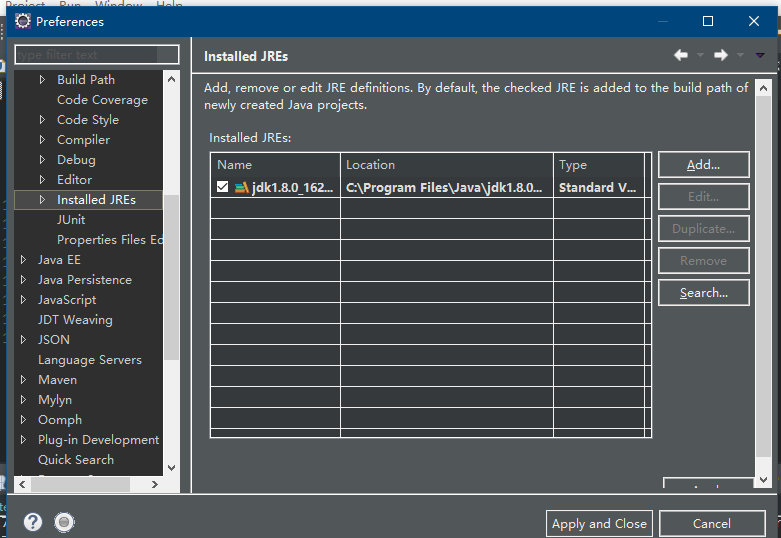
配置自己安装的jdk
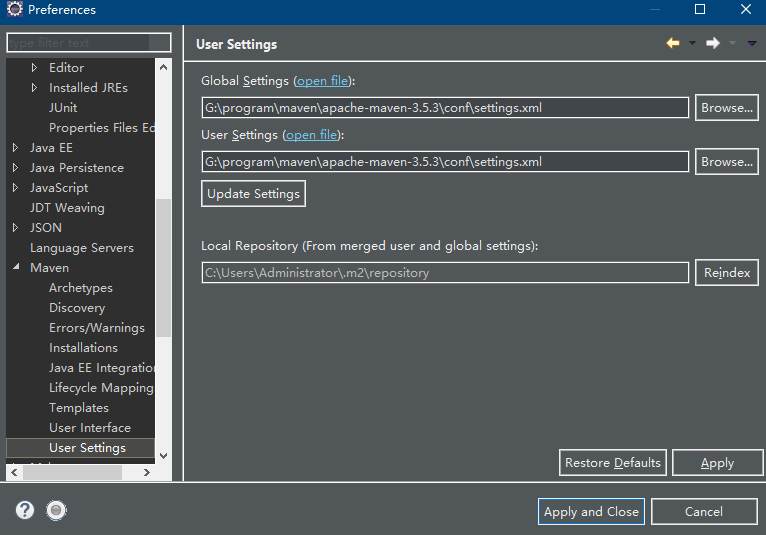
配置自己安装maven

完成之后保存
update maven
run as
重新运行一下啊
maven打包错误:No compiler is provided in this environment. Perhaps you are running on a JRE rather than a JDK?的更多相关文章
- eclipse Maven操作出现No compiler is provided in this environment.Perhaps you are running on a JRE rather than a JDK?
右键 pom.xml -> Run as -> Maven install 后出现类似如下错误: 解决方法: 1)选择项目后,点击 eclipse 导航栏中 [Window]-->[ ...
- 【maven】maven的web项目打包报错:No compiler is provided in this environment. Perhaps you are running on a JRE rather than a JDK
打包过程中报错如下: No compiler is provided in this environment. Perhaps you are running on a JRE rather than ...
- Maven错误:[ERROR] No compiler is provided in this environment. Perhaps you are running on a JRE rather than a JDK?的解决方法
错误: [ERROR] No compiler is provided in this environment. Perhaps you are running on a JRE rather tha ...
- No compiler is provided in this environment. Perhaps you are running on a JRE rather than a JDK? idea maven 打包报错问题解决
mvn clean install -X -Dmaven.test.skip=true -P dev 打包报错:No compiler is provided in this environment. ...
- Maven No compiler is provided in this environment. Perhaps you are running on a JRE rather than a JDK? 问题
maven编译项目时出错,提示信息如下: [ERROR] Failed to execute goal org.apache.maven.plugins:maven-compiler-plugin:3 ...
- maven启动报错No compiler is provided in this environment. Perhaps you are running on a JRE rather than a JDK?
[INFO] Scanning for projects... [WARNING] [WARNING] Some problems were encountered while building th ...
- maven No compiler is provided in this environment. Perhaps you are running on a JRE rather than a JDK?
maven install项目时出错,提示信息如下: [ERROR] Failed to execute goal org.apache.maven.plugins:maven-compiler-pl ...
- Maven异常: No compiler is provided in this environment. Perhaps you are running on a JRE rather than a JDK解决(能力工场小马哥)
问题描述: No compiler is provided in this environment. Perhaps you are running on a JRE rather than a JD ...
- Maven构建项目出现No compiler is provided in this environment. Perhaps you are running on a JRE rather than a JDK?
No compiler is provided in this environment. Perhaps you are running on a JRE rather than a JDK? 你应该 ...
随机推荐
- 【221】◀▶ IDL GUI 函数说明
参考:GUI - Dialogs Routines参考:GUI - Widgets Routines参考:GUI - Compound Widgets Routines 01 DIALOG_MES ...
- eclipse项目从编程到打jar包到编写BashShell执行
eclipse项目从编程到打jar包到编写BashShell执行 一.创建Java项目,并编写项目(带额外jar包) 二.打jar包 三.编写BashShell执行 其中一以及二可以参考我的博客 Ec ...
- 01.课程介绍 & 02.最小可行化产品MVP
01.课程介绍 02.最小可行化产品MVP 产品开发过程 最小化和可用之间找到一个平衡点
- Pycharm 配置autopep8到菜单
Pycharm 可以自动检测PEP8规范. 我们可以安装autopep8来自动修改文件实现PEP8规范. 1.通过Pycharm安装autopep8 2.File->Setting->Ex ...
- c# 添加reference后,Visual Studio 仍然提示无法找到函数, 询问是否添加了含有这个函数的Assembly
1.问题 添加reference后,编译仍然无法通过,测试工程添加这个assembly 就可以编译通过. 对比了这个assembly的 .net 版本,也没问题 由于工程是x64的, 添加的assem ...
- xml中运用js和jq
1.点击事件参数为this 一般<a>标签中会使用href和onclick两种方式来进行进行页面跳转或执行动作,但是小编一般都会使用onclick来进行执行Ajax函数进行跳转,并同时使用 ...
- 用shell脚本监控MySQL主从同步
企业面试题1:(生产实战案例):监控MySQL主从同步是否异常,如果异常,则发送短信或者邮件给管理员.提示:如果没主从同步环境,可以用下面文本放到文件里读取来模拟:阶段1:开发一个守护进程脚本每30秒 ...
- C 语言实例 - 二进制与十进制相互转换
C 语言实例 - 二进制与十进制相互转换 C 语言实例 C 语言实例 二进制转与十进制相互转换. 实例 - 二进制转换为十进制 #include <stdio.h> #include &l ...
- 51Nod 1099 任务执行顺序 (贪心)
#include <iostream> #include <algorithm> using namespace std; +; struct node{ int r, q; ...
- Csc”任务不支持“SharedCompilationId”参数。请确认该参数存在于此任务中,并且是可设置的公共实例属性
今天.NetCore2.1版本,建立Asp.net Core web应用程序项目时,报以下错误: 未能使用“Csc”任务的输入参数初始化该任务. “Csc”任务不支持“SharedCompilatio ...