
用shell脚本监控MySQL主从同步
企业面试题1:(生产实战案例):监控MySQL主从同步是否异常,如果异常,则发送短信或者邮件给管理员。提示:如果没主从同步环境,可以用下面文本放到文件里读取来模拟:
阶段1:开发一个守护进程脚本每30秒实现检测一次。
阶段2:如果同步出现如下错误号(1158,1159,1008,1007,1062),则跳过错误。
阶段3:请使用数组技术实现上述脚本(获取主从判断及错误号部分)
 [root@mysql01 shell]# mysql -uroot -poldboy123 -S /data//mysql.sock -e "show slave status\G"

 Warning: Using a password on the command line interface can be insecure.

 *************************** . row ***************************

                Slave_IO_State: Waiting for master to send event

                   Master_Host: 172.16.1.52

                   Master_User: rep

                   Master_Port:

                 Connect_Retry:

               Master_Log_File: mysql-bin.

           Read_Master_Log_Pos:

                Relay_Log_File: relay-bin.

                 Relay_Log_Pos:

         Relay_Master_Log_File: mysql-bin.

              Slave_IO_Running: Yes

             Slave_SQL_Running: Yes

               Replicate_Do_DB:

           Replicate_Ignore_DB:

            Replicate_Do_Table:

        Replicate_Ignore_Table:

       Replicate_Wild_Do_Table:

   Replicate_Wild_Ignore_Table:

                    Last_Errno:

                    Last_Error:

                  Skip_Counter:

           Exec_Master_Log_Pos:

               Relay_Log_Space:

               Until_Condition: None

                Until_Log_File:

                 Until_Log_Pos:

            Master_SSL_Allowed: No

            Master_SSL_CA_File:

            Master_SSL_CA_Path:

               Master_SSL_Cert:

             Master_SSL_Cipher:

                Master_SSL_Key:

         Seconds_Behind_Master:

 Master_SSL_Verify_Server_Cert: No

                 Last_IO_Errno:

                 Last_IO_Error:

                Last_SQL_Errno:

                Last_SQL_Error:

   Replicate_Ignore_Server_Ids:

              Master_Server_Id:

                   Master_UUID: 74e721f9-3c82-11e8-a818-000c29a97a9f

              Master_Info_File: /data//data/master.info

                     SQL_Delay:

           SQL_Remaining_Delay: NULL

       Slave_SQL_Running_State: Slave has read all relay log; waiting for the slave I/O thread to update it

            Master_Retry_Count:

                   Master_Bind:

       Last_IO_Error_Timestamp:

      Last_SQL_Error_Timestamp:

                Master_SSL_Crl:

            Master_SSL_Crlpath:

            Retrieved_Gtid_Set:

             Executed_Gtid_Set:

                 Auto_Position:
1、编写shell脚本:
系统:centos6.7
Mysql:多实例主从同步
#!/bin/bash

#-------------CopyRight-------------

#   Name:MySQL Check master and slave

#   Version Number:1.00

#   Type:sh

#   Language:bash shell

#   Date:--

#   Author:xubing

#   QQ:

#   Email:eeexu123@.com

#   Blog:https://www.cnblogs.com/eeexu123/

Port=3307                                         //MySQL端口

User="root"                                       //MySQL用户

Password="oldboy123"                              //MySQL用户密码

Mysql_sock="/data/${Port}/mysql.sock"             //mysql.sock随着每次MySQL启动而生成

Mysql_cmd="/application/mysql/bin/mysql -u${User} -p${Password} -S $Mysql_sock -e"  //MySQL非交互命令

Error_file="/tmp/mysql_check_error.log"   //错误输入文件

#source functions libary

. /etc/init.d/functions

#check mysql server    //检查MySQL是否启动

[ -e $Mysql_sock ]||{

  echo "The Mysql server no start"

  exit

}

#function ingore errors    //忽略错误函数

skip_errors(){

  array=(    )

  flag=

  for num in ${array[*]}

  do

    if [ "$1" = "$num" ];then    //如果有对应的错误号,MySQL就跳过此错误号

       ${Mysql_cmd} "stop slave;set global sql_slave_skip_counter = 1;start slave;"

       echo "Last_IO_Errno:$1">>$Error_file

    else

       echo "Last_IO_Errno:$1">>$Error_file

       ((flag++))   //如果此错误号不在array数组中,将此错误号写入错误文件中,并循环五次

    fi

  done

  if [ $flag = ${#array[@]} ];then   //发送邮件

     echo "**********`date +%F_%T`************">>$Error_file

     uniq $Error_file|mail -s "Mysql Slave error" eeexu123@.com

  fi

}

#check mysql slave  //检查从库是否正常

check_mysql(){

  array1=(`${Mysql_cmd} "show slave status\G"|egrep "Slave_IO_Running|Slave_SQL_Running|Last_SQL_Errno|Seconds_Behind_Master"|awk '{print $NF}'`)

  if [ "${array1[0]}" = "Yes" -a "${array1[1]}" == "Yes" -a "${array1[2]}" =  ];then

     action "Mysql Slave" /bin/true

  else

     action "Mysql Slave" /bin/false

     if [ "${array1[0]}" != "Yes" ];then   //将上述错误的列写入到错误文件中

        ${Mysql_cmd} "show slave status\G"|grep "Slave_IO_Running">>$Error_file

     elif [ "${array1[1]}" != "Yes" ];then

        ${Mysql_cmd} "show slave status\G"|grep "Slave_SQL_Running"|grep -v "Slave_SQL_Running_State">>$Error_file

     else [ "${array1[2]}" !=  ]

        ${Mysql_cmd} "show slave status\G"|grep "Seconds_Behind_Master">>$Error_file

     fi

     skip_errors ${array1[]}  //发送邮件

  fi

}

main(){

  while true

  do

    check_mysql

    sleep

  done

}

main
2、检测(执行脚本)
a:检测忽略号
先在从库3307中创建库
mysql>  create database taili123;

Query OK,  row affected (0.00 sec)
再在主库3306中创建库
mysql>  create database taili123;

Query OK,  row affected (0.00 sec)
再次查看从库状态如下:出现错误代码
 mysql> show slave status\G

 *************************** . row ***************************

                Slave_IO_State: Waiting for master to send event

                   Master_Host: 172.16.1.52

                   Master_User: rep

                   Master_Port:

                 Connect_Retry:

               Master_Log_File: mysql-bin.

           Read_Master_Log_Pos:

                Relay_Log_File: relay-bin.

                 Relay_Log_Pos:

         Relay_Master_Log_File: mysql-bin.

              Slave_IO_Running: Yes

             Slave_SQL_Running: No

               Replicate_Do_DB:

           Replicate_Ignore_DB:

            Replicate_Do_Table:

        Replicate_Ignore_Table:

       Replicate_Wild_Do_Table:

   Replicate_Wild_Ignore_Table:

                    Last_Errno:

                    Last_Error: Error 'Can't create database 'taili123'; database exists' on query. Default database: 'taili123'. Query: 'create database taili123'

                  Skip_Counter:

           Exec_Master_Log_Pos:

               Relay_Log_Space:

               Until_Condition: None

                Until_Log_File:

                 Until_Log_Pos:

            Master_SSL_Allowed: No

            Master_SSL_CA_File:

            Master_SSL_CA_Path:

               Master_SSL_Cert:

             Master_SSL_Cipher:

                Master_SSL_Key:

         Seconds_Behind_Master: NULL

 Master_SSL_Verify_Server_Cert: No

                 Last_IO_Errno:

                 Last_IO_Error:

                Last_SQL_Errno:

                Last_SQL_Error: Error 'Can't create database 'taili123'; database exists' on query. Default database: 'taili123'. Query: 'create database taili123'

   Replicate_Ignore_Server_Ids:

              Master_Server_Id:

                   Master_UUID: 74e721f9-3c82-11e8-a818-000c29a97a9f

              Master_Info_File: /data//data/master.info

                     SQL_Delay:

           SQL_Remaining_Delay: NULL

       Slave_SQL_Running_State:

            Master_Retry_Count:

                   Master_Bind:

       Last_IO_Error_Timestamp:

      Last_SQL_Error_Timestamp:  ::

                Master_SSL_Crl:

            Master_SSL_Crlpath:

            Retrieved_Gtid_Set:

             Executed_Gtid_Set:

                 Auto_Position:
查看脚本执行状态:
 [root@mysql01 shell]# sh ckmysql_master_slave.sh

 Warning: Using a password on the command line interface can be insecure.

 Mysql Slave                                                [失败]

 Warning: Using a password on the command line interface can be insecure.

 Warning: Using a password on the command line interface can be insecure.

 Warning: Using a password on the command line interface can be insecure.

 Mysql Slave                                                [失败]

 Warning: Using a password on the command line interface can be insecure.

 Warning: Using a password on the command line interface can be insecure.

 Warning: Using a password on the command line interface can be insecure.

 Mysql Slave                                                [确定]
b:检测发送邮件
在从库中停止SQL线程
mysql> stop slave sql_thread;

Query OK,  rows affected (0.02 sec)
再次查看从库状态
 mysql> show slave status\G

 *************************** . row ***************************

                Slave_IO_State: Waiting for master to send event

                   Master_Host: 172.16.1.52

                   Master_User: rep

                   Master_Port:

                 Connect_Retry:

               Master_Log_File: mysql-bin.

           Read_Master_Log_Pos:

                Relay_Log_File: relay-bin.

                 Relay_Log_Pos:

         Relay_Master_Log_File: mysql-bin.

              Slave_IO_Running: Yes

             Slave_SQL_Running: No

               Replicate_Do_DB:

           Replicate_Ignore_DB:

            Replicate_Do_Table:

        Replicate_Ignore_Table:

       Replicate_Wild_Do_Table:

   Replicate_Wild_Ignore_Table:

                    Last_Errno:

                    Last_Error:

                  Skip_Counter:

           Exec_Master_Log_Pos:

               Relay_Log_Space:

               Until_Condition: None

                Until_Log_File:

                 Until_Log_Pos:

            Master_SSL_Allowed: No

            Master_SSL_CA_File:

            Master_SSL_CA_Path:

               Master_SSL_Cert:

             Master_SSL_Cipher:

                Master_SSL_Key:

         Seconds_Behind_Master: NULL

 Master_SSL_Verify_Server_Cert: No

                 Last_IO_Errno:

                 Last_IO_Error:

                Last_SQL_Errno:

                Last_SQL_Error:

   Replicate_Ignore_Server_Ids:

              Master_Server_Id:

                   Master_UUID: 74e721f9-3c82-11e8-a818-000c29a97a9f

              Master_Info_File: /data//data/master.info

                     SQL_Delay:

           SQL_Remaining_Delay: NULL

       Slave_SQL_Running_State:

            Master_Retry_Count:

                   Master_Bind:

       Last_IO_Error_Timestamp:

      Last_SQL_Error_Timestamp:

                Master_SSL_Crl:

            Master_SSL_Crlpath:

            Retrieved_Gtid_Set:

             Executed_Gtid_Set:

                 Auto_Position:
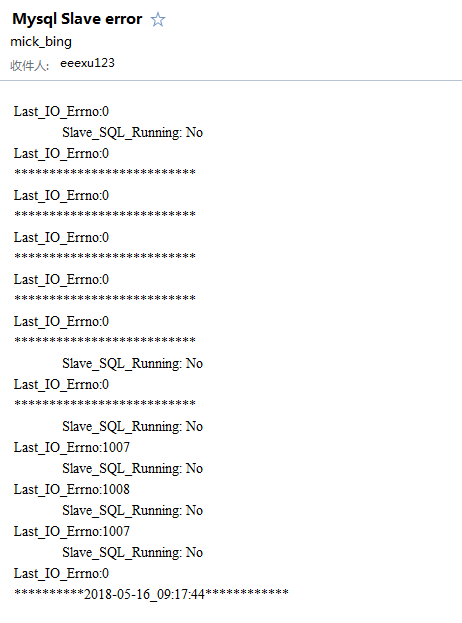
查看邮件收发,接收如下状态:
用shell脚本监控MySQL主从同步的更多相关文章
- shell脚本监控MySQL主从同步
企业面试题1:监控MySQL主从同步是否异常,如果异常,则发送短信或者邮件给管理员. 阶段1:开发一个守护进程脚本每30秒实现检测一次. 阶段2:如果同步出现如下错误号(1158,1159,1008, ...
- shell脚本修复MySQL主从同步
发布:thebaby 来源:net [大 中 小] 分享一例shell脚本,用于修改mysql的主从同步问题,有需要的朋友参考下吧. 一个可以修改mysql主从同步的shell脚本. 例子 ...
- 监控mysql主从同步状态
在高并发网站架构中,MySQL数据库主从同步是不可或缺的,不过经常会发生由于网络原因或者操作错误,MySQL主从经常会出现不同步的情况,那么如何监控MySQL主从同步,也变成网站正常运行的重要环节. ...
- nagios系列(七)nagios通过自定义脚本的方式监控mysql主从同步
nagios监控mysql主从同步 起因:nagios可能监控到mysql服务的运行情况,但确不能监控mysql的主从复制是否正常:有时候,同步已经停止,但管理人员却不知道. 登陆mysql从服务器, ...
- 监控mysql主从同步状态脚本
监控mysql主从同步状态脚本 示例一: cat check_mysql_health #!/bin/sh slave_is=($(mysql -S /tmp/mysql3307.sock -uroo ...
- 监控mysql主从同步
1,昨天看到shell一道面试题,需求如下: 监控MySQL主从同步是否异常,如果异常,则发送短信或者邮件给管理员.提示:如果没主从同步环境,可以用下面文本放到文件里读取来模拟:阶段1:开发一个守护进 ...
- 监控mysql主从同步状态是否异常
监控mysql主从同步状态是否异常,如果异常,则发生短信或邮寄给管理员 标签:监控mysql主从同步状态是否异常 阶段1:开发一个守护进程脚本每30秒实现检测一次. 阶段2:如果同步出现如下错误号(1 ...
- 运维派 企业面试题1 监控MySQL主从同步是否异常
Linux运维必会的实战编程笔试题(19题) 企业面试题1:(生产实战案例):监控MySQL主从同步是否异常,如果异常,则发送短信或者邮件给管理员.提示:如果没主从同步环境,可以用下面文本放到文件里读 ...
- zabbix3.0.4监控mysql主从同步
zabbix3.0.4监控mysql主从同步 1.监控mysql主从同步原理: 执行一个命令 mysql -u zabbix -pzabbix -e 'show slave status\G' 我们在 ...
随机推荐
- java之插入排序
//插入排序(Insertion Sorting)的基本思想是:把n个待排序的元素看成为一个有序表和一个无序表,开始有序表只包含一个元素,无序表中包含有n-1个元素,排序过程中每次从无序表中取出第一个 ...
- Android笔记之自定义PopupWindow
效果图 popup_window_addition.xml <?xml version="1.0" encoding="utf-8"?> <L ...
- MongoDB 学习五:索引
这章我们介绍MongoDB的索引,用来优化查询. 索引介绍 数据库索引有些类似书的目录. 一个查询如果没有使用索引被称为表扫描,意思是它必须像阅读整本书那样去获取一个查询结果.一般来说,我们应尽量避免 ...
- 浏览器中的BOM和DOM
BOM 浏览器对象模型 提供了独立于内容而与浏览器窗口进行交互的对象.描述了与浏览器进行交互的方法和接口,可以对浏览器窗口进行访问和操作,譬如可以弹出新的窗口,改变状态栏中的文本,对Cookie的支持 ...
- hadoop 添加,删除节点
http://www.cnblogs.com/tommyli/p/3418273.html
- sort quick
package com.demo; import java.util.ArrayList; import java.util.List; public class SearchSort { publi ...
- linux应用之mysql数据库的安装及配置(centos)
CentOS下Mysql数据库的安装与配置 如果要在Linux上做j2ee开发,首先得搭建好j2ee的开发环境,包括了jdk.tomcat.eclipse的安装(这个在之前的一篇随笔中已经有详细讲 ...
- im资源
https://github.com/oikomi/FishChatServer https://github.com/subrosa-io https://github.com/WhisperSys ...
- Ubuntu 16.04上安装SkyEye及测试
说明一下,在Ubuntu 16.04上安装SkyEye方法不是原创,是来自互联网,仅供学习参考. 一.检查支持软件包 gcc,make,vim(optional),ssh,subversionbinu ...
- JS搜索商品(跟外卖app店内搜索商品一样) ,keyup函数和click函数调用
HTML: input输入框: <input id="sea" type="text"> JS: //点击搜索商品 $('#mys').click( ...