
Maven 编译
pom.xml 添加插件
  <build>

		<plugins>

			<plugin>

				<groupId>org.apache.maven.plugins</groupId>

				<artifactId>maven-shade-plugin</artifactId>

				<version>1.4</version>

				<executions>

					<execution>

						<phase>package</phase>

						<goals>

							<goal>shade</goal>

						</goals>

						<configuration>

						<webXml>WebContent\WEB-INF\web.xml</webXml>

							<filters>

								<filter>

									<artifact>*:*</artifact>

									<excludes>

										<exclude>META-INF/*.SF</exclude>

										<exclude>META-INF/*.DSA</exclude>

										<exclude>META-INF/*.RSA</exclude>

										<exclude>META-INF/*.XSD</exclude>

									</excludes>

								</filter>

							</filters>

							<transformers>

								<transformer

									implementation="org.apache.maven.plugins.shade.resource.ManifestResourceTransformer">

									<mainClass>com.defonds.RsaEncryptor</mainClass>

								</transformer>

								<transformer

									implementation="org.apache.maven.plugins.shade.resource.AppendingTransformer">

									<resource>META-INF/spring.handlers</resource>

								</transformer>

								<transformer

									implementation="org.apache.maven.plugins.shade.resource.AppendingTransformer">

									<resource>META-INF/spring.schemas</resource>

								</transformer>

							</transformers>

						</configuration>

					</execution>

				</executions>

			</plugin>

		</plugins>

	</build>
    <!-- 可执行jar包 -->

			<plugin>

				<groupId>org.apache.maven.plugins</groupId>

				<artifactId>maven-assembly-plugin</artifactId>

				<version>2.3</version>

				<configuration>

					<appendAssemblyId>false</appendAssemblyId>

					<descriptorRefs>

						<descriptorRef>jar-with-dependencies</descriptorRef>

					</descriptorRefs>

					<archive>

						<manifest>

							<mainClass>com.spider.DYMovieProcessor</mainClass>

						</manifest>

					</archive>

				</configuration>

				<executions>

					<execution>

						<id>make-assembly</id>

						<phase>package</phase>

						<goals>

							<goal>assembly</goal>

						</goals>

					</execution>

				</executions>

			</plugin>
pom.xml:<packaging>jar</packaging> 表示包 war 或者jar
执行:
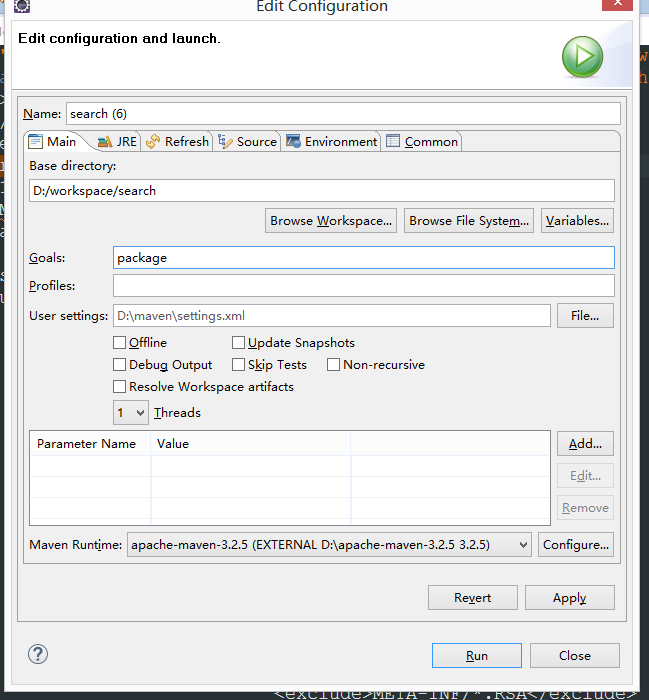
执行
Maven 编译的更多相关文章
- 安装maven编译环境
安装maven编译环境 1.默认已经装好yum并配置好yum源(推荐使用163yum源) 2.安装JDK 3.安装相关依赖环境(root用户登陆) yum install -y cmake lzo-d ...
- maven编译报错 -source 1.5 中不支持 lambda 表达式
在用maven编译项目是由于项目中用了jdk 1.8, 编译是报错 -source 1.5 中不支持 lambda 表达式,Google找到这篇解决方案,记录一下: 编译时报如下错误: [ERROR ...
- Maven编译jar出现:无法确定 T 的类型参数的异常的原因和处理方案
出错场景: 代码: public class JsonUtil { private static final Gson gson = new GsonBuilder().setDateFormat(& ...
- 使用maven编译Java项目 http://www.tuicool.com/articles/YfIfIrq
使用maven编译Java项目 时间 2014-07-17 17:42:37 Way Lau's Blog 原文 http://www.waylau.com/build-java-project- ...
- Spark-1.0.1 的make-distribution.sh编译、SBT编译、Maven编译 三种编译方法
fesh个人实践,欢迎经验交流!本文Blog地址:http://www.cnblogs.com/fesh/p/3775343.html 本文编译方法所支持的hadoop环境是Hadoop-2.2.0, ...
- 使用Maven编译项目遇到——“maven编码gbk的不可映射字符”解决办法 ——转载
一.问题描述 今天在MyEclipse中使用Maven编译项目源代码时,结果如下了如下的错误
- 菜鸟调错(八)—— Maven编译错误:不兼容的类型的解决方案
泛型在实际的工作中应用非常广泛,关于泛型就不在这里赘述了,感兴趣请戳<重新认识泛型>.项目中用到了如下的泛型: public <T> T query(String sql, R ...
- 使用maven编译dubbo,导入eclipse(其他maven开源项目编译类似)
dubbo github下载地址:https://github.com/alibaba/dubbo 相关文档:http://dubbo.io/ 使用maven编译dubbo,导入eclipse(其他m ...
- maven编译时候报"编码 GBK 的不可映射字符"
决这个问题的思路: 在maven的编译插件中声明正确的字符集编码编码——编译使用的字符集编码与代码文件使用的字符集编码一致!! 安装系统之后,一般中文系统默认字符集是GBK.我们安装的软件一般都继承使 ...
- 转】使用Maven编译项目遇到——“maven编码gbk的不可映射字符”解决办法
原博文出自于: http://www.cnblogs.com/xdp-gacl/p/4239006.html 感谢! 一.问题描述 今天在MyEclipse中使用Maven编译项目源代码时,结果如下了 ...
随机推荐
- poj 2892(二分+树状数组)
Tunnel Warfare Time Limit: 1000MS Memory Limit: 131072K Total Submissions: 7749 Accepted: 3195 D ...
- LeetCode OJ-- Sudoku Solver ***
https://oj.leetcode.com/problems/sudoku-solver/ 九宫格数独问题. 一行上为1 2 3 到9 一列上为1 2 3 到9 每个小的3*3格子为 1 2 3 ...
- mysql 更新数据
set @num= 1000;update table set a= @num:=@num+1; set @date=now();UPDATE Orders t SET t.CreateTime = ...
- MySQL常见注意事项及优化
MySQL常见注意事项 模糊查询 like 默认是对name字段建立了索引 注意:在使用模糊查询的时候,当% 在第一个字母的位置的时候,这个时候索引是无法被使用的.但是% 在其他的位置的时候,索引是可 ...
- Java---Static内存图详解
案例: 输出结果 内存图: 执行流程: java文件通过编译成class文件,class文件通过类加载器加载到方法区中,程序首先会加载核心类库,也就是你的程序想要运行所需要的一些最基本的类.接着程序会 ...
- 如何在SQLite中创建自增字段
SQLite 简单的回答:一个声明为 INTEGER PRIMARY KEY 的字段将自动增加. 这里是详细的答案: 从 SQLite 的 2.3.4 版本开始,如果你将一个表中的一个字段声明为 ...
- iOS -- iOS11新特性,如何适配iOS11
前言 这几天抽空把WWDC的Session看了一些,总结了一些iOS11新的特性,可能对我们的App有影响,需要我们进行适配.本文作为一个总结. 本文内容包括:集成了搜索的大标题栏.横向选项卡栏.Ma ...
- NOIP 2014 D2T3 解方程 Hash大法好
题目大意:给定高次方程an*x^n+...+a1*x^1+a0*x^0=0 求[1,m]区间内有多少个整数根 ai<=10^10000.m<=100W 懒得高精,考场上写的long dou ...
- Oracle数据泵远程导入文件到本地数据库
--以dba身份登录 C:\Users\Administrator>sqlplus / as sysdba --创建用户 SQL> create user bfzg0828 identif ...
- 百度 api 测试 & python
''' 一.文字转语音api,树莓派天气闹钟爬取实时天气数据转换为语音,设置树莓派计划任务 ''' from aip import AipSpeech import requests import r ...