
spring boot + activeMq 邮件服务
引入依赖:
        <dependency>

            <groupId>org.springframework.boot</groupId>

            <artifactId>spring-boot-starter-activemq</artifactId>

        </dependency>

        <dependency>

            <groupId>org.springframework.boot</groupId>

            <artifactId>spring-boot-starter-mail</artifactId>

        </dependency>

        <dependency>

            <groupId>org.springframework.boot</groupId>

            <artifactId>spring-boot-starter-freemarker</artifactId>

        </dependency>
配置文件:
spring:

  activemq:

    broker-url: tcp://127.0.0.1:61616

    in-memory: true

    pool:

      enabled: false

  mail:

    host: smtp.163.com

    username: 你的邮箱

    password: 你的密码

    properties:

      mail:

        smtp: true

        starttls:

          enable: true

          required: true

  freemarker:

    allow-request-override: false

    cache: true

    check-template-location: true

    charset: UTF-8

    content-type: text/html

    expose-request-attributes: false

    expose-session-attributes: false

    expose-spring-macro-helpers: false

mail:

  fromMail:

    addr: dandingdedanding@163.com
邮件服务:
public interface MailService {

    boolean sendEmail(String to, String subject, String content);

    boolean sendEmailByTemplate(String to, String subject, String templateFile, Map<String, String> content);

}
@Service

public class MailServiceImpl implements MailService {

    @Autowired

    private JavaMailSender mailSender;

    @Value("${mail.fromMail.addr}")

    private String from; // 邮件发送者

    @Override

    public boolean sendEmail(String to, String subject, String content) {

        MimeMessage message = mailSender.createMimeMessage();

        MimeMessageHelper helper = new MimeMessageHelper(message);

        try {

            helper.setFrom(from); // 邮件发送者

            helper.setTo(to); // 邮件接收者

            helper.setSubject(subject); // 邮件主题

            helper.setText(content, true); // 邮件正文,是否支持html格式

            mailSender.send(message); // 发送邮件

        } catch (MessagingException e) {

            e.printStackTrace();

            return false;

        }

        return true;

    }

    @Override

    public boolean sendEmailByTemplate(String to, String subject, String templateFile, Map<String, String> content) {

        Configuration cfg = new Configuration(Configuration.VERSION_2_3_23);

        cfg.setClassForTemplateLoading(this.getClass(), "/templates");

        try {

            Template template = cfg.getTemplate(templateFile);

            String html = FreeMarkerTemplateUtils.processTemplateIntoString(template, content);

            return this.sendEmail(to, subject, html);

        } catch (Exception e) {

            e.printStackTrace();

            return false;

        }

    }

}
模板文件:
<html>

 <body>

   <h3>你好,这是绿茵狙击手的测试邮件,我是${name}</h3>

 </body>

</html>
spring boot启动类:
@SpringBootApplication

@EnableJms

public class Application {

    @Bean("emailQueue")

    public Queue emailQueue() {

        return new ActiveMQQueue("email.queue");

    }

    public static void main(String[] args) {

        SpringApplication.run(Application.class, args);

    }

}
email rest 接口:
/**

 * 邮件服务暴露给外部的rest接口

 */

@RestController

@RequestMapping("/mail")

public class MailRestController {

    @Autowired

    private MailProducer mailProducer;

    /**

     * 发送简单邮件消息缓存在activeMq队列中

     */

    @PostMapping("/send")

    public String send(@RequestParam String to,

                       @RequestParam String subject,

                       @RequestParam String content) {

        Map<String, String> map = new HashMap<>();

        map.put("to", to);

        map.put("subject", subject);

        map.put("content", content);

        String msg = JSONObject.toJSONString(map);

        mailProducer.send(msg);

        return "success";

    }

}
通过请求 /test/send 接口,通过调用邮件消息生产者,将想要发送的邮件信息缓存在activeMq的email.queue队列中,
由邮件消息消费者调用邮件服务类发送邮件
邮件消息生产者:
/**

 * 邮件消息生产者

 */

@Component

public class MailProducer {

    @Autowired

    private JmsMessagingTemplate jmsMessagingTemplate;

    @Autowired

    @Qualifier("emailQueue")

    private Queue emailQueue;

    public void send(String msg) {

        this.jmsMessagingTemplate.convertAndSend(this.emailQueue, msg);

    }

}
邮件消息消费者:
/**

 * 邮件消息消费者

 */

@Component

public class MailConsumer {

    @Autowired

    private MailService mailService;

    @JmsListener(destination = "email.queue")

    public void receiveQueue(String text) {

        System.out.println("消费邮件消息:" + text);

        // 将activeMq email.queue队列中的邮件消息发送至接收者邮箱

        JSONObject jsonObject = JSONObject.parseObject(text);

        String to = jsonObject.getString("to");

        String subject = jsonObject.getString("subject");

        String content = jsonObject.getString("content");

        mailService.sendEmail(to, subject, content);

    }

}
启动项目测试接口:
发送post请求
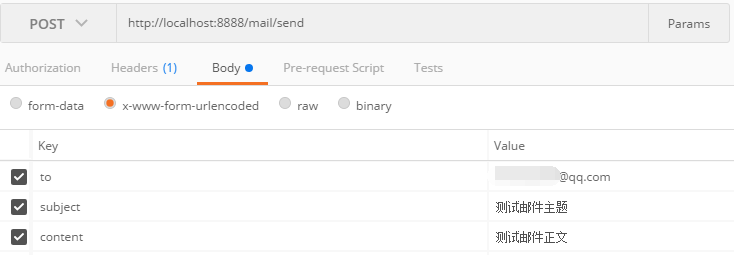
初次调用接口会报这个错误:邮箱不可用 550 User has no permission
可以参考这篇文章解决问题:https://blog.csdn.net/Hughnes/article/details/52070878
邮箱不可用 550 User has no permission
当传入发送邮箱正确的用户名和密码时,总是收到到:550 User has no permission这样的错误,
其实我们用Java发送邮件时相当于自定义客户端根据用户名和密码进行登录,然后使用SMTP服务发送邮件。但新注册的163邮件默认是不开启客户端授权验证的(对自定的邮箱大师客户端默认开启),
因此登录总是会被拒绝,验证没有权限。解决办法是进入163邮箱,进入邮箱中心——客户端授权密码,选择开启即可,如下截图

设置完毕后,在代码中用使用客户端授权密码代替原始的邮箱密码,这样就可以正确的发送邮件了。
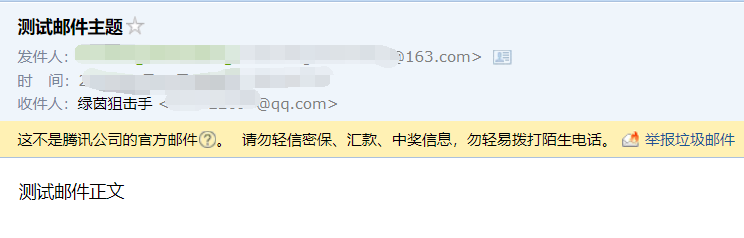
继续发送post请求,观察结果
邮箱收到邮件:
spring boot + activeMq 邮件服务的更多相关文章
- Spring Boot :邮件服务
简单使用 1.pom 包配置 pom 包里面添加 spring-boot-starter-mail 包引用 <dependencies> <dependency> <gr ...
- Spring Boot实现邮件服务,附常见邮箱的配置
1. pom.xml文件中引入依赖 <dependency> <groupId>org.springframework.boot</groupId> <art ...
- spring boot(十)邮件服务
springboot仍然在狂速发展,才五个多月没有关注,现在看官网已经到1.5.3.RELEASE版本了.准备慢慢在写写springboot相关的文章,本篇文章使用springboot最新版本1.5. ...
- spring boot和邮件服务
1.运行环境 开发工具:intellij idea JDK版本:1.8 项目管理工具:Maven 4.0.0 2.GITHUB地址
- Spring Boot Admin实现服务健康预警
Over View 上一篇文章主要介绍了Spring Boot Admin的概况以及我们如何在系统中引入和使用Spring Boot Admin,以此来帮助我们更加了解自己的系统,做到能快速发现.排查 ...
- 一文读懂 Spring Boot、微服务架构和大数据治理三者之间的故事
微服务架构 微服务的诞生并非偶然,它是在互联网高速发展,技术日新月异的变化以及传统架构无法适应快速变化等多重因素的推动下诞生的产物.互联网时代的产品通常有两类特点:需求变化快和用户群体庞大,在这种情况 ...
- 如何做自己的服务监控?spring boot 2.x服务监控揭秘
Actuator是spring boot项目中非常强大一个功能,有助于对应用程序进行监视和管理,通过 restful api请求来监管.审计.收集应用的运行情况,针对微服务而言它是必不可少的一个环节. ...
- 一文读懂spring boot 和微服务的关系
欢迎访问网易云社区,了解更多网易技术产品运营经验. Spring Boot 和微服务没关系, Java 微服务治理框架普遍用的是 Spring Cloud. Spring Boot 产生的背景,是开发 ...
- Spring Boot、微服务架构和大数据
一文读懂 Spring Boot.微服务架构和大数据治理三者之间的故事 https://www.cnblogs.com/ityouknow/p/9034377.html 微服务架构 微服务的诞生并非偶 ...
随机推荐
- 韦东山笔记之安装arm-linux-gcc交叉编译环境详细步骤。
1在关盘主目录tools下复制arm-linux-gcc-3.4.5-glibc-2.3.6.tar.bz2到虚拟机上 解压 tar xjf arm-linux-gcc-3.4.5-glibc ...
- 【Android】ContentProvider
转载地址:http://www.cnblogs.com/lqminn/archive/2012/10/16/2725624.html 一.ContentProvider的概念 ContentProvi ...
- uvm_reg_predictor——寄存器模型(十一)
保存寄存器的值 观察DUT寄存器值的变化. //---------------------------------------------------------------------------- ...
- awk对列求和
awk 'BEGIN{total=0}{total+=$1}END{print total}' 文件名
- Literals
Uppercase or lowercase L means long (however, using a lowercase l is confusing because it can look l ...
- 51nod 1431 快乐排队
题目来源: CodeForces 基准时间限制:1 秒 空间限制:131072 KB 分值: 80 难度:5级算法题 收藏 关注 有一群人在排队,如果某个人想排到前面去,可以花一元钱给直接站在他前 ...
- UWP开发:存储容器设置&复合设置数据
有时候为了将应用设置进行分类,需要创建新的容器进行存储应用设置的信息. 1,容器的创建:在一个根容器里嵌套一个新容器 1)首先获取根容器. 2)调用ApplicationDataContainer.C ...
- Codeforces 724 G Xor-matic Number of the Graph 线性基+DFS
G. Xor-matic Number of the Graph http://codeforces.com/problemset/problem/724/G 题意:给你一张无向图.定义一个无序三元组 ...
- UVA 11627 Slalom(二分)
二分,判断的时候,一个点一个点的考虑肯定是不行啦,考虑的单位是一个区间, 每次左端点尽量向左边移动,右端点尽量向右,得到下次可以达到的范围,检查一下和下一个区间有没有交集. #include<b ...
- CodeForces 77C Beavermuncher-0xFF (树形dp)
不错的树形dp.一个结点能走多次,树形的最大特点是到达后继的路径是唯一的,那个如果一个结点无法往子结点走,那么子结点就不用考虑了. 有的结点不能走完它的子结点,而有的可能走完他的子节点以后还会剩下一些 ...