
Flutter Swiper制作轮播效果
1、引入flutter_swiper插件
flutter最强大的siwiper, 多种布局方式,无限轮播,Android和IOS双端适配.
Flutter_swiper的GitHub地址:https://github.com/best-flutter/flutter_swiper
了解flutter_swiper后,需要作的第一件事就再pubspec.yaml文件中引入这个插件(记得使用最新版)
flutter_swiper: ^1.1.
引入后点击Get Packages下载,或者直接保存,会自动为我们下载包。
Swiper基本参数
| 参数 | 默认值 | 描述 |
|---|---|---|
| scrollDirection | Axis.horizontal | 滚动方向,设置为Axis.vertical如果需要垂直滚动 |
| loop | true | 无限轮播模式开关 |
| index | 0 | 初始的时候下标位置 |
| autoplay | false | 自动播放开关. |
| autoplayDely | 3000 | 自动播放延迟毫秒数. |
| autoplayDiableOnInteraction | true | 当用户拖拽的时候,是否停止自动播放. |
| onIndexChanged | void onIndexChanged(int index) | 当用户手动拖拽或者自动播放引起下标改变的时候调用 |
| onTap | void onTap(int index) | 当用户点击某个轮播的时候调用 |
| duration | 300.0 | 动画时间,单位是毫秒 |
| pagination | null | 设置 new SwiperPagination() 展示默认分页指示器 |
| control | null | 设置 new SwiperControl() 展示默认分页按钮 |
分页指示器 pagination
分页指示器继承自 SwiperPlugin,SwiperPlugin 为 Swiper 提供额外的界面.设置为new SwiperPagination() 展示默认分页.
| 参数 | 默认值 | 描述 |
|---|---|---|
| alignment | Alignment.bottomCenter | 如果要将分页指示器放到其他位置,那么可以修改这个参数 |
| margin | const EdgeInsets.all(10.0) | 分页指示器与容器边框的距离 |
| builder | SwiperPagination.dots | 目前已经定义了两个默认的分页指示器样式: SwiperPagination.dots 、 SwiperPagination.fraction,都可以做进一步的自定义. |
简单的定义:
pagination: new SwiperPagination(

      builder: DotSwiperPaginationBuilder(

      color: Colors.black54,

      activeColor: Colors.white,

 ))
自定义分页组件:
new Swiper(

    ...,

    pagination:new SwiperCustomPagination(

        builder:(BuildContext context, SwiperPluginConfig config){

            return new YourOwnPaginatipon();

        }

    )

);
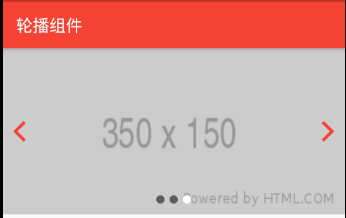
示例代码如下:
import 'package:flutter/material.dart';

import 'package:flutter_swiper/flutter_swiper.dart';

class HomePage extends StatefulWidget {

  @override

  HomePageState createState() {

    return HomePageState();

  }

}

class HomePageState extends State<HomePage> {

  @override

  Widget build(BuildContext context) {

    return Scaffold(

      appBar: AppBar(

        title: Text('轮播组件'),

      ),

      body: Container(

          width: MediaQuery.of(context).size.width,

          height: 200.0,

          child: Swiper(

            itemBuilder: _swiperBuilder,

            itemCount: ,

            pagination: new SwiperPagination(

                builder: DotSwiperPaginationBuilder(

              color: Colors.black54,

              activeColor: Colors.white,

            )),

            control: new SwiperControl(),

            scrollDirection: Axis.horizontal,

            autoplay: true,

            onTap: (index) => print('点击了第$index个'),

          )),

    );

  }

  Widget _swiperBuilder(BuildContext context, int index) {

    return (Image.network(

       "http://via.placeholder.com/350x150",

       fit: BoxFit.fill,

    ));

  }

}
内建的布局

new Swiper(

  itemBuilder: (BuildContext context, int index) {

    return new Image.network(

      "http://via.placeholder.com/288x188",

      fit: BoxFit.fill,

    );

  },

  itemCount: ,

  viewportFraction: 0.8,

  scale: 0.9,

)

new Swiper(

  itemBuilder: (BuildContext context, int index) {

    return new Image.network(

      "http://via.placeholder.com/288x188",

      fit: BoxFit.fill,

    );

  },

  itemCount: ,

  itemWidth: 300.0,

  layout: SwiperLayout.STACK,

)

 new Swiper(

  layout: SwiperLayout.CUSTOM,

  customLayoutOption: new CustomLayoutOption(

      startIndex: -,

      stateCount:

  ).addRotate([

    -45.0/,

    0.0,

    45.0/

  ]).addTranslate([

    new Offset(-370.0, -40.0),

    new Offset(0.0, 0.0),

    new Offset(370.0, -40.0)

  ]),

  itemWidth: 300.0,

  itemHeight: 200.0,

  itemBuilder: (context, index) {

    return new Container(

      color: Colors.grey,

      child: new Center(

        child: new Text("$index"),

      ),

    );

  },

  itemCount:

)
CustomLayoutOption 被设计用来描述布局和动画,很简单的可以指定每一个元素的状态.
new CustomLayoutOption(

      startIndex: -,  /// 开始下标

      stateCount:     /// 下面的数组长度

  ).addRotate([        //  每个元素的角度

    -45.0/,

    0.0,

    45.0/

  ]).addTranslate([           /// 每个元素的偏移

    new Offset(-370.0, -40.0),

    new Offset(0.0, 0.0),

    new Offset(370.0, -40.0)

  ])
Flutter Swiper制作轮播效果的更多相关文章
- Flutter移动电商实战 --(10)使用FlutterSwiper制作轮播效果
1.引入flutter_swiper插件 flutter最强大的siwiper, 多种布局方式,无限轮播,Android和IOS双端适配. 好牛X得介绍,一般敢用“最”的一般都是神级大神,看到这个介绍 ...
- 10-Flutter移动电商实战-使用FlutterSwiper制作轮播效果
1.引入flutter_swiper插件 flutter最强大的siwiper, 多种布局方式,无限轮播,Android和IOS双端适配. 好牛X得介绍,一般敢用“最”的一般都是神级大神,看到这个介绍 ...
- Flutter实战视频-移动电商-10.首页_FlutterSwiper轮播效果制作
10.首页_FlutterSwiper轮播效果制作 博客地址: https://jspang.com/post/FlutterShop.html#toc-5c2 flutter_swiper http ...
- Taro -- Swiper的图片由小变大3d轮播效果
Swiper的图片由小变大3d轮播效果 this.state = ({ nowIdx:, swiperH:'', imgList:[ {img:'../../assets/12.jpg'}, {img ...
- 基于css制作轮播图的部分效果
在轮播图中,我们可以通过鼠标在特定位置上的滑动来实现元素背景的改变.通常在制作轮播图时,我们首先想到的是js中的交互.可是,如果我们无法使用js,只能单纯的靠css又该如何实现这一效果呢?下面,本人将 ...
- CSS3图片轮播效果
原文:CSS3图片轮播效果 在网页中用到图片轮播效果,单纯的隐藏.显示,那再简单不过了,要有动画效果,如果是自己写的话(不用jquery等),可能要费点时间.css3的出现,让动画变得不再是问题,而且 ...
- vue项目全局引入vue-awesome-swiper插件做出轮播效果
在安装了vue的前提下,打开命令行窗口,输入vue init webpack swiper-test,创建一个vue项目且名为swiper-test(创建速度可能会有点慢,耐心等),博文讲完后,源码托 ...
- Vue如何使用vue-awesome-swiper实现轮播效果
在Vue项目中如何实现轮播图的效果呢,在传统项目中第一个想到的一般都是swiper插件,代码简单好用.一开始我也是直接npm安装swiper然后照着之前的传统写法写,然而却没有效果,只会显示图片但没有 ...
- 在 vue 中用 transition 实现轮播效果
概述 今天我接到一个需求:轮播效果.本来我是打算使用 Swiper 实现的,但是想起来貌似 transition 也能实现.于是就试了下,真的可以,还挺简单的,于是就记录下来,供以后开发时参考,相信对 ...
随机推荐
- 【产品对比】Word开发工具Aspose.Words和Spire.Doc性能和优劣对比一览
转:evget.com/article/2018/4/3/27885.html 概述:Microsoft Office Word是微软公司的一个文字处理器应用程序,作为办公软件必不可少的神器之一,Wo ...
- 大数据之路week05--day02(Maven安装,环境变量的配置及基本使用)
今天我们就来学习一下maven,怎么说呢,maven更像是一种管理的工具,实现的原理是使用插件. 举个例子,比如说,一个公司需要做一个项目,这个项目又分成了很多的模块,每个模块又分成了许多的业务等等, ...
- 《图解HTTP》笔记1
Web 是建立在 HTTP 协议上通信的. HTTP 通常被译为超文本传输协议,但这种译法并不严谨.严谨的译名应该为“超文本转移协议”. 通过发送请求获取服务器资源的 Web 浏览器等,都可称为客户端 ...
- css选择器学习(二)属性选择器
属性选择器 /*******************************************css2中的属性选择器*************************************** ...
- linux实操_shell读取控制台输入
基本语法: read [选项] [参数] 选项: -p 指定读取值时的提示符 -t 指定读取值时等待的时间(秒),如果没有在指定的时间内输入,就不再等待了 参数: 变量:指定读取值的变量名 实例1:读 ...
- k8s 命令自动补全
yum install -y bash-completion source /usr/share/bash-completion/bash_completion source <(kubectl ...
- 009_Linux驱动之_request_irq()函数
1. request_irq()函数原型 int request_irq(unsigned int irq, irq_handler_t handler, unsigned long irqflags ...
- js数据类型自动转化规律
1. 原始数据遇运算符 1. +运算符 1) 如果算子两侧都是字符串,返回拼接结果: 2) 如果算子两侧不全是字符串,则根据实际情况: 如果需要字符串,就调用String(); true + &quo ...
- 五十九.大数据、Hadoop 、 Hadoop安装与配置 、 HDFS
1.安装Hadoop 单机模式安装Hadoop 安装JAVA环境 设置环境变量,启动运行 1.1 环境准备 1)配置主机名为nn01,ip为192.168.1.21,配置yum源(系统源) 备 ...
- 【csp模拟赛6】计数--单调栈
对于60%的数据:暴力枚举对于100%的数据:因为排列是随机的,所以从每个点向后可能的差值最多2logn个,所以答案最多只可能有nlogn种,用单调队列找出来统计即可 维护对于每个位置,向右能影响到的 ...