
openpose-opencv 的body数据多人体姿态估计
介绍
opencv除了支持常用的物体检测模型和分类模型之外,还支持openpose模型,同样是线下训练和线上调用。这里不做特别多的介绍,先把源代码和数据放出来~
实验模型获取地址:https://github.com/CMU-Perceptual-Computing-Lab/openpose
基于body数据的代码实现:
 import cv2

 import time

 import numpy as np

 from random import randint

 image1 = cv2.imread("E:\\usb_test\\example\\yolov3\\OpenPose-Multi-Person\\111.jpg")

 protoFile = "E:\\usb_test\\example\\yolov3\\OpenPose-Multi-Person\\pose\\body_25\\pose_deploy.prototxt"

 weightsFile = "E:\\usb_test\\example\\yolov3\\OpenPose-Multi-Person\\pose\\body_25\\pose_iter_584000.caffemodel"

 nPoints = 25

 # COCO Output Format

 keypointsMapping = ['Nose', 'Neck', 'RShoulder', 'RElbow', 'RWrist', 'LShoulder', 'LElbow', 'LWrist', 'MidHip', 'RHip', 'RKnee',

 'RAnkle', 'LHip', 'LKnee', 'LAnkle', 'REye', 'LEye', 'REar', "LEar", 'LBigToe', 'LSmallToe', "LHeel", 'RBigToe', 'RSmallToe' ,

 'RHeel']

 POSE_PAIRS = [[1,8], [1,2], [1,5], [2,3], [3,4], [5,6],

               [6,7],[8,9],[9,10],[10,11], [8,12], [12,13],

               [13,14], [1,0], [0,15],[15,17],[0,16],[16,18],

               [2,17], [5,18], [14,19], [19,20], [14,21],[11,22],

               [22,23] ,[11,24]]

 # index of pafs correspoding to the POSE_PAIRS

 # e.g for POSE_PAIR(1,2), the PAFs are located at indices (31,32) of output, Similarly, (1,5) -> (39,40) and so on.

 mapIdx = [[26,27], [40,41], [48,49], [42,43], [44,45], [50,51],

           [52,53], [32,33], [28,29], [30,31], [34,35],[36,37],

           [38,39], [56,57], [58,59], [62,63], [60,61], [64,65],

           [46,47], [54,55], [66,67], [68,69], [70,71],[72,73],

           [74,75],[76,77]]

 colors = [[255, 0, 0], [255, 85, 0], [255, 170, 0],

            [255, 255, 0], [170, 255, 0], [85, 255, 0],

            [0, 255, 0], [0, 255, 85], [0, 255, 170],

            [0, 255, 255], [0, 170, 255], [0, 85, 255],

            [0, 0, 255], [85, 0, 255], [170, 0, 255],

            [255, 0, 255], [255, 0, 170], [255, 0, 85],

            [255, 170, 85], [255, 170, 170], [255, 170, 255],

            [255, 85, 85], [255, 85, 170], [255, 85, 255],

            [170, 170, 170]]

 def getKeypoints(probMap, threshold=0.1):

     mapSmooth = cv2.GaussianBlur(probMap,(3,3),0,0)

     mapMask = np.uint8(mapSmooth>threshold)

     keypoints = []

     #find the blobs

     _, contours, hierarchy = cv2.findContours(mapMask, cv2.RETR_TREE, cv2.CHAIN_APPROX_SIMPLE)

     #for each blob find the maxima

     for cnt in contours:

         #print(cnt)

         blobMask = np.zeros(mapMask.shape)

         blobMask = cv2.fillConvexPoly(blobMask, cnt, 1)

         maskedProbMap = mapSmooth * blobMask

         _, maxVal, _, maxLoc = cv2.minMaxLoc(maskedProbMap)

         keypoints.append(maxLoc + (probMap[maxLoc[1], maxLoc[0]],))

     return keypoints

 # Find valid connections between the different joints of a all persons present

 def getValidPairs(output):

     valid_pairs = []

     invalid_pairs = []

     n_interp_samples = 15

     paf_score_th = 0.1

     conf_th = 0.7

     # loop for every POSE_PAIR

     for k in range(len(mapIdx)):

         # A->B constitute a limb

         pafA = output[0, mapIdx[k][0], :, :]

         pafB = output[0, mapIdx[k][1], :, :]

         pafA = cv2.resize(pafA, (frameWidth, frameHeight))

         pafB = cv2.resize(pafB, (frameWidth, frameHeight))

         # Find the keypoints for the first and second limb

         candA = detected_keypoints[POSE_PAIRS[k][0]]

         candB = detected_keypoints[POSE_PAIRS[k][1]]

         nA = len(candA)

         nB = len(candB)

         # If keypoints for the joint-pair is detected

         # check every joint in candA with every joint in candB

         # Calculate the distance vector between the two joints

         # Find the PAF values at a set of interpolated points between the joints

         # Use the above formula to compute a score to mark the connection valid

         if( nA != 0 and nB != 0):

             valid_pair = np.zeros((0,3))

             for i in range(nA):

                 max_j=-1

                 maxScore = -1

                 found = 0

                 for j in range(nB):

                     # Find d_ij

                     d_ij = np.subtract(candB[j][:2], candA[i][:2])

                     norm = np.linalg.norm(d_ij)

                     if norm:

                         d_ij = d_ij / norm

                     else:

                         continue

                     # Find p(u)

                     interp_coord = list(zip(np.linspace(candA[i][0], candB[j][0], num=n_interp_samples),

                                             np.linspace(candA[i][1], candB[j][1], num=n_interp_samples)))

                     # Find L(p(u))

                     paf_interp = []

                     for k in range(len(interp_coord)):

                         paf_interp.append([pafA[int(round(interp_coord[k][1])), int(round(interp_coord[k][0]))],

                                            pafB[int(round(interp_coord[k][1])), int(round(interp_coord[k][0]))] ])

                     # Find E

                     paf_scores = np.dot(paf_interp, d_ij)

                     avg_paf_score = sum(paf_scores)/len(paf_scores)

                     # Check if the connection is valid

                     # If the fraction of interpolated vectors aligned with PAF is higher then threshold -> Valid Pair

                     if ( len(np.where(paf_scores > paf_score_th)[0]) / n_interp_samples ) > conf_th :

                         if avg_paf_score > maxScore:

                             max_j = j

                             maxScore = avg_paf_score

                             found = 1

                 # Append the connection to the list

                 if found:

                     valid_pair = np.append(valid_pair, [[candA[i][3], candB[max_j][3], maxScore]], axis=0)

             # Append the detected connections to the global list

             valid_pairs.append(valid_pair)

         else: # If no keypoints are detected

             print("No Connection : k = {}".format(k))

             invalid_pairs.append(k)

             valid_pairs.append([])

     return valid_pairs, invalid_pairs

 # This function creates a list of keypoints belonging to each person

 # For each detected valid pair, it assigns the joint(s) to a person

 def getPersonwiseKeypoints(valid_pairs, invalid_pairs):

     # the last number in each row is the overall score

     personwiseKeypoints = -1 * np.ones((0, 26))

     for k in range(len(mapIdx)):

         if k not in invalid_pairs:

             partAs = valid_pairs[k][:,0]

             partBs = valid_pairs[k][:,1]

             indexA, indexB = np.array(POSE_PAIRS[k])

             for i in range(len(valid_pairs[k])):

                 found = 0

                 person_idx = -1

                 for j in range(len(personwiseKeypoints)):

                     if personwiseKeypoints[j][indexA] == partAs[i]:

                         person_idx = j

                         found = 1

                         break

                 print("find",found)

                 if found:

                     personwiseKeypoints[person_idx][indexB] = partBs[i]

                     personwiseKeypoints[person_idx][-1] += keypoints_list[partBs[i].astype(int), 2] + valid_pairs[k][i][2]

                 # if find no partA in the subset, create a new subset

                 elif not found and k < 24:

                     row = -1 * np.ones(26)

                     row[indexA] = partAs[i]

                     row[indexB] = partBs[i]

                     # add the keypoint_scores for the two keypoints and the paf_score

                     row[-1] = sum(keypoints_list[valid_pairs[k][i,:2].astype(int), 2]) + valid_pairs[k][i][2]

                     personwiseKeypoints = np.vstack([personwiseKeypoints, row])

     return personwiseKeypoints

 frameWidth = image1.shape[1]

 frameHeight = image1.shape[0]

 t = time.time()

 net = cv2.dnn.readNetFromCaffe(protoFile, weightsFile)

 # Fix the input Height and get the width according to the Aspect Ratio

 inHeight = 360

 inWidth = int((inHeight/frameHeight)*frameWidth)

 inpBlob = cv2.dnn.blobFromImage(image1, 1.0 / 255, (inWidth, inHeight),

                           (0, 0, 0), swapRB=False, crop=False)

 print("", inpBlob.shape )

 net.setInput(inpBlob)

 #net.setPreferableBackend(cv2.dnn.DNN_BACKEND_OPENCV)

 #net.setPreferableTarget(cv2.dnn.DNN_TARGET_OPENCL)

 output = net.forward()

 print(output.shape)

 print("Time Taken in forward pass = {}".format(time.time() - t))

 detected_keypoints = []

 keypoints_list = np.zeros((0,3))

 keypoint_id = 0

 threshold = 0.1

 for part in range(nPoints):

     probMap = output[0,part,:,:]

     probMap = cv2.resize(probMap, (image1.shape[1], image1.shape[0]))

     keypoints = getKeypoints(probMap, threshold)

     print("Keypoints - {} : {}".format(keypointsMapping[part], keypoints))

     keypoints_with_id = []

     for i in range(len(keypoints)):

         keypoints_with_id.append(keypoints[i] + (keypoint_id,))

         keypoints_list = np.vstack([keypoints_list, keypoints[i]])

         keypoint_id += 1

     detected_keypoints.append(keypoints_with_id)

     print("detected_keypoints",detected_keypoints)

 frameClone = image1.copy()

 for i in range(nPoints):

     for j in range(len(detected_keypoints[i])):

         cv2.circle(frameClone, detected_keypoints[i][j][0:2], 3, colors[i], -1, cv2.LINE_AA)

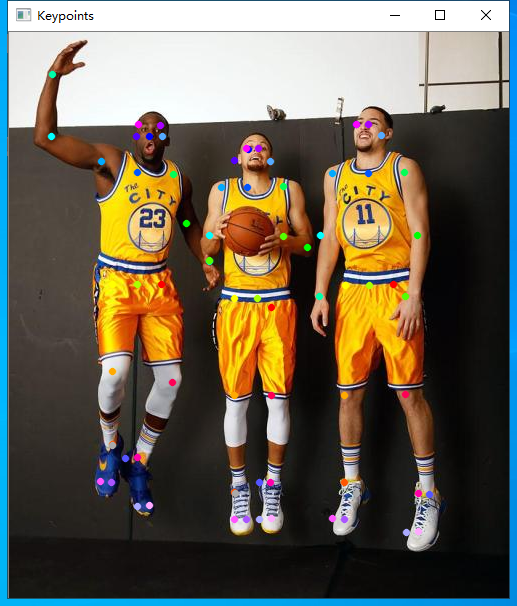
 cv2.imshow("Keypoints",frameClone)

 valid_pairs, invalid_pairs = getValidPairs(output)

 personwiseKeypoints = getPersonwiseKeypoints(valid_pairs, invalid_pairs)

 for i in range(24):

     for n in range(len(personwiseKeypoints)):

         index = personwiseKeypoints[n][np.array(POSE_PAIRS[i])]

         if -1 in index:

             continue

         B = np.int32(keypoints_list[index.astype(int), 0])

         A = np.int32(keypoints_list[index.astype(int), 1])

         cv2.line(frameClone, (B[0], A[0]), (B[1], A[1]), colors[i], 2, cv2.LINE_AA)

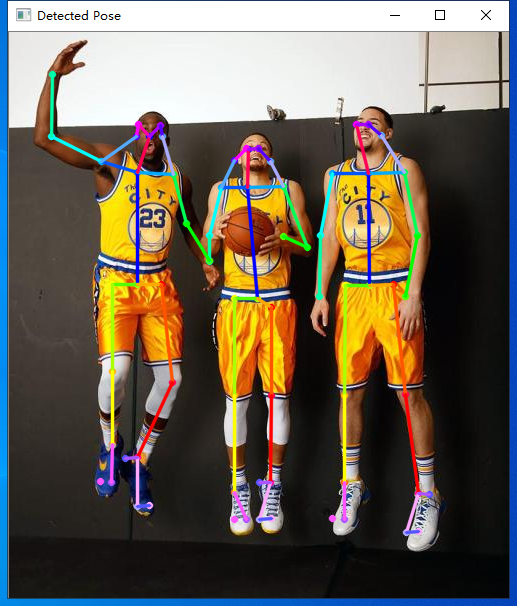
 cv2.imshow("Detected Pose" , frameClone)

 cv2.waitKey(0)
实验效果
openpose-opencv 的body数据多人体姿态估计的更多相关文章
- openpose-opencv 的coco数据多人体姿态估计
介绍 opencv除了支持常用的物体检测模型和分类模型之外,还支持openpose模型,同样是线下训练和线上调用.这里不做特别多的介绍,先把源代码和数据放出来- 实验模型获取地址:https://gi ...
- Facebook提出DensePose数据集和网络架构:可实现实时的人体姿态估计
https://baijiahao.baidu.com/s?id=1591987712899539583 选自arXiv 作者:Rza Alp Güler, Natalia Neverova, Ias ...
- 快速人体姿态估计:CVPR2019论文阅读
快速人体姿态估计:CVPR2019论文阅读 Fast Human Pose Estimation 论文链接: http://openaccess.thecvf.com/content_CVPR_201 ...
- 人体姿态和形状估计的视频推理:CVPR2020论文解析
人体姿态和形状估计的视频推理:CVPR2020论文解析 VIBE: Video Inference for Human Body Pose and Shape Estimation 论文链接:http ...
- 从DeepNet到HRNet,这有一份深度学习“人体姿势估计”全指南
从DeepNet到HRNet,这有一份深度学习"人体姿势估计"全指南 几十年来,人体姿态估计(Human Pose estimation)在计算机视觉界备受关注.它是理解图像和视频 ...
- CVPR 2020几篇论文内容点评:目标检测跟踪,人脸表情识别,姿态估计,实例分割等
CVPR 2020几篇论文内容点评:目标检测跟踪,人脸表情识别,姿态估计,实例分割等 CVPR 2020中选论文放榜后,最新开源项目合集也来了. 本届CPVR共接收6656篇论文,中选1470篇,&q ...
- 人体姿态的相似性评价基于OpenCV实现最近邻分类KNN K-Nearest Neighbors
最近学习了人体姿态的相似性评价.需要用到KNN来统计与当前姿态相似的k个姿态信息. 假设我们已经有了矩阵W和给定的测试样本姿态Xi,需要寻找与Xi相似的几个姿态,来估计当前Xi的姿态标签. //knn ...
- 利用RGB-D数据进行人体检测 带dataset
利用RGB-D数据进行人体检测 LucianoSpinello, Kai O. Arras 摘要 人体检测是机器人和智能系统中的重要问题.之前的研究工作使用摄像机和2D或3D测距器.本文中我们提出一种 ...
- 头部姿态估计 - Android
概括 通过Dlib获得当前人脸的特征点,然后通过旋转平移标准模型的特征点进行拟合,计算标准模型求得的特征点与Dlib获得的特征点之间的差,使用Ceres不断迭代优化,最终得到最佳的旋转和平移参数. A ...
随机推荐
- JsonSchema用法
JsonSchema用法 简介 JSON Schema是基于JSON格式,用于定义JSON数据结构以及校验JSON数据内容.JSON Schema官网地址:http://json-schema.org ...
- iostat的坑
简单使用iostat查询io使用量,会让你看不懂所以然,因为很多人疏忽了这个命令查到的结果根本不是实际值,需要注意的是一句话: “第1次采样信息与单独执行iostat的效果一样,为从系统开机到当前执行 ...
- VS2010开发.cpp与.c的注意事项
VS2010开发.cpp与.c的注意事项 声明:引用请注明出处http://blog.csdn.net/lg1259156776/ 强大的VS2010,正是由于vs2010的完全封装,让现在的wind ...
- Fiddler之手机抓包
1.Fiddle设置端口,Tools->Options->Connections, 2.手机设置代理服务器: 注意:要保证手机和PC电脑IP在同一个网段(或者同一个网关) (1).安卓手机 ...
- 《Mysql 事务 - 隔离》
一:事务概念 - ACID(Atomicity.Consistency.Isolation.Durability,即原子性.一致性.隔离性.持久性) 二:事务产生的问题 - 多个事务同时执行的时候 ...
- 阿里三面46题:java高级+数据库+网络+架构设计!含答案大赠送!
阿里一面 自我介绍 链表,数组的优缺点,应用场景,查找元素的复杂度 二叉树怎么实现的 Java中都有哪些锁 可重入锁的设计思路是什么 乐观锁和悲观锁 synchronized机制 hashmap原理, ...
- Windows下jmap命令报错问题
最近换了笔记本,新的工作环境下jmap命令居然在报错,而jps.jstat.jinfo.jstack都能正常使用,所以初步排除进程号的问题. Attaching to core 17536 fr ...
- Spring Cloud 中注册中心Eureka客户端配置
注册中心配置客户端(注册一个虚拟的商品服务) 一.新建项目: 1.创建一个SpirngBoot应用,增加服务注册和发现依赖 2.模拟商品信息,存储在内存中 3.开发商品列表接口 ...
- TZOJ2882: 美食节之感恩父母
#include<stdio.h> int main() { ],b[],i,j,max,m,t1,t2,t3; while(scanf("%d",&m),m) ...
- Python中操作mysql的pymysql模块详解(转载)
https://www.cnblogs.com/wt11/p/6141225.html