
Linux下nginx配置https协议访问
一、配置nginx支持https协议访问,需要在编译安装nginx的时候添加相应的模块--with-http_ssl_module
查看nginx编译参数:/usr/local/nginx/sbin/nginx -V
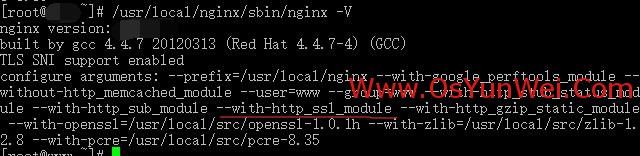
如下所示:
configure arguments: --prefix=/usr/local/nginx --with-google_perftools_module --without-http_memcached_module --user=www --group=www --with-http_stub_status_module --with-http_sub_module --with-http_ssl_module --with-http_gzip_static_module --with-openssl=/usr/local/src/openssl-1.0.1h --with-zlib=/usr/local/src/zlib-1.2.8 --with-pcre=/usr/local/src/pcre-8.35
如果没有--with-http_gzip_static_module这个参数,需要重新编辑nginx
二、防火墙开启https协议默认端口443
vi /etc/sysconfig/iptables #编辑防火墙配置文件,添加以下代码
-A INPUT -m state --state NEW -m tcp -p tcp --dport 443 -j ACCEPT
:wq! #保存退出
service iptables restart #重启防火墙
三、创建https证书
确保机器上安装了openssl和openssl-devel
yum install openssl openssl-devel #CentOS使用yum命令安装
mkdir /usr/local/nginx/conf/ssl #创建证书存放目录
cd /usr/local/nginx/conf/ssl #进入目录
创建服务器私钥:openssl genrsa -des3 -out server.key 1024 #根据提示输入证书口令

创建签名请求的证书(CSR):openssl req -new -key server.key -out server.csr #输入上面设置的口令
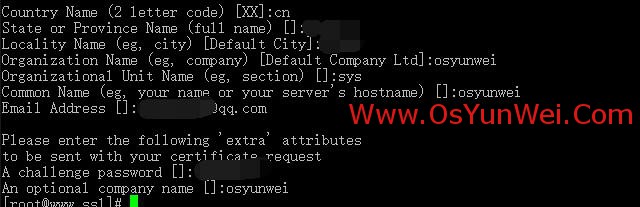
#根据提示输入相应的信息
Country Name (2 letter code) [XX]:cn #国家
State or Province Name (full name) []:zhejiang #省份
Locality Name (eg, city) [Default City]:hangzhou #城市
Organization Name (eg, company) [Default Company Ltd]:osyunwei #公司
Organizational Unit Name (eg, section) []:sys #部门
Common Name (eg, your name or your server's hostname) []:osyunwei #主机名称
Email Address []:xxx@qq.com #邮箱
Please enter the following 'extra' attributes
to be sent with your certificate request
A challenge password []:123456 #证书请求密钥,CA读取证书的时候需要输入密码
An optional company name []:osyunwei #公司名称,CA读取证书的时候需要输入密码
openssl rsa -in server.key -out server_nopassword.key #对key进行解密
openssl x509 -req -days 365 -in server.csr -signkey server_nopassword.key -out server.crt
#标记证书使用上述私钥和CSR
四、修改nginx配置文件,加载ssl证书
vi /usr/local/nginx/conf/nginx.conf #编辑
listen 80;
listen 443;
ssl on;
ssl_certificate /usr/local/nginx/conf/ssl/server.crt;
ssl_certificate_key /usr/local/nginx/conf/ssl/server_nopassword.key;
ssl_session_timeout 10m;
ssl_session_cache shared:SSL:10m;
ssl_protocols TLSv1 TLSv1.1 TLSv1.2;
ssl_ciphers ALL:!ADH:!EXPORT56:-RC4+RSA:+HIGH:+MEDIUM:!EXP;
ssl_prefer_server_ciphers on;
fastcgi_param HTTPS $https if_not_empty; #有https协议时自动使用https,否则忽略这个参数。
:wq! #保存退出
service nginx restart #重启nginx
rewrite ^(.*) https://www.osyunwei.com$1 permanent; #可以把http协议重定向到https上面
#301跳转也可以把http协议重定向到https上面
server {
listen 80;
server_name www.osyunwei.com;
return 301 https://$host$request_uri;
}
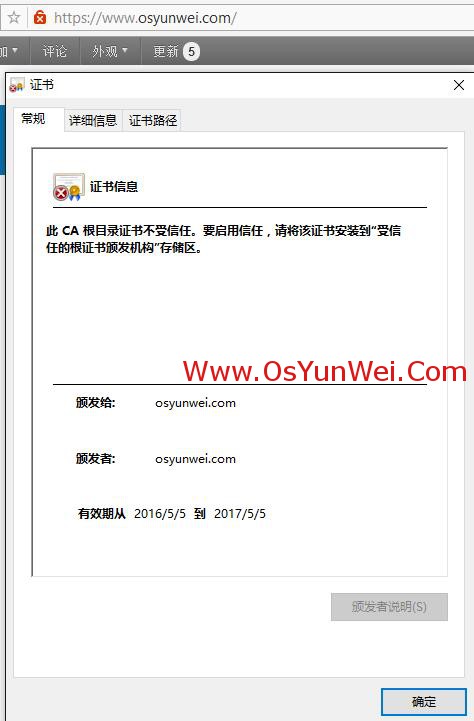
使用https协议打开网址,如下图所示:
转载于OS运维
Linux下nginx配置https协议访问的更多相关文章
- 【转】Linux下nginx配置https协议访问的方法
一.配置nginx支持https协议访问,需要在编译安装nginx的时候添加相应的模块--with-http_ssl_module 查看nginx编译参数:/usr/local/nginx/sbin/ ...
- Linux下nginx配置https协议访问的方法
一.配置nginx支持https协议访问,需要在编译安装nginx的时候添加相应的模块--with-http_ssl_module 查看nginx编译参数:/usr/local/nginx/sbin/ ...
- Linux服务之nginx服务篇四(配置https协议访问)
一.配置nginx支持https协议访问 编译安装nginx的时候需要添加相应的模块--with-http_ssl_module和--with-http_gzip_static_module(可通过/ ...
- windwos下nginx 配置https并http强制跳转https
windwos下nginx 配置https并http强制跳转https 一.首先配置证书文件 申请证书文件,这里就不做详细过程了,直接看证书文件结果. 这是两个证书的关键文件 打开ngxin下con ...
- Tomcat配置https协议访问
Tomcat9配置https协议访问: https://blog.csdn.net/weixin_42273374/article/details/81010203 配置Tomcat使用https协议 ...
- Linux下Nginx配置阿里云 SSL证书实现HTTPS访问
这篇文章主要介绍了nginx配置ssl证书实现https访问的示例 1.服务器系统:Centos 2. 阿里云申请SSL证书 选择“免费版DV SSL”,点击立即购买: 下载证书 列表中找到已签发的证 ...
- linux下nginx配置ssl证书(https)
nginx配置ssl很简单,首先需要两个文件,一个是crt文件,另一个是key文件,如下所示: xxx.crt; #(证书公钥)xxx.key; #(证书私钥) 把这两个文件放到nginx的conf ...
- lnmp之Nginx配置https加密访问
配置lnmp之Nginx网站支持https加密访问 注: 1. 这里拿购买的(pxsnx.pxjy.com)证书来做样例 证书文件共有三个---> (pxsnxg.pxjy.com_ca.crt ...
- Linux下Apache配置HTTPS功能
Apache配置HTTPS功能 转 https://www.cnblogs.com/liaojiafa/p/6028816.html 一.yum 安装openssl和openssl-devel,ht ...
随机推荐
- 【OGG 故障处理】OGG-01028
通过ATSCN 的方式启动REPLICAT 进程的时候报错 GGSCI> START REPLICAT RP_XXXX1, ATCSN 15572172378 GGSCI> VIEW RE ...
- docker alpine wkhtmltopdf
截止2019.08 wkhtmltopdf 还没有 alpine 的版本 如需使用 需要在 alpine 环境中编译 生成 wkhtmltopdf (使用 apk add wkhtmltopdf ...
- 深度解析Graph Embedding
Graph Embedding是推荐系统.计算广告领域最近非常流行的做法,是从word2vec等一路发展而来的Embedding技术的最新延伸:并且已经有很多大厂将Graph Embedding应用于 ...
- MFC消息路由
1.Command Routing(命令传递):当消息进来时,会有一个泵推动它前进.消息如何进来,以有泵函数如何推动,都是属于windows程序设计的范畴, 消息如果是从子类流向父类(纵向流动),那么 ...
- Java8-Executors-No.02
import java.util.concurrent.ExecutionException; import java.util.concurrent.ExecutorService; import ...
- Java8-Lock-No.02
import java.util.concurrent.ExecutorService; import java.util.concurrent.Executors; import java.util ...
- mouseover([[data],fn])
mouseover([[data],fn]) 概述 当鼠标指针位于元素上方时,会发生 mouseover 事件. 该事件大多数时候会与 mouseout 事件一起使用.直线电机选型 注释:与 mous ...
- keyup([[data],fn]) 当按钮被松开时,发生 keyup 事件。它发生在当前获得焦点的元素上。
keyup([[data],fn]) 概述 当按钮被松开时,发生 keyup 事件.它发生在当前获得焦点的元素上. 注释:如果在文档元素上进行设置,则无论元素是否获得焦点,该事件都会发生.直线电机选型 ...
- 添加QQ群
点击右边添加 <a target=" src="//pub.idqqimg.com/wpa/images/group.png" alt="陆小果哥 ...
- Self install windows service in .NET c#
http://stackoverflow.com/questions/4144019/self-install-windows-service-in-net-c-sharp using System; ...