
【转】Linux下nginx配置https协议访问的方法
一、配置nginx支持https协议访问,需要在编译安装nginx的时候添加相应的模块--with-http_ssl_module
查看nginx编译参数:/usr/local/nginx/sbin/nginx -V
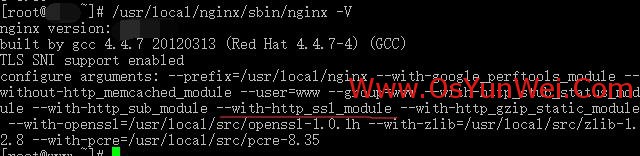
如下所示:
configure arguments: --prefix=/usr/local/nginx --with-google_perftools_module --without-http_memcached_module --user=www --group=www --with-http_stub_status_module --with-http_sub_module --with-http_ssl_module --with-http_gzip_static_module --with-openssl=/usr/local/src/openssl-1.0.1h --with-zlib=/usr/local/src/zlib-1.2.8 --with-pcre=/usr/local/src/pcre-8.35
如果没有--with-http_gzip_static_module这个参数,需要重新编辑nginx
二、防火墙开启https协议默认端口443
vi /etc/sysconfig/iptables #编辑防火墙配置文件,添加以下代码
-A INPUT -m state --state NEW -m tcp -p tcp --dport 443 -j ACCEPT
:wq! #保存退出
service iptables restart #重启防火墙
三、创建https证书
确保机器上安装了openssl和openssl-devel
yum install openssl openssl-devel #CentOS使用yum命令安装
mkdir /usr/local/nginx/conf/ssl #创建证书存放目录
cd /usr/local/nginx/conf/ssl #进入目录
创建服务器私钥:openssl genrsa -des3 -out server.key 1024 #根据提示输入证书口令

创建签名请求的证书(CSR):openssl req -new -key server.key -out server.csr #输入上面设置的口令
#根据提示输入相应的信息
Country Name (2 letter code) [XX]:cn #国家
State or Province Name (full name) []:zhejiang #省份
Locality Name (eg, city) [Default City]:hangzhou #城市
Organization Name (eg, company) [Default Company Ltd]:osyunwei #公司
Organizational Unit Name (eg, section) []:sys #部门
Common Name (eg, your name or your server's hostname) []:osyunwei #主机名称
Email Address []:[email protected] #邮箱
Please enter the following 'extra' attributes
to be sent with your certificate request
A challenge password []:123456 #证书请求密钥,CA读取证书的时候需要输入密码
An optional company name []:osyunwei #公司名称,CA读取证书的时候需要输入密码
openssl rsa -in server.key -out server_nopassword.key #对key进行解密
openssl x509 -req -days 365 -in server.csr -signkey server_nopassword.key -out server.crt
#标记证书使用上述私钥和CSR

四、修改nginx配置文件,加载ssl证书
vi /usr/local/nginx/conf/nginx.conf #编辑
listen 80;
listen 443;
ssl on;
ssl_certificate /usr/local/nginx/conf/ssl/server.crt;
ssl_certificate_key /usr/local/nginx/conf/ssl/server_nopassword.key;
fastcgi_param HTTPS $https if_not_empty; #有https协议时自动使用https,否则忽略这个参数。
:wq! #保存退出
service nginx restart #重启nginx
rewrite ^(.*) https://www.osyunwei.com$1 permanent; #可以把http协议重定向到https上面
使用https协议打开网址,如下图所示:
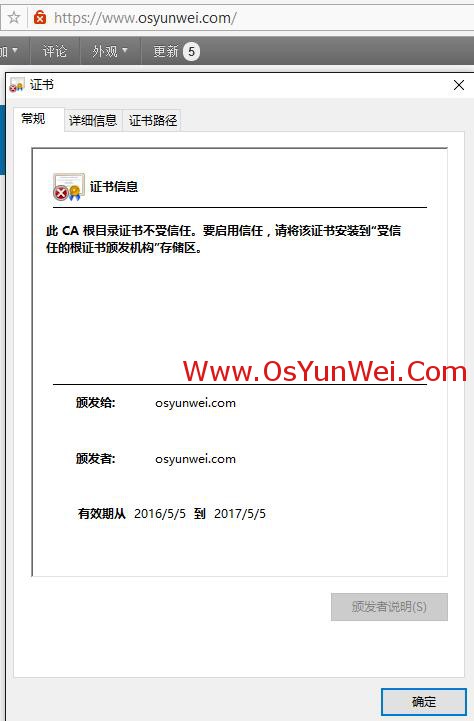
至此,Linux下nginx配置https协议访问完成。
【转】Linux下nginx配置https协议访问的方法的更多相关文章
- Linux下nginx配置https协议访问的方法
一.配置nginx支持https协议访问,需要在编译安装nginx的时候添加相应的模块--with-http_ssl_module 查看nginx编译参数:/usr/local/nginx/sbin/ ...
- Linux下nginx配置https协议访问
一.配置nginx支持https协议访问,需要在编译安装nginx的时候添加相应的模块--with-http_ssl_module 查看nginx编译参数:/usr/local/nginx/sbin/ ...
- Linux服务之nginx服务篇四(配置https协议访问)
一.配置nginx支持https协议访问 编译安装nginx的时候需要添加相应的模块--with-http_ssl_module和--with-http_gzip_static_module(可通过/ ...
- windwos下nginx 配置https并http强制跳转https
windwos下nginx 配置https并http强制跳转https 一.首先配置证书文件 申请证书文件,这里就不做详细过程了,直接看证书文件结果. 这是两个证书的关键文件 打开ngxin下con ...
- Tomcat配置https协议访问
Tomcat9配置https协议访问: https://blog.csdn.net/weixin_42273374/article/details/81010203 配置Tomcat使用https协议 ...
- Linux下Nginx配置阿里云 SSL证书实现HTTPS访问
这篇文章主要介绍了nginx配置ssl证书实现https访问的示例 1.服务器系统:Centos 2. 阿里云申请SSL证书 选择“免费版DV SSL”,点击立即购买: 下载证书 列表中找到已签发的证 ...
- linux下nginx配置ssl证书(https)
nginx配置ssl很简单,首先需要两个文件,一个是crt文件,另一个是key文件,如下所示: xxx.crt; #(证书公钥)xxx.key; #(证书私钥) 把这两个文件放到nginx的conf ...
- lnmp之Nginx配置https加密访问
配置lnmp之Nginx网站支持https加密访问 注: 1. 这里拿购买的(pxsnx.pxjy.com)证书来做样例 证书文件共有三个---> (pxsnxg.pxjy.com_ca.crt ...
- Linux下Apache配置HTTPS功能
Apache配置HTTPS功能 转 https://www.cnblogs.com/liaojiafa/p/6028816.html 一.yum 安装openssl和openssl-devel,ht ...
随机推荐
- TortoiseSVN文档
https://tortoisesvn.net/docs/release/TortoiseSVN_zh_CN/index.html TortoiseSVN 针对 Windows 平台的 Subvers ...
- datagrid实现单行的选择、取消
<html> <head> <meta http-equiv="Content-Type" content="text/html; char ...
- Mvc4_传值取值应用
Mvc路由运行机制: 首先,Web 浏览器向服务器发送一条URL 请求,如http://HostName/ControllerName/ActionName/Parameters. 其次,请求被A ...
- PHP 递归的密码
http://www.cnsecer.com/4146.html 说实话 真的很炫 好像还是不好理解啊
- Unity3D播放视频
http://blog.csdn.net/awnuxcvbn/article/details/17618919 点击这里下载视频转换器,该转换器会把其他格式转化为ogv格式,直接被unity识别,不需 ...
- 【转】实现RTP协议的H.264视频传输系统
1. 引言 随着信息产业的发展,人们对信息资源的要求已经逐渐由文字和图片过渡到音频和视频,并越来越强调获取资源的实时性和互动性.但人们又面临着另外一种不可避免的尴尬,就是在网络上看到生动 ...
- H5网页播放器播不了服务器上的mp4视频文件
打开IIS,在功能视图里找到MIME类型菜单,打开该菜单后鼠标右键添加.mp4扩展名的MIME类型video/mp4 其他视频文件播放不了估计也得在IIS里添加对应的MIME类型(从服务器下载文件时也 ...
- js键盘操作事件
<!DOCTYPE html> <html lang="en"> <head> <meta charset="UTF-8&quo ...
- [saiku] JCR在saiku中的运用原理
转载自: 什么是JAVA内容仓库(Java Content Repository)(1) 什么是JAVA内容仓库(Java Content Repository)(2) 什么是JAVA内容仓库(Jav ...
- C++继承与派生(原理归纳)
1. C++继承与java不同,java遵循单继承,但java的接口为其不足做了很好的弥补了. C++则是灵活的多,为多继承.即一个C++类可以同时继承N个类的属性. 2. 对于继承方式 : 有三 ...