
多版本YUM仓库搭建

服务器:CentOS7
YUM源:阿里云
空间要求:CentOS6+CentOS7 50G,考虑后期更新预留,LVS空间100G
1、在服务器配置CentOS7的yum源和CentOS6的yum源
#Centos7
[base7]

name=CentOS-$releasever - Base - mirrors.aliyun.com

failovermethod=priority

baseurl=http://mirrors.aliyun.com/centos/$releasever/os/$basearch/

        http://mirrors.aliyuncs.com/centos/$releasever/os/$basearch/

        http://mirrors.cloud.aliyuncs.com/centos/$releasever/os/$basearch/

gpgcheck=

gpgkey=http://mirrors.aliyun.com/centos/RPM-GPG-KEY-CentOS-7

[updates7]

name=CentOS-$releasever - Updates - mirrors.aliyun.com

failovermethod=priority

baseurl=http://mirrors.aliyun.com/centos/$releasever/updates/$basearch/

        http://mirrors.aliyuncs.com/centos/$releasever/updates/$basearch/

        http://mirrors.cloud.aliyuncs.com/centos/$releasever/updates/$basearch/

gpgcheck=

gpgkey=http://mirrors.aliyun.com/centos/RPM-GPG-KEY-CentOS-7

[extras7]

name=CentOS-$releasever - Extras - mirrors.aliyun.com

failovermethod=priority

baseurl=http://mirrors.aliyun.com/centos/$releasever/extras/$basearch/

        http://mirrors.aliyuncs.com/centos/$releasever/extras/$basearch/

        http://mirrors.cloud.aliyuncs.com/centos/$releasever/extras/$basearch/

gpgcheck=

gpgkey=http://mirrors.aliyun.com/centos/RPM-GPG-KEY-CentOS-7

[epel7]

name=CentOS--epel-cmiot.local

baseurl=https://mirrors.aliyun.com/epel/7/x86_64/

gpgcheck=
#Centos6
[base6]

name=CentOS- - Base - mirrors.aliyun.com

failovermethod=priority

baseurl=http://mirrors.aliyun.com/centos/6/os/x86_64/

        http://mirrors.aliyuncs.com/centos/6/os/x86_64/

        http://mirrors.cloud.aliyuncs.com/centos/6/os/x86_64/

gpgcheck=

gpgkey=http://mirrors.aliyun.com/centos/RPM-GPG-KEY-CentOS-6

[updates6]

name=CentOS- - Updates - mirrors.aliyun.com

failovermethod=priority

baseurl=http://mirrors.aliyun.com/centos/6/updates/x86_64/

        http://mirrors.aliyuncs.com/centos/6/updates/x86_64/

        http://mirrors.cloud.aliyuncs.com/centos/6/updates/x86_64/

gpgcheck=

gpgkey=http://mirrors.aliyun.com/centos/RPM-GPG-KEY-CentOS-6

[extras6]

name=CentOS- - Extras - mirrors.aliyun.com

failovermethod=priority

baseurl=http://mirrors.aliyun.com/centos/6/extras/x86_64/

        http://mirrors.aliyuncs.com/centos/6/extras/x86_64/

        http://mirrors.cloud.aliyuncs.com/centos/6/extras/x86_64/

gpgcheck=

gpgkey=http://mirrors.aliyun.com/centos/RPM-GPG-KEY-CentOS-6

[epel6]

name=CentOS--epel-cmiot.local

baseurl=https://mirrors.aliyun.com/epel/6/x86_64/

gpgcheck=
2、检查yum的可用性,并查看yum的repoid
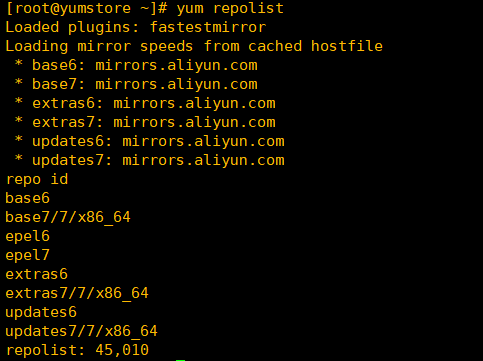
3、安装repo同步工具和必要软件包
yum install -y wget make cmake gcc gcc-c++ pcre-devel zlib-devel openssl openssl-devel createrepo yum-utils
4、创建yum软件包目录并向阿里同步,时间较久。
mkdir -p /mirror/Aliyun/CentOS/

reposync -n --repoid=extras6 --repoid=updates6 --repoid=base6 --repoid=epel6 -p /mirror/Aliyun/CentOS/

mkdir -p /mirror/Aliyun/CentOS/

reposync -n --repoid=extras7 --repoid=updates7 --repoid=base7 --repoid=epel7 -p /mirror/Aliyun/CentOS/
5、创建索引
createrepo -po /mirror/Aliyun/CentOS//base6/ /mirror/Aliyun/CentOS//base6/

createrepo -po /mirror/Aliyun/CentOS//epel6/ /mirror/Aliyun/CentOS//epel6/

createrepo -po /mirror/Aliyun/CentOS//extras6/ /mirror/Aliyun/CentOS//extras6/

createrepo -po /mirror/Aliyun/CentOS//updates6/ /mirror/Aliyun/CentOS//updates6/

createrepo -po /mirror/Aliyun/CentOS//base7/ /mirror/Aliyun/CentOS//base7/

createrepo -po /mirror/Aliyun/CentOS//epel7/ /mirror/Aliyun/CentOS//epel7/

createrepo -po /data/website/centos//extras7 /data/website/centos//extras7

createrepo -po /mirror/Aliyun/CentOS//updates7/ /mirror/Aliyun/CentOS//updates7/
6、安装nginx并配置
worker_processes  ;

events {

    worker_connections  ;

}

http {

    include       mime.types;

    default_type  application/octet-stream;

    sendfile        on;

    keepalive_timeout  ;

    server {

        listen       ;

        server_name  localhost;

        root         /mirror ;   #这里是yum源存放目录

        location / {

            autoindex on;        #打开目录浏览功能

            autoindex_exact_size off;  # off:以可读的方式显示文件大小

            autoindex_localtime on; # on、off:是否以服务器的文件时间作为显示的时间

            charset utf-,gbk; #展示中文文件名

            index index.html;

        }

        error_page        /50x.html;

        location = /50x.html {

            root   html;

        }

    }

}
7、创建更新软件包的定时任务
0 1 * * * /mirror/update.sh
#!/bin/bash

reposync -n --repoid=extras6 --repoid=updates6 --repoid=base6 --repoid=epel6 -p /mirror/Aliyun/CentOS/

reposync -n --repoid=extras7 --repoid=updates7 --repoid=base7 --repoid=epel7 -p /mirror/Aliyun/CentOS/

createrepo --update /mirror/Aliyun/CentOS//base6/

createrepo --update /mirror/Aliyun/CentOS//epel6/

createrepo --update /mirror/Aliyun/CentOS//extras6/

createrepo --update /mirror/Aliyun/CentOS//updates6/

createrepo --update /mirror/Aliyun/CentOS//base7/

createrepo --update /mirror/Aliyun/CentOS//epel7/

createrepo --update /mirror/Aliyun/CentOS//extras7/

createrepo --update /mirror/Aliyun/CentOS//updates7/
8、配置客户端yum文件使用
[base]

name=CentOS-$releasever - Base

baseurl=http://10.150.203.8/Aliyun/CentOS/$releasever/base$releasever

gpgcheck=

gpgkey=http://10.150.203.8/Aliyun/CentOS/RPM-GPG-KEY-CentOS-$releasever

[updates]

name=CentOS-$releasever - Updates

baseurl=http://10.150.203.8/Aliyun/CentOS/$releasever/updates$releasever

gpgcheck=

gpgkey=http://10.150.203.8/Aliyun/CentOS/RPM-GPG-KEY-CentOS-$releasever

[extras]

name=CentOS-$releasever - Extras

baseurl=http://10.150.203.8/Aliyun/CentOS/$releasever/extras$releasever

gpgcheck=

gpgkey=http://10.150.203.8/Aliyun/CentOS/RPM-GPG-KEY-CentOS-$releasever

[epel]

name=CentOS-$releasever - epel

baseurl=http://10.150.203.8/Aliyun/CentOS/$releasever/epel$releasever

gpgcheck=
多版本YUM仓库搭建的更多相关文章
- 自动化利器-YUM仓库搭建实战
本地YUM仓库搭建实战 YUM主要用于自动安装.升级rpm软件包,它能自动查找并解决rpm包之间的依赖关系.要成功的使用YUM工具安装更新软件或系统,就需要有一个包含各种rpm软件包的reposito ...
- 其他综合-内网下Yum仓库搭建配置
内网下Yum仓库搭建配置 1.实验环境 虚拟机环境: VMware 12 版本虚拟机 网络环境: 内网 IP 段:172.16.1.0 外网 iP 段(模拟):10.0.0.0 实验基础:(能够上网, ...
- 本地YUM仓库搭建实战
YUM主要用于自动安装.升级rpm软件包,它能自动查找并解决rpm包之间的依赖关系.要成功的使用YUM工具安装更新软件或系统,就需要有一个包含各种rpm软件包的repository(软件仓库),这个软 ...
- linux运维、架构之路-rpm定制、本地yum仓库搭建
一.定制rpm包 1.环境 [root@m01 ~]# cat /etc/redhat-release CentOS release 6.9 (Final) [root@m01 ~]# uname - ...
- Firewalld共享上网及本地yum仓库搭建
1.firewalld共享上网 1.服务端操作(有外网的服务器) 1.开启防火墙并加入开机自启动 [root@zeq ~]# systemctl start firewalld [root@zeq ~ ...
- mysql5.7版本yum安装---redhat7.0
1.官网下载yum包 [root@test01 test]# wget http://dev.mysql.com/get/mysql57-community-release-el7-10.noarch ...
- 本地yum仓库搭建,使用163yum源
如果内部网络没有连接Internet就在本地配置yum仓库 将操作系统镜像上传到服务器中,进行挂载 mount –o loop rhel-server-6.7-x86_64-dvd.iso /mnt ...
- 定制化rpm包及本地yum仓库搭建
为方便本地yum的管理,一般都是在公司局域网内搭建本地yum仓库,实现公司内部快速安装常用软件. 步骤如下: 1.搭建要实现本地yum管理的软件,测试该软件搭建成功与否: 2.定制rpm包及其相关依赖 ...
- redhat6.8服务器版本 yum 源的配置
阿里云的源地址: http://mirrors.aliyun.com/ 打开后点击帮助: 有如下提示: 不过不能直接使用这个源,因为自己使用的是服务器版本,要修改一个变量,先将源文件下载下来. wge ...
随机推荐
- CSS3 -- 边框圆角
文章后有彩蛋哦 <!DOCTYPE html> <html lang="en"> <head> <meta charset="U ...
- PHP mysqli_field_count() 函数
定义和用法 mysqli_field_count() 函数返回最近查询的列数. 假设我们有一个 "websites" 表,其中有 5 个字段 20 行记录.返回最近查询的列数: & ...
- 2019.6.20 校内测试 NOIP模拟 Day 1 分析+题解
这次是zay神仙给我们出的NOIP模拟题,不得不说好难啊QwQ,又倒数了~ T1 大美江湖 这个题是一个简单的模拟题. ----zay 唯一的坑点就是打怪的时候计算向上取整时,如果用ceil函数一 ...
- Codeforces 1111 E. Tree(虚树,DP)
题意 有一棵树,q个询问,每次询问,指定一个点做树根,再给定k个点,要求把这些点分成不超过m组的方案数,分配的限制是任意两个有祖先关系的点不能分在同一组.题目还保证了所有的询问的k加起来不超过1e5. ...
- 关于在java 8中,为什么不能调用当前类正在实现的接口的静态方法的解释
以下情况可以通过编译 Class A { static void staticMethod() { println(); } } Class B extends A { } B.staticMetho ...
- Linux设备驱动程序 之 字符设备的注册
内核内部使用struct cdev结构来标识字符设备,在内核调用设备的操作之前,必须分配并注册一个或者多个上述结构,为此,我们的代码需要包含<linux/cdev.h>,其中定义了这个结构 ...
- Linux设备驱动程序 之 模块参数
模块支持参数的方法 内核允许驱动程序指定参数,这些参数可在运行insmod或者modprobe命令装载模块时赋值,modprobe还可以从它的配置文件(/etc/modporb.conf)中读取参数值 ...
- CodeIgniter启用缓存和清除缓存的方法
Codeigniter支持缓存技术,以达到最快的速度.尽管CI已经相当高效了,但是网页中的动态内容.主机的内存CPU和数据库读取速度等因素直接影响了网页的加载速度.依靠网页缓存,你的网页可以达到近乎静 ...
- Linux字符编码默认为UTF-8,如出现乱码可设置为GBK
Linux字符编码默认为UTF-8,如出现乱码可设置为GBK1.手动更改profile文件的命令: vi /etc/profile 也可以修改 /etc/sysconfig/i18n 文件,如 LAN ...
- leetcode-hard-array-179 Largest Number-NO
mycode 写的很复杂,还报错... 参考: class Solution: # @param {integer[]} nums # @return {string} def largestNum ...