
Centos7安装gitlab11 学习笔记之备份恢复及邮箱配置
一、备份
修改配置文件
vim /etc/gitlab/gitlab.rb
 默认路径为

   # gitlab_rails['backup_path'] = "/var/opt/gitlab/backups"

 #可以自定义为“/data/backups/gitlab”
gitlab_rails['backup_path'] = "/data/backups/gitlab"
gitlab_rails['backup_keep_time'] = 604800 #代表只保留7天
使之生效
[root@web1 ~]# mkdir -p /data/backups/gitlab

[root@web1 ~]# gitlab-ctl reconfigure
在重启以下
[root@web1 ~]# gitlab-ctl restart
授权
[root@web1 backups]# chown -R git.git /data/backups/gitlab
加入定时任务
[root@web1 backups]# crontab -e
* * * /usr/bin/gitlab-rake gitlab:backup:create #每天2点备份一次
手动测试,手动创建备份
[root@web1 backups]# /usr/bin/gitlab-rake gitlab:backup:create

-- :: + -- Dumping database ...

Dumping PostgreSQL database gitlabhq_production ... [DONE]

-- :: + -- done

-- :: + -- Dumping repositories ...

 * proj1/test ... [DONE]

[SKIPPED] Wiki

-- :: + -- done

-- :: + -- Dumping uploads ...

-- :: + -- done

-- :: + -- Dumping builds ...

-- :: + -- done

-- :: + -- Dumping artifacts ...

-- :: + -- done

-- :: + -- Dumping pages ...

-- :: + -- done

-- :: + -- Dumping lfs objects ...

-- :: + -- done

-- :: + -- Dumping container registry images ...

-- :: + -- [DISABLED]

Creating backup archive: 1558020748_2019_05_16_11..4_gitlab_backup.tar ... done

Uploading backup archive to remote storage  ... skipped

Deleting tmp directories ... done

done

done

done

done

done

done

done

Deleting old backups ... done. ( removed)
[root@web1 backups]# cd /data/backups/gitlab/

[root@web1 gitlab]# ll

total

-rw-------  git git  May    1558020748_2019_05_16_11.10.4_gitlab_backup.tar

[root@web1 gitlab]#

###

1558020748_2019_05_16_11.10.4为事件戳,date -d 1558020748_2019_05_16_11.10.4
[root@web1 gitlab]# date -d @1558020748
Thu May 16 23:32:28 CST 2019
[root@web1 gitlab]#
###
二、恢复数据
首先删除项目,然后恢复测试

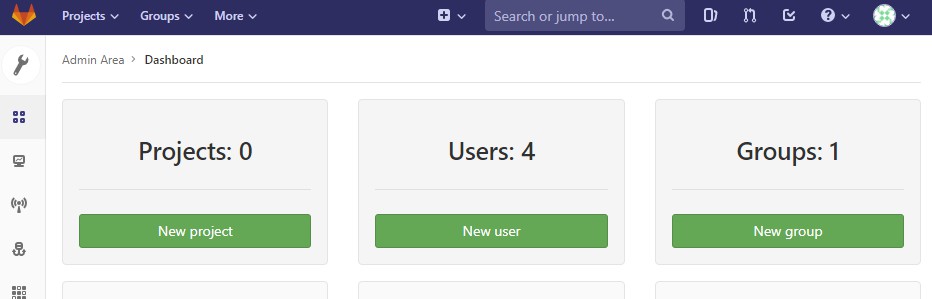
开始恢复
  gitlab-ctl stop unicorn

  gitlab-ctl stop sidekiq

  gitlab-rake gitlab:backup:restore BACKUP=1558020748_2019_05_16_11.10.4

  gitlab-ctl restart
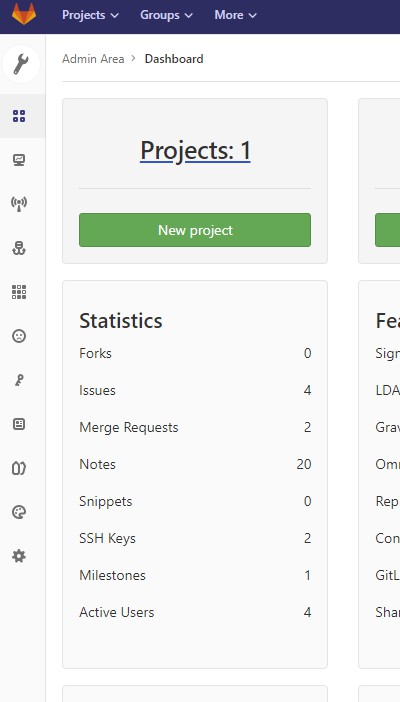
三、只备份代码方法为
[root@web1 gitlab]# cd /var/opt/gitlab/

[root@web1 gitlab]# ll

total

drwxr-x---  gitlab-prometheus root         May    alertmanager

drwx------  git               root          May   : backups

-rw-------  root              root         May   : bootstrapped

drwx------  git               root         May  : gitaly

drwx------  git               root         May   : git-data

drwxr-xr-x  git               root         May   : gitlab-ci

drwxr-xr-x  git               root         May    gitlab-monitor

drwxr-xr-x  git               root        May    gitlab-rails

drwx------  git               root         May    gitlab-shell

drwxr-x---  git               gitlab-www   May  : gitlab-workhorse

drwx------  root              root         May    logrotate

drwxr-x---  root              gitlab-www  May  : nginx

drwxr-xr-x  root              root         May   : node-exporter

drwx------  gitlab-psql       root         May    postgres-exporter

drwxr-xr-x  gitlab-psql       root         May  : postgresql

drwxr-x---  gitlab-prometheus root         May    prometheus

-rw-r--r--  root              root        May    public_attributes.json

drwxr-x---  gitlab-redis      git          May  : redis

-rw-r--r--  root              root         May   : trusted-certs-directory-hash

[root@web1 gitlab]# cd git-data/

[root@web1 git-data]# ll

total

drwxrws---  git root  May  : repositories

[root@web1 git-data]# cd repositories/

[root@web1 repositories]# ll

total

drwx--S---  git root  May  : +gitaly

drwxr-s---  git root  May  : proj1

[root@web1 repositories]# cd proj1/

[root@web1 proj1]# ll

total

drwxr-sr-x  git root  May  : test.git

[root@web1 proj1]#
四、邮件配置
添加如下配置即可
gitlab_rails['time_zone'] = 'Asia/Shanghai'

gitlab_rails['gitlab_email_enabled'] = true

gitlab_rails['gitlab_email_from'] = 'zhangxingeng@126.com'

gitlab_rails['gitlab_email_display_name'] = 'gitlab'

gitlab_rails['smtp_enable'] = true

gitlab_rails['smtp_address'] = "smtp.126.com"

gitlab_rails['smtp_port'] =

gitlab_rails['smtp_user_name'] = "zhangxingeng"

gitlab_rails['smtp_password'] = "your_password"

gitlab_rails['smtp_domain'] = "126.com"

gitlab_rails['smtp_authentication'] = "login"
转载请注明出处:https://www.cnblogs.com/zhangxingeng/p/10874979.html
Centos7安装gitlab11 学习笔记之备份恢复及邮箱配置的更多相关文章
- Centos7安装gitlab11 学习笔记之基础概念、部署安装、权限管理、issue管理
一.基础介绍 1.简介 一个基于GIT的源码托管解决方案 基于rubyonrails开发 集成了nginx postgreSQL redis sidekiq等组件 2.安装要求 2g内存以上,有点占内 ...
- Android安装器学习笔记(一)
Android安装器学习笔记(一) 一.Android应用的四种安装方式: 1.通过系统应用PackageInstaller.apk进行安装,安装过程中会让用户确认 2.系统程序安装:在开机的时候自动 ...
- Centos7 安装 Python 的笔记
Centos7 安装 Python 的笔记 注意:系统自带的Python2.7不要改动,最好也不要出错,不然yum之类的工具可能会出错. 安装Python3.7.0 TensorFlow对Python ...
- STM32 FSMC学习笔记+补充(LCD的FSMC配置)
STM32 FSMC学习笔记+补充(LCD的FSMC配置) STM32 FSMC学习笔记 STM32 FSMC的用法--LCD
- CAS学习笔记五:SpringBoot自动/手动配置方式集成CAS单点登出
本文目标 基于SpringBoot + Maven 分别使用自动配置与手动配置过滤器方式实现CAS客户端登出及单点登出. 本文基于<CAS学习笔记三:SpringBoot自动/手动配置方式集成C ...
- android cocos2d-x for Android安装和学习笔记(请用adt-bundle21.1或以上导入)
引用:http://weimingtom.iteye.com/blog/1483566 (20121108)注意:这篇文章用cdt编译ndk工程的内容已过时(现在可以用adt-bundle,避免配置繁 ...
- mongodb 3.4 学习 (五)备份&恢复
备份恢复命令 mongodump -h 127.0.0.1 -p 27017 -o /opt/backup -u app -p '@app' --collection demo --db app -- ...
- 张高兴的 Xamarin.Android 学习笔记:(一)环境配置
最近在自学 Xamarin 和 Android ,同时发现国内在做 Xamarin 的不多.我在自学中间遇到了很多问题,而且百度到的很多教程也有些过时,现在打算写点东西稍微总结下,顺便帮后人指指路了. ...
- 【转】 Pro Android学习笔记(五六):配置变化
目录(?)[-] Activity的destorycreate过程 Fragment的destorycreate过程 onSaveInstanceState saveFragmentInstanceS ...
随机推荐
- clickhouse redash---olap
curl -XPUT '10.1.193.250:9200/ngx-logstash-2019-06/_settings' -d ' { "index.mapping.total_field ...
- 切换node版本,node-sass安装报错
一.问题 经常在开发过程中,会遇到切换node环境的情况,这时候切换之后,npm安装不了node-sass,有可能是之前把node-sass安装地址修改了,导致翻墙翻不了,所以安装不了. 二.解决 1 ...
- oracle中的cursor
游标是SQL的一个内存工作区,由系统或用户以变量的形式定义.游标的作用就是用于临时存储从数据库中提取的数据块.在某些情况下,需要把数据从存放在磁盘的表中调到计算机内存中进行处理,最后将处理结果显示出来 ...
- python 设计模式之备忘录模式
1.为什么用备忘录模式 假设大战僵尸游戏共10关,越是往后关卡越难,越难就越是费时间费钱费精力. 开始大战僵尸,玩了好久好久终于玩到了第9关,真是不容易. 这个时候开始玩第9关了,哇,好难啊,真不幸, ...
- AnimatorSet学习示例代码
package com.loaderman.customviewdemo; import android.animation.AnimatorSet; import android.animation ...
- jenkins报错集合
可能会碰到以下报错: 1)这里的失败原因是因为运行jenkins程序的是jenkins用户,我们连接节点的秘钥是root的,所以现在连接不上 打开配置文件/var/lib/jenkins 将jenki ...
- Jenkins加入systemctl管理
Jenkins安装目录为 /usr/local/jenkins-tomcat/ 添加文档 /usr/lib/systemd/system/jenkins.service [Unit] Descript ...
- idea自动下载依赖的源代码等信息
mvn dependency:sources -DdownloadSources=true -DdownloadJavadocs=true
- 同时支持Android 和 ios 投屏到电脑的软件,Support Android and ios screen shrare to PC - 希沃授课助手
最近学校由粉笔黑板更换了智慧电子黑板,然后发现了一个好玩的软件. 感谢希沃公司的开发: 希沃授课助手,这是一款同时支持Android 和 ios 投屏和远程控制的. 效果很流畅,非常赞
- Hyperledger Fabric1.4 手动搭建过程
1.生成证书: #路径需要更改为自己的路径 cd ~/go/src/github.com/hyperledger/fabric/scripts/fabric-samples/first-network ...