
Centos7安装gitlab11 学习笔记之备份恢复及邮箱配置
一、备份
修改配置文件
vim /etc/gitlab/gitlab.rb
 默认路径为

   # gitlab_rails['backup_path'] = "/var/opt/gitlab/backups"

 #可以自定义为“/data/backups/gitlab”
gitlab_rails['backup_path'] = "/data/backups/gitlab"
gitlab_rails['backup_keep_time'] = 604800 #代表只保留7天
使之生效
[root@web1 ~]# mkdir -p /data/backups/gitlab

[root@web1 ~]# gitlab-ctl reconfigure
在重启以下
[root@web1 ~]# gitlab-ctl restart
授权
[root@web1 backups]# chown -R git.git /data/backups/gitlab
加入定时任务
[root@web1 backups]# crontab -e
* * * /usr/bin/gitlab-rake gitlab:backup:create #每天2点备份一次
手动测试,手动创建备份
[root@web1 backups]# /usr/bin/gitlab-rake gitlab:backup:create

-- :: + -- Dumping database ...

Dumping PostgreSQL database gitlabhq_production ... [DONE]

-- :: + -- done

-- :: + -- Dumping repositories ...

 * proj1/test ... [DONE]

[SKIPPED] Wiki

-- :: + -- done

-- :: + -- Dumping uploads ...

-- :: + -- done

-- :: + -- Dumping builds ...

-- :: + -- done

-- :: + -- Dumping artifacts ...

-- :: + -- done

-- :: + -- Dumping pages ...

-- :: + -- done

-- :: + -- Dumping lfs objects ...

-- :: + -- done

-- :: + -- Dumping container registry images ...

-- :: + -- [DISABLED]

Creating backup archive: 1558020748_2019_05_16_11..4_gitlab_backup.tar ... done

Uploading backup archive to remote storage  ... skipped

Deleting tmp directories ... done

done

done

done

done

done

done

done

Deleting old backups ... done. ( removed)
[root@web1 backups]# cd /data/backups/gitlab/

[root@web1 gitlab]# ll

total

-rw-------  git git  May    1558020748_2019_05_16_11.10.4_gitlab_backup.tar

[root@web1 gitlab]#

###

1558020748_2019_05_16_11.10.4为事件戳,date -d 1558020748_2019_05_16_11.10.4
[root@web1 gitlab]# date -d @1558020748
Thu May 16 23:32:28 CST 2019
[root@web1 gitlab]#
###
二、恢复数据
首先删除项目,然后恢复测试

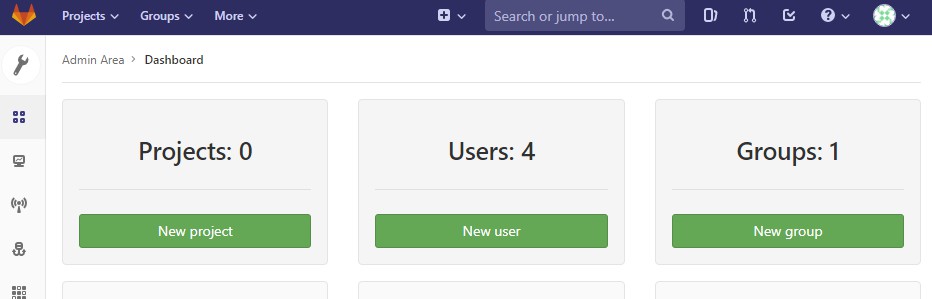
开始恢复
  gitlab-ctl stop unicorn

  gitlab-ctl stop sidekiq

  gitlab-rake gitlab:backup:restore BACKUP=1558020748_2019_05_16_11.10.4

  gitlab-ctl restart
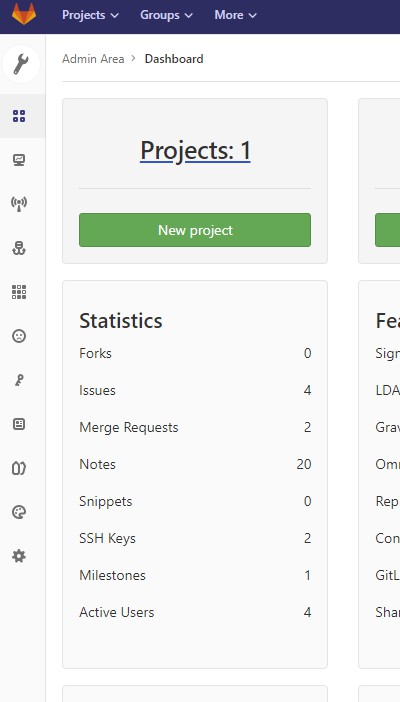
三、只备份代码方法为
[root@web1 gitlab]# cd /var/opt/gitlab/

[root@web1 gitlab]# ll

total

drwxr-x---  gitlab-prometheus root         May    alertmanager

drwx------  git               root          May   : backups

-rw-------  root              root         May   : bootstrapped

drwx------  git               root         May  : gitaly

drwx------  git               root         May   : git-data

drwxr-xr-x  git               root         May   : gitlab-ci

drwxr-xr-x  git               root         May    gitlab-monitor

drwxr-xr-x  git               root        May    gitlab-rails

drwx------  git               root         May    gitlab-shell

drwxr-x---  git               gitlab-www   May  : gitlab-workhorse

drwx------  root              root         May    logrotate

drwxr-x---  root              gitlab-www  May  : nginx

drwxr-xr-x  root              root         May   : node-exporter

drwx------  gitlab-psql       root         May    postgres-exporter

drwxr-xr-x  gitlab-psql       root         May  : postgresql

drwxr-x---  gitlab-prometheus root         May    prometheus

-rw-r--r--  root              root        May    public_attributes.json

drwxr-x---  gitlab-redis      git          May  : redis

-rw-r--r--  root              root         May   : trusted-certs-directory-hash

[root@web1 gitlab]# cd git-data/

[root@web1 git-data]# ll

total

drwxrws---  git root  May  : repositories

[root@web1 git-data]# cd repositories/

[root@web1 repositories]# ll

total

drwx--S---  git root  May  : +gitaly

drwxr-s---  git root  May  : proj1

[root@web1 repositories]# cd proj1/

[root@web1 proj1]# ll

total

drwxr-sr-x  git root  May  : test.git

[root@web1 proj1]#
四、邮件配置
添加如下配置即可
gitlab_rails['time_zone'] = 'Asia/Shanghai'

gitlab_rails['gitlab_email_enabled'] = true

gitlab_rails['gitlab_email_from'] = 'zhangxingeng@126.com'

gitlab_rails['gitlab_email_display_name'] = 'gitlab'

gitlab_rails['smtp_enable'] = true

gitlab_rails['smtp_address'] = "smtp.126.com"

gitlab_rails['smtp_port'] =

gitlab_rails['smtp_user_name'] = "zhangxingeng"

gitlab_rails['smtp_password'] = "your_password"

gitlab_rails['smtp_domain'] = "126.com"

gitlab_rails['smtp_authentication'] = "login"
转载请注明出处:https://www.cnblogs.com/zhangxingeng/p/10874979.html
Centos7安装gitlab11 学习笔记之备份恢复及邮箱配置的更多相关文章
- Centos7安装gitlab11 学习笔记之基础概念、部署安装、权限管理、issue管理
一.基础介绍 1.简介 一个基于GIT的源码托管解决方案 基于rubyonrails开发 集成了nginx postgreSQL redis sidekiq等组件 2.安装要求 2g内存以上,有点占内 ...
- Android安装器学习笔记(一)
Android安装器学习笔记(一) 一.Android应用的四种安装方式: 1.通过系统应用PackageInstaller.apk进行安装,安装过程中会让用户确认 2.系统程序安装:在开机的时候自动 ...
- Centos7 安装 Python 的笔记
Centos7 安装 Python 的笔记 注意:系统自带的Python2.7不要改动,最好也不要出错,不然yum之类的工具可能会出错. 安装Python3.7.0 TensorFlow对Python ...
- STM32 FSMC学习笔记+补充(LCD的FSMC配置)
STM32 FSMC学习笔记+补充(LCD的FSMC配置) STM32 FSMC学习笔记 STM32 FSMC的用法--LCD
- CAS学习笔记五:SpringBoot自动/手动配置方式集成CAS单点登出
本文目标 基于SpringBoot + Maven 分别使用自动配置与手动配置过滤器方式实现CAS客户端登出及单点登出. 本文基于<CAS学习笔记三:SpringBoot自动/手动配置方式集成C ...
- android cocos2d-x for Android安装和学习笔记(请用adt-bundle21.1或以上导入)
引用:http://weimingtom.iteye.com/blog/1483566 (20121108)注意:这篇文章用cdt编译ndk工程的内容已过时(现在可以用adt-bundle,避免配置繁 ...
- mongodb 3.4 学习 (五)备份&恢复
备份恢复命令 mongodump -h 127.0.0.1 -p 27017 -o /opt/backup -u app -p '@app' --collection demo --db app -- ...
- 张高兴的 Xamarin.Android 学习笔记:(一)环境配置
最近在自学 Xamarin 和 Android ,同时发现国内在做 Xamarin 的不多.我在自学中间遇到了很多问题,而且百度到的很多教程也有些过时,现在打算写点东西稍微总结下,顺便帮后人指指路了. ...
- 【转】 Pro Android学习笔记(五六):配置变化
目录(?)[-] Activity的destorycreate过程 Fragment的destorycreate过程 onSaveInstanceState saveFragmentInstanceS ...
随机推荐
- bagging,random forest,boosting(adaboost、GBDT),XGBoost小结
Bagging 从原始样本集中抽取训练集.每轮从原始样本集中使用Bootstraping(有放回)的方法抽取n个训练样本(在训练集中,有些样本可能被多次抽取到,而有些样本可能一次都没有被抽中).共进行 ...
- oracle主键修改级联外键
举例:修改te_rygj_menu这张表的主键menu_id时,te_rygj_usermenu中的menu_id也跟着修改.利用触发器trigger实现: create or replace tri ...
- perl 语法速查 | 模块安装
perl -MCPAN -e shell install Bio::SeqIO 或者直接perl -MCPAN -e 'install Excel::Writer::XLSX' 用cpan装不上,编译 ...
- 二维背包---P1855 榨取kkksc03
P1855 榨取kkksc03 题解 二维背包板子题 f[ i ][ j ] 前 n 个物品,花费金钱不超过 i ,花费时间不超过 j 的最大价值 如果每个物品只能选一次,那么就相当于在01背包上多加 ...
- android: 日期转Unix时间戳,Unix时间戳转日期,带时区
1.UTC时间&GMT时间 UTC时间是时间标准时间(Universal Time Coordinated),UTC是根据原子钟来计算时间,误差非常小. UTC也是指零时区的时间,如果要表示其 ...
- Android Studio 3.5新特性
Android Studio 3.5新特性 原文链接:https://blog.csdn.net/jklwan/article/details/99974869 Android Studio ...
- Qt KDChart编译
最近开发中需要用到甘特图,感觉KDChart这个插件不错,在这里记录一下编译过程(其实很好编译,而且一次性就过了) 下载,kdchart-2.6.1-source,解压 打开src目录,用Qt Cre ...
- flutter的生命周期
大致可以看成三个阶段 初始化(插入渲染树) 状态改变(在渲染树中存在) 销毁(从渲染树种移除) initState 当插入渲染树的时候调用,这个函数在生命周期中只调用一次.这里可以做一些初始化工作,比 ...
- Linux -- 信号编程
进程捕捉到信号对其进行处理时,进程正在执行的正常序列就被信号处理程序临时中断,它首先执行该信号处理程序中的指令.如果从信号处理程序返回(例如没有调用exit或longjmp),则继续执行在捕捉到信号时 ...
- 第四章 INI配置——《跟我学Shiro》
转发地址:https://www.iteye.com/blog/jinnianshilongnian-2020820 第四章 INI配置——<跟我学Shiro> 博客分类: 跟我学Shir ...