
Java 读取 .properties 文件的几种方式
Java 读取 .properties 配置文件的几种方式
Java 开发中,需要将一些易变的配置参数放置再 XML 配置文件或者 properties 配置文件中。然而 XML 配置文件需要通过 DOM 或 SAX 方式解析,而读取 properties 配置文件就比较容易。
介绍几种读取方式:
1、基于ClassLoder读取配置文件
注意:该方式只能读取类路径下的配置文件,有局限但是如果配置文件在类路径下比较方便。

1     Properties properties = new Properties();

2     // 使用ClassLoader加载properties配置文件生成对应的输入流

3     InputStream in = PropertiesMain.class.getClassLoader().getResourceAsStream("config/config.properties");

4     // 使用properties对象加载输入流

5     properties.load(in);

6     //获取key对应的value值

7     properties.getProperty(String key);
2、基于 InputStream 读取配置文件
注意:该方式的优点在于可以读取任意路径下的配置文件
1     Properties properties = new Properties();

2     // 使用InPutStream流读取properties文件

3     BufferedReader bufferedReader = new BufferedReader(new FileReader("E:/config.properties"));

4     properties.load(bufferedReader);

5     // 获取key对应的value值

6     properties.getProperty(String key);
3、通过 java.util.ResourceBundle 类来读取,这种方式比使用 Properties 要方便一些
1>通过 ResourceBundle.getBundle() 静态方法来获取(ResourceBundle是一个抽象类),这种方式来获取properties属性文件不需要加.properties后缀名,只需要文件名即可
1    properties.getProperty(String key);

2     //config为属性文件名,放在包com.test.config下,如果是放在src下,直接用config即可

3     ResourceBundle resource = ResourceBundle.getBundle("com/test/config/config");

4     String key = resource.getString("keyWord");
2>从 InputStream 中读取,获取 InputStream 的方法和上面一样,不再赘述
1 ResourceBundle resource = new PropertyResourceBundle(inStream);
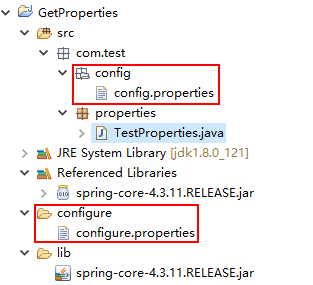
注意:在使用中遇到的最大的问题可能是配置文件的路径问题,如果配置文件入在当前类所在的包下,那么需要使用包名限定,如:config.properties入在com.test.config包下,则要使用com/test/config/config.properties(通过Properties来获取)或com/test/config/config(通过ResourceBundle来获取);属性文件在src根目录下,则直接使用config.properties或config即可。
下面附上几种方式的测试代码,仅供参考:
  1 package com.test.properties;

  2

  3 import java.io.BufferedInputStream;

  4 import java.io.File;

  5 import java.io.FileInputStream;

  6 import java.io.IOException;

  7 import java.io.InputStream;

  8 import java.util.Enumeration;

  9 import java.util.Properties;

 10

 11 import org.springframework.core.io.support.PropertiesLoaderUtils;

 12

 13 /**

 14  *

 15  * @ClassName: TestProperties

 16  * @Description: 获取配置文件信息

 17  * @date: 2017年11月25日 上午10:56:00

 18  * @version: 1.0.0

 19  */

 20 public class TestProperties {

 21

 22

 23     /**

 24      *

 25      * @Title: printAllProperty

 26      * @Description: 输出所有配置信息

 27      * @param props

 28      * @return void

 29      * @throws

 30      */

 31     private static void printAllProperty(Properties props)

 32     {

 33         @SuppressWarnings("rawtypes")

 34         Enumeration en = props.propertyNames();

 35         while (en.hasMoreElements())

 36         {

 37             String key = (String) en.nextElement();

 38             String value = props.getProperty(key);

 39             System.out.println(key + " : " + value);

 40         }

 41     }

 42

 43     /**

 44      * 根据key读取value

 45      *

 46      * @Title: getProperties_1

 47      * @Description: 第一种方式:根据文件名使用spring中的工具类进行解析

 48      *                  filePath是相对路劲,文件需在classpath目录下

 49      *                   比如:config.properties在包com.test.config下,

 50      *                路径就是com/test/config/config.properties

 51      *

 52      * @param filePath

 53      * @param keyWord

 54      * @return

 55      * @return String

 56      * @throws

 57      */

 58     public static String getProperties_1(String filePath, String keyWord){

 59         Properties prop = null;

 60         String value = null;

 61         try {

 62             // 通过Spring中的PropertiesLoaderUtils工具类进行获取

 63             prop = PropertiesLoaderUtils.loadAllProperties(filePath);

 64             // 根据关键字查询相应的值

 65             value = prop.getProperty(keyWord);

 66         } catch (IOException e) {

 67             e.printStackTrace();

 68         }

 69         return value;

 70     }

 71

 72     /**

 73      * 读取配置文件所有信息

 74      *

 75      * @Title: getProperties_1

 76      * @Description: 第一种方式:根据文件名使用Spring中的工具类进行解析

 77      *                  filePath是相对路劲,文件需在classpath目录下

 78      *                   比如:config.properties在包com.test.config下,

 79      *                路径就是com/test/config/config.properties

 80      *

 81      * @param filePath

 82      * @return void

 83      * @throws

 84      */

 85     public static void getProperties_1(String filePath){

 86         Properties prop = null;

 87         try {

 88             // 通过Spring中的PropertiesLoaderUtils工具类进行获取

 89             prop = PropertiesLoaderUtils.loadAllProperties(filePath);

 90             printAllProperty(prop);

 91         } catch (IOException e) {

 92             e.printStackTrace();

 93         }

 94     }

 95

 96     /**

 97      * 根据key读取value

 98      *

 99      * @Title: getProperties_2

100      * @Description: 第二种方式:使用缓冲输入流读取配置文件,然后将其加载,再按需操作

101      *                    绝对路径或相对路径, 如果是相对路径,则从当前项目下的目录开始计算,

102      *                  如:当前项目路径/config/config.properties,

103      *                  相对路径就是config/config.properties

104      *

105      * @param filePath

106      * @param keyWord

107      * @return

108      * @return String

109      * @throws

110      */

111     public static String getProperties_2(String filePath, String keyWord){

112         Properties prop = new Properties();

113         String value = null;

114         try {

115             // 通过输入缓冲流进行读取配置文件

116             InputStream InputStream = new BufferedInputStream(new FileInputStream(new File(filePath)));

117             // 加载输入流

118             prop.load(InputStream);

119             // 根据关键字获取value值

120             value = prop.getProperty(keyWord);

121         } catch (Exception e) {

122             e.printStackTrace();

123         }

124         return value;

125     }

126

127     /**

128      * 读取配置文件所有信息

129      *

130      * @Title: getProperties_2

131      * @Description: 第二种方式:使用缓冲输入流读取配置文件,然后将其加载,再按需操作

132      *                    绝对路径或相对路径, 如果是相对路径,则从当前项目下的目录开始计算,

133      *                  如:当前项目路径/config/config.properties,

134      *                  相对路径就是config/config.properties

135      *

136      * @param filePath

137      * @return void

138      * @throws

139      */

140     public static void getProperties_2(String filePath){

141         Properties prop = new Properties();

142         try {

143             // 通过输入缓冲流进行读取配置文件

144             InputStream InputStream = new BufferedInputStream(new FileInputStream(new File(filePath)));

145             // 加载输入流

146             prop.load(InputStream);

147             printAllProperty(prop);

148         } catch (Exception e) {

149             e.printStackTrace();

150         }

151     }

152

153     /**

154      * 根据key读取value

155      *

156      * @Title: getProperties_3

157      * @Description: 第三种方式:

158      *                    相对路径, properties文件需在classpath目录下,

159      *                  比如:config.properties在包com.test.config下,

160      *                  路径就是/com/test/config/config.properties

161      * @param filePath

162      * @param keyWord

163      * @return

164      * @return String

165      * @throws

166      */

167     public static String getProperties_3(String filePath, String keyWord){

168         Properties prop = new Properties();

169         String value = null;

170         try {

171             InputStream inputStream = TestProperties.class.getResourceAsStream(filePath);

172             prop.load(inputStream);

173             value = prop.getProperty(keyWord);

174         } catch (IOException e) {

175             e.printStackTrace();

176         }

177         return value;

178     }

179

180     /**

181      * 读取配置文件所有信息

182      *

183      * @Title: getProperties_3

184      * @Description: 第三种方式:

185      *                    相对路径, properties文件需在classpath目录下,

186      *                  比如:config.properties在包com.test.config下,

187      *                  路径就是/com/test/config/config.properties

188      * @param filePath

189      * @return

190      * @throws

191      */

192     public static void getProperties_3(String filePath){

193         Properties prop = new Properties();

194         try {

195             InputStream inputStream = TestProperties.class.getResourceAsStream(filePath);

196             prop.load(inputStream);

197             printAllProperty(prop);

198         } catch (IOException e) {

199             e.printStackTrace();

200         }

201     }

202

203

204     public static void main(String[] args) {

205         // 注意路径问题

206         String properties_1 = getProperties_1("com/test/config/config.properties", "wechat_appid");

207         System.out.println("wechat_appid = " + properties_1);

208         getProperties_1("com/test/config/config.properties");

209         System.out.println("*********************************************");

210         // 注意路径问题

211         String properties_2 = getProperties_2("configure/configure.properties", "jdbc.url");

212         System.out.println("jdbc.url = " + properties_2);

213         getProperties_2("configure/configure.properties");

214         System.out.println("*********************************************");

215         // 注意路径问题

216         String properties_3 = getProperties_3("/com/test/config/config.properties", "wechat_appid");

217         System.out.println("wechat_appid = " + properties_3);

218         getProperties_3("/com/test/config/config.properties");

219     }

220 }
Java 读取 .properties 文件的几种方式的更多相关文章
- 【开发笔记】- Java读取properties文件的五种方式
原文地址:https://www.cnblogs.com/hafiz/p/5876243.html 一.背景 最近,在项目开发的过程中,遇到需要在properties文件中定义一些自定义的变量,以供j ...
- java分享第十六天( java读取properties文件的几种方法&java配置文件持久化:static块的作用)
java读取properties文件的几种方法一.项目中经常会需要读取配置文件(properties文件),因此读取方法总结如下: 1.通过java.util.Properties读取Propert ...
- java读取XML文件的四种方式
java读取XML文件的四种方式 Xml代码 <?xml version="1.0" encoding="GB2312"?> <RESULT& ...
- Java 读取 .properties 配置文件的几种方式
Java 开发中,需要将一些易变的配置参数放置再 XML 配置文件或者 properties 配置文件中.然而 XML 配置文件需要通过 DOM 或 SAX 方式解析,而读取 properties 配 ...
- Java 读取properties 配置文件的几种方式
基于ClassLoder读取配置文件 Properties properties = new Properties(); // 使用ClassLoader加载properties配置文件生成对应的输入 ...
- java读取properties文件的几种方法
一.项目中经常会需要读取配置文件(properties文件),因此读取方法总结如下: 1.通过java.util.Properties读取 Properties p=new Properties(); ...
- java读取excel文件的两种方式
方式一: 借用 package com.ij34.util; /** * @author Admin * @date 创建时间:2017年8月29日 下午2:07:59 * @version 1.0 ...
- SpringMVC加载配置Properties文件的几种方式
最近开发的项目使用了SpringMVC的框架,用下来感觉SpringMVC的代码实现的非常优雅,功能也非常强大, 网上介绍Controller参数绑定.URL映射的文章都很多了,写这篇博客主要总结一下 ...
- 用java读取properties文件--转
今天为了通过java读取properties文件,google了很长时间,终于找到了.现在特记录之和大家一起分享. 下面直接贴出代码:java类 public class Mytest pub ...
随机推荐
- JS创建类和对象,看完了,头就不大了
JavaScript 创建类/对象的几种方式 在JS中,创建对象(Create Object)并不完全是我们时常说的创建类对象,JS中的对象强调的是一种复合类型,JS中创建对象及对对象的访问是极其灵活 ...
- Re0:在.NetCore 中Dapper的基本用法
整理一下目前在用的Dapper 与FrameWork不同,NetCore数据库配置需要从appsettings.json中获取 刚接触的时候被这块坑了,自己手动建了个app.config.然后你懂的( ...
- 差分约束算法————洛谷P4878 [USACO05DEC] 布局
题目: 不难看出题意主要是给出ml+md个格式为xi-xj<=ak的不等式,xi-xj为i,j俩头牛的距离,要我们求x1-xn的最大值. 经过上下加减我们可以将这几个不等式化成x1-xn< ...
- springmvc 参数解析绑定原理
handlerMethodArgumentResolver:方法参数解析器接口,这个接口是springmvc参数解析绑定的核心接口.不同的参数类型绑定都是通过实行这个接口来实现.也可以通过实现这个接口 ...
- 【Qt开发】【ARM-Linux开发】 QT在ARM上显示字体的问题
在PC机上利用QT开发的应用程序在设置字体时,在PC上运行,可根据自己的设置,字体随之变大或变小.而移植到ARM上运行时发现,显示字体与所设置的字体不用,字体普遍偏小.经过上网搜索发现,是环境变量字库 ...
- 【VS开发】图像颜色
版权声明:本文为博主原创文章,转载请注明出处http://blog.csdn.net/lg1259156776/. 最近被图像颜色整的乱七八糟的,一会儿YUV422,一会儿RGB,一会儿gray... ...
- javascript let
es6支持通过let关键字声明属于单独块{}的变量,更好的管理变量作用屿 funtion foo() { var a=1; if (a>1) { let b=2; //只属于if模块 while ...
- Design HashSet
Design a HashSet without using any built-in hash table libraries. To be specific, your design should ...
- 【转载】SpringBoot-配置发送邮件遇到的一些问题
前言:前一天调用163邮箱发送邮件还么有问题,今天再调用就各种发送不成功,害的我都关闭授权,还花了一毛钱短信费重新开启授权,最后百度到了一篇文章,非常贴切,在此转载下. 本人遇到的错误代码是554,邮 ...
- Istio技术与实践01: 源码解析之Pilot多云平台服务发现机制
服务模型 首先,Istio作为一个(微)服务治理的平台,和其他的微服务模型一样也提供了Service,ServiceInstance这样抽象服务模型.如Service的定义中所表达的,一个服务有一个全 ...