
Java 读取 .properties 配置文件的几种方式
Java 开发中,需要将一些易变的配置参数放置再 XML 配置文件或者 properties 配置文件中。然而 XML 配置文件需要通过 DOM 或 SAX 方式解析,而读取 properties 配置文件就比较容易。
介绍几种读取方式:
1、基于ClassLoder读取配置文件
注意:该方式只能读取类路径下的配置文件,有局限但是如果配置文件在类路径下比较方便。
     Properties properties = new Properties();

     // 使用ClassLoader加载properties配置文件生成对应的输入流

     InputStream in = PropertiesMain.class.getClassLoader().getResourceAsStream("config/config.properties");

     // 使用properties对象加载输入流

     properties.load(in);

     //获取key对应的value值

     properties.getProperty(String key);
2、基于 InputStream 读取配置文件
注意:该方式的优点在于可以读取任意路径下的配置文件
     Properties properties = new Properties();

     // 使用InPutStream流读取properties文件

     BufferedReader bufferedReader = new BufferedReader(new FileReader("E:/config.properties"));

     properties.load(bufferedReader);

     // 获取key对应的value值

     properties.getProperty(String key);
3、通过 java.util.ResourceBundle 类来读取,这种方式比使用 Properties 要方便一些
1>通过 ResourceBundle.getBundle() 静态方法来获取(ResourceBundle是一个抽象类),这种方式来获取properties属性文件不需要加.properties后缀名,只需要文件名即可
    properties.getProperty(String key);

     //config为属性文件名,放在包com.test.config下,如果是放在src下,直接用config即可

     ResourceBundle resource = ResourceBundle.getBundle("com/test/config/config");

     String key = resource.getString("keyWord");
2>从 InputStream 中读取,获取 InputStream 的方法和上面一样,不再赘述
ResourceBundle resource = new PropertyResourceBundle(inStream);
注意:在使用中遇到的最大的问题可能是配置文件的路径问题,如果配置文件入在当前类所在的包下,那么需要使用包名限定,如:config.properties入在com.test.config包下,则要使用com/test/config/config.properties(通过Properties来获取)或com/test/config/config(通过ResourceBundle来获取);属性文件在src根目录下,则直接使用config.properties或config即可。
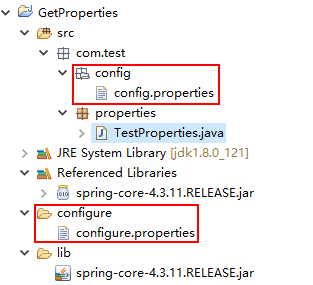
下面附上几种方式的测试代码,仅供参考:
 package com.test.properties;

 import java.io.BufferedInputStream;

 import java.io.File;

 import java.io.FileInputStream;

 import java.io.IOException;

 import java.io.InputStream;

 import java.util.Enumeration;

 import java.util.Properties;

 import org.springframework.core.io.support.PropertiesLoaderUtils;

 /**

  *

  * @ClassName: TestProperties

  * @Description: 获取配置文件信息

  * @date: 2017年11月25日 上午10:56:00

  * @version: 1.0.0

  */

 public class TestProperties {

     /**

      *

      * @Title: printAllProperty

      * @Description: 输出所有配置信息

      * @param props

      * @return void

      * @throws

      */

     private static void printAllProperty(Properties props)

     {

         @SuppressWarnings("rawtypes")

         Enumeration en = props.propertyNames();

         while (en.hasMoreElements())

         {

             String key = (String) en.nextElement();

             String value = props.getProperty(key);

             System.out.println(key + " : " + value);

         }

     }

     /**

      * 根据key读取value

      *

      * @Title: getProperties_1

      * @Description: 第一种方式:根据文件名使用spring中的工具类进行解析

      *                  filePath是相对路劲,文件需在classpath目录下

      *                   比如:config.properties在包com.test.config下,

      *                路径就是com/test/config/config.properties

      *

      * @param filePath

      * @param keyWord

      * @return

      * @return String

      * @throws

      */

     public static String getProperties_1(String filePath, String keyWord){

         Properties prop = null;

         String value = null;

         try {

             // 通过Spring中的PropertiesLoaderUtils工具类进行获取

             prop = PropertiesLoaderUtils.loadAllProperties(filePath);

             // 根据关键字查询相应的值

             value = prop.getProperty(keyWord);

         } catch (IOException e) {

             e.printStackTrace();

         }

         return value;

     }

     /**

      * 读取配置文件所有信息

      *

      * @Title: getProperties_1

      * @Description: 第一种方式:根据文件名使用Spring中的工具类进行解析

      *                  filePath是相对路劲,文件需在classpath目录下

      *                   比如:config.properties在包com.test.config下,

      *                路径就是com/test/config/config.properties

      *

      * @param filePath

      * @return void

      * @throws

      */

     public static void getProperties_1(String filePath){

         Properties prop = null;

         try {

             // 通过Spring中的PropertiesLoaderUtils工具类进行获取

             prop = PropertiesLoaderUtils.loadAllProperties(filePath);

             printAllProperty(prop);

         } catch (IOException e) {

             e.printStackTrace();

         }

     }

     /**

      * 根据key读取value

      *

      * @Title: getProperties_2

      * @Description: 第二种方式:使用缓冲输入流读取配置文件,然后将其加载,再按需操作

      *                    绝对路径或相对路径, 如果是相对路径,则从当前项目下的目录开始计算,

      *                  如:当前项目路径/config/config.properties,

      *                  相对路径就是config/config.properties

      *

      * @param filePath

      * @param keyWord

      * @return

      * @return String

      * @throws

      */

     public static String getProperties_2(String filePath, String keyWord){

         Properties prop = new Properties();

         String value = null;

         try {

             // 通过输入缓冲流进行读取配置文件

             InputStream InputStream = new BufferedInputStream(new FileInputStream(new File(filePath)));

             // 加载输入流

             prop.load(InputStream);

             // 根据关键字获取value值

             value = prop.getProperty(keyWord);

         } catch (Exception e) {

             e.printStackTrace();

         }

         return value;

     }

     /**

      * 读取配置文件所有信息

      *

      * @Title: getProperties_2

      * @Description: 第二种方式:使用缓冲输入流读取配置文件,然后将其加载,再按需操作

      *                    绝对路径或相对路径, 如果是相对路径,则从当前项目下的目录开始计算,

      *                  如:当前项目路径/config/config.properties,

      *                  相对路径就是config/config.properties

      *

      * @param filePath

      * @return void

      * @throws

      */

     public static void getProperties_2(String filePath){

         Properties prop = new Properties();

         try {

             // 通过输入缓冲流进行读取配置文件

             InputStream InputStream = new BufferedInputStream(new FileInputStream(new File(filePath)));

             // 加载输入流

             prop.load(InputStream);

             printAllProperty(prop);

         } catch (Exception e) {

             e.printStackTrace();

         }

     }

     /**

      * 根据key读取value

      *

      * @Title: getProperties_3

      * @Description: 第三种方式:

      *                    相对路径, properties文件需在classpath目录下,

      *                  比如:config.properties在包com.test.config下,

      *                  路径就是/com/test/config/config.properties

      * @param filePath

      * @param keyWord

      * @return

      * @return String

      * @throws

      */

     public static String getProperties_3(String filePath, String keyWord){

         Properties prop = new Properties();

         String value = null;

         try {

             InputStream inputStream = TestProperties.class.getResourceAsStream(filePath);

             prop.load(inputStream);

             value = prop.getProperty(keyWord);

         } catch (IOException e) {

             e.printStackTrace();

         }

         return value;

     }

     /**

      * 读取配置文件所有信息

      *

      * @Title: getProperties_3

      * @Description: 第三种方式:

      *                    相对路径, properties文件需在classpath目录下,

      *                  比如:config.properties在包com.test.config下,

      *                  路径就是/com/test/config/config.properties

      * @param filePath

      * @return

      * @throws

      */

     public static void getProperties_3(String filePath){

         Properties prop = new Properties();

         try {

             InputStream inputStream = TestProperties.class.getResourceAsStream(filePath);

             prop.load(inputStream);

             printAllProperty(prop);

         } catch (IOException e) {

             e.printStackTrace();

         }

     }

     public static void main(String[] args) {

         // 注意路径问题

         String properties_1 = getProperties_1("com/test/config/config.properties", "wechat_appid");

         System.out.println("wechat_appid = " + properties_1);

         getProperties_1("com/test/config/config.properties");

         System.out.println("*********************************************");

         // 注意路径问题

         String properties_2 = getProperties_2("configure/configure.properties", "jdbc.url");

         System.out.println("jdbc.url = " + properties_2);

         getProperties_2("configure/configure.properties");

         System.out.println("*********************************************");

         // 注意路径问题

         String properties_3 = getProperties_3("/com/test/config/config.properties", "wechat_appid");

         System.out.println("wechat_appid = " + properties_3);

         getProperties_3("/com/test/config/config.properties");

     }

 }
Java 读取 .properties 配置文件的几种方式的更多相关文章
- Java 读取properties 配置文件的几种方式
基于ClassLoder读取配置文件 Properties properties = new Properties(); // 使用ClassLoader加载properties配置文件生成对应的输入 ...
- Java 读取 .properties 文件的几种方式
Java 读取 .properties 配置文件的几种方式 Java 开发中,需要将一些易变的配置参数放置再 XML 配置文件或者 properties 配置文件中.然而 XML 配置文件需要通过 ...
- java读取.properties配置文件的几种方法
读取.properties配置文件在实际的开发中使用的很多,总结了一下,有以下几种方法(仅仅是我知道的):一.通过jdk提供的java.util.Properties类.此类继承自java.util. ...
- 【转载】java读取.properties配置文件的几种方法
读取.properties配置文件在实际的开发中使用的很多,总结了一下,有以下几种方法(仅仅是我知道的):一.通过jdk提供的java.util.Properties类.此类继承自java.util. ...
- 2017.6.29 java读取.properties配置文件的几种方法
参考来自:http://www.cnblogs.com/s3189454231s/p/5626557.html 关于路径的解释:http://blog.csdn.net/bluishglc/artic ...
- 【开发笔记】- Java读取properties文件的五种方式
原文地址:https://www.cnblogs.com/hafiz/p/5876243.html 一.背景 最近,在项目开发的过程中,遇到需要在properties文件中定义一些自定义的变量,以供j ...
- 读取Properties配置文件, 四种方式都可以得到webroot/WEB-INF/classes这个路径
下面四种方式都可以得到webroot/WEB-INF/classes这个路径,有什么区别,哪种方式最好? String path = this.getClass().getResource(" ...
- java分享第十六天( java读取properties文件的几种方法&java配置文件持久化:static块的作用)
java读取properties文件的几种方法一.项目中经常会需要读取配置文件(properties文件),因此读取方法总结如下: 1.通过java.util.Properties读取Propert ...
- java读取properties配置文件总结
java读取properties配置文件总结 在日常项目开发和学习中,我们不免会经常用到.propeties配置文件,例如数据库c3p0连接池的配置等.而我们经常读取配置文件的方法有以下两种: (1) ...
随机推荐
- Java策略模式以及来自lambda的优化
前言 设计模式是软件工程中一些问题的统一解决方案的模型,它的出现是为了解决一些普遍存在的,却不能被语言特性直接解决的问题,随着软件工程的发展,设计模式也会不断的进行更新,本文介绍的是经典设计模式 ...
- adb获取Android性能数据
环境:Android测试环境 搭建Android测试环境: 1.下载AndroidSDK: 2.配置环境变量: (1).ANDROID_HOME (2).ANDROID_HOME-TOOLS (3). ...
- Java多线程——创建线程的两种方式
创建线程方式一:继承Thread类. 步骤:1,定义一个类继承Thread类.2,覆盖Thread类中的run方法.3,直接创建Thread的子类对象创建线程.4,调用start方法开启线程并调用线程 ...
- rewrap-ajax.js插件
很久没有动手写技术的文章,这个过程中间一直在写日记,生活点滴的记录替代了技术文章的编写,可以看出以往的内心是激情或烈火,现在是... 最近写了一个JS插件,用圈内的话说叫造了个轮子,造的好与不好都不是 ...
- RT-thread 利用Scons 工具编译提示python编码错误解决办法
错误信息: scons: Reading SConscript files ...UnicodeDecodeError: 'ascii' codec can't decode byte 0xbd in ...
- 什么是git?window下安装git
一:Git是什么? Git是目前世界上最先进的分布式版本控制系统. 二:SVN与Git的最主要的区别? SVN是集中式版本控制系统,版本库是集中放在中央服务器的,而干活的时候,用的都是自己的电脑,所以 ...
- (扩展根目录容量方法汇总)把Linux系统迁移到另一个分区或者硬盘
Linux系统扩容方法汇总 相信很多朋友都有过这样的经历,本想装个Ubantu玩玩,没想到玩久了反而不习惯Windows了,然而开始装系统的时候只分配了非常小的空间,那应该怎样扩展我们的ubantu呢 ...
- Oracle学习笔记之存储过程
...
- HTTP认证方式与https简介
HTTP认证与https简介 HTTP请求报头: Authorization [ˌɔ:θəraɪˈzeɪʃn] HTTP响应报头: WWW-Authenticate [ɔ:ˈθentɪkeɪt] HT ...
- C#连接oracle数据库提示ORA-12154: TNS: 无法解析指定的连接标识符
C#连接oracle数据库提示ORA-12154: TNS: 无法解析指定的连接标识符如果PLSQL Develope能连接上而用代码无法连接上则可以考虑sqlnet.ora文件中是否有NAMES.D ...