
python urllib2 实现大文件下载
使用urllib2下载并分块copy:
# from urllib2 import urlopen # Python 2

from urllib.request import urlopen # Python 3

response = urlopen(url)

CHUNK = 16 * 1024

with open(file, 'wb') as f:

    while True:

        chunk = response.read(CHUNK)

        if not chunk:

            break

        f.write(chunk)
另一种大文件copy方式, shutil:
import shutil

try:

    from urllib.request import urlopen # Python 3

except ImportError:

    from urllib2 import urlopen # Python 2

def get_large_file(url, file, length=16*1024):

    req = urlopen(url)

    with open(file, 'wb') as fp:

        shutil.copyfileobj(req, fp, length)
关于shutil的一些介绍:https://www.cnblogs.com/zhangboblogs/p/7821702.html
使用urlib2并显示下载进度,以视频为例:
#coding:utf-8

import urllib

import urllib2

import requests

import random

import uuid

import time

import sys

from threading import Thread

#img_url = "https://p.ssl.qhimg.com/dm/48_48_100/t017aee03b28107657b.jpg"

img="http://vip.zuiku8.com/1810/妖精的尾巴最终季-01.mp4"

my_headers={

    "User-Agent":"Mozilla/5.0 (Windows NT 6.3; Win64; x64) \

    AppleWebKit/537.36 (KHTML, like Gecko) Chrome/70.0.3538.77 Safari/537.36",

   'Referer':'https://www.bilibili.com/bangumi/play/ep250436',

}

def chunk_report(bytes_so_far, chunk_size, total_size):

   percent = float(bytes_so_far) / total_size

   percent = round(percent*100, 2)

   if percent %1==0:

      sys.stdout.write("Downloaded %d of %d bytes (%0.2f%%)\n" %

           (bytes_so_far, total_size, percent))

   if bytes_so_far >= total_size:

      sys.stdout.write('\n')

def chunk_read(response, url,chunk_size=8192, report_hook=None):

   total_size = response.info().getheader('Content-Length').strip()

   total_size = int(total_size)

   bytes_so_far = 0

   path_name=url.split("/")[-1]

   path_name=path_name.replace("\n","")

   path_name=path_name.decode("utf-8")

   print path_name

   with open("%s" % path_name, "wb") as f:

      while 1:

         chunk = response.read(chunk_size)

         f.write(chunk)

         f.flush()

         bytes_so_far += len(chunk)

         if not chunk:

            break

         if report_hook:

            report_hook(bytes_so_far, chunk_size, total_size)

   return bytes_so_far

def down_load(img):

        print img

        request =  urllib2.Request(url=img, headers=my_headers)

        response = urllib2.urlopen(request);

        chunk_read(response,img, report_hook=chunk_report)

        print "downloading with urllib  --->"

if __name__ == '__main__':

     down_load(img)
结果:
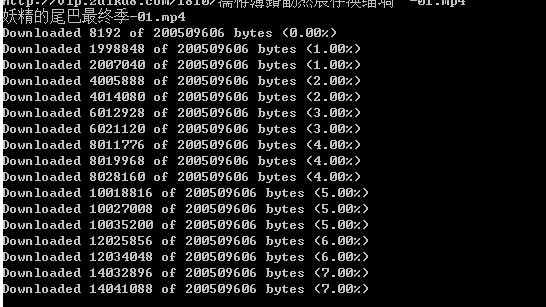
如果想在一行显示,打印时加\r,end为空 :
print ('\r downloading...{:.1f}'.format(percent), end="")
\r 是移至本行行首
\b 是退一个字符
此外,提一下urllib,之后没有用它,是因为不支持https:
#!/usr/bin/python

#encoding:utf-8

import urllib

import os

img="http://vip.zuiku8.com/1810/妖精的尾巴最终季-01.mp4"

def Schedule(a,b,c):

   '''

   a:已经下载的数据块

   b:数据块的大小

   c:远程文件的大小

   '''

   per = 100.0*a*b/c

   if per > 100:

      per = 100

   print '%.2f%%' % per

def main():

   path=img.split(".")[-1]

   urllib.urlretrieve(img,path,Schedule)

if __name__ == '__main__':

   main()
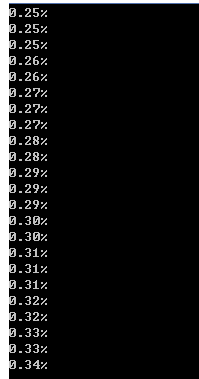
使用urllib2时,发现https下载不成功,添加了如下代码:
import ssl

ssl._create_default_https_context = ssl._create_unverified_context
python urllib2 实现大文件下载的更多相关文章
- python 全栈开发,Day36(作业讲解(大文件下载以及进度条展示),socket的更多方法介绍,验证客户端链接的合法性hmac,socketserver)
先来回顾一下昨天的内容 黏包现象粘包现象的成因 : tcp协议的特点 面向流的 为了保证可靠传输 所以有很多优化的机制 无边界 所有在连接建立的基础上传递的数据之间没有界限 收发消息很有可能不完全相 ...
- Django 大文件下载
django提供文件下载时,若果文件较小,解决办法是先将要传送的内容全生成在内存中,然后再一次性传入Response对象中: def simple_file_download(request): # ...
- 使用urllib2实现图片文件下载
# -*- coding: utf-8 -*- #python 27 #xiaodeng #使用urllib2实现图片文件下载 #来源:my2010Sam import urllib2 import ...
- 【NLP】Python NLTK 走进大秦帝国
Python NLTK 走进大秦帝国 作者:白宁超 2016年10月17日18:54:10 摘要:NLTK是由宾夕法尼亚大学计算机和信息科学使用python语言实现的一种自然语言工具包,其收集的大量公 ...
- Python写各大聊天系统的屏蔽脏话功能原理
Python写各大聊天系统的屏蔽脏话功能原理 突然想到一个视频里面弹幕被和谐的一满屏的*号觉得很有趣,然后就想用python来试试写写看,结果还真玩出了点效果,思路是首先你得有一个脏话存放的仓库好到时 ...
- ASP.NET 大文件下载的实现思路及代码
文件下载是一个网站最基本的功能,ASP.NET网站的文件下载功能实现也很简单,但是如果遇到大文件的下载而不做特殊处理的话,那将会出现不可预料的后果.本文就基于ASP.NET提供大文件下载的实现思路及代 ...
- 2016 - 1- 24 大文件下载 关于NSOutStream 的使用补充
// // ViewController.m // 大文件下载 // // Created by Mac on 16/1/24. // Copyright © 2016年 Mac. All right ...
- python urllib2使用心得
python urllib2使用心得 1.http GET请求 过程:获取返回结果,关闭连接,打印结果 f = urllib2.urlopen(req, timeout=10) the_page = ...
- python urllib2 模拟网站登陆
python urllib2 模拟网站登陆 1. 可用浏览器先登陆,然后查看网页源码,分析登录表单 2. 使用python urllib2,cookielib 模拟网页登录 import urllib ...
随机推荐
- Codeforces Round #590 (Div. 3) C. Pipes
链接: https://codeforces.com/contest/1234/problem/C 题意: You are given a system of pipes. It consists o ...
- SSL虚拟主机
1.生成公钥与私钥 [root@proxy ~]# cd /usr/local/nginx/conf [root@proxy ~]# openssl genrsa > cert.key //生成 ...
- 路由器配置——广播多路访问链路上的OSPF
一.实验目的:作广播形式的OSPF,了解DR与BDR之间的链路关系 二.拓扑图: 三.具体步骤配置 (1)R1路由器配置 enableconfigure terminalhostname R1inte ...
- python利用pybind11调用PCL点云库
2019年7月9日14:31:13 完成了一个简单的小例子,python生成点云数据,利用pybind11传给PCL显示. ubuntu 16.04 + Anaconda3 python3.6 + ...
- Linux命令行学习日志-ps ax
当我们需要查询某个运行中的进程的时候,这个命令就显得很有用了,可以查看当前进程的PID和状态(S代表睡眠,SW代表睡眠和等待,R表示运行中) ps ax //查看当前运行中的进程
- Java基础_类的加载机制和反射
类的使用分为三个步骤: 类的加载->类的连接->类的初始化 一.类的加载 当程序运行的时候,系统会首先把我们要使用的Java类加载到内存中.这里加载的是编译后的.class文件 每个类加载 ...
- linux 部署jar
Linux 运行jar包命令如下: 方式一: java -jar xxx.jar 这种方式特点是ssh窗口关闭时,程序中止运行.或者是运行时没法切出去执行其他任务,有没有办法让Jar在后台运行呢: 方 ...
- Leetcode题目160.相交链表(简单)
题目描述 编写一个程序,找到两个单链表相交的起始节点. 如下面的两个链表: 在节点 c1 开始相交. 输入:intersectVal = 8, listA = [4,1,8,4,5], listB = ...
- Leetcode题目152.乘积最大子序列(动态规划-中等)
题目描述: 给定一个整数数组 nums ,找出一个序列中乘积最大的连续子序列(该序列至少包含一个数). 示例 1: 输入: [2,3,-2,4] 输出: 6 解释: 子数组 [2,3] 有最大乘积 6 ...
- openapi and light-4j
light-4j项目支持openapi规范,本文介绍一下参照相关demo做的上传功能. openapi.yaml,按照规范编写内容,/openapi/swagger可以查看对应的swagger页面,A ...