
HTML Forms(转)
内容来自HTML Dog:http://htmldog.com/guides/html/beginner/forms/
Forms
Forms被用来收集用户的输入,它们通常被作为web应用的接口。
在实际中经常用到的相关标签 form, input, textarea, select 以及 option.
form
一个表单元素看起来是这样的
<form action="processingscript.php" method="post">

</form>
action决定表单内容将被发送到哪里。
method决定了数据的发送形式。
input
input是表单世界里的爸爸。
想看它的整个家族,请参看这里。(还有例如文件上传等等)
像br和img一样,input是不包含内容的标签,不需要“关闭”
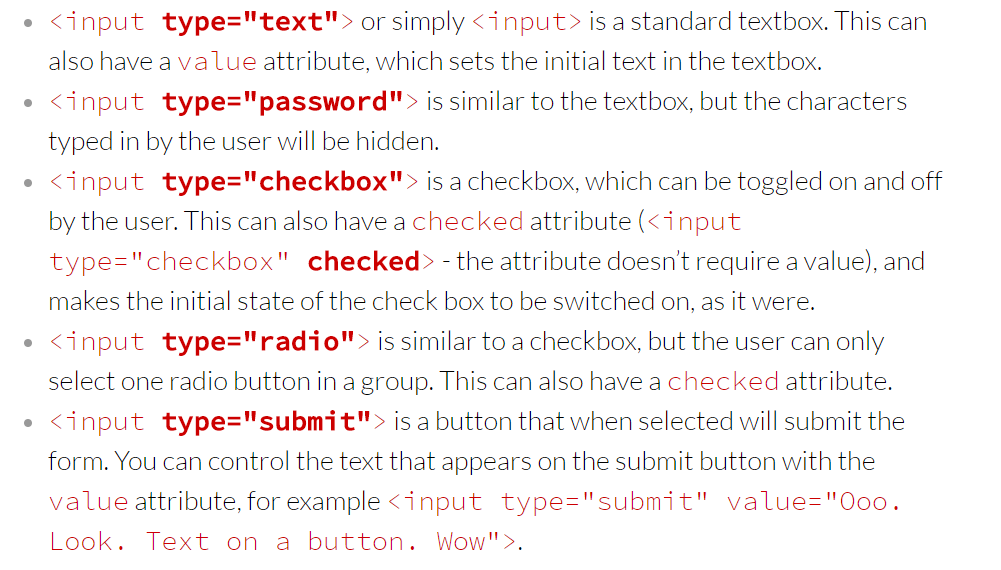
它具有极为丰富的类型,下面仅仅是最常用的几种,认真看一下就清楚了。
textarea
<textarea rows="5" cols="20">A big load of text</textarea>
A big load of text
select
<select>

    <option>Option 1</option>

    <option>Option 2</option>

    <option value="third option">Option 3</option>

</select>
Option 1
Option 2
Option 3
select需要和option配合使用,
提交值默认是<option></option>中间的文本,如果设置了value,那么提交的是value的值。
select也是有默认选项的,例如,在上面的代码上补充一句
<option selected>Rodent</option>
将呈现如下情景
Option 1
Option 2
Option 3
Rodent
Names
上面的标签看上去都很漂亮,
然而一旦把表单提交给一个“表单处理脚本”,它们都会被直接无视掉!!!
原因是它们没有名字!所以上面的所有标签都需要修改一下,
改成这样——>>>>> <input type="text" name="talkingsponge">.
例如:
<form action="contactus.php" method="post">

    <p>Name:</p>

    <p><input type="text" name="name" value="Your name"></p>

    <p>Species:</p>

    <p><input name="species"></p>

    <!-- remember: 'type="text"' isn't actually necessary -->

    <p>Comments: </p>

    <p><textarea name="comments" rows="5" cols="20">Your comments</textarea></p>

    <p>Are you:</p>

    <p><input type="radio" name="areyou" value="male"> Male</p>

    <p><input type="radio" name="areyou" value="female"> Female</p>

    <p><input type="radio" name="areyou" value="hermaphrodite"> An hermaphrodite</p>

    <p><input type="radio" name="areyou" value="asexual"> Asexual</p>

    <p><input type="submit"></p>

</form>
Name:
Species:
Comments:
事实上我想做一个多人的文字游戏,每天更新,需要一名写手,围绕上船的人来写剧情,应该会很有意思
Are you:
Male
Female
An hermaphrodite
Asexual
一个完整的 demo
就一篇文章而言,下面的标签已经完全够用了
<!DOCTYPE html>

<html>

    <head>

        <title>My first web page</title>

        <!-- This is a comment, by the way -->

    </head>

    <body>

        <h1>My first web page</h1>

        <h2>What this is</h2>

        <p>A simple page put together using HTML. <em>I said a simple page put together using HTML.</em> A simple page put together using HTML. A simple page put together using HTML. A simple page put together using HTML. A simple page put together using HTML. A simple page put together using HTML. A simple page put together using HTML. A simple page put together using HTML.</p>

        <h2>Why this is</h2>

        <ul>

            <li>To learn HTML</li>

            <li>

                To show off

                <ol>

                    <li>To my boss</li>

                    <li>To my friends</li>

                    <li>To my cat</li>

                    <li>To the little talking duck in my brain</li>

                </ol>

            </li>

            <li>Because I have fallen in love with my computer and want to give her some HTML loving.</li>

        </ul>

        <h2>Where to find the tutorial</h2>

        <p>

            <a href="http://www.htmldog.com"><img src="http://www.htmldog.com/badge1.gif" width="120" height="90" alt="HTML Dog"></a>

        </p>

        <h3>Some random table</h3>

        <table>

            <tr>

                <td>Row 1, cell 1</td>

                <td>Row 1, cell 2</td>

                <td>Row 1, cell 3</td>

            </tr>

            <tr>

                <td>Row 2, cell 1</td>

                <td>Row 2, cell 2</td>

                <td>Row 2, cell 3</td>

            </tr>

            <tr>

                <td>Row 3, cell 1</td>

                <td>Row 3, cell 2</td>

                <td>Row 3, cell 3</td>

            </tr>

            <tr>

                <td>Row 4, cell 1</td>

                <td>Row 4, cell 2</td>

                <td>Row 4, cell 3</td>

            </tr>

        </table>

        <h3>Some random form</h3>

        <p><strong>Note:</strong> It looks the part, but won't do a damned thing.</p>

        <form action="somescript.php" method="post">

            <p>Name:</p>

            <p><input name="name" value="Your name"></p>

            <p>Comments: </p>

            <p><textarea rows="10" cols="20" name="comments">Your comments</textarea></p>

            <p>Are you:</p>

            <p><input type="radio" name="areyou" value="male"> Male</p>

            <p><input type="radio" name="areyou" value="female"> Female</p>

            <p><input type="radio" name="areyou" value="hermaphrodite"> An hermaphrodite</p>

            <p><input type="radio" name="areyou" value="asexual" checked> Asexual</p>

            <p><input type="submit"></p>

        </form>

    </body>

</html>

Advertise Here!
HTML Forms(转)的更多相关文章
- Wizard Framework:一个自己开发的基于Windows Forms的向导开发框架
最近因项目需要,我自己设计开发了一个基于Windows Forms的向导开发框架,目前我已经将其开源,并发布了一个NuGet安装包.比较囧的一件事是,当我发布了NuGet安装包以后,发现原来已经有一个 ...
- xamarin.forms新建项目android编译错误
vs2015 update3 新建的xamarin.forms项目中的android项目编译错误.提示缺少android_m2repository_r22.zip,96659D653BDE0FAEDB ...
- ASP.NET Forms 身份验证
ASP.NET Forms 身份验证 在开发过程中,我们需要做的事情包括: 1. 在 web.config 中设置 Forms 身份验证相关参数.2. 创建登录页. 登录页中的操作包括: 1. 验证用 ...
- Xamarin.Forms 简介
An Introduction to Xamarin.Forms 来源:http://developer.xamarin.com/guides/cross-platform/xamarin-forms ...
- C# 定时器 Timers.Timer Forms.Timer
1.定义在System.Windows.Forms里 Windows.Forms里面的定时器比较简单,只要把工具箱中的Timer控件拖到窗体上,然后设置一下事件和间隔时间等属性就可以了 //启动定时器 ...
- Xamarin.Forms 免费电子书
Xamarin Evolve 正在举行,现在已经放出2本免费的Xamarin.Forms 免费电子书,据现场的同学说这两天还有Xamarin.Forms 重磅消息发布: Creating Mobile ...
- 老司机学新平台 - Xamarin Forms开发框架之MvvmCross插件精选
在前两篇老司机学Xamarin系列中,简单介绍了Xamarin开发环境的搭建以及Prism和MvvmCross这两个开发框架.不同的框架,往往不仅仅使用不同的架构风格,同时社区活跃度不同,各种功能模块 ...
- 老司机学新平台 - Xamarin Forms开发框架二探 (Prism vs MvvmCross)
在上一篇Xamarin开发环境及开发框架初探中,曾简单提到MvvmCross这个Xamarin下的开发框架.最近又评估了一些别的,发现老牌Mvvm框架Prism现在也支持Xamarin Forms了, ...
- Nancy之Forms authentication的简单使用
一.前言 想必大家或多或少都听过微软推出的ASP.NET Identity技术,可以简单的认为就是一种授权的实现 很巧的是,Nancy中也有与之相类似的技术Authentication,这两者之间都用 ...
- ASP.NET MVC4 Forms 登录验证
Web.config配置: 在<system.web>节下: <authentication mode="Forms"> <forms loginUr ...
随机推荐
- jquery获取checkbox状态
$("#id").is(":checked"); 返回true false
- Windows下RabbitMQ安装,部署,配置
安装部署 1.当前环境以及参考资料出处 部署环境:windows server 2008 r2 enterprise 官方安装部署文档:http://www.rabbitmq.com/install- ...
- js json 单双引号互换
var _adrobj = JSON.stringify(address).replace(/\"/g,"'"); var _nstr = _adrdata.replac ...
- npm中本地安装命令行类型的模块是不注册Path的
http://www.jianshu.com/p/c04dea6e46de 首先有必要解释下什么是命令行(Command Line)类型的模块.npm的模块一共分为三类: 绑定型(Binding):本 ...
- Eclipse修改背景颜色
windows->peferences->General->Editors->Text EditorAppearance color options:选择Background ...
- Volley 源码分析
Volley 源码分析 图片分析 要说源码分析,我们得先看一下官方的配图: 从这张图中我们可以了解到 volley 工作流程: 1.请求加入优先队列 2.从缓存调度器中查看是否存在该请求,如果有(没有 ...
- ng-template
一,锚点链接 定义锚点: <a href="#login" class="btn btn-primary">Login</a> < ...
- mvc jsonresult 前台、后台解析
背景介绍:asp.net中使用json对象传参;mvc中可以直接使用jsonresult这个对象 一:怎么使用jsonresult public JsonResult text() { var str ...
- 【BZOJ4676】Xor-Mul棋盘 拆位+状压DP
[BZOJ4676]Xor-Mul棋盘 Description 一个n*m的棋盘,左上角为(1,1),右下角为(n,m).相邻的2点之间有连边(如下图中实线)特殊地,(1,i)与(n,i)也连有一条边 ...
- FineReport----日期处理
日期处理:http://help.finereport.com/doc-view-819.html DAYSOFMONTH(date):返回当日的该月天数 DATEDELTA(Today(),-1): ...