
iOS:使用block代码块实现事件处理过程中的回调
block是什么,这里就不多加强调了,它的优点:
第一:执行效率高,速度快
第二:使用起来比代理简单,省却不少代码,增强代码美感
有一些小的知识点要强调一下:
第一点:它类似于一个匿名函数,也跟java中的匿名内部类相似,但是,记住,它是一种数据类型,因为它内部是一个结构体,有方法有属性,所以它具有对象的特征;
第二点:在类中声明block为属性时,如果使用assgin修饰,那么它被放到了栈中,方法已过就会被销毁,所以,尽量使用copy作为修饰词,这样一来block就被存放到了堆中,生命周期就会延长,保证block不会被立即销毁;
第三点:要防止循环引用,造成线程死锁,所以,有时需要加上__weak修饰。
第四点:为什么多用copy修饰,而不用strong修饰,这是MRC时期遗留下来的写法习惯,其实用strong也可以修饰,但是尽量用copy。
block既可以作为属性,单独赋值然后回调;也可以作为一个方法的参数使用,再进行回调,举例如下,直接代码演示:
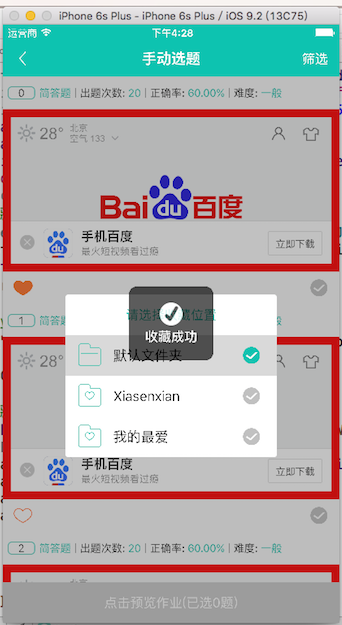
我的例子过程大概是:首先用户浏览题库时,点击收藏按钮,弹出收藏界面,用户选择完某一个文件夹后,隐藏收藏界面,提示收藏成功!
例子一:block使用属性单独赋值后回调
这是收藏界面类的回调代码
#import <UIKit/UIKit.h>

//声明block,用作选择收藏文件后的回调处理

typedef void (^CollectionBlock)();     //选择文件夹

typedef void (^CompleteHandleBlock)(); //选完之后的处理

@interface KJCollectionView : UITableView

@property (copy,nonatomic)CollectionBlock collectionBlock;

@property (copy,nonatomic)CompleteHandleBlock completeBlock;

-(instancetype)initWithFrame:(CGRect)frame withFiles:(NSArray *)files;

@end

#import "KJCollectionView.h"

#import "KJMyQueBankFile.h"

@interface KJCollectionView()<UITableViewDataSource,UITableViewDelegate>

@property (strong,nonatomic)NSArray *allFiles;

@end

@implementation KJCollectionView

-(instancetype)initWithFrame:(CGRect)frame withFiles:(NSArray *)files

{

    self = [super initWithFrame:frame];

    if (self) {

        self.dataSource = self;

        self.delegate = self;

        self.tableHeaderView = [UILabel createLabel:CGRectMake(, , SCREEN_WIDTH, ) title:@"请选择收藏位置" titleColor:HMColor(, , ) alignmentType:NSTextAlignmentCenter size:];

        self.tableFooterView = [[UIView alloc]initWithFrame:CGRectZero];

        self.allFiles = [NSArray arrayWithArray:files];

        MoveUnderLine(self);

    }

    return self;

}

#pragma mark - block回调,为block属性赋值

-(void)setCollectionBlock:(CollectionBlock)collectionBlock{

    if (_collectionBlock != collectionBlock) {

       _collectionBlock = collectionBlock;

    }

}

-(void)setCompleteBlock:(CompleteHandleBlock)completeBlock{

    if (_completeBlock != completeBlock) {

        _completeBlock = completeBlock;

    }

}

#pragma mark - UITableViewDataSource

#pragma mark - Required

-(NSInteger)tableView:(UITableView *)tableView numberOfRowsInSection:(NSInteger)section{

    return self.allFiles.count;

}

-(UITableViewCell *)tableView:(UITableView *)tableView cellForRowAtIndexPath:(NSIndexPath *)indexPath{

    static NSString *reuseIdentifier = @"Cell";

    UITableViewCell *cell = [tableView dequeueReusableCellWithIdentifier:reuseIdentifier];

    if (!cell) {

        cell = [[UITableViewCell alloc]init];

    }

    cell.accessoryView = [UIButton createButton:CGRectMake(, , , ) imageName:@"default_true" target:self Done:@selector(chooseFileDone:)];

    cell.imageView.image = [UIImage imageNamed:[self.allFiles[indexPath.row] file_image]];

    cell.textLabel.text = [self.allFiles[indexPath.row] file_Name];

    return cell;

}

#pragma mark - Optional

- (CGFloat)tableView:(UITableView *)tableView heightForRowAtIndexPath:(NSIndexPath *)indexPath{

    return ;

}

#pragma mark - UITableViewDelegate

#pragma mark - Optional

- (void)tableView:(UITableView *)tableView didSelectRowAtIndexPath:(NSIndexPath *)indexPath{

    UITableViewCell *cell = [tableView cellForRowAtIndexPath:indexPath];

    cell.accessoryView = [UIButton createButton:CGRectMake(, , , ) imageName:@"selected_ture" target:nil Done:nil];

    //回调处理

    _collectionBlock();

    _completeBlock();

}

#pragma mark - 按钮选择文件夹

-(void)chooseFileDone:(UIButton *)btn{

    UITableViewCell *cell = (UITableViewCell *)btn.superview;

    cell.accessoryView = [UIButton createButton:CGRectMake(, , , ) imageName:@"selected_ture" target:nil Done:nil];

    //回调处理

    _collectionBlock();

    _completeBlock();

}

@end
这是在题库类中给block传递回调处理的代码:直接通过属性赋值
#pragma mark - 点击收藏按钮时的代理方法

/**

 *  收藏作业

 *  @param indexPath     当前cell中选择按钮选中后的cell

 *  @param btn           收藏按钮

 *  @param collectionTag 当前cell中收藏按钮的tag

 */

-(void)finishedClickedCollectionFileIndexPath:(NSIndexPath *)indexPath CollectionBtn:(UIButton *)btn{

    //创建收藏文件夹视图和蒙版视图

    self.collectionView = [[KJCollectionView alloc]initWithFrame:CGRectMake(, , , ) withFiles:self.filesArrayM];

    self.collectionView.layer.cornerRadius = 3.0;

    self.collectionView.layer.masksToBounds = YES;

    self.collectionView.center = [UIApplication sharedApplication].keyWindow.center;

    self.coverView = [[UIView alloc]initWithFrame:self.view.bounds];

    self.coverView.backgroundColor = HMColorRGBA(, , , 0.3);

    [self.view addSubview:self.collectionView];

    [self.view addSubview:self.coverView];

    [self.view insertSubview:self.collectionView aboveSubview:self.coverView];

    __weak typeof(self) weakSelf = self;

   //为选择文件的block赋值

    self.collectionView.collectionBlock = ^(){

        //取出收藏字典

        KJChooseHomeworkDicM *checkBtnDicManager = [KJChooseHomeworkDicM sharedCheckBtnDicMManager];

        [checkBtnDicManager.collectionDicM setObject:indexPath forKey:indexPath];

        [btn setSelected:YES];

        //获取作业模型

        KJLog(@"clickedCollection:%@",[weakSelf.homeworkCellFrames[indexPath.row] defaultFH]);

    };

   //为选完文件后的block赋值

    self.collectionView.completeBlock = ^(){

        [MBProgressHUD showSuccess:@"收藏成功"];

        //移除收藏文件夹视图和蒙版视图

        dispatch_after(dispatch_time(DISPATCH_TIME_NOW, (int64_t)(0.5 * NSEC_PER_SEC)), dispatch_get_main_queue(), ^{

            [weakSelf.collectionView removeFromSuperview];

            [weakSelf.coverView removeFromSuperview];

            [weakSelf setCollectionView:nil];

            [weakSelf setCoverView:nil];

        });

    };

}
例子二:block作为方法的参数赋值后再进行回调
这是收藏界面类的回调代码
#import <UIKit/UIKit.h>

//声明block,用作选择收藏文件后的回调处理

typedef void (^CollectionBlock)();     //选择文件夹

typedef void (^CompleteHandleBlock)(); //选完之后的处理

@interface KJCollectionView : UITableView

@property (copy,nonatomic)CollectionBlock collectionBlock;

@property (copy,nonatomic)CompleteHandleBlock completeBlock;

-(instancetype)initWithFrame:(CGRect)frame withFiles:(NSArray *)files;

//声明一个方法

-(void)chooseFile:(CollectionBlock )collectionBlock compeleteChooseBlock:(CompleteHandleBlock)completeBlock;

@end

//  Created by mac on 16/5/20.

//  Copyright © 2016年 mac. All rights reserved.

#import "KJCollectionView.h"

#import "KJMyQueBankFile.h"

@interface KJCollectionView()<UITableViewDataSource,UITableViewDelegate>

@property (strong,nonatomic)NSArray *allFiles;

@end

@implementation KJCollectionView

-(instancetype)initWithFrame:(CGRect)frame withFiles:(NSArray *)files

{

    self = [super initWithFrame:frame];

    if (self) {

        self.dataSource = self;

        self.delegate = self;

        self.tableHeaderView = [UILabel createLabel:CGRectMake(, , SCREEN_WIDTH, ) title:@"请选择收藏位置" titleColor:HMColor(, , ) alignmentType:NSTextAlignmentCenter size:];

        self.tableFooterView = [[UIView alloc]initWithFrame:CGRectZero];

        self.allFiles = [NSArray arrayWithArray:files];

        MoveUnderLine(self);

    }

    return self;

}

#pragma mark - block回调,通过方法为block属性赋值

-(void)chooseFile:(CollectionBlock )collectionBlock compeleteChooseBlock:(CompleteHandleBlock)completeBlock{

    if (_collectionBlock != collectionBlock) {

        _collectionBlock = collectionBlock;

    }

    if (_completeBlock != completeBlock) {

        _completeBlock = completeBlock;

    }

}

#pragma mark - UITableViewDataSource

#pragma mark - Required

-(NSInteger)tableView:(UITableView *)tableView numberOfRowsInSection:(NSInteger)section{

    return self.allFiles.count;

}

-(UITableViewCell *)tableView:(UITableView *)tableView cellForRowAtIndexPath:(NSIndexPath *)indexPath{

    static NSString *reuseIdentifier = @"Cell";

    UITableViewCell *cell = [tableView dequeueReusableCellWithIdentifier:reuseIdentifier];

    if (!cell) {

        cell = [[UITableViewCell alloc]init];

    }

    cell.accessoryView = [UIButton createButton:CGRectMake(, , , ) imageName:@"default_true" target:self Done:@selector(chooseFileDone:)];

    cell.imageView.image = [UIImage imageNamed:[self.allFiles[indexPath.row] file_image]];

    cell.textLabel.text = [self.allFiles[indexPath.row] file_Name];

    return cell;

}

#pragma mark - Optional

- (CGFloat)tableView:(UITableView *)tableView heightForRowAtIndexPath:(NSIndexPath *)indexPath{

    return ;

}

#pragma mark - UITableViewDelegate

#pragma mark - Optional

- (void)tableView:(UITableView *)tableView didSelectRowAtIndexPath:(NSIndexPath *)indexPath{

    UITableViewCell *cell = [tableView cellForRowAtIndexPath:indexPath];

    cell.accessoryView = [UIButton createButton:CGRectMake(, , , ) imageName:@"selected_ture" target:nil Done:nil];

    //回调处理

    _collectionBlock();

    _completeBlock();

}

#pragma mark - 按钮选择文件夹

-(void)chooseFileDone:(UIButton *)btn{

    UITableViewCell *cell = (UITableViewCell *)btn.superview;

    cell.accessoryView = [UIButton createButton:CGRectMake(, , , ) imageName:@"selected_ture" target:nil Done:nil];

    //回调处理

    _collectionBlock();

    _completeBlock();

}

@end
这是在题库类中给block传递回调处理的代码:直接将要赋值的block写入到方法中
#pragma mark - 点击收藏按钮时的代理方法

/**

 *  收藏作业

 *  @param indexPath     当前cell中选择按钮选中后的cell

 *  @param btn           收藏按钮

 *  @param collectionTag 当前cell中收藏按钮的tag

 */

-(void)finishedClickedCollectionFileIndexPath:(NSIndexPath *)indexPath CollectionBtn:(UIButton *)btn{

    //创建收藏文件夹视图和蒙版视图

    self.collectionView = [[KJCollectionView alloc]initWithFrame:CGRectMake(, , , ) withFiles:self.filesArrayM];

    self.collectionView.layer.cornerRadius = 3.0;

    self.collectionView.layer.masksToBounds = YES;

    self.collectionView.center = [UIApplication sharedApplication].keyWindow.center;

    self.coverView = [[UIView alloc]initWithFrame:self.view.bounds];

    self.coverView.backgroundColor = HMColorRGBA(, , , 0.3);

    [self.view addSubview:self.collectionView];

    [self.view addSubview:self.coverView];

    [self.view insertSubview:self.collectionView aboveSubview:self.coverView];

    __weak typeof(self) weakSelf = self;

    //把block放入方法中

    [self.collectionView chooseFile:^{

        //取出收藏字典

        KJChooseHomeworkDicM *checkBtnDicManager = [KJChooseHomeworkDicM sharedCheckBtnDicMManager];

        [checkBtnDicManager.collectionDicM setObject:indexPath forKey:indexPath];

        [btn setSelected:YES];

        [MBProgressHUD showSuccess:@"收藏成功"];

        //获取作业模型

        KJLog(@"clickedCollection:%@",[weakSelf.homeworkCellFrames[indexPath.row] defaultFH]);

    } compeleteChooseBlock:^{

        //移除收藏文件夹视图和蒙版视图

        dispatch_after(dispatch_time(DISPATCH_TIME_NOW, (int64_t)(0.5 * NSEC_PER_SEC)), dispatch_get_main_queue(), ^{

            [MBProgressHUD hideHUD];

            [weakSelf.collectionView removeFromSuperview];

            [weakSelf.coverView removeFromSuperview];

            [weakSelf setCollectionView:nil];

            [weakSelf setCoverView:nil];

        });

    }];

}
上面两种演示截图达到的效果是一样的:
点击题库中的收藏 选择文件夹收藏

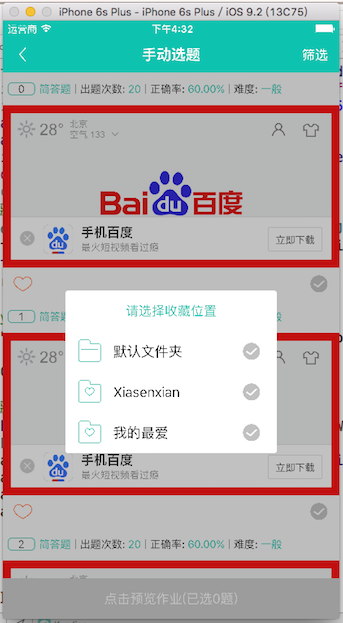
显示收藏成功 移除文件夹视图

本人原创,转载须注明出处,谢谢!
iOS:使用block代码块实现事件处理过程中的回调的更多相关文章
- iOS - OC Block 代码块
前言 Block 是一段预先准备好的代码,可以在需要的时候执行,可以当作参数传递.Block 可以作为函数参数或者函数的返回值,而其本身又可以带输入参数或返回值.Block 是 C 语言的,类似于一个 ...
- block(代码块)的介绍以及使用方法和变量之间的关系
http://blog.csdn.net/menxu_work/article/details/8762848 block(代码块)的介绍以及使用方法和变量之间的关系 block(代码块)的介绍以及使 ...
- ios开发 block语句块
ios开发 block语句块 1.block 理解为匿名函数 2.block变量的定义 //定义block变量,^表示定义block //技巧:函数名左右加括号,在函数名前面在加^ void (^bl ...
- IOS开发之----代码块的使用(二)
iOS4引入了一个新特性,支持代码块的使用,这将从根本上改变你的编程方式.代码块是对C语言的一个扩展,因此在Objective-C中完全支持.如果你学过Ruby,Python或Lisp编程语言,那么你 ...
- block代码块介绍
关于block的简单介绍 什么是block? Block是C语言的一个语法特性,同时也是C语言的运行时特性,它很像C中的函数指针,因为你可以像使用函数指针一样的去使用block对象:它也很像C++中的 ...
- Block代码块中使用局部变量注意点
第一次写代码遇到报这个错,实在是想不通为什么,按常理应该是不会有问题,报错的呀??纠结了一会之后只好仔细查看报错原因咯,原来是: 当我们在block代码块中使用局部变量时,就会很容易出现如图的错误. ...
- eclipse实现代码块折叠-类似于VS中的#region……#endregion
背 景 刚才在写代码的时候,写了十几行可以说是重复的代码: 如果整个方法或类中代码多了,感觉它们太TM占地方了,给读者在阅读代码上造成很大的困难,于是想到能不能把他们“浓缩”成一行,脑子里第一个闪现出 ...
- 【玩转Eclipse】——eclipse实现代码块折叠-类似于VS中的#region……#endregion
[玩转Eclipse]——eclipse实现代码块折叠-类似于VS中的#region……#endregion http://www.cnblogs.com/Micheal-G/articles/507 ...
- IOS学习4——block代码块
本文转载自:iOS开发-由浅至深学习block 一.关于block 在iOS 4.0之后,block横空出世,它本身封装了一段代码并将这段代码当做变量,通过block()的方式进行回调.这不免让我们想 ...
随机推荐
- 《逐梦旅程 WINDOWS游戏编程之从零开始》笔记8——载入三维模型&Alpha混合技术&深度测试与Z缓存
第17章 三维游戏模型的载入 主要是如何从3ds max中导出.X文件,以及如何从X文件加载三维模型到DirextX游戏程序里.因为复杂的3D物体,要用代码去实现,那太反人类了,所以我们需要一些建模软 ...
- Single Number I&& II——还没看,倒过头来再看
Single Number I Given an array of integers, every element appears twice except for one. Find that si ...
- netcore 配置文件使用
一直在记录整理接口调用,但是最近发现关于项目在vs中本地启动也有许多方便的地方. 首先由于使用的是Java的Eureka和网关来做的服务基础, 然后服务就涉及到注册一说, 问题是,如果appsetti ...
- slice切割数组arr=[[0,1],[2,3]]
for (var i = 0; i < 10; i++) { arr.push(i) } function arrSlice(arr, num) { var arr1 = []; for (va ...
- jquery.bootpag分页控件
<script src="//code.jquery.com/jquery-2.1.3.min.js"></script> <script src=& ...
- bss、data、text、heap(堆)与stack(栈)
bss段: bss段(bss segment)通常是指用来存放程序中未初始化的全局变量和静态变量(static)的一块内存区域. bss是英文Block Started by Symbol的简称. b ...
- Linux NFS服务器的简明配置6.8
Linux NFS服务器的简明配置6.8 Linux NFS服务器的简明配置 一.NFS服务简介 NFS 是Network File System的缩写,即网络文件系统.一种使用于分散式文件系统的 ...
- B. Black Square(字符串)
B. Black Square time limit per test 1 second memory limit per test 256 megabytes input standard inpu ...
- Eclipse generate javadoc
注:若遇到导出文档乱码,则点击上图的[next]按钮,在vm options的输入框输入 -J-Xmx180m —- 设置内存大小 (若遇到内存溢出时) -encoding utf-8 ...
- 洛谷——P1618 三连击(升级版)
P1618 三连击(升级版) 题目描述 将1,2,…,9共9个数分成三组,分别组成三个三位数,且使这三个三位数的比例是A:B:C,试求出所有满足条件的三个三位数,若无解,输出“No!!!”. //感谢 ...