
spring mvc: 页面重定向调整
我的项目名称是hello,
在src/main/java目录下面建了一个chapter2目录
有三个配置文件: web.xml, chapter2-servlet.xml, applicationContext.xml
三个配置如下:
web.xml
<web-app>

  <display-name>Archetype Created Web Application</display-name>

<!--配置文件路径-->

<context-param>

 	<param-name>contextConfigLocation</param-name>

	<param-value>/WEB-INF/applicationContext.xml</param-value>

</context-param>

<listener>

	<listener-class>org.springframework.web.context.ContextLoaderListener</listener-class>

</listener>

  <servlet>

    <servlet-name>chapter2</servlet-name>

    <servlet-class>org.springframework.web.servlet.DispatcherServlet</servlet-class>

    <load-on-startup>1</load-on-startup>

</servlet>

<servlet-mapping>

    <servlet-name>chapter2</servlet-name>

    <url-pattern>/</url-pattern>

</servlet-mapping>

</web-app>
applicationContext.xml
<beans xmlns="http://www.springframework.org/schema/beans"

       xmlns:xsi="http://www.w3.org/2001/XMLSchema-instance"

       xmlns:mvc="http://www.springframework.org/schema/mvc"

       xmlns:context="http://www.springframework.org/schema/context"

       xsi:schemaLocation="http://www.springframework.org/schema/beans

					       http://www.springframework.org/schema/beans/spring-beans.xsd

					       http://www.springframework.org/schema/mvc

					       http://www.springframework.org/schema/mvc/spring-mvc.xsd

					       http://www.springframework.org/schema/context

					       http://www.springframework.org/schema/context/spring-context.xsd">

<!-- ViewResolver -->

<bean class="org.springframework.web.servlet.view.InternalResourceViewResolver">

	<property name="viewClass" value="org.springframework.web.servlet.view.JstlView"/>

	<property name="prefix" value="/WEB-INF/jsp/"/>

	<property name="suffix" value=".jsp"/>

</bean>

</beans>
chapter2-servlet.xml
<beans xmlns="http://www.springframework.org/schema/beans"

       xmlns:xsi="http://www.w3.org/2001/XMLSchema-instance"

       xmlns:mvc="http://www.springframework.org/schema/mvc"

       xmlns:context="http://www.springframework.org/schema/context"

       xsi:schemaLocation="http://www.springframework.org/schema/beans

					       http://www.springframework.org/schema/beans/spring-beans.xsd

					       http://www.springframework.org/schema/mvc

					       http://www.springframework.org/schema/mvc/spring-mvc.xsd

					       http://www.springframework.org/schema/context

					       http://www.springframework.org/schema/context/spring-context.xsd">

<!-- 默认的注解映射的支持 -->

<mvc:annotation-driven />

<!-- 静态资源 -->

<mvc:resources mapping="/pages/**" location="/pages/"/>

 <!-- 自动扫描的包名 -->

<context:component-scan base-package="chapter2.*" />

</beans>
接下来看代码实现:
WeboneController.java
import org.springframework.stereotype.Controller;

import org.springframework.web.bind.annotation.RequestMapping;

import org.springframework.web.bind.annotation.RequestMethod;

@Controller

public class WeboneController {

	@RequestMapping(value="/webone/index", method=RequestMethod.GET)

	public String index()

	{

		return "webone_index";

	}

	//重定向跳转

	@RequestMapping(value="/webone/redirect", method=RequestMethod.GET)

	public String redirect()

	{

		return "redirect:finalPage";

	}

	@RequestMapping(value="/webone/finalPage", method=RequestMethod.GET)

	public String finalPage()

	{

		return "webone_final";

	}

}
jsp页面
webone_index.jsp
<%@ page language="java" contentType="text/html; charset=utf-8" pageEncoding="utf-8"%>

<%@ taglib uri="http://www.springframework.org/tags/form" prefix="form" %>

<!DOCTYPE html PUBLIC "-//W3C//DTD HTML 4.01 Transitional//EN" "http://www.w3.org/TR/html4/loose.dtd">

<html>

<head>

<meta http-equiv="Content-Type" content="text/html; charset=utf-8">

<title>webone index</title>

</head>

<body>

<form:form method="GET" action="/hello/webone/redirect">

<table>

	<tr>

		<td><input type="submit" value="重定向跳转"/> </td>

	</tr>

</table>

</form:form>

</body>

</html>
webone_fina.jsp
<%@ page language="java" contentType="text/html; charset=utf-8" pageEncoding="utf-8"%>

<%@ taglib uri="http://www.springframework.org/tags/form" prefix="form" %>

<!DOCTYPE html PUBLIC "-//W3C//DTD HTML 4.01 Transitional//EN" "http://www.w3.org/TR/html4/loose.dtd">

<html>

<head>

<meta http-equiv="Content-Type" content="text/html; charset=utf-8">

<title>web-one finalPage spring mvc重定向页面<</title>

</head>

<body>

<h2>spring mvc重定向页面</h2>

</body>

</html>
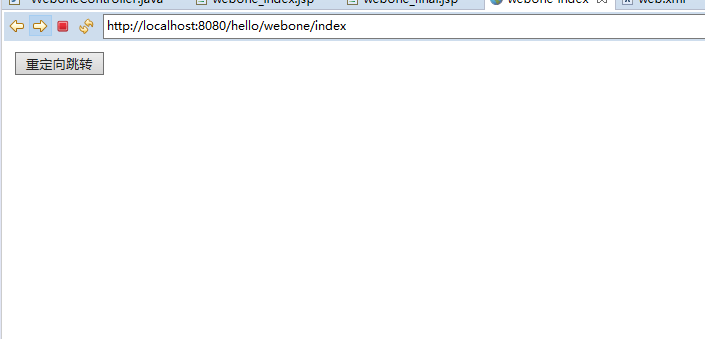
实际我的 访问地址如下: http://localhost:8080/hello/webone/index
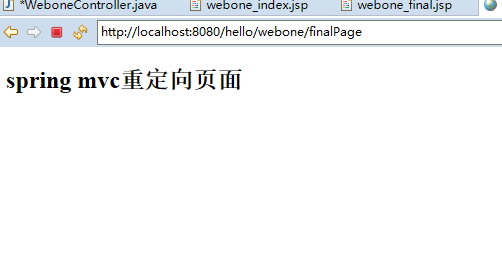
点击里面的跳转按钮,会自动跳转到:http://localhost:8080/hello/webone/finalPage
spring mvc: 页面重定向调整的更多相关文章
- Spring MVC页面重定向
以下示例显示如何编写一个简单的基于Web的重定向应用程序,这个应用程序使用重定向将http请求传输到另一个页面. 基于Spring MVC - Hello World实例章节中代码,创建创建一个名称为 ...
- Spring MVC页面重定向实例
以下内容引用自http://wiki.jikexueyuan.com/project/spring/mvc-framework/spring-page-redirection-example.html ...
- MVC页面重定向'页面跳转
MVC页面重定向,主要有以下几种形式: 1.Response.Redirect();方法 using System; using System.Collections.Generic; using S ...
- spring MVC页面的重定向
如图,一个jsp页面跳转到下一个jsp页面通常需要上一个页面发出带有参数得请求,我们都知道spring MVC是不能直接跳页面的. 需要配置视图解析器,通过返回视图名再跳转到相应得JSP页面. 即使这 ...
- Spring MVC 页面跳转时传递参数
页面仍然使用 JSP,在跳转时如果想传递参数则需要用到类 RedirectAttributes. 首先看看如何打开一个普通页面: // 登录页面(每个页面都要独立的 Action 来支持其呈现) @R ...
- 【Spring学习笔记-MVC-16】Spring MVC之重定向-解决中文乱码
概述 spring MVC框架controller间跳转,需重定向,主要有如下三种: 不带参数跳转:形如:http://localhost:8080/SpringMVCTest/test/myRedi ...
- spring mvc redirect 重定向 跳转并传递参数
在项目中做form表单功能提交时,防止用户客户端后退或者刷新时重复提交问题,需要在服务端进行重定向跳转,具体跳转方式有以下几种方式: 公用代码: @RequestMapping(value=" ...
- Spring mvc后台重定向页面,实际前端不跳转
1.ajax不支持重定向 ajax是不支持重定向的,因为ajax本身就是局部刷新,不重新加载页面的. 2.若后台出现需要重定向页面,可以设置唯一错误码 前端ajax公共调用后,凡是遇到这一类错误码,则 ...
- spring mvc页面显示图片失败
在配置文件中需要映射静态资源 <!-- 当在web.xml 中 DispatcherServlet使用 <url-pattern>/</url-pattern> 映射时, ...
随机推荐
- 七、H5 直播视频播放
HTML5实现视频直播功能思路详解_html5教程技巧_脚本之家 https://m.jb51.net/html5/587215.html 七.H5 直播视频播放 移动端iOS和 Android 都天 ...
- Scalable IO in Java
Scalable IO in Java http://gee.cs.oswego.edu/dl/cpjslides/nio.pdf 大部分IO都是下面这个步骤, Most have same basi ...
- delphi中String 和 动态静态数组
默认string类型为ansiString:有编译开关控制 shortString: strShort : shortString; strShort 大小256字节,可根据sizeof()计算出,s ...
- Java 之Object 类
Object 类: 所有类的根类, 是不断向上抽取而来, 具备着所有对象都具备的共性内容. 常用共性方法 boolean equals(Object obj) : 判断两个对象是否相等. 默认比较的是 ...
- ubuntu14 编译安装(升级)g++
编译安装(升级)g++ ubuntu14自带的g++为4.8.4,不支持c++11.现要将g++升至5.2.0 1.下载安装: 参考https://www.cppfans.org/1719.html ...
- echarts系列之动态修改柱状图颜色
echarts根据某一变量动态修改柱状图颜色 1.option中参数配置项series { "name":"Android", "type" ...
- 某游戏应用的redis 数据库结构设计(转)
add by zhj: 搜了一下作者,原来之前是网易的大牛.2011年的文章,有些老了,很多地方可以将string类型键转为hash类型,这样更节省内存,将key聚合在一起,也更简练. 原文:http ...
- JavaScript-4.2函数,变量作用域---ShinePans
<html> <head> <meta http-equiv="content-type" content="text/html;chars ...
- C语言高级宏技巧
特殊符号#.## (1)# When you put a # before an argument in a preprocessor macro, the preprocessor turns t ...
- mysql增量恢复的一个实例操作
通过防火墙禁止web等应用向主库写数据或者锁表,让主库暂时停止更新,然后进行恢复 模拟整个场景 1.登录数据库 [root@promote 3306]# mysql -uroot -S /data/3 ...