
路由器port触发与转发---Port Forwarding & Port Triggering
What is Port Triggering?
If you have not read my explanation of port forwarding do so now. You can find it
here.
Port triggering is pretty simple once you know what port forwarding is. Port Triggering is port forwarding with an on/off switch for the ports that have been forwarded. This on/off switch is turned on or off by data flowing out of a trigger port.
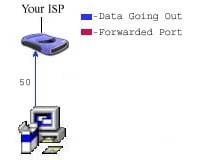
Let's say that there is a port triggering rule configured in the router. This port triggering rule says when data flows out on port 50 forward port 80. In the picture above you see data flowing from a computer to the internet on port 50.
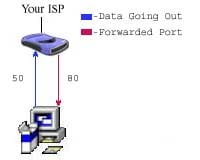
The router see's the traffic coming out of the router on port 50, and evaluates it's triggering rules. The router then forwards port 80 to the computer that sent out the data on port 50. It's important to realize that port 80 can only be forwarded to one
computer at a time. If two computers were trying to send data out on port 50, there would be a conflict. What happened after that really depends upon which router you are running. One thing is for sure, port 80 would not be forwarded to both computers.
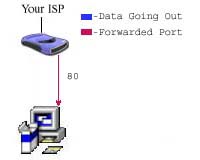
The picture above shows that the data has quit being sent out of port 50. Programs do not send data if there is nothing to be sent, so data being sent out of port 50 is not guaranteed. The router keeps port 80 forwarded for a certain amount of time. How
much time really depends upon the router.
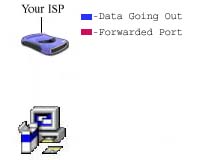
Once the router is done waiting, it quits forwarding port 80 to the computer that sent data out on port 50. This makes a port triggering configuration a tricky thing. The software that requires ports to be forwarded must first send data out of a port at
a somewhat constant rate. If the software has a port that is constantly sending data out, then port triggering is possible. The length of time that the router keeps those ports open still needs to be taken into account. If the router times out between the
gaps of outgoing data, the port forwarding connection will be severed. That is why so few programs support port triggering. What happens when you are trying todownload a very large file? Well the software you have setup port triggering for may not keep sending
data out of the trigger port.If it doesn't your router closes the incoming ports, and your download is interrupted.
Port Triggering is a little more secure than port forwarding, because the incoming ports are not open all the time. They are only open when a program is actively using the trigger port. Another thing to note, is that most port triggering setups do not require
you to enter an internal ip address to forward the incoming ports to. This means that any computer on the network can use your port triggering setup. If two computers try to use the port triggering setup at the same time you will run into problems.
路由器port触发与转发---Port Forwarding & Port Triggering的更多相关文章
- NAT&Port Forwarding&Port Triggering
NAT Nat,网络地址转换协议.主要功能是实现局域网内的本地主机与外网通信. 在连接外网时,内部Ip地址须要转换为网关(一般为路由器Ip地址)(port号也须要对应的转换) ...
- Why was 80 Chosen as the Default HTTP Port and 443 as the Default HTTPS Port?
https://www.howtogeek.com/233383/why-was-80-chosen-as-the-default-http-port-and-443-as-the-default-h ...
- shell脚本检查是否存在tun0虚拟网卡,若不不存在服务器更改port,并重启服务器,客户端修改port,并重新启动客户端
openvp 客户端 /home 目录下各脚本文件名 [root@jira home]# ls openvpn_server_restart.sh openvpn_tunnel_monitor.sh ...
- TCP的三次握手和四次挥手与路由器(三层)转发原理
传输层是国际标准化组织提出的开放系统互连(OSI)参考模型中的第四层.该层协议为网络端点主机上的进程之间提供了可靠.有效的报文传送服务.其功能紧密地依赖于网络层的虚拟电路或数据报服务.传输层定义了主机 ...
- Hbase启动的时候出现:[RpcServer.handler=28,port=60000] ipc.RpcServer: RpcServer.handler=28,port=60000: exiting,master.HMasterCommandLine: Master exiting
hadoop 版本:CDH5.02 Hbase 版本:hbase-0.96.1.1-cdh5.0.2 配置文件:hbase-site.xml <configuration> <pro ...
- H3C 路由器单播IP包转发
- NAT&Port Forwarding&Port Triggering
NAT Nat,网络地址转换协议.主要功能是实现局域网内的本地主机与外网通信. 在连接外网时,内部Ip地址需要转换为网关(一般为路由器Ip地址)(端口号也需要相应的转换) 如: ...
- Port Forwarding in Windows
转自:http://woshub.com/port-forwarding-in-windows/ Since Windows XP there is a built-in ability in Mic ...
- Port forwarding with xinetd Ask
https://stackoverflow.com/questions/21716673/port-forwarding-with-xinetd --------------------------- ...
随机推荐
- Oracle 临时表空间 temp表空间切换
一.TEMP表空间 临时表空间主要用途是在数据库进行排序运算.管理索引.访问视图等操作时提供临时的运算空间,当运算完成之后系统会自动清理.当oracle里需要用到sort的时候,PGA中sort_ar ...
- 用开源NGINX-RTMP-MODULE搭建FLASH直播环境
用开源nginx-rtmp-module搭建flash直播环境 1.将nginx和nginx-rtmp-module的源码包解压PS:nginx-rtmp-module网址https://github ...
- CCF-201512-3 绘图
问题描写叙述 用 ASCII 字符来绘图是一件有趣的事情.并形成了一门被称为 ASCII Art 的艺术.比如,下图是用 ASCII 字符画出来的 CSPRO 字样. .._._.._.._-_.. ...
- FIFO、LRU、LFU的含义和原理(转)
题目:请简要介绍FIFO.LRU.LFU的含义和原理 含义: FIFO:First In First Out,先进先出LRU:Least Recently Used,最近最少使用 LFU:Leas ...
- 关于org.springframework.scheduling.concurrent.ThreadPoolTaskExecutor的队列
今天查看源码发现spring的线程池是支持队列的: 并且队列支持的上限相当大: 当线程池的达到最大线程时,默认会把任务放在队列(内存)中,所以我们可以放心用这个东西来写日志了
- hibernate 联合主键
xml方式处理联合主键: 以有两个主键:id和name的student表为例. 先创建个主键类: package com.bjsxt.hibernate; //黑色为必写项 public ...
- DDL语句--改动表
改动表是指改动数据库中已经存在的表的定义.改动表比又一次定义表简单.不须要又一次载入数据.也不会影响正在进行的服务. MySQL中通过ALTER TABLE语句来改动表.改动表包含改动表名.改动字段数 ...
- css-id选择器
<!DOCTYPE html><html lang="en"><head> <meta charset="UTF-8" ...
- SQL SERVER 如何处理带字母的自增列--【叶子】
--需求说明: /* id col ---------- ---------- AB00001 a AB00002 b --当再插入数据的时候让id自动变成AB00003 ...
- 电子商务(电销)平台中订单模块(Order)数据库设计明细(转载)
电子商务(电销)平台中订单模块(Order)数据库设计明细 以下是自己在电子商务系统设计中的订单模块的数据库设计经验总结,而今发表出来一起分享,如有不当,欢迎跟帖讨论~ 订单表 (order)|-- ...