
Port Forwarding in Windows
转自:http://woshub.com/port-forwarding-in-windows/
Since Windows XP there is a built-in ability in Microsoft Windows to set up network ports forwarding. Due to it, any incoming TCP connection (IPv4 or IPv6) to local port can be redirected to another local port or even to port on the remote computer. And it is not necessary for system to have a service that listens to this port.
In Linux, port redirection is configured quite simply using iptables. On Windows Server systems, the Routing and Remote Access Service (RRAS) is used to organize port forwarding. However, there is an easier way to configure the port forwarding, which works well in any version of Windows.
Port forwarding in Windows can be configured using Portproxy mode of the command Netsh. The syntax of this command is as follows:netsh interface portproxy add v4tov4 listenaddress=localaddress listenport=localport connectaddress=destaddress connectport=destport
where
- listenaddress – is a local IP address waiting for a connection.
- listenport – local listening TCP port (the connection is waited on it).
- connectaddress – is a local or remote IP address (or DNS name) to which the incoming connection will be redirected.
- connectport – is a TCP port to which the connection from listenport is forwarded to.
Let’s imagine that our task is to make the RDP service to respond on a non-standard port, for example 3340 (the port can be changed in the settings of the service, but we will use RDP to make it easier to demonstrate forwarding). To do this, you need to redirect incoming traffic from TCP port 3340 to another local port – 3389 (standard rdp port).
Start the command prompt as an administrator and perform the following command:
netsh interface portproxy add v4tov4 listenport=3340 listenaddress=10.1.1.110 connectport=3389 connectaddress=10.1.1.110
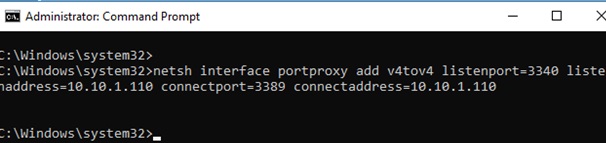
Where 10.10.1.110 – the current IP address of this computer.
Using netstat make sure that port 3340 is listened now:
netstat -ano | findstr :3340


IPv6 support must be enabled on the network interface for which the port forwarding rule is created.
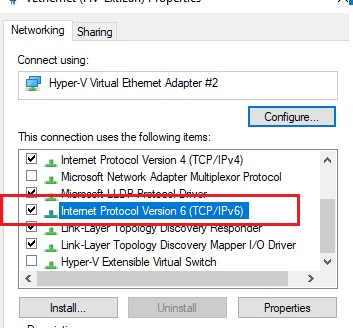
These are the prerequisites for correct port-forwarding. Without the IP Helper service and without IPv6 support enabled, the port redirection won’t work.
You can find out what process is listening to this port use its PID (in our example, the PID is 636):
tasklist | findstr 636
Let’s try to connect to this computer from a remote system using any RDP client. Port 3340 should be specified as the RDP port.It is specified after the colon following the RDP server address, for example, 10.10.1.110:3340:
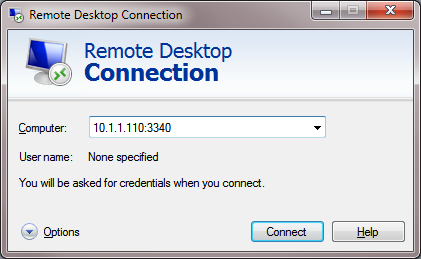
The connection should be established successfully.
netsh advfirewall firewall add rule name=”forwarded_RDPport_3340” protocol=TCP dir=in localip=10.1.1.110 localport=3340 action=allow
When creating an incoming firewall rule for port 3340 via Windows Firewall graphical interface, no program needs to be associated with it. This port is only listened by the network driver.
You can create any number of Windows port forwarding rules. All netsh interface portproxy rules are persistent and are stored in the system after a Windows restart.
Display the list of forwarding rules in the system:
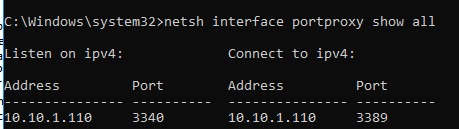
netsh interface portproxy show all
In our case there is only one forwarding rule from port 3340 to 3389:
Listen on ipv4:             Connect to ipv4:
Address         Port        Address         Port
--------------- ----------  --------------- ----------
10.1.1.110     3340        10.1.1.110     3389
netsh interface portproxy dump#========================
# Port Proxy configuration
#========================
pushd interface portproxy
reset
add v4tov4 listenport=3340 connectaddress=10.1.1.110 connectport=3389
popd
# End of Port Proxy configuration
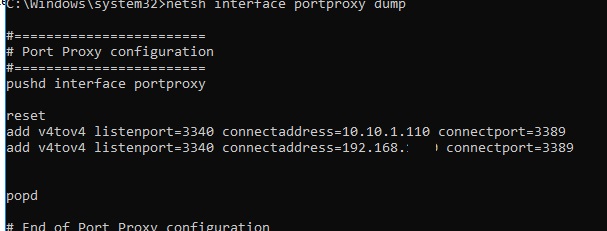
To remove a specific port forwarding rule:
netsh interface portproxy delete v4tov4 listenport=3340 listenaddress=10.1.1.110
To clear all current port forwarding rules:
netsh interface portproxy reset
If you want to forward an incoming TCP connection to another computer, the command can look like this:
netsh interface portproxy add v4tov4 listenport=3389 listenaddress=0.0.0.0 connectport=3389 connectaddress=192.168.100.101
This rule will redirect all incoming RDP requests (to port 3389) from this computer to a remote computer with an IP address 192.168.1.101.
Another portproxy feature is an opportunity to make it look like any remote network service is operating locally.
For example, forward the connection from the local port 5555 to the remote address 157.166.226.25 (CNN website):
netsh interface portproxy add v4tov4 listenport=5555 connectport=80 connectaddress= 157.166.226.25 protocol=tcp
Now if you go to http://localhost:5555/ in your browser, CNN Start page will open. So despite the browser addresses the local computer, it opens a remote page.

Port forwarding can also be used to forward a port from an external address of a network card to a virtual machine port running on the same computer.
Also, there were cases when in Windows Server 2012 R2 the port forwarding rules worked only until the system was rebooted, and after restart they were reset. In this case, you need to check whether there is a periodic disconnection on the network interface, and whether the IP address changes when the OS boots (it is better to use a static IP). As a workaround, I had to add a script to the Windows scheduler with the netsh interface portproxy rules that run on the system startup.
In Windows Server 2003 / XP, you must additionally set the IPEnableRouter parameter to 1 in the registry key HKLM\SYSTEM\ControlSet001\Services\Tcpip\Parameters.
Port Forwarding in Windows的更多相关文章
- How To Set Up Port Forwarding in Linux
Port forwarding usually used when we want our computer act like a router. Our computer receive the p ...
- How to do SSH Tunneling (Port Forwarding)
How to do SSH Tunneling (Port Forwarding) In this post we will see how ssh works?, what is SSH tunne ...
- NAT&Port Forwarding&Port Triggering
NAT Nat,网络地址转换协议.主要功能是实现局域网内的本地主机与外网通信. 在连接外网时,内部Ip地址需要转换为网关(一般为路由器Ip地址)(端口号也需要相应的转换) 如: ...
- 路由器port触发与转发---Port Forwarding & Port Triggering
What is Port Triggering? If you have not read my explanation of port forwarding do so now. You can f ...
- OpenSSH高级功能之端口转发(Port Forwarding)
在RedHat提供的系统管理员指南中提到OpenSSH不止是一个安全shell,它还具有X11转发(X11 Forwarding)和端口转发(Port Forwarding)的功能.X11功能一般用于 ...
- NAT&Port Forwarding&Port Triggering
NAT Nat,网络地址转换协议.主要功能是实现局域网内的本地主机与外网通信. 在连接外网时,内部Ip地址须要转换为网关(一般为路由器Ip地址)(port号也须要对应的转换) ...
- 端口转发 Port Forwarding (一)
0x00First 最近发现一些好用的端口转发工具和技巧,计划认真梳理一下 SSH.NC.LCX.EW.FRP 0x01 SSH隧道端口转发 目前利用SSH隧道(SSH tunneling)进行端口转 ...
- SSH Tunnel扫盲(ssh port forwarding端口转发)
SSH的的Port Forward,中文可以称为端口转发,是SSH的一项非常重要的功能.它可以建立一条安全的SSH通道,并把任意的TCP连接放到这条通道中.下面仔细就仔细讨论SSH的这种非常有用的功能 ...
- Port forwarding with xinetd Ask
https://stackoverflow.com/questions/21716673/port-forwarding-with-xinetd --------------------------- ...
随机推荐
- Software Engineering homework2
现在市面上有诸多软件,选取一类软件,请分析: Q1:此类软件是什么时候出现的,这些软件是怎么说服你(陌生人)成为它们的用户的?他们的目标都是盈利的么?他们的目标都是赚取用户的现金的么?还是别的? A1 ...
- Windows 下面 winrar 压缩简单记录
1. 最高压缩比率 原始文件大小: 2.06g(3000余个文件) 压缩后文件大小:475m 压缩耗时: 210s 压缩率:22% 2. 较高压缩比率 压缩后文件大小:700 m 压缩率:32% 3 ...
- [自学]Docker system 命令 查看docker镜像磁盘占用情况 Docker volume 相关
内容From https://docs.docker.com/engine/reference/commandline/system_df/ docker的image和docker的container ...
- python学习笔记五——数据结构
4 . python的数据结构 数据结构是用来存储数据的逻辑结构,合理使用数据结构才能编写出优秀的代码.python提供的几种内置数据结构——元组.列表.字典和序列.内置数据结构是Python语言的精 ...
- Java之静态代码块
有一些情况下,有些代码需要在项目启动的时候就执行,则需要使用静态代码块,这种代码是主动执行的.Java中的静态代码块是在虚拟机加载类的时候,就执行的,而且只执行一次.如果static代码块有多个,JV ...
- zookeeper 四字命令
zookeeper四字命令 ZooKeeper3.4.6支持某些特定的四字命令字母与其的交互.它们大多是查询命令,用来获取 ZooKeeper 服务的当前状态及相关信息.用户在客户端可以通过 te ...
- mvc 中英文切换
我常用的2个方案,其实性质是一样的 方案1,使用过滤器 ActionFilterAttribute,这个就不细说了,比较方便. 实现一个继承自ActionFilterAttribute的类,实现OnA ...
- ansible创建vmware虚拟机
环境:vmware 虚拟化需求:如果业务部门一次提几十台甚至几百台虚拟机需求,一个个的手动创建肯定耗时 使用ansible vmware_guest 创建虚拟机,避免手动一台一台创建的纯手工 工作废话 ...
- 搜索Ex
哎呀好几天没写POI题解了 (>﹏<) 看着摇曳不定的小旗子深深惶恐 打算开始肝洛谷试炼场的提高分区了[对我就是这么菜… 搜索Ex 比暴搜不错得多的题 洛谷P1514 引水入城 拆成两问来 ...
- bat 脚本处理windows 文件
背景:以下脚本使用了导出文件列表.移动文件.复制文件.report 系统信息.分段执行的功能 主要针对在从事于Easeware公司中,对软件Bug中,所需文件的提取. 代码片段说明: cls ver ...