
ios-自定义alertView提示框
先上图,弹框的背景色,按钮背景色,提示的消息的字体颜色都可以改变
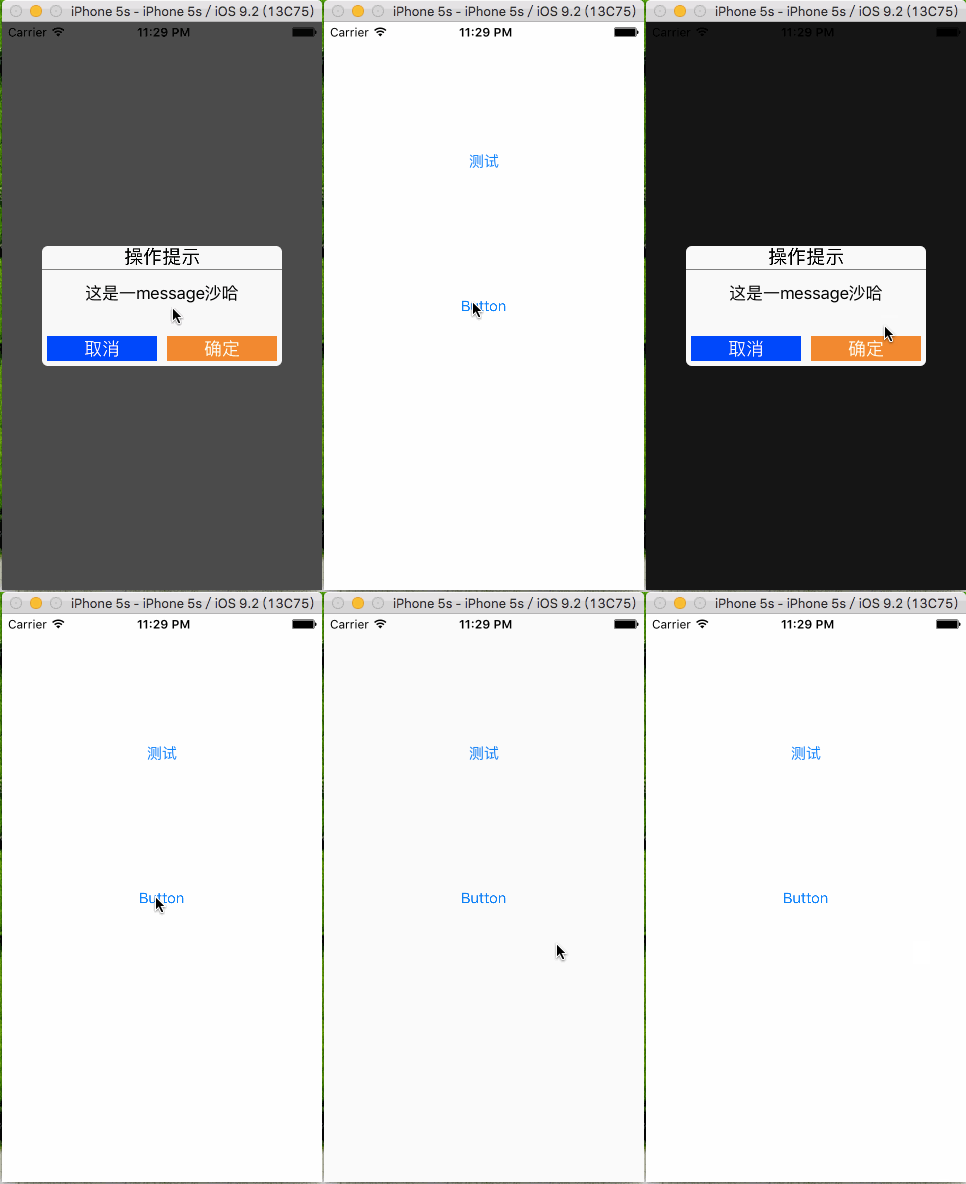
- 利用单例实现丰富的自定义接口
//

//  PBAlertController.h

//  PBAlertDemo

//

//  Created by 裴波波 on 16/4/20.

//  Copyright © 2016年 裴波波. All rights reserved.

//

#import <UIKit/UIKit.h>

typedef void(^PBBlock)();

@interface PBAlertController : UIViewController

/** 设置alertView背景色 */

@property (nonatomic, copy) UIColor *alertBackgroundColor;

/** 设置确定按钮背景色 */

@property (nonatomic, copy) UIColor *btnConfirmBackgroundColor;

/** 设置取消按钮背景色 */

@property (nonatomic, copy) UIColor *btnCancelBackgroundColor;

/** 设置message字体颜色 */

@property (nonatomic, copy) UIColor *messageColor;

/** 创建单例 */

+(instancetype)shareAlertController;

/** 弹出alertView以及点击确定回调的block */

-(void)alertViewControllerWithMessage:(NSString *)message andBlock:(PBBlock) block;

@end
- .m文件中初始化控件以及对alertView的控件的属性进行懒加载,确定初始的颜色.
//

//  PBAlertController.m

//  PBAlertDemo

//

//  Created by 裴波波 on 16/4/20.

//  Copyright © 2016年 裴波波. All rights reserved.

//

#import "PBAlertController.h"

/** 屏幕尺寸 */

#define kMainScreenBounds [UIScreen mainScreen].bounds

@interface PBAlertController ()

/** 蒙版 */

@property (nonatomic, strong) UIView *coverView;

/** 弹框 */

@property (nonatomic, strong) UIView *alertView;

/** 点击确定回调的block */

@property (nonatomic, copy) PBBlock block;

@end

@implementation PBAlertController

- (void)viewDidLoad {

    [super viewDidLoad];

    self.view.backgroundColor = [UIColor whiteColor];

}

-(void)alertViewControllerWithMessage:(NSString *)message andBlock:(PBBlock) block{

    self.block = block;

    //创建蒙版

    UIView * coverView = [[UIView alloc] initWithFrame:kMainScreenBounds];

    self.coverView = coverView;

    [self.view addSubview:coverView];

    coverView.backgroundColor = [UIColor blackColor];

    coverView.alpha = 0.7;

    //创建提示框view

    UIView * alertView = [[UIView alloc] init];

    alertView.backgroundColor = self.alertBackgroundColor;

    //设置圆角半径

    alertView.layer.cornerRadius = 6.0;

    self.alertView = alertView;

    [self.view addSubview:alertView];

    alertView.center = coverView.center;

    alertView.bounds = CGRectMake(0, 0, kMainScreenBounds.size.width * 0.75, kMainScreenBounds.size.width * 0.75 * 1.5/ 3);

    //创建操作提示 label

    UILabel * label = [[UILabel alloc] init];

    [alertView addSubview:label];

    label.text = @"操作提示";

    label.font = [UIFont systemFontOfSize:19];

    label.textAlignment = NSTextAlignmentCenter;

    CGFloat lblWidth = alertView.bounds.size.width;

    CGFloat lblHigth = 22;

    label.frame = CGRectMake(0, 0, lblWidth, lblHigth);

    //创建中间灰色分割线

    UIView * separateLine = [[UIView alloc] init];

    separateLine.backgroundColor = [UIColor grayColor];

    [alertView addSubview:separateLine];

    separateLine.frame = CGRectMake(0, lblHigth + 1, alertView.bounds.size.width, 1);

    //创建message label

    UILabel * lblMessage = [[UILabel alloc] init];

    lblMessage.textColor = self.messageColor;

    [alertView addSubview:lblMessage];

    lblMessage.text = message;

    lblMessage.textAlignment = NSTextAlignmentCenter;

    lblMessage.numberOfLines = 2; //最多显示两行Message

    CGFloat margin = 5;

    CGFloat msgX = margin;

    CGFloat msgY = lblHigth + 3;

    CGFloat msgW = alertView.bounds.size.width - 2 * margin;

    CGFloat msgH = 44;

    lblMessage.frame = CGRectMake(msgX, msgY, msgW, msgH);

    //创建确定 取消按钮

    CGFloat buttonWidth = (alertView.bounds.size.width - 4 * margin) * 0.5;

    CGFloat buttonHigth = 25;

    UIButton * btnCancel = [[UIButton alloc] init];

    [alertView addSubview:btnCancel];

    [btnCancel setTitleColor:[UIColor whiteColor] forState:UIControlStateNormal];

    [btnCancel setTitle:@"取消" forState:UIControlStateNormal];

    [btnCancel setBackgroundColor:self.btnCancelBackgroundColor];

    btnCancel.frame = CGRectMake(margin, alertView.bounds.size.height - margin - buttonHigth, buttonWidth, buttonHigth);

    btnCancel.tag = 0;

    [btnCancel addTarget:self action:@selector(didClickBtnConfirm:) forControlEvents:UIControlEventTouchUpInside];

    //确定按钮

    UIButton * btnConfirm = [[UIButton alloc] init];

    btnConfirm.tag = 1;

    [alertView addSubview:btnConfirm];

    [btnConfirm setTitleColor:[UIColor whiteColor] forState:UIControlStateNormal];

    [btnConfirm setTitle:@"确定" forState:UIControlStateNormal];

    [btnConfirm setBackgroundColor:self.btnConfirmBackgroundColor];

    btnConfirm.frame = CGRectMake(alertView.bounds.size.width - margin - buttonWidth, alertView.bounds.size.height - margin - buttonHigth, buttonWidth, buttonHigth);

    [btnConfirm addTarget:self action:@selector(didClickBtnConfirm:) forControlEvents:UIControlEventTouchUpInside];

}

/** 点击确定 or 取消触发事件 */

-(void)didClickBtnConfirm:(UIButton *)sender{

    if (sender.tag == 0) {

        [self dismissViewControllerAnimated:YES completion:nil];

        return;

    }

    self.block();

    [self dismissViewControllerAnimated:YES completion:nil];

}

- (void)didReceiveMemoryWarning {

    [super didReceiveMemoryWarning];

}

static PBAlertController * instance = nil;

+(instancetype)shareAlertController{

    static dispatch_once_t onceToken;

    dispatch_once(&onceToken, ^{

        instance = [[PBAlertController alloc] init];

    });

    return instance;

}

-(UIColor *)alertBackgroundColor{

    if (_alertBackgroundColor == nil) {

        _alertBackgroundColor = [UIColor colorWithRed:249/255.0 green:249/255.0 blue:249/255.0 alpha:1];

    }

    return _alertBackgroundColor;

}

/** 确定按钮背景色 */

-(UIColor *)btnConfirmBackgroundColor{

    if (_btnConfirmBackgroundColor == nil) {

        _btnConfirmBackgroundColor = [UIColor orangeColor];

    }

    return _btnConfirmBackgroundColor;

}

/** 取消按钮背景色 */

-(UIColor *)btnCancelBackgroundColor{

    if (_btnCancelBackgroundColor == nil) {

        _btnCancelBackgroundColor = [UIColor blueColor];

    }

    return _btnCancelBackgroundColor;

}

/** message字体颜色 */

-(UIColor *)messageColor{

    if (_messageColor == nil) {

        _messageColor = [UIColor blackColor];

    }

   return _messageColor;

}

@end
- 在需要调用的地方进行调用
//

//  ViewController.m

//  PBAlertDemo

//

//  Created by 裴波波 on 16/4/20.

//  Copyright © 2016年 裴波波. All rights reserved.

//

#import "ViewController.h"

#import "PBAlertController.h"

@interface ViewController ()

@end

@implementation ViewController

//点击按钮弹出提示框

- (IBAction)clickShowAlertBtn:(id)sender {

    PBAlertController * alertVc = [PBAlertController shareAlertController];

    alertVc.messageColor = [UIColor redColor];

    [alertVc alertViewControllerWithMessage:@"这是一message沙哈" andBlock:^{

        NSLog(@"点击确定后执行的方法");

    }];

    alertVc.modalTransitionStyle = UIModalTransitionStyleCrossDissolve;

    [self presentModalViewController:alertVc animated:YES];

}

@end
- 源代码demo下载地址,以及使用方法
https://git.oschina.net/alexpei/AlertViewController.git
ios-自定义alertView提示框的更多相关文章
- echarts自定义tooltip提示框内容
1.echarts自定义tooltip提示框内容 https://blog.csdn.net/dreamsup/article/details/56667330 2.关于Echarts的formatt ...
- iOS 开发自定义一个提示框
在开发的时候,会碰到很多需要提示的地方,提示的方法也有很多种,ios 8 以前的版本有alertview还是以后用的alertController,都是这种作用, 但是不够灵活,而且用的多了,用户体验 ...
- iOS自定义AlertView 与 ActionSheet 遮罩提示+弹出动画
产品大人总是能够想到很多让人欣慰的点子,基本所有能提示的地方都要很多文案啊图片之类 由此封装了一个半透明黑色遮罩的alert类(假装有图.jpg) 代码略糙,just share (逃 下载链接
- IOS自定义alertview
在家闲来无事,于是就看起来ios绘图的那块,写点什么好呢? 鼓捣了一会,总算写出了一个小东西 这个是写完以后的效果 这里我实现了三种款式的alertview 分别是成功,错误和警告,剩下的呢有空继续添 ...
- vue2.0移动端自定义性别选择提示框
这篇文章主要是简单的实现了vue2.0移动端自定义性别选择的功能,很简单但是经常用到,于是写了一个小小的demo,记录下来. 效果图: 实现代码: <template> <div c ...
- html自定义提示框
自定义html提示框比较令人困惑的就是编写三角形的样式:以前的实现方式是在标签内使用span标签来实现.不过现在有了css提供的两个为类:before,:after之后,可以不用再内置span标签了: ...
- iOS:提示框(警告框)控件UIAlertView的详解
提示框(警告框)控件:UIAlertView 功能:当点击按钮或标签等时,弹出一个提示框,显示必要的提示,然后通过添加的按钮完成需要的功能. 类型:typedef NS_ENUM(NSInte ...
- iOS -iOS9中提示框(UIAlertController)的常见使用
iOS 8 之前提示框主要使用 UIAlertView和UIActionSheet:iOS 9 将UIAlertView和UIActionSheet合二为一为:UIAlertController . ...
- android自定义弹出框样式实现
前言: 做项目时,感觉Android自带的弹出框样式比较丑,很多应用都是自己做的弹出框,这里也试着自己做了一个. 废话不说先上图片: 实现机制 1.先自定义一个弹出框的样式 2.自己实现CustomD ...
随机推荐
- android-async-http cancelRequests
github地址:https://github.com/loopj/android-async-http 使用上:官方建议使用一个静态的AsyncHttpClient: 1.AsyncHttpClie ...
- tshark (wireshark)笔记
1. dumpcap -i eth0 -q -n -b duration:120 -b files:5000 -s65535 -f "! ip broadcast and ! ip mult ...
- GO语言练习:channel select 超时机制
1.代码 2.运行 3.解析 1.代码 package main import ( "time" "fmt" ) func waitFor(ch chan in ...
- 使用C#实现FTP的文件上传和下载【转】
参考博文:http://blog.163.com/mity_rui@126/blog/static/1098136182013101525615577/
- linux vi 删除多行的方法
dd 删除一行 d$ 删除以当前字符开始的一行字符 ndd 删除以当前行开始的n行 dw 删除以当前字符开始的一个字 ndw 删除以当前字符开始的n个字 D 与d$同义 d) 删除到下一句的开始 d} ...
- javascrit2.0完全参考手册(第二版) 第2章第1节 基本定义
在这里,我们介绍一些将要使用的编程语言术语.表2-1提供了精确定义的概念. Table 2-1: 编程语言的基本术语 名字 定义 例子 Token令牌 最小的不可分割的词汇的语言单位.一个连续的字符序 ...
- [CareerCup] 17.14 Unconcatenate Words 断词
17.14 Oh, no! You have just completed a lengthy document when you have an unfortunate Find/Replace m ...
- SBT Assembly - Deduplicate error & Exclude error
sbt assembly java.lang.RuntimeException: deduplicate: different file contents found in the following ...
- php修改指定文件的指定内容
<?php $origin_str = file_get_contents('路径/文件.txt'); $update_str = str_replace('qwe=0', 'qwe=1', $ ...
- 一些变态的PHP一句话后门收集
这类后门让网站.服务器管理员很是头疼,经常要换着方法进行各种检测,而很多新出现的编写技术,用普通的检测方法是没法发现并处理的.今天我们细数一些有意思的PHP一句话木马. 利用404页面隐藏PHP小马 ...