
ES实战-桶查询
目的
研究聚合查询的BUCKETS桶·到底是如何计算?

PS:es版本为7.8.1
Bucket概念
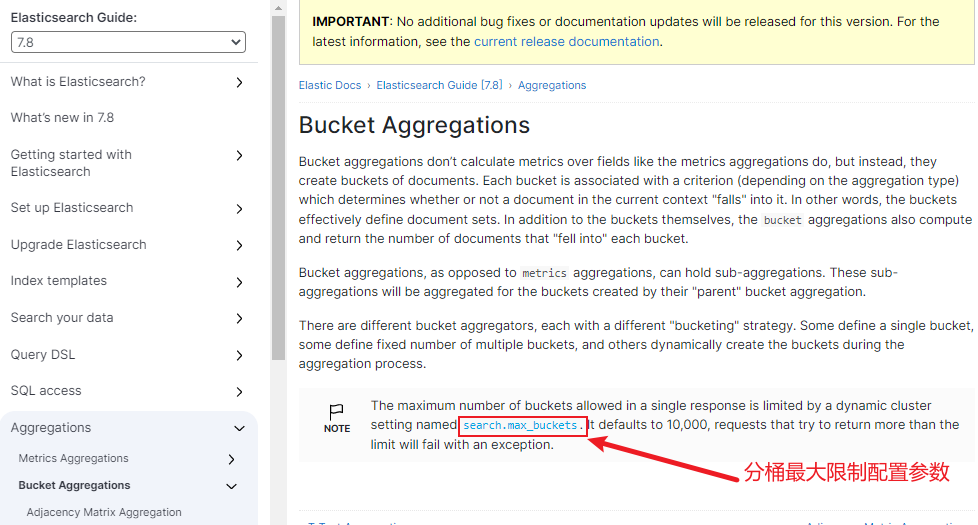
关于es聚合查询,官方介绍,可以参考 es聚合查询-bucket。
有道翻译:
桶聚合不像指标聚合那样计算字段的指标,相反,它们创建文档的桶。每个桶都与一个标准相关联(取决于聚合类型),该标准确定当前上下文中的文档是否“属于”它。换句话说,存储桶有效地定义了文档集。除了存储桶本身,存储桶聚合还计算并返回“落入”每个存储桶的文档数量。

与度量聚合相反,桶聚合可以容纳子聚合。这些子聚合将为它们的“父”桶聚合所创建的桶聚合。

有不同的桶聚合器,每个都有不同的“桶”策略。有的定义单个桶,有的定义固定数量的多个桶,还有的在聚合过程中动态创建桶。

备注:单个响应中允许的最大桶数受名为search.max_buckets的动态集群设置限制。它默认为10,000,尝试返回超过限制的请求将失败并出现异常。
search.max_buckets
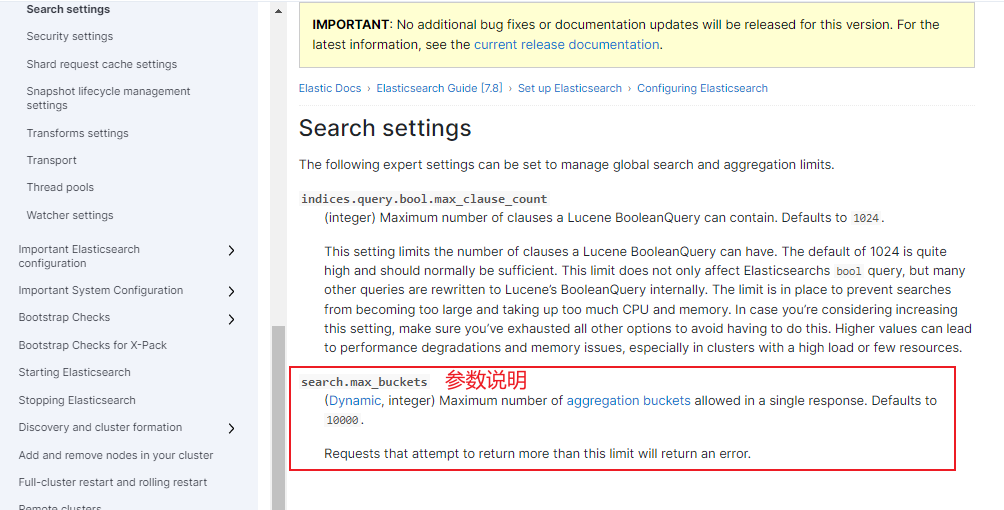
官网看下search.max_buckets这个参数:
有道翻译:
search.max_buckets

(Dynamic, integer)单个响应中允许的最大聚合桶数。默认值为10000。

Requests that attempt to return more than this limit will return an error.

试图返回超过此限制的请求将返回错误。
缘起
在一次排查问题中,遇到如下报错日志:
trying to create too many buckets. must be less than or equal to: [10000] but was [10001].
关于以上问题的分析以及原因可参看我的这篇实战分析博文进行了解:trying to create too many buckets,本篇博文,我主要是要来验证一下search.max_buckets这个配置项的计算桶的个数究竟是如何进行统计算桶数的。
数据准备
1、创建测试索引库(PUT请求)
注意:此处建库有一定数据倾向性,多数字段mapping我设置了字段存储类型为keyword类型,是为了后面方便测试聚合操作,原因是keyword类型的数据可以满足类似名称、类别、状态码、邮政编码和标签等数据的要求,不进行分词,常常被用来过滤、排序和聚合。
如下:我构建一个用于测试聚合分桶查询的手机信息索引库,用于演示我下面的操作使用。
localhost:9200/phones_test_bucket

{

    "mappings": {

        "properties": {

            "name": {

                "type": "keyword"

            },

            "price": {

                "type": "long"

            },

            "color": {

                "type": "keyword"

            },

            "size": {

                "type": "long"

            },

            "category": {

                "type": "keyword"

            },

            "label": {

                "type": "keyword"

            },

            "release_date": {

                "type": "date"

            }

        }

    }

}

===返回===

    {

    "acknowledged": true,

    "shards_acknowledged": true,

    "index": "phones_test_bucket"

}
2、添加模拟数据
下面我将根据手机名称,颜色,类别进行聚合分桶查询,然后通过更改search.max_buckets的配置参数来验证分桶参数的取值关系。
localhost:9200/phones_test_bucket/_bulk

{"index":{}}

{"name":"小米","price":3400,"color":"白色","size":6.21,"category":"标准版","label":"性价比1","release_date":"2023-02-06"}

{"index":{}}

{"name":"小米","price":3400,"color":"白色","size":6.21,"category":"升级版","label":"性价比2","release_date":"2023-03-06"}

{"index":{}}

{"name":"小米","price":2400,"color":"黑色","size":6.21,"category":"升级版","label":"性价比3","release_date":"2023-02-06"}

{"index":{}}

{"name":"小米","price":3400,"color":"黑色","size":6.21,"category":"标准版","label":"性价比4","release_date":"2023-03-06"}

{"index":{}}

{"name":"苹果","price":2400,"color":"远峰蓝色","size":6.21,"category":"标准版","label":"流畅","release_date":"2023-02-06"}

{"index":{}}

{"name":"华为","price":5200,"color":"白色","size":6.21,"category":"标准版","label":"高端1","release_date":"2023-03-06"}

{"index":{}}

{"name":"华为","price":5200,"color":"黑色","size":6.21,"category":"标准版","label":"高端2","release_date":"2023-04-06"}

{"index":{}}

{"name":"华为","price":5900,"color":"黑色","size":6.21,"category":"升级版","label":"高端3","release_date":"2023-05-06"}

{"index":{}}

{"name":"华为","price":5900,"color":"白色","size":6.21,"category":"升级版","label":"高端4","release_date":"2023-05-06"}
3、分桶参数设置
在开始测试之前,我们需要关注下search.max_buckets这个参数的设置API,在一开始我就截图了,官网对这个参数说明的默认值是10000(我的es版本是7.8.1),截至我写这篇博文时,es最新版本已经更新到8.6,感兴趣可以去官网看看,8.6版本分桶参数说明了,此参数的默认值也变更了,变更为65536。
修改es分桶最大配置(PUT请求)

http://127.0.0.1:9200/_cluster/settings

{

  "persistent": {

    "search.max_buckets": 2

  }

}

===返回===

    {

    "acknowledged": true,

    "persistent": {

        "search": {

            "max_buckets": "2"

        }

    },

    "transient": {}

}

修改查看分桶最大配置(GET请求)

http://127.0.0.1:9200/_cluster/settings

//无请求参数

====返回====

{

    "persistent": {

        "search": {

            "max_buckets": "2"

        }

    },

    "transient": {}

}
4、测试
1、第一组测试
单字段分组-最大分桶2-结果失败
http://127.0.0.1:9200/phones_test_bucket/_search

// 第一组数据,"max_buckets": "2"的情况下,分组失败

{

    "size":0,

    "aggs":{

        "group_by_name":{

            "terms":{

                "field":"name"

            }

        }

    }

}

===返回====

{

    "error": {

        "root_cause": [

            {

                "type": "too_many_buckets_exception",

                "reason": "Trying to create too many buckets. Must be less than or equal to: [2] but was [3]. This limit can be set by changing the [search.max_buckets] cluster level setting.",

                "max_buckets": 2

            }

        ],

        "type": "search_phase_execution_exception",

        "reason": "all shards failed",

        "phase": "query",

        "grouped": true,

        "failed_shards": [

            {

                "shard": 0,

                "index": "phones_test_bucket",

                "node": "UuMcBk37TNWHjY4hVtzyVA",

                "reason": {

                    "type": "too_many_buckets_exception",

                    "reason": "Trying to create too many buckets. Must be less than or equal to: [2] but was [3]. This limit can be set by changing the [search.max_buckets] cluster level setting.",

                    "max_buckets": 2

                }

            }

        ]

    },

    "status": 503

}
单字段分组-最大分桶数3-结果成功
http://127.0.0.1:9200/phones_test_bucket/_search

// 第一组数据,"max_buckets": "3"的情况下,分组成功

{

    "size":0,

    "aggs":{

        "group_by_name":{

            "terms":{

                "field":"name"

            }

        }

    }

}

===返回结果===

{

    "took": 32,

    "timed_out": false,

    "_shards": {

        "total": 1,

        "successful": 1,

        "skipped": 0,

        "failed": 0

    },

    "hits": {

        "total": {

            "value": 9,

            "relation": "eq"

        },

        "max_score": null,

        "hits": []

    },

    "aggregations": {

        "group_by_name": {

            "doc_count_error_upper_bound": 0,

            "sum_other_doc_count": 0,

            "buckets": [

                {

                    "key": "华为",

                    "doc_count": 4

                },

                {

                    "key": "小米",

                    "doc_count": 4

                },

                {

                    "key": "苹果",

                    "doc_count": 1

                }

            ]

        }

    }

}
2、第二组测试
多字段分组-最大分桶7-结果失败
http://127.0.0.1:9200/phones_test_bucket/_search

// 多字段分组查询,name+color,第二组,"max_buckets": "7"的情况下,分组失败

{

    "aggs": {

        "group_by_name": {

            "terms": {

                "field": "name"

            },

            "aggs": {

                "group_by_color": {

                    "terms": {

                        "field": "color"

                    }

                }

            }

        }

    }

}

===返回===

{

    "error": {

        "root_cause": [

            {

                "type": "too_many_buckets_exception",

                "reason": "Trying to create too many buckets. Must be less than or equal to: [7] but was [8]. This limit can be set by changing the [search.max_buckets] cluster level setting.",

                "max_buckets": 7

            }

        ],

        "type": "search_phase_execution_exception",

        "reason": "all shards failed",

        "phase": "query",

        "grouped": true,

        "failed_shards": [

            {

                "shard": 0,

                "index": "phones_test_bucket",

                "node": "UuMcBk37TNWHjY4hVtzyVA",

                "reason": {

                    "type": "too_many_buckets_exception",

                    "reason": "Trying to create too many buckets. Must be less than or equal to: [7] but was [8]. This limit can be set by changing the [search.max_buckets] cluster level setting.",

                    "max_buckets": 7

                }

            }

        ]

    },

    "status": 503

}
多字段分组-最大分桶8-结果成功
http://127.0.0.1:9200/phones_test_bucket/_search

// 多字段分组查询,name+color,第二组,"max_buckets": "8"的情况下,分组成功

{

    "size":0,

    "aggs": {

        "group_by_name": {

            "terms": {

                "field": "name"

            },

            "aggs": {

                "group_by_color": {

                    "terms": {

                        "field": "color"

                    }

                }

            }

        }

    }

}

===返回===

    {

    "took": 2,

    "timed_out": false,

    "_shards": {

        "total": 1,

        "successful": 1,

        "skipped": 0,

        "failed": 0

    },

    "hits": {

        "total": {

            "value": 9,

            "relation": "eq"

        },

        "max_score": null,

        "hits": []

    },

    "aggregations": {

        "group_by_name": {

            "doc_count_error_upper_bound": 0,

            "sum_other_doc_count": 0,

            "buckets": [

                {

                    "key": "华为",

                    "doc_count": 4,

                    "group_by_color": {

                        "doc_count_error_upper_bound": 0,

                        "sum_other_doc_count": 0,

                        "buckets": [

                            {

                                "key": "白色",

                                "doc_count": 2

                            },

                            {

                                "key": "黑色",

                                "doc_count": 2

                            }

                        ]

                    }

                },

                {

                    "key": "小米",

                    "doc_count": 4,

                    "group_by_color": {

                        "doc_count_error_upper_bound": 0,

                        "sum_other_doc_count": 0,

                        "buckets": [

                            {

                                "key": "白色",

                                "doc_count": 2

                            },

                            {

                                "key": "黑色",

                                "doc_count": 2

                            }

                        ]

                    }

                },

                {

                    "key": "苹果",

                    "doc_count": 1,

                    "group_by_color": {

                        "doc_count_error_upper_bound": 0,

                        "sum_other_doc_count": 0,

                        "buckets": [

                            {

                                "key": "远峰蓝色",

                                "doc_count": 1

                            }

                        ]

                    }

                }

            ]

        }

    }

}
3、第三组测试
多字段分组-最大分桶16-结果失败
http://127.0.0.1:9200/phones_test_bucket/_search

// 多字段分组查询,name+color,第三组,"max_buckets": "17"的情况下,分组成功

{

    "size":0,

    "aggs": {

        "group_by_name": {

            "terms": {

                "field": "name"

            },

            "aggs": {

                "group_by_color": {

                    "terms": {

                        "field": "color"

                    },

                          "aggs": {

                "group_by_category": {

                    "terms": {

                        "field": "category"

                    }

                }

            }

                }

            }

        }

    }

}

===返回===

{

    "error": {

        "root_cause": [],

        "type": "search_phase_execution_exception",

        "reason": "",

        "phase": "fetch",

        "grouped": true,

        "failed_shards": [],

        "caused_by": {

            "type": "too_many_buckets_exception",

            "reason": "Trying to create too many buckets. Must be less than or equal to: [16] but was [17]. This limit can be set by changing the [search.max_buckets] cluster level setting.",

            "max_buckets": 16

        }

    },

    "status": 503

}
多字段分组-最大分桶17-结果成功
http://127.0.0.1:9200/phones_test_bucket/_search

// 多字段分组查询,name+color,第三组,"max_buckets": "17"的情况下,分组成功

{

    "size":0,

    "aggs": {

        "group_by_name": {

            "terms": {

                "field": "name"

            },

            "aggs": {

                "group_by_color": {

                    "terms": {

                        "field": "color"

                    },

                          "aggs": {

                "group_by_category": {

                    "terms": {

                        "field": "category"

                    }

                }

            }

                }

            }

        }

    }

}

===返回===

{

    "took": 2,

    "timed_out": false,

    "_shards": {

        "total": 1,

        "successful": 1,

        "skipped": 0,

        "failed": 0

    },

    "hits": {

        "total": {

            "value": 9,

            "relation": "eq"

        },

        "max_score": null,

        "hits": []

    },

    "aggregations": {

        "group_by_name": {

            "doc_count_error_upper_bound": 0,

            "sum_other_doc_count": 0,

            "buckets": [

                {

                    "key": "华为",

                    "doc_count": 4,

                    "group_by_color": {

                        "doc_count_error_upper_bound": 0,

                        "sum_other_doc_count": 0,

                        "buckets": [

                            {

                                "key": "白色",

                                "doc_count": 2,

                                "group_by_category": {

                                    "doc_count_error_upper_bound": 0,

                                    "sum_other_doc_count": 0,

                                    "buckets": [

                                        {

                                            "key": "升级版",

                                            "doc_count": 1

                                        },

                                        {

                                            "key": "标准版",

                                            "doc_count": 1

                                        }

                                    ]

                                }

                            },

                            {

                                "key": "黑色",

                                "doc_count": 2,

                                "group_by_category": {

                                    "doc_count_error_upper_bound": 0,

                                    "sum_other_doc_count": 0,

                                    "buckets": [

                                        {

                                            "key": "升级版",

                                            "doc_count": 1

                                        },

                                        {

                                            "key": "标准版",

                                            "doc_count": 1

                                        }

                                    ]

                                }

                            }

                        ]

                    }

                },

                {

                    "key": "小米",

                    "doc_count": 4,

                    "group_by_color": {

                        "doc_count_error_upper_bound": 0,

                        "sum_other_doc_count": 0,

                        "buckets": [

                            {

                                "key": "白色",

                                "doc_count": 2,

                                "group_by_category": {

                                    "doc_count_error_upper_bound": 0,

                                    "sum_other_doc_count": 0,

                                    "buckets": [

                                        {

                                            "key": "升级版",

                                            "doc_count": 1

                                        },

                                        {

                                            "key": "标准版",

                                            "doc_count": 1

                                        }

                                    ]

                                }

                            },

                            {

                                "key": "黑色",

                                "doc_count": 2,

                                "group_by_category": {

                                    "doc_count_error_upper_bound": 0,

                                    "sum_other_doc_count": 0,

                                    "buckets": [

                                        {

                                            "key": "升级版",

                                            "doc_count": 1

                                        },

                                        {

                                            "key": "标准版",

                                            "doc_count": 1

                                        }

                                    ]

                                }

                            }

                        ]

                    }

                },

                {

                    "key": "苹果",

                    "doc_count": 1,

                    "group_by_color": {

                        "doc_count_error_upper_bound": 0,

                        "sum_other_doc_count": 0,

                        "buckets": [

                            {

                                "key": "远峰蓝色",

                                "doc_count": 1,

                                "group_by_category": {

                                    "doc_count_error_upper_bound": 0,

                                    "sum_other_doc_count": 0,

                                    "buckets": [

                                        {

                                            "key": "标准版",

                                            "doc_count": 1

                                        }

                                    ]

                                }

                            }

                        ]

                    }

                }

            ]

        }

    }

}
测试结论
以第三组测试数据为例子,按名称+颜色+类别进行聚合分组,最终发现临界值出现在max_buckets为17,那这个17是怎么算的,为甚设置17就可以查出来,设置max_buckets为16就报Trying to create too many buckets错呢。来,我画了一张分桶模拟图,动动你的小手,我们来数一数。
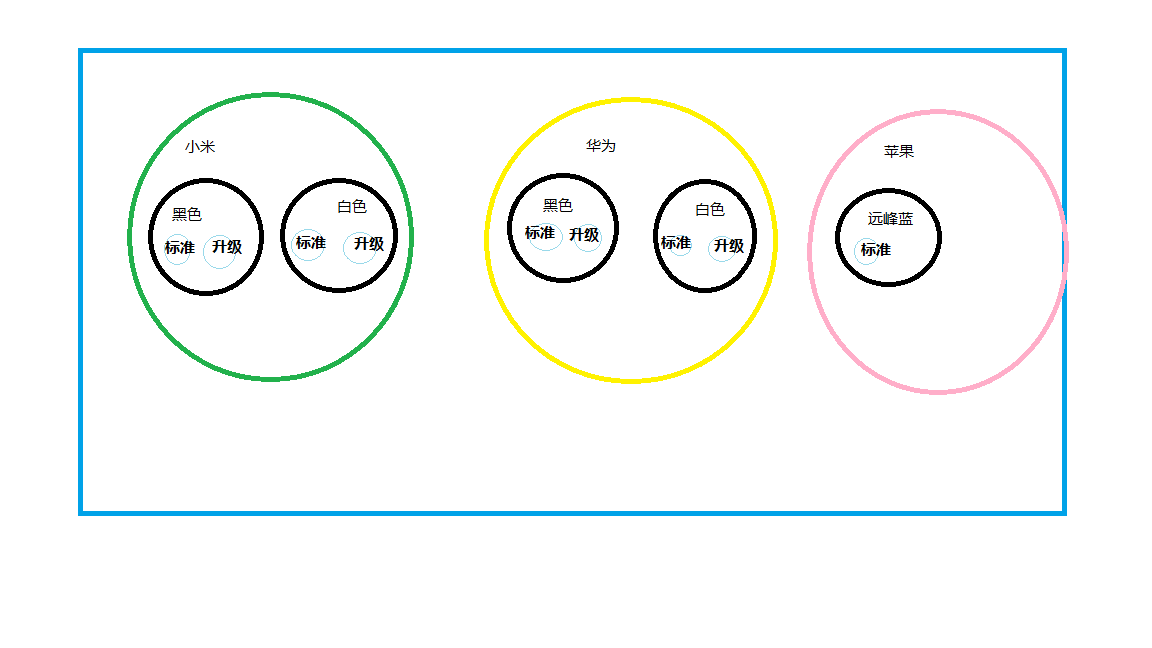
结合我上面测试的返回值,看一下,结果是不是正好对应了17个桶,想必到这里你应该也知道分桶的个数到底是怎么计算的了吧。
测试结论:es聚合分组的桶数计算规则,具体分了多少桶,是和数据相关的,数据异同越大,

分桶数目越多,对于多字段嵌套查询,嵌套的层数越深,分桶数越大。所以不建议大量字

段嵌套进行聚合查询,容易引发分桶爆炸,触发熔断查询。
ES实战-桶查询的更多相关文章
- es实战之查询大量数据
背景 项目中已提供海量日志数据的多维实时查询,客户提出新需求:将数据导出. 将数据导出分两步: 查询大量数据 将数据生成文件并下载 本文主要探讨第一步,在es中查询大量数据或者说查询大数据集. es支 ...
- es实战之数据导出成csv文件
从es将数据导出分两步: 查询大量数据 将数据生成文件并下载 本篇主要是将第二步,第一步在<es实战之查询大量数据>中已讲述. csv vs excel excel2003不能超过6553 ...
- 1W字|40 图|硬核 ES 实战
前言 上篇我们讲到了 Elasticsearch 全文检索的原理<别只会搜日志了,求你懂点检索原理吧>,通过在本地搭建一套 ES 服务,以多个案例来分析了 ES 的原理以及基础使用.这次我 ...
- 【Elasticsearch】ES中时间查询报错:Caused by: ElasticsearchParseException[failed to parse date field [Sun Dec 31 16:00:00 UTC 2017] with format [yyyy-MM-dd HH:mm:ss||yyyy-MM-dd||epoch_millis]];
ES中时间查询报错:Caused by: ElasticsearchParseException[failed to parse date field [Sun Dec 31 16:00:00 UTC ...
- ES 07 - Elasticsearch查询文档的六种方法
目录 1 Query String Search(查询串检索) 2 Query DSL(ES特定语法检索) 3 Query Filter(过滤检索) 4 Full Text Search(全文检索) ...
- ES系列九、ES优化聚合查询之深度优先和广度优先
1.优化聚合查询示例 假设我们现在有一些关于电影的数据集,每条数据里面会有一个数组类型的字段存储表演该电影的所有演员的名字. { "actors" : [ "Fred J ...
- 在es中用scroll查询与completableFuture
一般而言,es返回数据的上限是10000条,如果超过这个数量,就必须使用scroll查询. 所谓scroll查询就类似DBMS中的游标,或者快照吧,利用查询条件,在第一次查询时,在所有的结果上形成了一 ...
- ES开启慢查询日志
默认情况,慢日志是不开启的.要开启它,需要定义具体动作(query,fetch 还是 index),你期望的事件记录等级( WARN.INFO.DEBUG.TRACE 等),以及时间阈值. es有几种 ...
- ES 调优查询亿级数据毫秒级返回!怎么做到的?--文件系统缓存
一道面试题的引入: 如果面试的时候碰到这样一个面试题:ElasticSearch(以下简称ES) 在数据量很大的情况下(数十亿级别)如何提高查询效率? 这个问题说白了,就是看你有没有实际用过 ES,因 ...
- ES的索引查询和删除
postman 1.查看es状态 get http://127.0.0.1:9200/_cat/health 红色表示数据不可用,黄色表示数据可用,部分副本没有分配,绿色表示一切正常 2.查看所有索引 ...
随机推荐
- 二分查找 & 移除元素
一.二分查找 704.二分查找 leetcode链接 1.二分查找方法概述 二分查找是针对有序数组的一种查找方式.是利用(letf+right)/2 = mid的方式来对半缩短搜索范围的一种方法,一次 ...
- 三分钟实战手写Spring Boot Starter
1 背景 在平时的开发中,开发的同学会把一些通用的方法,写成一个工具类,例如日期转换的,JSON转换的等等,方便业务后续调用,使代码更容易维护. 如果一些更常用的方法,例如鉴权的,加解密的等等,几乎每 ...
- python下载图片实现方法
转载: https://www.jb51.net/article/119178.htm
- Fastjson Sec
Fastjson 前置知识 autoType功能 序列化:fastjson在通过JSON.toJSONString()将对象转换为字符串的时候,当使用SerializerFeature.WriteCl ...
- Java开发中要避免的坑和一些代码优化技巧
1:动态SQL遇到的坑,先看下面OGNL表达式的说明. Any object can be used where a boolean is required. OGNL interprets obje ...
- 用C++ 弹奏武侠音乐:沧海一声笑
前言: 参照网路代码,用编程语言来弹奏一首音乐,搞点轻松的 原文:点击此处 完整代码: 以下为Visual Stuido 2022测试可用,控制台程序.运行之后,会自动弹奏沧海一声笑,并且出现歌词.主 ...
- 看完这一篇,ShardingSphere-jdbc 实战再也不怕了
谈到分库分表中间件时,我们自然而然的会想到 ShardingSphere-JDBC . 这篇文章,我们聊聊 ShardingSphere-JDBC 相关知识点,并实战演示一番. 1 ShardingS ...
- ABP微服务系列学习-搭建自己的微服务结构(三)
上一篇我们基础服务初步搭建完毕,接下来我们整一下认证和网关. 搭建认证服务 认证服务的话,ABP CLI生成的所有模板都包括了一个AuthServer.我们直接生成模板然后微调一下就可以直接用了. a ...
- 【博图scl语言】313-2dp
①如果 if(***) then *** := ***; end_if; ②循环 for n1:=1 to 50 by 1 do end_for; WHILE #n1 < 54 DO END_W ...
- 【C学习笔记】day5-2 写代码可以在整型有序数组中查找想要的数字, 找到了返回下标,找不到返回-1.(折半查找)
#include <stdio.h> #include <stdlib.h> int find(int s) { int n = 0; scanf_s("%d&quo ...