
运行python脚本报错:selenium.common.exceptions.SessionNotCreatedException: Message: session not created
运行python脚本报错:selenium.common.exceptions.SessionNotCreatedException: Message: session not created
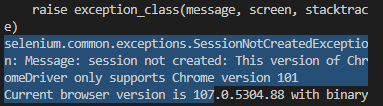
原因:ChromeDriver版本与浏览器版本不匹配。
解决方法:重新下载适配的ChromeDriver。
ChromeDriver下载路径:https://registry.npmmirror.com/binary.html?path=chromedriver/
1.选择适配的版本进行下载
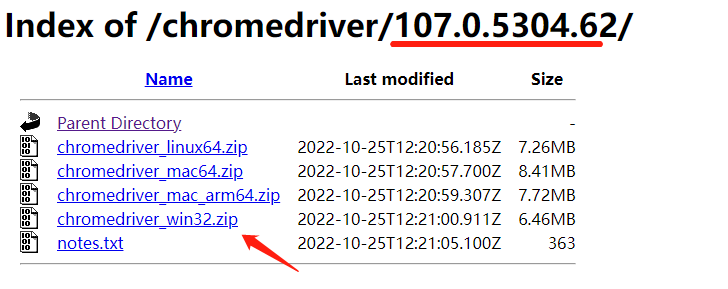
2.找到python的安装路径
以win10为例:打开cmd--输入命令where Python--按下Enter键,可查看python安装路径
3.将下载好的ChromeDriver的zip版本进行解压
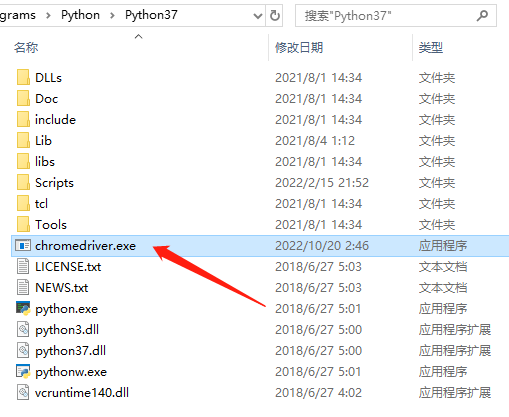
4.将解压后的 chromedriver.exe 放到 python的安装路径即可
运行python脚本报错:selenium.common.exceptions.SessionNotCreatedException: Message: session not created的更多相关文章
- appium常见问题03_appium脚本报错selenium.common.exceptions.WebDriverException
运行appium脚本时报错selenium.common.exceptions.WebDriverException...,如下截图: 该报错说明appium和app的内置chrome版本不一致 [解 ...
- python无法启动火狐浏览器且报错“selenium.common.exceptions.WebDriverException: Message: Unable to find a matching set of capabilities”
安装了python2,使用pip安装了selenium,但是在使用时,报了“selenium.common.exceptions.WebDriverException: Message: 'gecko ...
- robotframework执行用例时,报错selenium.common.exceptions.WebDriverException: Message: unknown error: cannot get automation extension from unknown error: page could not be found: chrome-extension://aapnijgdinl
在用robotframework编写移动端测试用例(用chrome浏览器模拟手机浏览器),执行用例时, 报错selenium.common.exceptions.WebDriverException: ...
- selenium使用报错“selenium.common.exceptions.WebDriverException: Message: 'geckodriver' executable needs to be in PATH.”
安装了python3,使用pip安装了selenium,但是在使用时,报了“selenium.common.exceptions.WebDriverException: Message: 'gecko ...
- windows下使用selenium报错selenium.common.exceptions.WebDriverException: Message: 'geckodriver' executable needs to be in PATH
问题 :执行程序代码报错: WebDriverException:Message:'geckodriver'executable needs to be in Path 或者 selenium.com ...
- Windows下运行python脚本报错“ImportError: No Module named ...”的解决方法
之前遇到一个问题,在Pycharm或IPython之类的IDE上运行脚本正常,但是直接运行或cmd命令行运行的时候报了模块未能找到的错误--ImportError: No Module named . ...
- “selenium.common.exceptions.SessionNotCreatedException: Message: Unable to find a matching set of capabilities“解决办法
问题: 原因:firefox浏览器版本和浏览器驱动版本不匹配 解决办法:卸载高版本浏览器,安装低版本浏览器 下载地址:http://ftp.mozilla.org/pub/firefox/releas ...
- 错误:selenium.common.exceptions.SessionNotCreatedException: Message: Unable to find a matching set of capabilities
错误再现 原因:firefox浏览器版本和浏览器驱动版本不匹配 解决办法:卸载高版本浏览器,安装低版本浏览器
- selenium.common.exceptions.WebDriverException: Message: 'geckodriver' executable needs to be in PATH. 错误处理方法
首次使用selenium webdriver,webdriver.Firefox() 报错selenium.common.exceptions.WebDriverException: Message: ...
- 如何解决错误【selenium.common.exceptions.SessionNotCreatedException】
如何解决错误[selenium.common.exceptions.SessionNotCreatedException] [问题起因] 2018年12月26日晚,启动我的pycharm准备学习s ...
随机推荐
- java.3 Java数据类型1
数据类型讲解 Java属于强类型语言 即要求变量的使用要严格符合规定,所有变量都必须严格定义以后才能使用 优点:安全性高 缺点:速度慢(相对而言) Java数据类型分为引用类型和基本类型 基本数据类型 ...
- 最简单的asp验证码
<%Public Function BornVerifyCode() Randomize '设置随机因子 BornVerifyCode=Mid((Rnd * 10 ...
- vue-quill-editor 图片上传处理
<template> <div class="quill-editor"> <!-- 图片上传组件辅助--> <el-upload cla ...
- SpringBoot多数据源详细配置与使用(包含数据源和事务配置)
SpringBoot项目数据库配置文件中配置多个数据源: #********* primary jdbc ************************** spring.datasource.dr ...
- Expected indentation of 2 spaces but found 4
预期缩进2个空格,但发现4个 把缩进空格修改后如图
- 暑假学习四 8.26 Hadoop的简单使用
先说今日情况,本来打算返校结果回不去,然后身体差发烧了,就随便学了一些东西,阑尾炎还是好疼. 有一说一,我觉得我的电脑真的有点拉啊,三台虚拟机开启之后,运存直接90%,呜呜响,和我本人情况一样,麻了 ...
- code的用法
今天写程序的时候用了const,想到之前遇到的code的用法,那是第一次遇到code的那样的用法,查了一下,解释如下: 在单片机使用C语言进行编程的时候,经常使用到code.code是keil C51 ...
- 小程序ios设置map圆角不生效的问题解决方案
给map组件加个view外框,设置如下样式即可 border-radius:10rpx; overflow:hidden; transform: translateY(0);
- holiday08
第八天 管道 linux允许将 一个命令的输出 可以 通过管道 作为 另一个命令的输入 ls -lh | more 可以理解现实生活中的管子,管子一头塞东西进去,另一头取出来,这里 | 的左右分为两端 ...
- Java-Excel表数据转List对象->导入数据库
1 import java.io.File; 2 import java.io.FileInputStream; 3 import java.util.ArrayList; 4 import java ...