
矩池云 | 教你如何使用GAN为口袋妖怪上色
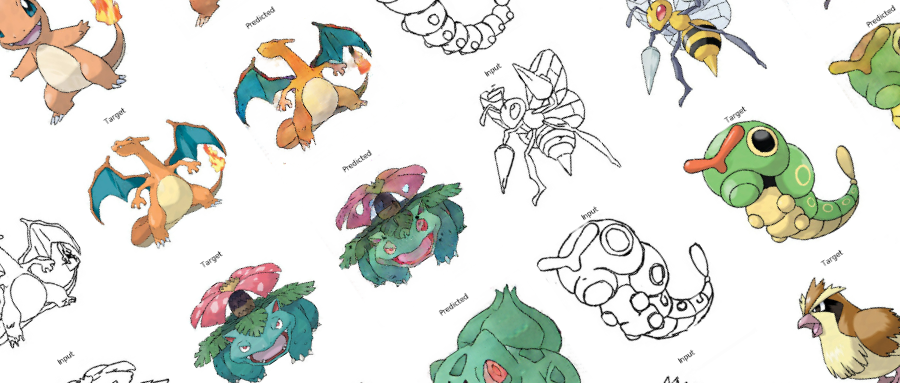
在之前的Demo中,我们使用了条件GAN来生成了手写数字图像。那么除了生成数字图像以外我们还能用神经网络来干些什么呢?
在本案例中,我们用神经网络来给口袋妖怪的线框图上色。
第一步: 导入使用库
from __future__ import absolute_import, division, print_function, unicode_literals

import tensorflow as tf

tf.enable_eager_execution()

import numpy as np

import pandas as pd

import os

import time

import matplotlib.pyplot as plt

from IPython.display import clear_output
口袋妖怪上色的模型训练过程中,需要比较大的显存。为了保证我们的模型能在2070上顺利的运行,我们限制了显存的使用量为90%, 来避免显存不足的引起的错误。
config = tf.compat.v1.ConfigProto()

config.gpu_options.per_process_gpu_memory_fraction = 0.9

session = tf.compat.v1.Session(config=config)
定义需要使用到的常量。
BUFFER_SIZE = 400

BATCH_SIZE = 1

IMG_WIDTH = 256

IMG_HEIGHT = 256

PATH = 'dataset/'

OUTPUT_CHANNELS = 3

LAMBDA = 100

EPOCHS = 10
第二步: 定义需要使用的函数
图片数据加载函数,主要的作用是使用Tensorflow的io接口读入图片,并且放入tensor的对象中,方便后续使用
def load(image_file):

    image = tf.io.read_file(image_file)

    image = tf.image.decode_jpeg(image)

    w = tf.shape(image)[1]

    w = w // 2

    input_image = image[:, :w, :]

    real_image = image[:, w:, :]

    input_image = tf.cast(input_image, tf.float32)

    real_image = tf.cast(real_image, tf.float32)

    return input_image, real_image
tensor对象转成numpy对象的函数
在训练过程中,我会可视化一些训练的结果以及中间状态的图片。Tensorflow的tensor对象无法直接在matplot中直接使用,因此我们需要一个函数,将tensor转成numpy对象。
def tensor_to_array(tensor1):

    return tensor1.numpy()
第三步: 数据可视化
我们先来看下我们的训练数据长成什么样。
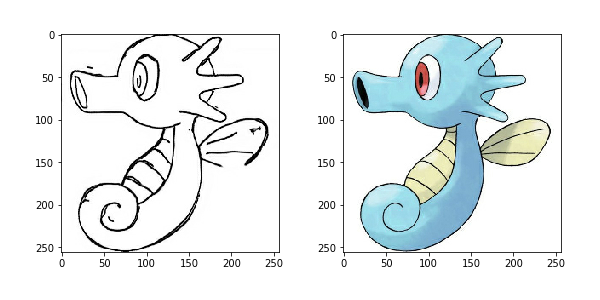
我们每张数据图片分成了两个部分,左边部分是线框图,我们用来作为输入数据,右边部分是上色图,我们用来作为训练的目标图片。
我们使用上面定义的load函数来加载一张图片看下
input, real = load(PATH+'train/114.jpg')

plt.figure()

plt.imshow(tensor_to_array(input)/255.0)

plt.figure()

plt.imshow(tensor_to_array(real)/255.0)
第四步: 数据增强
由于我们的训练数据不够多,我们使用数据增强来增加我们的样本。从而让小样本的数据也能达到更好的效果。
我们采取如下的数据增强方案:
- 图片缩放, 将输入数据的图片缩放到我们指定的图片的大小
- 随机裁剪
- 数据归一化
- 左右翻转
def resize(input_image, real_image, height, width):

    input_image = tf.image.resize(input_image, [height, width], method=tf.image.ResizeMethod.NEAREST_NEIGHBOR)

    real_image = tf.image.resize(real_image, [height, width], method=tf.image.ResizeMethod.NEAREST_NEIGHBOR)

    return input_image, real_image
def random_crop(input_image, real_image):

    stacked_image = tf.stack([input_image, real_image], axis=0)

    cropped_image = tf.image.random_crop(stacked_image, size=[2, IMG_HEIGHT, IMG_WIDTH, 3])

    return cropped_image[0], cropped_image[1]
def random_crop(input_image, real_image):

    stacked_image = tf.stack([input_image, real_image], axis=0)

    cropped_image = tf.image.random_crop(stacked_image, size=[2, IMG_HEIGHT, IMG_WIDTH, 3])

    return cropped_image[0], cropped_image[1]
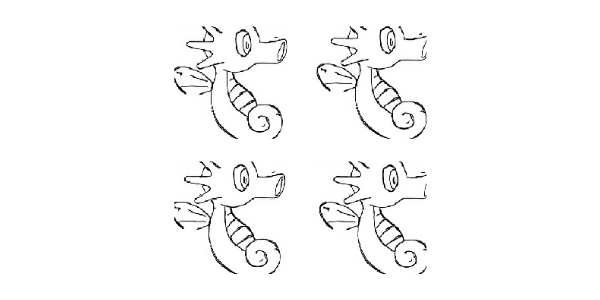
我们将上述的增强方案做成一个函数,其中左右翻转是随机进行
@tf.function()

def random_jitter(input_image, real_image):

    input_image, real_image = resize(input_image, real_image, 286, 286)

    input_image, real_image = random_crop(input_image, real_image)

    if tf.random.uniform(()) > 0.5:

        input_image = tf.image.flip_left_right(input_image)

        real_image = tf.image.flip_left_right(real_image)

    return input_image, real_image
数据增强的效果
plt.figure(figsize=(6, 6))

for i in range(4):

    input_image, real_image = random_jitter(input, real)

    plt.subplot(2, 2, i+1)

    plt.imshow(tensor_to_array(input_image)/255.0)

    plt.axis('off')

plt.show()
第五步: 训练数据的准备
定义训练数据跟测试数据的加载函数
def load_image_train(image_file):

    input_image, real_image = load(image_file)

    input_image, real_image = random_jitter(input_image, real_image)

    input_image, real_image = normalize(input_image, real_image)

    return input_image, real_image
def load_image_test(image_file):

    input_image, real_image = load(image_file)

    input_image, real_image = resize(input_image, real_image, IMG_HEIGHT, IMG_WIDTH)

    input_image, real_image = normalize(input_image, real_image)

    return input_image, real_image
使用tensorflow的DataSet来加载训练和测试数据, 定义我们的训练数据跟测试数据集对象
train_dataset = tf.data.Dataset.list_files(PATH+'train/*.jpg')

train_dataset = train_dataset.map(load_image_train, num_parallel_calls=tf.data.experimental.AUTOTUNE)

train_dataset = train_dataset.cache().shuffle(BUFFER_SIZE)

train_dataset = train_dataset.batch(1)
test_dataset = tf.data.Dataset.list_files(PATH+'test/*.jpg')

test_dataset = test_dataset.map(load_image_test)

test_dataset = test_dataset.batch(1)
第六步: 定义模型
口袋妖怪的上色,我们使用的是GAN模型来训练, 相比上个条件GAN生成手写数字图片,这次的GAN模型的复杂读更加的高。
我们先来看下生成网络跟判别网络的整体结构
生成网络
生成网络使用了U-Net的基本框架,编码阶段的每一个Block我们使用, 卷积层->BN层->LeakyReLU的方式。解码阶段的每一个Block我们使用, 反卷积->BN层->Dropout或者ReLU。其中前三个Block我们使用Dropout, 后面的我们使用ReLU。每一个编码层的Block输出还连接了与之对应的解码层的Block. 具体可以参考U-Net的skip connection.
定义编码Block
def downsample(filters, size, apply_batchnorm=True):

    initializer = tf.random_normal_initializer(0., 0.02)

    result = tf.keras.Sequential()

    result.add(tf.keras.layers.Conv2D(filters, size, strides=2, padding='same', kernel_initializer=initializer, use_bias=False))

    if apply_batchnorm:

        result.add(tf.keras.layers.BatchNormalization())

    result.add(tf.keras.layers.LeakyReLU())

    return result

down_model = downsample(3, 4)
定义解码Block
def upsample(filters, size, apply_dropout=False):

    initializer = tf.random_normal_initializer(0., 0.02)

    result = tf.keras.Sequential()

    result.add(tf.keras.layers.Conv2DTranspose(filters, size, strides=2, padding='same', kernel_initializer=initializer, use_bias=False))

    result.add(tf.keras.layers.BatchNormalization())

    if apply_dropout:

        result.add(tf.keras.layers.Dropout(0.5))

    result.add(tf.keras.layers.ReLU())

    return result

up_model = upsample(3, 4)
定义生成网络模型
def Generator():

    down_stack = [

        downsample(64, 4, apply_batchnorm=False), # (bs, 128, 128, 64)

        downsample(128, 4), # (bs, 64, 64, 128)

        downsample(256, 4), # (bs, 32, 32, 256)

        downsample(512, 4), # (bs, 16, 16, 512)

        downsample(512, 4), # (bs, 8, 8, 512)

        downsample(512, 4), # (bs, 4, 4, 512)

        downsample(512, 4), # (bs, 2, 2, 512)

        downsample(512, 4), # (bs, 1, 1, 512)

    ]

    up_stack = [

        upsample(512, 4, apply_dropout=True), # (bs, 2, 2, 1024)

        upsample(512, 4, apply_dropout=True), # (bs, 4, 4, 1024)

        upsample(512, 4, apply_dropout=True), # (bs, 8, 8, 1024)

        upsample(512, 4), # (bs, 16, 16, 1024)

        upsample(256, 4), # (bs, 32, 32, 512)

        upsample(128, 4), # (bs, 64, 64, 256)

        upsample(64, 4), # (bs, 128, 128, 128)

    ]

    initializer = tf.random_normal_initializer(0., 0.02)

    last = tf.keras.layers.Conv2DTranspose(OUTPUT_CHANNELS, 4,

                                         strides=2,

                                         padding='same',

                                         kernel_initializer=initializer,

                                         activation='tanh') # (bs, 256, 256, 3)

    concat = tf.keras.layers.Concatenate()

    inputs = tf.keras.layers.Input(shape=[None,None,3])

    x = inputs

    skips = []

    for down in down_stack:

        x = down(x)

        skips.append(x)

    skips = reversed(skips[:-1])

    for up, skip in zip(up_stack, skips):

        x = up(x)

        x = concat([x, skip])

    x = last(x)

    return tf.keras.Model(inputs=inputs, outputs=x)

generator = Generator()
判别网络
判别网络我们使用PatchGAN, PatchGAN又称之为马尔可夫判别器。传统的基于CNN的分类模型有很多都是在最后引入了一个全连接层,然后将判别的结果输出。然而PatchGAN却不一样,它完全由卷积层构成,最后输出的是一个纬度为N的方阵。然后计算矩阵的均值作真或者假的输出。从直观上看,输出方阵的每一个输出,是模型对原图中的一个感受野,这个感受野对应了原图中的一块地方,也称之为Patch,因此,把这种结构的GAN称之为PatchGAN。
PatchGAN中的每一个Block是由卷积层->BN层->Leaky ReLU组成的。
在我们的这个模型中,最后一层我们的输出的纬度是(Batch Size, 30, 30, 1), 其中1表示图片的通道。
每个30x30的输出对应着原图的70x70的区域。详细的结构可以参考这篇论文。
def Discriminator():

    initializer = tf.random_normal_initializer(0., 0.02)

    inp = tf.keras.layers.Input(shape=[None, None, 3], name='input_image')

    tar = tf.keras.layers.Input(shape=[None, None, 3], name='target_image')

    # (batch size, 256, 256, channels*2)

    x = tf.keras.layers.concatenate([inp, tar])

    # (batch size, 128, 128, 64)

    down1 = downsample(64, 4, False)(x)

    # (batch size, 64, 64, 128)

    down2 = downsample(128, 4)(down1)

    # (batch size, 32, 32, 256)

    down3 = downsample(256, 4)(down2)

    # (batch size, 34, 34, 256)

    zero_pad1 = tf.keras.layers.ZeroPadding2D()(down3)

    # (batch size, 31, 31, 512)

    conv = tf.keras.layers.Conv2D(512, 4, strides=1, kernel_initializer=initializer, use_bias=False)(zero_pad1)

    batchnorm1 = tf.keras.layers.BatchNormalization()(conv)

    leaky_relu = tf.keras.layers.LeakyReLU()(batchnorm1)

    # (batch size, 33, 33, 512)

    zero_pad2 = tf.keras.layers.ZeroPadding2D()(leaky_relu)

    # (batch size, 30, 30, 1)

    last = tf.keras.layers.Conv2D(1, 4, strides=1, kernel_initializer=initializer)(zero_pad2)

    return tf.keras.Model(inputs=[inp, tar], outputs=last)

discriminator = Discriminator()
第七步: 定义损失函数和优化器
**
**
loss_object = tf.keras.losses.BinaryCrossentropy(from_logits=True)
**
def discriminator_loss(disc_real_output, disc_generated_output):

    real_loss = loss_object(tf.ones_like(disc_real_output), disc_real_output)

    generated_loss = loss_object(tf.zeros_like(disc_generated_output), disc_generated_output)

    total_disc_loss = real_loss + generated_loss

    return total_disc_loss
def generator_loss(disc_generated_output, gen_output, target):

    gan_loss = loss_object(tf.ones_like(disc_generated_output), disc_generated_output)

    l1_loss = tf.reduce_mean(tf.abs(target - gen_output))

    total_gen_loss = gan_loss + (LAMBDA * l1_loss)

    return total_gen_loss
generator_optimizer = tf.keras.optimizers.Adam(2e-4, beta_1=0.5)

discriminator_optimizer = tf.keras.optimizers.Adam(2e-4, beta_1=0.5)
第八步: 定义CheckPoint函数
由于我们的训练时间较长,因此我们会保存中间的训练状态,方便后续加载继续训练
checkpoint = tf.train.Checkpoint(generator_optimizer=generator_optimizer,

                                 discriminator_optimizer=discriminator_optimizer,

                                 generator=generator,

                                 discriminator=discriminator)
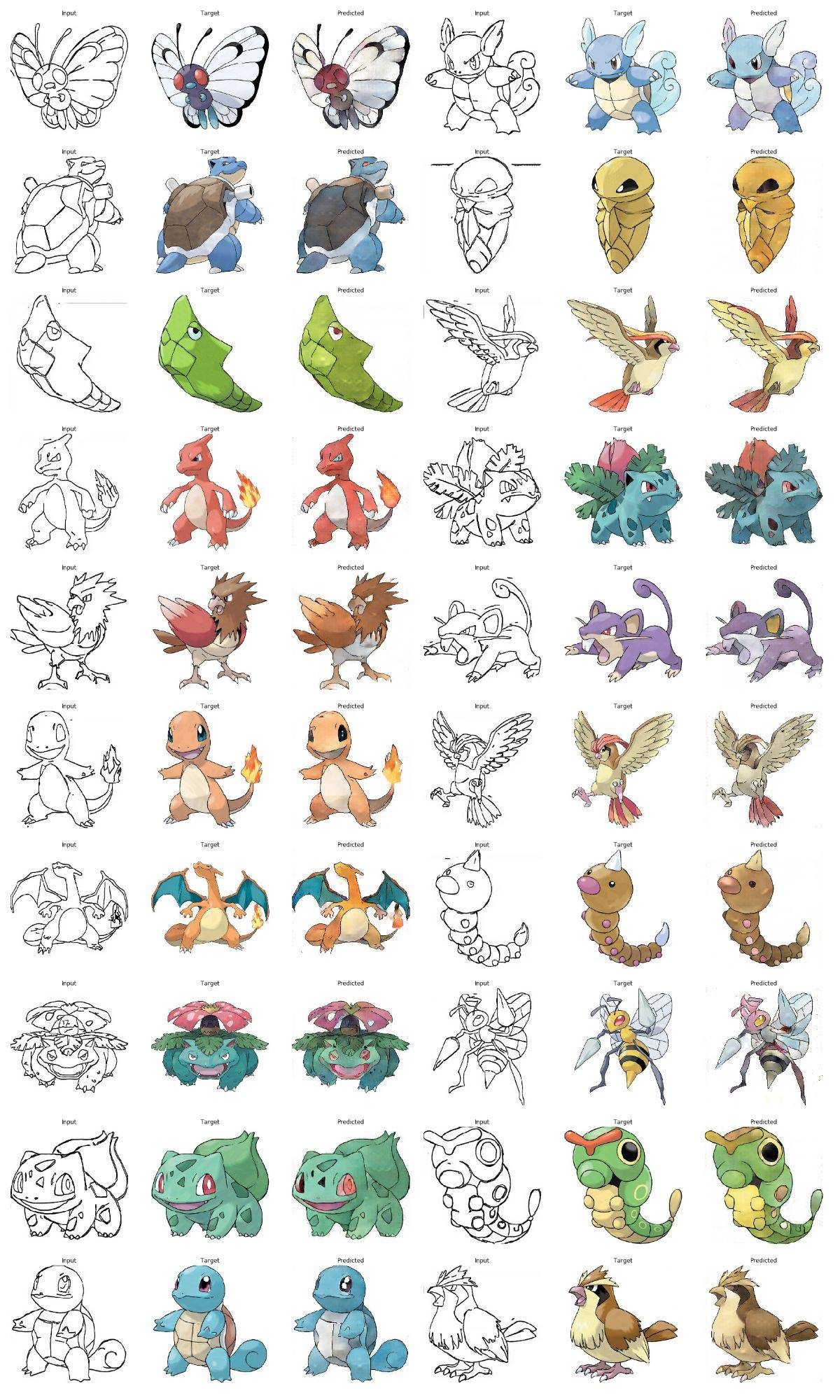
如果我们保存了之前的训练的结果,我们加载保存的数据。然后我们应用上次保存的模型来输出下我们的测试数据。
def generate_images(model, test_input, tar):

    prediction = model(test_input, training=True)

    plt.figure(figsize=(15,15))

    display_list = [test_input[0], tar[0], prediction[0]]

    title = ['Input', 'Target', 'Predicted']

    for i in range(3):

        plt.subplot(1, 3, i+1)

        plt.title(title[i])

        plt.imshow(tensor_to_array(display_list[i]) * 0.5 + 0.5)

        plt.axis('off')

    plt.show()
ckpt_manager = tf.train.CheckpointManager(checkpoint, "./", max_to_keep=2)

if ckpt_manager.latest_checkpoint:

    checkpoint.restore(ckpt_manager.latest_checkpoint)

for inp, tar in test_dataset.take(20):

    generate_images(generator, inp, tar)
第九步: 训练
在训练中,我们输出第一张图片来查看每个epoch给我们的预测结果带来的变化。让大家感受到其中的乐趣
每20个epoch我们保存一次状态
@tf.function

def train_step(input_image, target):

    with tf.GradientTape() as gen_tape, tf.GradientTape() as disc_tape:

        gen_output = generator(input_image, training=True)

        disc_real_output = discriminator([input_image, target], training=True)

        disc_generated_output = discriminator([input_image, gen_output], training=True)

        gen_loss = generator_loss(disc_generated_output, gen_output, target)

        disc_loss = discriminator_loss(disc_real_output, disc_generated_output)

    generator_gradients = gen_tape.gradient(gen_loss,

                                          generator.trainable_variables)

    discriminator_gradients = disc_tape.gradient(disc_loss,

                                               discriminator.trainable_variables)

    generator_optimizer.apply_gradients(zip(generator_gradients,

                                          generator.trainable_variables))

    discriminator_optimizer.apply_gradients(zip(discriminator_gradients,

                                              discriminator.trainable_variables))
def fit(train_ds, epochs, test_ds):

    for epoch in range(epochs):

        start = time.time()

        for input_image, target in train_ds:

            train_step(input_image, target)

        clear_output(wait=True)

        for example_input, example_target in test_ds.take(1):

            generate_images(generator, example_input, example_target)

        if (epoch + 1) % 20 == 0:

            ckpt_save_path = ckpt_manager.save()

            print ('保存第{}个epoch到{}\n'.format(epoch+1, ckpt_save_path))

        print ('训练第{}个epoch所用的时间为{:.2f}秒\n'.format(epoch + 1, time.time()-start))
fit(train_dataset, EPOCHS, test_dataset)
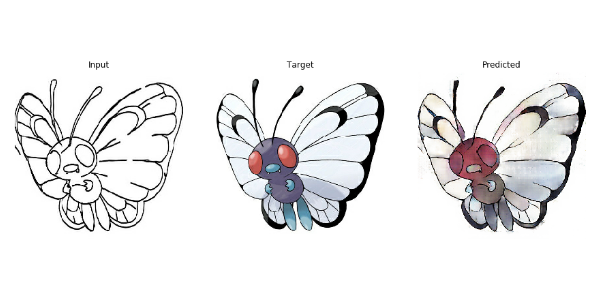
训练第8个epoch所用的时间为51.33秒。
第十步: 使用测试数据上色,查看下我们的效果
for input, target in test_dataset.take(20):

    generate_images(generator, input, target)
矩池云现在已经上架 “口袋妖怪上色” 镜像;感兴趣的小伙伴可以通过矩池云官网“Jupyter 教程 Demo” 镜像中尝试使用。
矩池云 | 教你如何使用GAN为口袋妖怪上色的更多相关文章
- 矩池云上使用nvidia-smi命令教程
简介 nvidia-smi全称是NVIDIA System Management Interface ,它是一个基于NVIDIA Management Library(NVML)构建的命令行实用工具, ...
- 矩池云里查看cuda版本
可以用下面的命令查看 cat /usr/local/cuda/version.txt 如果想用nvcc来查看可以用下面的命令 nvcc -V 如果环境内没有nvcc可以安装一下,教程是矩池云上如何安装 ...
- 在矩池云上复现 CVPR 2018 LearningToCompare_FSL 环境
这是 CVPR 2018 的一篇少样本学习论文:Learning to Compare: Relation Network for Few-Shot Learning 源码地址:https://git ...
- 矩池云上安装yolov4 darknet教程
这里我是用PyTorch 1.8.1来安装的 拉取仓库 官方仓库 git clone https://github.com/AlexeyAB/darknet 镜像仓库 git clone https: ...
- 用端口映射的办法使用矩池云隐藏的vnc功能
矩池云隐藏了很多高级功能待用户去挖掘. 租用机器 进入jupyterlab 设置vnc密码 VNC_PASSWD="userpasswd" ./root/vnc_startup.s ...
- 矩池云上安装ikatago及远程链接教程
https://github.com/kinfkong/ikatago-resources/tree/master/dockerfiles 从作者的库中可以看到,该程序支持cuda9.2.cuda10 ...
- 矩池云上编译安装dlib库
方法一(简单) 矩池云上的k80因为内存问题,请用其他版本的GPU去进行编译,保存环境后再在k80上用. 准备工作 下载dlib的源文件 进入python的官网,点击PyPi选项,搜索dilb,再点击 ...
- 如何在矩池云上运行FinRL-Libray股票交易策略框架
FinRL-Libray 项目:https://github.com/AI4Finance-LLC/FinRL-Library 选择FinRL镜像 在矩池云-主机市场选择合适的机器,并选择FinRL- ...
- 使用 MobaXterm 连接矩池云 GPU服务器
Host Name(主机名):hz.matpool.com 或 hz-t2.matpool.com,请以您 SSH 中给定的域名为准. Port(端口号):矩池云租用记录里 SSH 链接里冒号后的几位 ...
随机推荐
- plsql 视图中 为什么使用替代触发器
/* 什么是视图? 视图:数据库对象,存的是一个查询命令:当作一个虚拟的数据表来使用: 应用场景: 简化查询操作:不能直接在视图上进行create,insert,update操作: 创建视图? 需要管 ...
- 使用IndexedDB缓存给WebGL三维程序加速
前言 使用webgl开发三维应用的时候,经常会发现三维场景加载比较慢,往往需要等待挺长时间,这样用户的体验就很不友好. 造成加载慢的原因,主要是三维应用涉及到的资源文件会特别多,这些资源文件主要是模型 ...
- 「JOISC 2014 Day4」两个人的星座
首先突破口肯定在三角形不交,考虑寻找一些性质. 引理一:两个三角形不交当且仅当存在一个三角形的一条边所在直线将两个三角形分为异侧 证明可以参考:三角形相离充要条件,大致思路是取两个三角形重心连线,将其 ...
- RabbitMQ简介及安装
AMQP简介 AMQP AMQP(Advanced Message Queuing Protocol,高级消息队列协议)是进程之间传递异步消息的网络协议. AMQP工作过程 发布者(Publisher ...
- js instanceof 解析
js中的instanceof运算符 概述 instanceof运算符用来判断一个构造函数的prototype属性所指向的对象是否存在另外一个要检测对象的原型链上 语法 obj instanceofOb ...
- JspSmartUpload 简略中文API文档
感谢原文作者:~数字人生~ 原文链接:https://www.cnblogs.com/mycodelife/archive/2009/04/26/1444132.html 一.JspSmartUplo ...
- 关于linux shell编程,alias rm='cp $@ ~/backup; rm $@'
书上的这个例子需要在ubuntu的低版本的系统才支持,现在基本上都不支持了,想实现也很简单自己写一个脚本先备份再删除. alias也只是做了一次替换alias rm='cp $@ ~/backup; ...
- linux+nginx+tomcat负载均衡,实现session同步
第一部分:nginx反向代理tomcat 一.软件及环境 软件 系统 角色 用途 安装的软件 ip地址 Centos6.5x86_64 nginx 反向代理用户请求 nginx 172.16.249. ...
- Ext原码学习之lang-Object.js
// JavaScript Document (function(){ var TemplateClass = function(){}, ExtObject = Ext.Object = { cha ...
- springBoot工程解决跨域问题
更新:通过一个 @CrossOrigin 注解就可以完美解决跨域问题. 创建一个配置类 package com.miaoshaProject.configuration; import org.sp ...