
SSM框架——整合ssm
SSM整合
1.准备工作
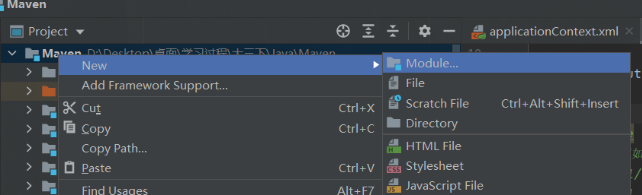
新建一个普通的Maven项目
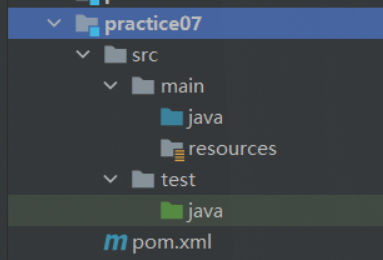
建好所有需要的架构层

向pom.xml中导入所有的依赖
<!--MyBatis相关-->

<dependency>

   <groupId>com.mchange</groupId>

   <artifactId>c3p0</artifactId>

   <version>0.9.5.2</version>

</dependency>

<dependency>

   <groupId>mysql</groupId>

   <artifactId>mysql-connector-java</artifactId>

   <version>5.1.47</version>

</dependency>

<dependency>

   <groupId>org.mybatis</groupId>

   <artifactId>mybatis</artifactId>

   <version>3.5.2</version>

</dependency>

<dependency>

   <groupId>org.mybatis</groupId>

   <artifactId>mybatis-spring</artifactId>

   <version>2.0.2</version>

</dependency>

<!--Spring相关-->

<dependency>

   <groupId>org.springframework</groupId>

   <artifactId>spring-webmvc</artifactId>

   <version>5.1.9.RELEASE</version>

</dependency>

<dependency>

   <groupId>org.springframework</groupId>

   <artifactId>spring-jdbc</artifactId>

   <version>5.1.9.RELEASE</version>

</dependency>

<!--Web相关-->

<dependency>

   <groupId>javax.servlet</groupId>

   <artifactId>servlet-api</artifactId>

   <version>2.5</version>

</dependency>

<dependency>

   <groupId>javax.servlet.jsp</groupId>

   <artifactId>jsp-api</artifactId>

   <version>2.2</version>

</dependency>

<dependency>

   <groupId>javax.servlet</groupId>

   <artifactId>jstl</artifactId>

   <version>1.2</version>

</dependency>

<!--插件-->

<dependency>

   <groupId>junit</groupId>

   <artifactId>junit</artifactId>

   <version>4.13.2</version>

</dependency>

<dependency>

   <groupId>org.projectlombok</groupId>

   <artifactId>lombok</artifactId>

   <version>1.18.12</version>

   <scope>provided</scope>

</dependency>
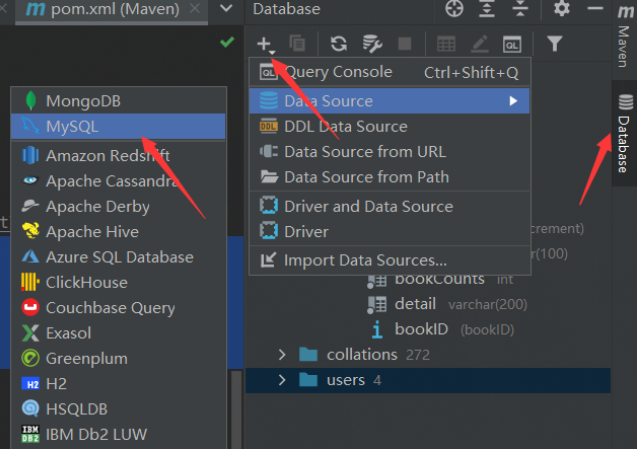
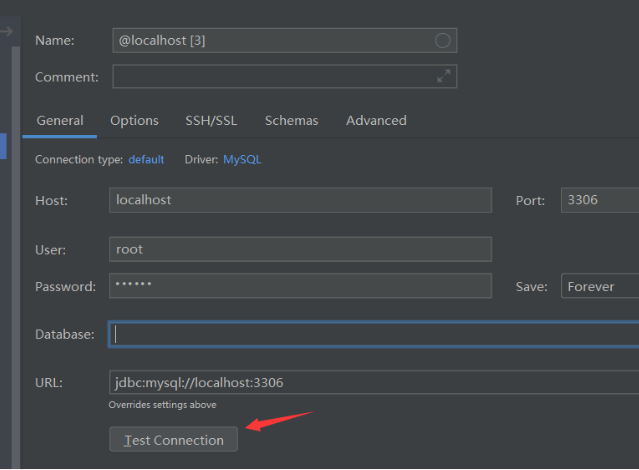
尝试在idea内连接数据库
2.配置MyBatis层
- 编写ORM实体类
package mycode.pojo;

import lombok.AllArgsConstructor;

import lombok.Data;

import lombok.NoArgsConstructor;

/**

 * @classname

 * @Author 姬如千泷

 * @Date 2021/7/25  23:01

 * @Version 1.0

 */

@Data

@AllArgsConstructor

@NoArgsConstructor

public class Book {

    private int bookID;

    private String bookName;

    private int bookCounts;

    private String detail;

}
- 编写dao层业务接口(为简便,以一个举例)
package mycode.dao;

import mycode.pojo.Book;

import java.util.List;

/**

 * @classname

 * @Author 姬如千泷

 * @Date 2021/7/25  23:03

 * @Version 1.0

 */

public interface BookMapper {

    //获取全部书籍信息

    List<Book> getBooks();

}
- 编写Mapper.xml
<?xml version="1.0" encoding="UTF-8" ?>

<!DOCTYPE mapper

        PUBLIC "-//mybatis.org//DTD Mapper 3.0//EN"

        "http://mybatis.org/dtd/mybatis-3-mapper.dtd">

<mapper namespace="mycode.dao.BookMapper">

    <select id="getBooks" resultType="mycode.pojo.Book">

        SELECT * from ssmbuild.books

    </select>

</mapper>
- 编写登录.properties文件
driver=com.mysql.jdbc.Driver

url=jdbc:mysql://localhost:3306/ssmbuild?useUnicode=true&characterEncoding=utf8&useSSL=false&severTimezone=GMT%2B8&allowPublicKeyRetrieval=true

username=root

password=123456
- 编写Mybatis-config.xml
<?xml version="1.0" encoding="UTF-8" ?>

<!DOCTYPE configuration

        PUBLIC "-//mybatis.org//DTD Config 3.0//EN"

        "http://mybatis.org/dtd/mybatis-3-config.dtd">

<configuration>

    <mappers>

        <mapper resource="mycode/dao/BookMapper.xml"/>

    </mappers>

</configuration>
3. 配置Spring层
- 编写业务抽象接口,只是为了给代理类提供接口
package mycode.service;

import mycode.pojo.Book;

import java.util.List;

/**

 * @classname

 * @Author 姬如千泷

 * @Date 2021/7/25  23:35

 * @Version 1.0

 */

public interface BookService {

    List<Book> getBooks();

}
- 编写服务代理类
package mycode.service;

import mycode.dao.BookMapper;

import mycode.pojo.Book;

import org.springframework.beans.factory.annotation.Autowired;

import org.springframework.stereotype.Service;

import java.util.List;

/**

 * @classname

 * @Author 姬如千泷

 * @Date 2021/7/25  23:36

 * @Version 1.0

 */

@Service

public class BookImpl implements BookService{

    private BookMapper mapper;

    public void setBookMapper(BookMapper bookMapper) {

        this.mapper = bookMapper;

    }

    @Override

    public List<Book> getBooks() {

        return mapper.getBooks();

    }

}
- 编写spring-dao.xml,用spring对接数据库连接
<?xml version="1.0" encoding="UTF-8"?>

<beans xmlns="http://www.springframework.org/schema/beans"

       xmlns:xsi="http://www.w3.org/2001/XMLSchema-instance"

       xmlns:context="http://www.springframework.org/schema/context"

       xsi:schemaLocation="http://www.springframework.org/schema/beans

       http://www.springframework.org/schema/beans/spring-beans.xsd

       http://www.springframework.org/schema/context

       https://www.springframework.org/schema/context/spring-context.xsd">

    <!-- 配置整合mybatis -->

    <!-- 1.关联数据库文件 -->

    <context:property-placeholder location="classpath:resources/database.properties"/>

    <!-- 2.数据库连接池 -->

    <!--数据库连接池

        dbcp 半自动化操作 不能自动连接

        c3p0 自动化操作(自动的加载配置文件 并且设置到对象里面)

    -->

    <bean id="dataSource" class="com.mchange.v2.c3p0.ComboPooledDataSource">

        <!-- 配置连接池属性 -->

        <property name="driverClass" value="${driver}"/>

        <property name="jdbcUrl" value="${url}"/>

        <property name="user" value="${username}"/>

        <property name="password" value="${password}"/>

        <!-- c3p0连接池的私有属性 -->

        <property name="maxPoolSize" value="30"/>

        <property name="minPoolSize" value="10"/>

        <!-- 关闭连接后不自动commit -->

        <property name="autoCommitOnClose" value="false"/>

        <!-- 获取连接超时时间 -->

        <property name="checkoutTimeout" value="10000"/>

        <!-- 当获取连接失败重试次数 -->

        <property name="acquireRetryAttempts" value="2"/>

    </bean>

    <!-- 3.配置SqlSessionFactory对象 -->

    <bean id="sqlSessionFactory" class="org.mybatis.spring.SqlSessionFactoryBean">

        <!-- 注入数据库连接池 -->

        <property name="dataSource" ref="dataSource"/>

        <!-- 配置MyBaties全局配置文件:mybatis-config.xml -->

        <property name="configLocation" value="classpath:resources/mybatis-config.xml"/>

    </bean>

    <!-- 4.配置扫描Dao接口包,动态实现Dao接口注入到spring容器中 -->

    <!--解释 :https://www.cnblogs.com/jpfss/p/7799806.html-->

    <bean class="org.mybatis.spring.mapper.MapperScannerConfigurer">

        <!-- 注入sqlSessionFactory -->

        <property name="sqlSessionFactoryBeanName" value="sqlSessionFactory"/>

        <!-- 给出需要扫描Dao接口包 -->

        <property name="basePackage" value="mycode.dao"/>

    </bean>

</beans>
- 编写spring-service.xml,用spring对接dao层服务和事务
<?xml version="1.0" encoding="UTF-8"?>

<beans xmlns="http://www.springframework.org/schema/beans"

       xmlns:xsi="http://www.w3.org/2001/XMLSchema-instance"

       xmlns:context="http://www.springframework.org/schema/context"

       xsi:schemaLocation="http://www.springframework.org/schema/beans

   http://www.springframework.org/schema/beans/spring-beans.xsd

   http://www.springframework.org/schema/context

   http://www.springframework.org/schema/context/spring-context.xsd">

    <!-- 扫描service相关的bean -->

    <context:component-scan base-package="mycode.service" />

    <!--BookServiceImpl注入到IOC容器中-->

    <bean id="BookImpl" class="mycode.service.BookImpl">

        <property name="bookMapper" ref="bookMapper"/>

    </bean>

    <!-- 配置事务管理器 -->

    <bean id="transactionManager" class="org.springframework.jdbc.datasource.DataSourceTransactionManager">

        <!-- 注入数据库连接池 -->

        <property name="dataSource" ref="dataSource" />

    </bean>

</beans>
4.配置Spring-MVC层(注解实现)
- 将maven项目升级为web项目
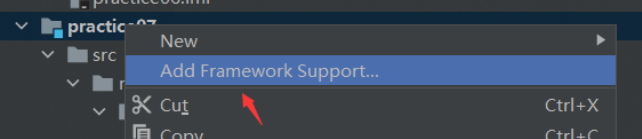
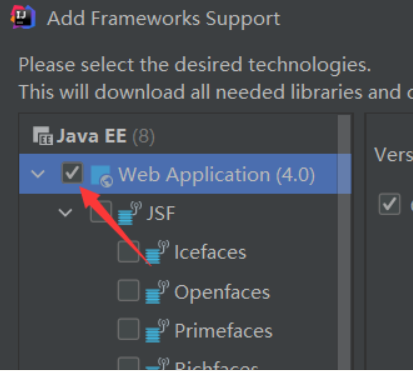
- 编写spring-mvc.xml
<?xml version="1.0" encoding="UTF-8"?>

<beans xmlns="http://www.springframework.org/schema/beans"

       xmlns:xsi="http://www.w3.org/2001/XMLSchema-instance"

       xmlns:context="http://www.springframework.org/schema/context"

       xmlns:mvc="http://www.springframework.org/schema/mvc"

       xsi:schemaLocation="http://www.springframework.org/schema/beans

   http://www.springframework.org/schema/beans/spring-beans.xsd

   http://www.springframework.org/schema/context

   http://www.springframework.org/schema/context/spring-context.xsd

   http://www.springframework.org/schema/mvc

   https://www.springframework.org/schema/mvc/spring-mvc.xsd">

    <!-- 配置SpringMVC -->

    <!-- 1.开启SpringMVC注解驱动 -->

    <mvc:annotation-driven />

    <!-- 2.静态资源默认servlet配置-->

    <mvc:default-servlet-handler/>

    <!-- 3.配置jsp 显示ViewResolver视图解析器 -->

    <bean class="org.springframework.web.servlet.view.InternalResourceViewResolver">

        <property name="viewClass" value="org.springframework.web.servlet.view.JstlView" />

        <property name="prefix" value="/WEB-INF/" />

        <property name="suffix" value=".jsp" />

    </bean>

    <!-- 4.扫描web相关的bean -->

    <context:component-scan base-package="mycode.controller" />

</beans>
- 编写applicationContext.xml整合xml配置
<?xml version="1.0" encoding="UTF-8"?>

<beans xmlns="http://www.springframework.org/schema/beans"

       xmlns:xsi="http://www.w3.org/2001/XMLSchema-instance"

       xsi:schemaLocation="http://www.springframework.org/schema/beans

       http://www.springframework.org/schema/beans/spring-beans.xsd">

    <import resource="spring-dao.xml"/>

    <import resource="spring-service.xml"/>

    <import resource="spring-mvc.xml"/>

</beans>
- 配置web.xml
<?xml version="1.0" encoding="UTF-8"?>

<web-app xmlns="http://xmlns.jcp.org/xml/ns/javaee"

         xmlns:xsi="http://www.w3.org/2001/XMLSchema-instance"

         xsi:schemaLocation="http://xmlns.jcp.org/xml/ns/javaee http://xmlns.jcp.org/xml/ns/javaee/web-app_4_0.xsd"

         version="4.0">

    <!--配置DispatcherServlet-->

    <servlet>

        <servlet-name>DispatcherServlet</servlet-name>

        <servlet-class>org.springframework.web.servlet.DispatcherServlet</servlet-class>

        <init-param>

            <param-name>contextConfigLocation</param-name>

            <!--加载总的配置文件-->

            <param-value>classpath:resources/applicationContext.xml</param-value>

        </init-param>

        <load-on-startup>1</load-on-startup>

    </servlet>

    <servlet-mapping>

        <servlet-name>DispatcherServlet</servlet-name>

        <url-pattern>/</url-pattern>

    </servlet-mapping>

    <!--mvc过滤器-->

    <filter>

        <filter-name>encodingFilter</filter-name>

        <filter-class>

            org.springframework.web.filter.CharacterEncodingFilter

        </filter-class>

        <init-param>

            <param-name>encoding</param-name>

            <param-value>utf-8</param-value>

        </init-param>

    </filter>

    <filter-mapping>

        <filter-name>encodingFilter</filter-name>

        <url-pattern>/*</url-pattern>

    </filter-mapping>

    <!--Session过期时间-->

    <session-config>

        <session-timeout>15</session-timeout>

    </session-config>

</web-app>
到这里基本配置就已经完成了,只需要再对接一下前端就可以了
5. 一个业务实例(取自狂神说java)
- 首页jsp页面
<%--

  Created by IntelliJ IDEA.

  User: 姬如千泷

  Date: 2021/7/26

  Time: 0:24

  To change this template use File | Settings | File Templates.

--%>

<%@ page language="java" contentType="text/html; charset=UTF-8" pageEncoding="UTF-8" %>

<!DOCTYPE HTML>

<html>

<head>

  <title>首页</title>

  <style type="text/css">

    a {

      text-decoration: none;

      color: black;

      font-size: 18px;

    }

    h3 {

      width: 180px;

      height: 38px;

      margin: 100px auto;

      text-align: center;

      line-height: 38px;

      background: deepskyblue;

      border-radius: 4px;

    }

  </style>

</head>

<body>

<h3>

  <a href="${pageContext.request.contextPath}/allBook">点击进入列表页</a>

</h3>

</body>

</html>
- 跳转jsp页面
<%--

  Created by IntelliJ IDEA.

  User: 姬如千泷

  Date: 2021/7/26

  Time: 0:33

  To change this template use File | Settings | File Templates.

--%>

<%@ taglib prefix="c" uri="http://java.sun.com/jsp/jstl/core" %>

<%@ page contentType="text/html;charset=UTF-8" language="java" %>

<html>

<head>

    <title>书籍列表</title>

    <meta name="viewport" content="width=device-width, initial-scale=1.0">

    <!-- 引入 Bootstrap -->

    <link href="https://cdn.bootcss.com/bootstrap/3.3.7/css/bootstrap.min.css" rel="stylesheet">

</head>

<body>

<div class="container">

    <div class="row clearfix">

        <div class="col-md-12 column">

            <div class="page-header">

                <h1>

                    <small>书籍列表 —— 显示所有书籍</small>

                </h1>

            </div>

        </div>

    </div>

    <div class="row">

        <div class="col-md-4 column">

        </div>

    </div>

    <div class="row clearfix">

        <div class="col-md-12 column">

            <table class="table table-hover table-striped">

                <thead>

                <tr>

                    <th>书籍编号</th>

                    <th>书籍名字</th>

                    <th>书籍数量</th>

                    <th>书籍详情</th>

                    <th>操作</th>

                </tr>

                </thead>

                <tbody>

                <c:forEach var="book" items="${requestScope.get('list')}">

                    <tr>

                        <td>${book.getBookID()}</td>

                        <td>${book.getBookName()}</td>

                        <td>${book.getBookCounts()}</td>

                        <td>${book.getDetail()}</td>

                    </tr>

                </c:forEach>

                </tbody>

            </table>

        </div>

    </div>

</div>
- 编写控制类
package mycode.controller;

import mycode.pojo.Book;

import mycode.service.BookService;

import org.springframework.beans.factory.annotation.Autowired;

import org.springframework.beans.factory.annotation.Qualifier;

import org.springframework.stereotype.Controller;

import org.springframework.ui.Model;

import org.springframework.web.bind.annotation.RequestMapping;

import java.util.List;

/**

 * @classname

 * @Author 姬如千泷

 * @Date 2021/7/26  0:29

 * @Version 1.0

 */

@Controller

public class BookController {

    @Autowired

    @Qualifier("BookImpl")

    private BookService bookService;

    @RequestMapping("/allBook")//代表入口url

    public String list(Model model) {

        List<Book> list = bookService.getBooks();

        model.addAttribute("list", list);

        return "allBook";

    }

}
- 配置tomcat启动项目
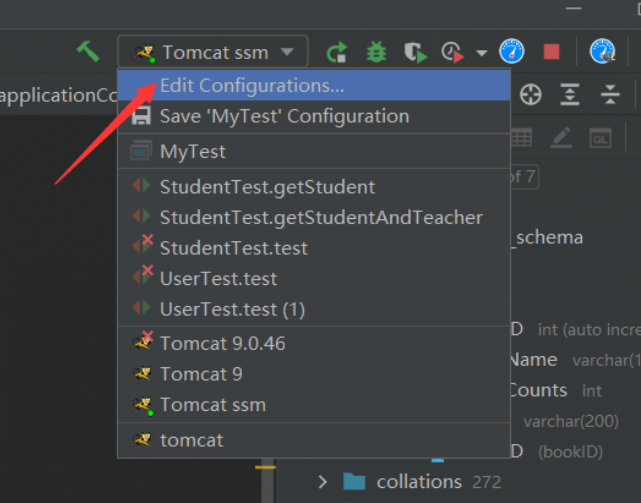
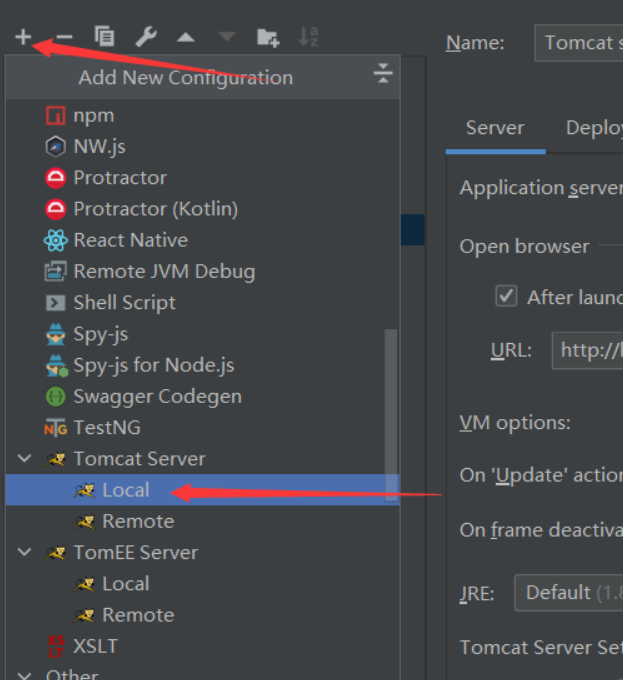
6. 可能出现的问题
6.1 java代码变成.java不可执行文件
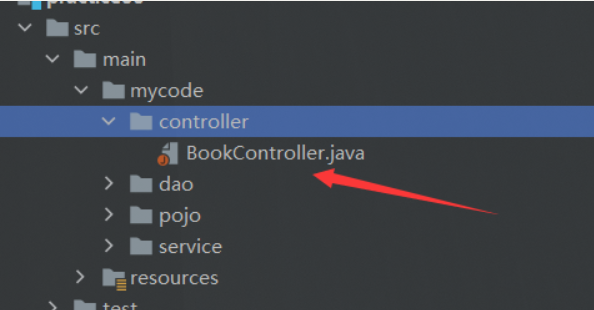
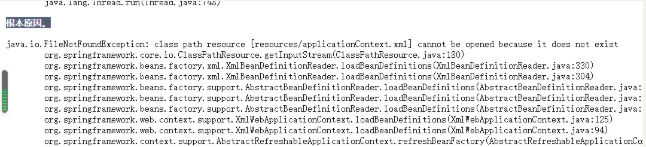
这说明项目的资源路径配置是存在问题的,我在开发过程中这种问题出现了不下3次,一般如果不及时处理,会报出io错误找不到xml配置文件
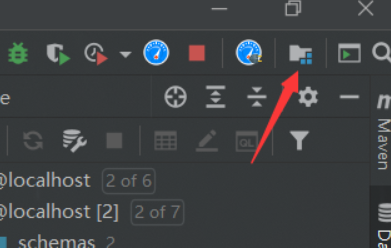
解决办法是重新配置资源路径
删除掉原有的资源路径配置
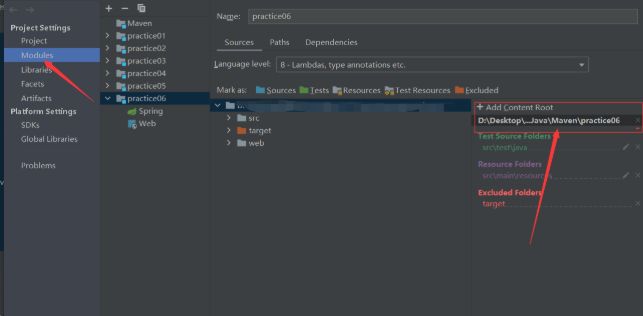
在新建一个即可,一般idea会重新智能匹配资源类型,如果没有自动匹配的话,重新为每一个文件选择对应类型即可
6.2 无法启动tomcat
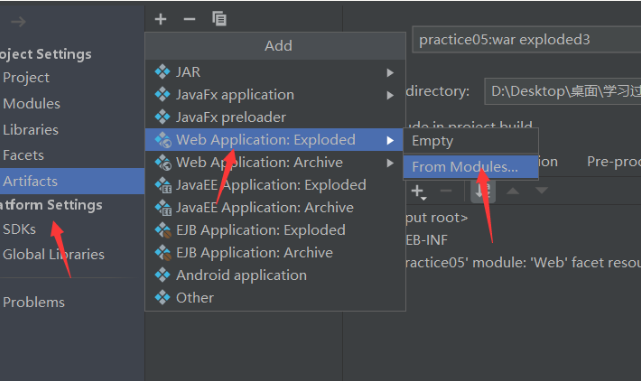
可能是war包缺失导致,tomcat的war包是项目输出的主要包,必须提前配置好
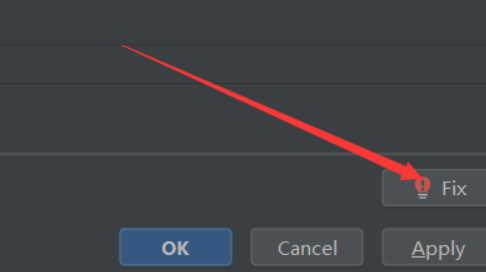
用idea的Fix自动修复war包
或者自己新建一个war包
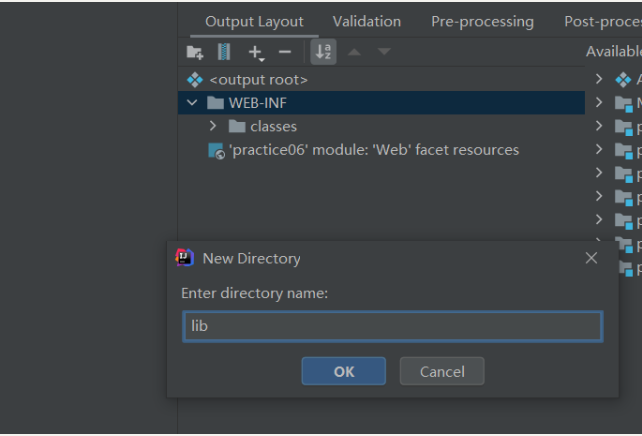
加入war包后,依然无法启动的话,检测out输出项目中是否含有lib目录,如果没有,则加入
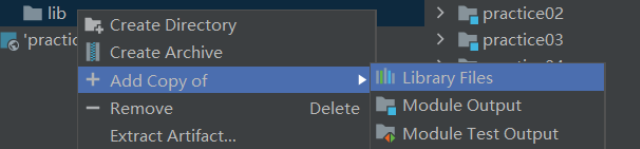
将依赖全都导入进去
6.3 无法连接数据库问题(即错误中出现jdbc关键字的大部分错)
可能是由于.properties文件的编码问题导致,可以明显在错误中看到root用户名乱码
Access denied for user '姬如�泷'@'local......
解决方案一是直接不使用properties导入,明文,但这样安全系数低一些
<property name="driverClass" value="com.mysql.jdbc.Driver"/>
<property name="jdbcUrl" value="jdbc:mysql://localhost:3306/ssmbuild?useUnicode=true&characterEncoding=utf8&useSSL=false&severTimezone=GMT%2B8&allowPublicKeyRetrieval=true"/>
<property name="user" value="root"/>
<property name="password" value="123456"/>
解决方案二是在idea中设置Properties的编码方式,设置为和idea编码格式一致,一般是utf-8
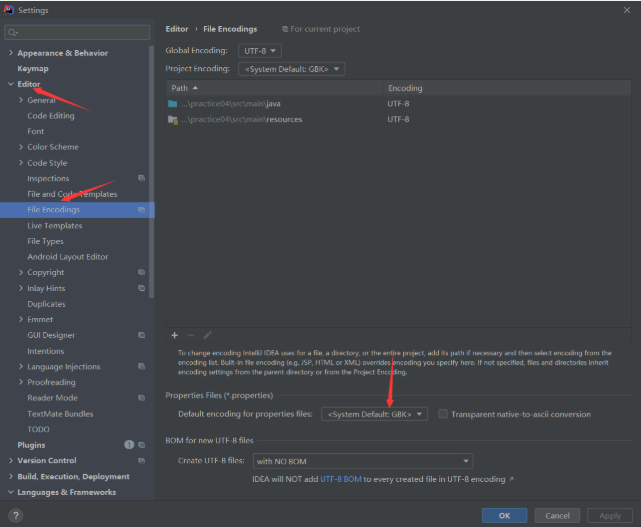
6.4 如果报错文件指向mapper.xml,那么一般是sql语句出了错误,这时候一般会检查返回类型(如果是返回集合的话,返回值类型要设置为集合元素的类型)、参数类型(多个参数要加@Param注解等)
6.5 如果报一些资源未找到问题
先检测输出文件中有没有对应资源,如xml文件、Properties文件等,如果项目中有,而实际输出文件中没有的话,极有可能是文件被过滤了,这时候需要在pom.xml中设置文件过滤器跳过哪些文件
<build>

    <resources>

        <resource>

            <directory>src/main/resources</directory>

            <includes>

                <include>**/*.xml</include>

                <include>**/*.properties</include>

            </includes>

            <filtering>false</filtering>

        </resource>

        <resource>

            <directory>src/main/java</directory>

            <includes>

                <include>**/*.xml</include>

                <include>**/*.properties</include>

            </includes>

            <filtering>false</filtering>

        </resource>

    </resources>

</build>
SSM框架——整合ssm的更多相关文章
- SSM框架整合项目 :租房管理系统
使用ssm框架整合,oracle数据库 框架: Spring SpringMVC MyBatis 导包: 1, spring 2, MyBatis 3, mybatis-spring 4, fastj ...
- 基于maven的ssm框架整合
基于maven的ssm框架整合 第一步:通过maven建立一个web项目. 第二步:pom文件导入jar包 (1 ...
- JavaWeb之ssm框架整合,用户角色权限管理
SSM框架整合 Spring SpringMVC MyBatis 导包: 1, spring 2, MyBatis 3, mybatis-spring 4, fastjson 5, aspectwea ...
- SSM框架整合环境构建——基于Spring4和Mybatis3
目录 环境 配置说明 所需jar包 配置db.properties 配置log4j.properties 配置spring.xml 配置mybatis-spring.xml 配置springmvc.x ...
- springmvc(二) ssm框架整合的各种配置
ssm:springmvc.spring.mybatis这三个框架的整合,有耐心一步步走. --WH 一.SSM框架整合 1.1.整合思路 从底层整合起,也就是先整合mybatis与spring,然后 ...
- SSM框架整合的其它方式
---------------------siwuxie095 SSM 框架整合的其它方式 1.主要是整合 Spring ...
- SSM框架整合过程总结
-----------------------siwuxie095 SSM 框架整合过程总结 1.导入相关 jar 包( ...
- SSM框架整合思想
-------------------siwuxie095 SSM 框架整合思想 1.SSM 框架,即 SpringMV ...
- SSM框架整合搭建教程
自己配置了一个SSM框架,打算做个小网站,这里把SSM的配置流程详细的写了出来,方便很少接触这个框架的朋友使用,文中各个资源均免费提供! 一. 创建web项目(eclipse) File-->n ...
随机推荐
- 细聊.Net Core中IServiceScope的工作方式
前言 自从.Net Core引入IOC相关的体系之后,关于它的讨论就从来没有停止过,因为它是.Net Core体系的底层框架,你只要使用了.Net Core的时候就必然会用到它.当然关于使用它的过程中 ...
- HTML+CSS基础知识(6)背景的设置、表格的设计、表单的设计和框架集
文章目录 1.背景 1.1 代码 1.2 测试结果 2.背景练习 2.1 代码 2.2 测试结果 3.表格 3.1 代码 3.2 测试结果 4.练习 4.1 代码 4.2 测试结果 5.表单 5.1 ...
- 《Java并发编程的艺术》读书笔记:一、并发编程的目的与挑战
发现自己有很多读书笔记了,但是一直都是自己闷头背,没有输出,突然想起还有博客圆这么个好平台给我留着位置,可不能荒废了. 此文读的书是<Jvava并发编程的艺术>,方腾飞等著,非常经典的一本 ...
- DevOps|从特拉斯辞职风波到研发效能中的不靠谱人干的荒唐事
今天发生了一件大事特拉斯辞任英国首相,我想借着这件事情说下我看到的一件研发效能的荒唐事,这其中的关联也许就是「都用了不靠谱的人」. 两件事情 今儿一早就听到,2022年10月20日英国第78任首相伊丽 ...
- 十三、Pod的资源控制器类型
Pod 的资源控制器类型 一.Pod 的资源控制器类型 什么是控制器呢?简单来说,控制器就好比是影视剧里面的剧本,演员会根据剧本所写的内容来针对不同的角色进行演绎,而我们的控制器就好比是剧本,Kube ...
- 转载:Python 实现百度翻译
来源: https://blog.csdn.net/qq_44814439/article/details/105642066 作者: Chloemxc 功能: Python 实现百度翻译 from ...
- 2022,一个Java程序猿的外设配置
工欲善其事,必先利其器. 是的没错,我就是个器材党,哈哈.正赶上搬家布置了新桌面,经过我的精心挑选和安装,也是凑齐了我新一套的桌面外设.写下来记录一下. 键盘 套件:腹灵MK870 轴体:佳达隆G白P ...
- 2022春每日一题:Day 41
题目:I Hate It 一个基础的线段树模板,单点修改+区间查询 代码: #include <cstdio> #include <cstdlib> #include < ...
- zabbix6.0安装
一.简述 zabbix6.0 对相关软件版本要求较高,需要php7.25以上php8.0以下版本支持,若使用mysql数据库,其最低要求为mysql8.0,本此搭建采用的是使用较广的lnmp架构 za ...
- React实用插件收集
1.react-img-editor 图片编辑 demo: npm install react-img-editor -S 引入和使用 import ReactImgEditor from 'reac ...