
Pytest Fixture(二)
作用域
固件的作用是为了抽离出重复的工作和方便复用,为了更精细化控制固件(比如只想对数据库访问测试脚本使用自动连接关闭的固件),pytest 使用作用域来进行指定固件的使用范围。
在定义固件时,通过 scope 参数声明作用域,可选项有:
1.function: 函数级,每个测试函数都会执行一次固件;

2.class: 类级别,每个测试类执行一次,所有方法都可以使用;

3.module: 模块级,每个模块执行一次,模块内函数和方法都可使用;

4.session: 会话级,一次测试只执行一次,所有被找到的函数和方法都可用;

5.package: 包级别,每个python包只执行一次;
默认的作用域为 function。
import pytest

@pytest.fixture(scope='function')

def func_scope():

   print('方法级别')

@pytest.fixture(scope='module')

def mod_scope():

    print('模块级别')

@pytest.fixture(scope='session')

def sess_scope():

    print('会话级别')

@pytest.fixture(scope='class')

def class_scope():

    print('类级别')

def test_multi_scope(sess_scope, mod_scope, func_scope):

    pass
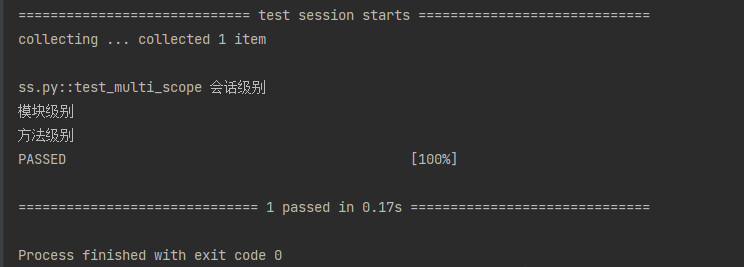
执行结果如下,可以清楚看到各固件的作用域和执行顺序:
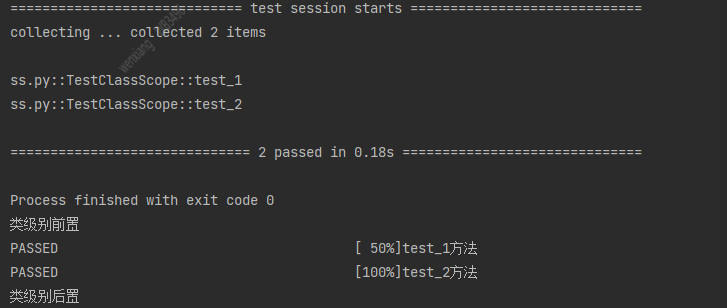
对于类使用作用域,需要使用 pytest.mark.usefixtures (对函数和方法也适用)
import pytest

@pytest.fixture(scope='class')

def class_scope():

    print('类级别前置')

    yield

    print('类级别后置')

@pytest.mark.usefixtures('class_scope')

class TestClassScope:

    def test_1(self):

        print("test_1方法")

    def test_2(self):

        print("test_2方法")
叠加usefixtures
如果一个方法或者一个class用例想要同时调用多个fixture,可以使用@pytest.mark.usefixture()进行叠加。注意叠加顺序,先执行的放底层,后执行的放上层。
import pytest

@pytest.fixture(scope='function')

def class_open():

    print('方法级别前置')

    yield

    print('方法级别后置')

@pytest.fixture(scope='class')

def class_close():

    print('类级别前置')

    yield

    print('类级别后置')

class TestClassScope:

    @pytest.mark.usefixtures('class_open')

    def test_1(self):

        print("test_1方法")

    @pytest.mark.usefixtures('class_open')

    @pytest.mark.usefixtures('class_close')

    def test_2(self):

        print("test_2方法")

if __name__ == '__main__':

    pytest.main(['-vs'])
自动执行
目前为止,所有固件的使用都是手动指定,或者作为参数,或者使用 usefixtures。
如果我们想让固件自动执行,可以在定义时指定 autouse 参数。
下面是两个自动计时固件,一个用于统计每个函数运行时间(function 作用域),一个用于计算测试总耗时(session 作用域)
注意下面的测试函数并都没有使用固件:
import pytest

@pytest.fixture(scope='session', autouse=True)

def timer_session_scope():

    print("用例执行前")

    yield

    print("用例执行后")

def test_one():

    print('test_one方法')
结果如下
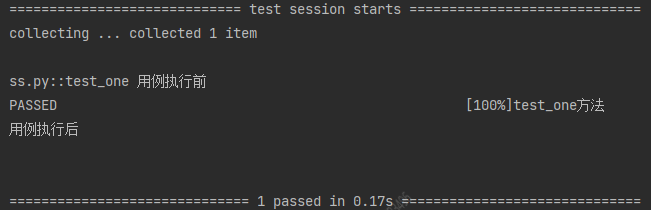
我们可以看到,我们选择自动执行,即使我们没有选择使用,pytest也会给自动执行的。执行到对应的function级别。
夹具 yield和return的区别
夹具中可以使用return,yield关键字为测试函数提供值,推荐使用yield关键字,他们的区别如下:
- yield返回值后,后面的代码还会继续运行
- return返回值后,后面的代码不会继续运行
Pytest Fixture(二)的更多相关文章
- pytest初始化与清除fixture(二)
@pytest.fixture用法 1.导入pytest模块:import pytest 2.调用装饰器函数:@pytest.fixture(callable_or_scope=None,*args, ...
- Pytest fixture及conftest详解
前言 fixture是在测试函数运行前后,由pytest执行的外壳函数.fixture中的代码可以定制,满足多变的测试需求,包括定义传入测试中的数据集.配置测试前系统的初始状态.为批量测试提供数据源等 ...
- pytest十二:cmd命令行参数
命令行参数是根据命令行选项将不同的值传递给测试函数,比如平常在 cmd 执行”pytest —html=report.html”,这里面的”—html=report.html“就是从命令行传入的参数对 ...
- pytest.fixture和普通函数调用
普通函数嗲用def one(): a="aaaaaaaaaaa" return a def test_one(): s=one() print (s) test_one() pyt ...
- pytest 用 @pytest.mark.usefixtures("fixtureName")或@pytest.fixture(scope="function", autouse=True)装饰,实现类似setup和TearDown的功能
conftest.py import pytest @pytest.fixture(scope="class") def class_auto(): print("&qu ...
- pytest fixture 利用 params参数实现用例集合
@pytest.fixture有一个params参数,接受一个列表,列表中每个数据都可以作为用例的输入.也就说有多少数据,就会形成多少用例.如下面例子,就形成3条用例 test_parametrizi ...
- pytest fixture中scope试验,包含function、module、class、session、package
上图是试验的目录结构 conftest.py:存放pytest fixture的文件 import uuid import pytest @pytest.fixture(scope="mod ...
- Pytest测试框架(三):pytest fixture 用法
xUnit style 结构的 fixture用于初始化测试函数, pytest fixture是对传统的 xUnit 架构的setup/teardown功能的改进.pytest fixture为测试 ...
- python单元测试框架pytest——fixture函数(类似unitest的setup和teardown)
pytest的setup和teardown函数(曾被一家云计算面试官问到过). pytest提供了fixture函数用以在测试执行前和执行后进行必要的准备和清理工作.与python自带的unitest ...
- pytest系列(二):筛选用例新姿势,mark 一下,你就知道。
pytest系列(一)中给大家介绍了pytest的特性,以及它的编写用例的简单至极. 那么在实际工作当中呢,我们要写的自动化用例会比较多,不会都放在一个py文件里. 如下图所示,我们编写的用例存放在不 ...
随机推荐
- [OC] 按照 元素 中的某个属性 来对数组进行排序
数组需要是 NSMutableArray 类型: //ascending - YES:升序,1,2,3 NO:降序:3,2,1 NSArray *sortDescriptors = [NSArray ...
- Flink Table API & SQL 自定义Redis Sink 使用方式
flink-connector-redis的使用方式和其他连接器几乎一样,除了一些公共的参数外(connector.type, format.type, or update-mode等),还支持以下参 ...
- Vue: 单页面应用如何保持登录状态
这篇文章写的还可以 https://www.xiabingbao.com/post/vue/vue-keep-logininfo.html
- python 安装redis,rediscluster
首先看下pip版本,过低版本会出问题 [root@test rpm]# pip -V pip 20.3.4 from /usr/lib/python2.7/site-packages/pip (pyt ...
- 如何使用使用Mysql中的慢查。
在MySQL中可以使用慢查找出运行速度慢的SQL语句. 1.在MySQL命令行中查看慢查: show variables like '%query%' 如图 "ON" 表示慢查 ...
- ES实战- data too large, data for
场景 客户现场业务系统突然查询不到数据,个人一开始分析以为是聚合查询报错,于是去看了下系统日志,看到如下日志打印: Caused by: ElasticsearchStatusException[El ...
- linux express配置ssl证书,开启https访问
1.下载ssl证书的Nginx版本,在项目根目录新建https空文件夹,把crt文件和key文件复制到https文件夹中; 2.安装依赖:npm i fs http https 3.修改www文件的内 ...
- vue教程
vue教程 环境搭建 nodejs下载 nodejs官网 已经"下一步式安装"过, 本地电脑历史版本 Mac更新到官网最新版本 # 1.先查看本机node.js版本: node - ...
- 【java数据结构与算法】插入排序
[插入排序解析]起始:假设第一个元素为已经排好序那么我们就要从数组的第二个元素开始每一轮确定1一个元素的正确位置所以外层循环的控制变量为 [1,arr.length)的左闭右开区间外层循环控制比较轮次 ...
- mysql报错:MySQL server has gone away
一.报错提示: 二.报错原因: 原因一: 一种可能是发送的 SQL 语句太长,以致超过了 max_allowed_packet 的大小,如果是这种原因,你只要修改 my.cnf,加大 max_allo ...