
Etherscan本地多文件开源(VScode)
项目创建
创建文件夹
mkdir Duckereum
cdDuckereum
添加nodejs配置
npm init -y
安装依赖添加
 npm install -D hardhat
 npm install --save ethers
 npm install @nomiclabs/hardhat-waffle
 npm install -D @nomiclabs/hardhat-ethers
 npm install @openzeppelin/contracts
 npm install --save-dev @nomiclabs/hardhat-etherscan
添加hardhat配置文件
npx hardhat
//选择create an empty hardhat.config.js
修改hardhat.config.js配置文件
引入@nomiclabs/hardhat-waffle依赖
其中solidity的编译器版本应根据自身项目做改动
/** @type import('hardhat/config').HardhatUserConfig */
require('@nomiclabs/hardhat-waffle');
module.exports = {
solidity: "0.8.4",
};
创建合约文件夹
 mkdir contracts
 cd contracts
编写合约
// SPDX-License-Identifier: MIT
pragma solidity ^0.8.4;
/*
* _ _ _ _ _ _ _
* >(')____, >(')____, >(')____, >(')____, >(')____, >(')____, >(')____,
* (` =~~/ (` =~~/ (` =~~/ (` =~~/ (` =~~/ (` =~~/ (` =~~/
* ^~^~^`---'~^~^~^`---'~^~^~^`---'~^~^~^`---'~^~^~^`---'~^~^~^`---'~^~^~^`---'~^~^
*
* GM DUCKERS,
*
* Ah, we see you. You're thinking it's yet another meme currency...
* You're wrong. Well, yes, of course, Duckereum is a meme currency,
* but it is (according to us) the only one that exists besides Dogecoin.
*
* Duckereum has no other purpose than to make crypto fun again.
* We have no marketcap goals, we don't encourage people to buy,
* we don't use weird techniques to inflate the US dollar value of our token.
*
* We're here to have a good time with you. Every week,
* a meme contest is organised by the team, the community votes the winner
* who then receives a number of Duckereums known in advance,
* regardless of its value in US dollars. Every week,
* Mark Duckerberg, the project's creator, keeps a diary
* in which he tells the story of the Duckereum adventure.
*
* No burn, no tax, no inflation, no deflation, no buy back,
* locked liquidity and renounced contract.
* Community spirit and lightness are at the heart of Duckereum.
* For us, it's all about the adventure, not the ranking on CoinMarketCap.
* Do you like it? Then, join us!
* You don't have to buy Duckereum, just bring your good humour and sympathy,
* and take part in our meme contests to win some Duckereum.
*
* See you soon, duckers!
*
* Website: https://duckereum.com
* Reddit: https://reddit.com/r/duckereum
* Twitter: https://twitter.com/duckereum
* Telegram: https://t.me/duckereum
* Medium: https://duckereum.medium.com
*
*
* 888888ba dP
* 88 `8b 88
* 88 88 dP dP .d8888b. 88 .dP .d8888b. 88d888b. .d8888b. dP dP 88d8b.d8b.
* 88 88 88 88 88' `"" 88888" 88ooood8 88' `88 88ooood8 88 88 88'`88'`88
* 88 .8P 88. .88 88. ... 88 `8b. 88. ... 88 88. ... 88. .88 88 88 88
* 8888888P `88888P' `88888P' dP `YP `88888P' dP `88888P' `88888P' dP dP dP
*
*
*
*@@@@@@@@@@@@@@@@@@@@@@@@@@@@@@@@@@@@@@@@@@@@@@@@@@@@@@@@@@@@@@@@@@@@@@@@@@@@@@@@@@@@@@@@
*@@@@@@@@@@@@@@@@@@@@@@@@@@@@@@@@@@@@@@@@@@@@@@@@@@@@@@@@@@@@@@@@@@@@@@@@@@@@@@@@@@@@@@@@
*@@@@@@@@@@@@@@@@@@@@@@@@@@@@@@@@@@@@@@@@@@@@@@@@@@@@@@@@@@@@@@@@@@@@@@@@@@@@@@@@@@@@@@@@
*@@@@@@@@@@@@@@@@@@@@@@@@@@@@@@@@@@@@@@@@@@@@@@@@@@@@@@@@@@@@@@@@@@@@@@@@@@@@@@@@@@@@@@@@
*@@@@@@@@@@@@@@@@@@@@@@@@@@@@@@@@@@@@&BY?!~7YPGPYYY5G#&@@@@@@@@@@@@@@@@@@@@@@@@@@@@@@@@@@
*@@@@@@@@@@@@@@@@@@@@@@@@@@@@@@@@@@@P7~^:..........:::~Y@@@@@@@@@@@@@@@@@@@@@@@@@@@@@@@@@
*@@@@@@@@@@@@@@@@@@@@@@@@@@@@@@@@@&J!!!~...............^J@@@@@@@@@@@@@@@@@@@@@@@@@@@@@@@@
*@@@@@@@@@@@@@@@@@@@@@@@@@@@@@@@@@5?5?!~~..............~^Y@@@@@@@@@@@@@@@@@@@@@@@@@@@@@@@
*@@@@@@@@@@@@@@@@@@@@@@@@@@@@@@@@#P@@Y~~~^............^!?~&@@@@@@@@@@@@@@@@@@@@@@@@@@@@@@
*@@@@@@@@@@@@@@@@@@@@@@@@@@@@@@@@&B#Y~~~J?~:::::::~~..:P@5&@@@@@@@@@@@@@@@@@@@@@@@@@@@@@@
*@@@@@@@@@@@@@@@@@@@@@@@@@@@@@@@@G7!~~~YPPP55YYYYYJJ::^^&&@@@@@@@@@@@@@@@@@@@@@@@@@@@@@@@
*@@@@@@@@@@@@@@@@@@@@@@@@@@@@@@@G?~~~!5GGGPGPYYYYYJY!.~!Y&@@@@@@@@@@@@@@@@@@@@@@@@@@@@@@@
*@@@@@@@@@@@@@@@@@@@@@@@@@@@@@@J~~~~~YBGGGGGPP5PP5Y5Y:.~?B@@@@@@@@@@@@@@@@@@@@@@@@@@@@@@@
*@@@@@@@@@@@@@@@@@@@@@@@@@@@@@J.::.!YGGGGGGPPP55PPPPP7..:^P@@@@@@@@@@@@@@@@@@@@@@@@@@@@@@
*@@@@@@@@@@@@@@@@@@@@@@@@@@@@5....~Y5555YYYJJ?JJJJY55Y:...:P@@@@@@@@@@@@@@@@@@@@@@@@@@@@@
*@@@@@@@@@@@@@@@@@@@@@@@@@@@P:...:!~~~!!!!^^^^~~!777777~. .^&@@@@@@@@@@@@@@@@@@@@@@@@@@@@
*@@@@@@@@@@@@@@@@@@@@@@@@@@@!......:^^^^^^^^^^^^^^~~^^^^... J@@@@@@@@@@@@@@@@@@@@@@@@@@@@
*@@@@@@@@@@@@@@@@@@@@@@@@@@@Y..... ^^^^^^^^^^^^^^^^^:......J@@@@@@@@@@@@@@@@@@@@@@@@@@@@
*@@@@@@@@@@@@@@@@@@@@@@@@@@@P..... .:......::. ....B@@@@@@@@@@@@@@@@@@@@@@@@@@@@
*@@@@@@@@@@@@@@@@@@@@@@@@@@@&^.... ... 7@@@@@@@@@@@@@@@@@@@@@@@@@@@@@
*@@@@@@@@@@@@@@@@@@@@@@@@@@@@B^^::................ ..... 7@@@@@@@@@@@@@@@@@@@@@@@@@@@@@@
*@@@@@@@@@@@@@@@@@@@@@@@@@@@@@Y~~~~^^^^^^^^^^^:..........5@@@@@@@@@@@@@@@@@@@@@@@@@@@@@@@
*@@@@@@@@@@@@@@@@@@@@@@@@@@@@@@7~~~~!^::^^:::^^........:#@@@@@@@@@@@@@@@@@@@@@@@@@@@@@@@@
*@@@@@@@@@@@@@@@@@@@@@@@@@@@@@@5~~~~:.................~@@@@@@@@@@@@@@@@@@@@@@@@@@@@@@@@@@
*@@@@@@@@@@@@@@@@@@@@@@@@@@@@@@P~~~~^................^B@@@@@@@@@@@@@@@@@@@@@@@@@@@@@@@@@@
*@@@@@@@@@@@@@@@@@@@@@@@@@@@@@@7~~~~.................!&@@@@@@@@@@@@@@@@@@@@@@@@@@@@@@@@@@
*@@@@@@@@@@@@@@@@@@@@@@@@@@@@@J!~~~~:...............:&@@@@@@@@@@@@@@@@@@@@@@@@@@@@@@@@@@@
*@@@@@@@@@@@@@@@@@@@@@@@@@@#Y?~~~~~~^:.......:.....^P@@@@@@@@@@@@@@@@@@@@@@@@@@@@@@@@@@@@
*@@@@@@@@@@@@@@@@@@@@@@BY!!~~~~~~~~!:.............:!&@@@@@@@@@@@@@@@@@@@@@@@@@@@@@@@@@@@@
*@@@@@@@@@@@@@@@@@@@@57~~~~~~~~~~~~:..............:5@@@@@@@@@@@@@@@@@@@@@@@@@@@@@@@@@@@@@
*@@@@@@@@@@@@@@@@@#5J~^^^~~~~~^::...............^:^G@@@@@@@@@@@@@@@@@@@@@@@@@@@@@@@@@@@@@
*@@@@@@@@@@@@@@&P5!^^~~^:~~~~~....................:5@@@@@@@@@@@@@@@@@@@@@@@@@@@@@@@@@@@@@
*@@@@@@@@@@@@&Y~~~~^^~~~~~~^:......................~?&@@@@@@@@@@@@@@@@@@@@@@@@@@@@@@@@@@@
*@@@@@@@@@@@@B~~~~~^~~~~^~~........................^~7@@@@@@@@@@@@@@@@@@@@@@@@@@@@@@@@@@@
*@@@@@@@@@&GP?~~~~~^^~~~^^..........................~B@@@@@@@@@@@@@@@@@@@@@@@@@@@@@@@@@@@
*@@@@@@@#5?^~^^~^:~:~~::.. .........................:Y@@@@@@@@@@@@@@@@@@@@@@@@@@@@@@@@@@@
*@@@@@@G^^^::.::^^^:^^^.............................:~7#@@@@@@@@@@@@@@@@@@@@@@@@@@@@@@@@@
*
*
*
* Duckereum, by Mark Duckerberg
* Warren Duckett
* M0THER Ducker
*
*
*/
import "@openzeppelin/contracts/access/Ownable.sol";
import "@openzeppelin/contracts/token/ERC20/ERC20.sol";
import "@openzeppelin/contracts/utils/math/SafeMath.sol";
contract Duckereum is ERC20, Ownable {
using SafeMath for uint256;
mapping(address => bool) private pair;
bool public tradingOpen;
uint256 public _maxWalletSize = 1000000 * 10 ** decimals();
uint256 private _totalSupply = 100000000 * 10 ** decimals();
constructor() ERC20("Duckereum", "DUCKER") {
_mint(msg.sender, 100000000 * 10 ** decimals());
}
function addPair(address toPair) public onlyOwner {
require(!pair[toPair], "This pair is already excluded");
pair[toPair] = true;
}
function setTrading(bool _tradingOpen) public onlyOwner {
tradingOpen = _tradingOpen;
}
function setMaxWalletSize(uint256 maxWalletSize) public onlyOwner {
_maxWalletSize = maxWalletSize;
}
function removeLimits() public onlyOwner{
_maxWalletSize = _totalSupply;
}
function _transfer(
address from,
address to,
uint256 amount
) internal override {
require(from != address(0), "ERC20: transfer from the zero address");
require(to != address(0), "ERC20: transfer to the zero address");
require(amount > 0, "Transfer amount must be greater than zero");
if(from != owner() && to != owner()) {
//Trade start check
if (!tradingOpen) {
require(from == owner(), "TOKEN: This account cannot send tokens until trading is enabled");
}
//buy
if(from != owner() && to != owner() && pair[from]) {
require(balanceOf(to) + amount <= _maxWalletSize, "TOKEN: Amount exceeds maximum wallet size");
}
// transfer
if(from != owner() && to != owner() && !(pair[to]) && !(pair[from])) {
require(balanceOf(to) + amount <= _maxWalletSize, "TOKEN: Balance exceeds max wallet size!");
}
}
super._transfer(from, to, amount);
}
}
编译合约
npx hardhat compile
编写部署文件
在hardhat.config.js添加网络配置
首先在infura获取mainnet fork api
infura: https://infura.io/
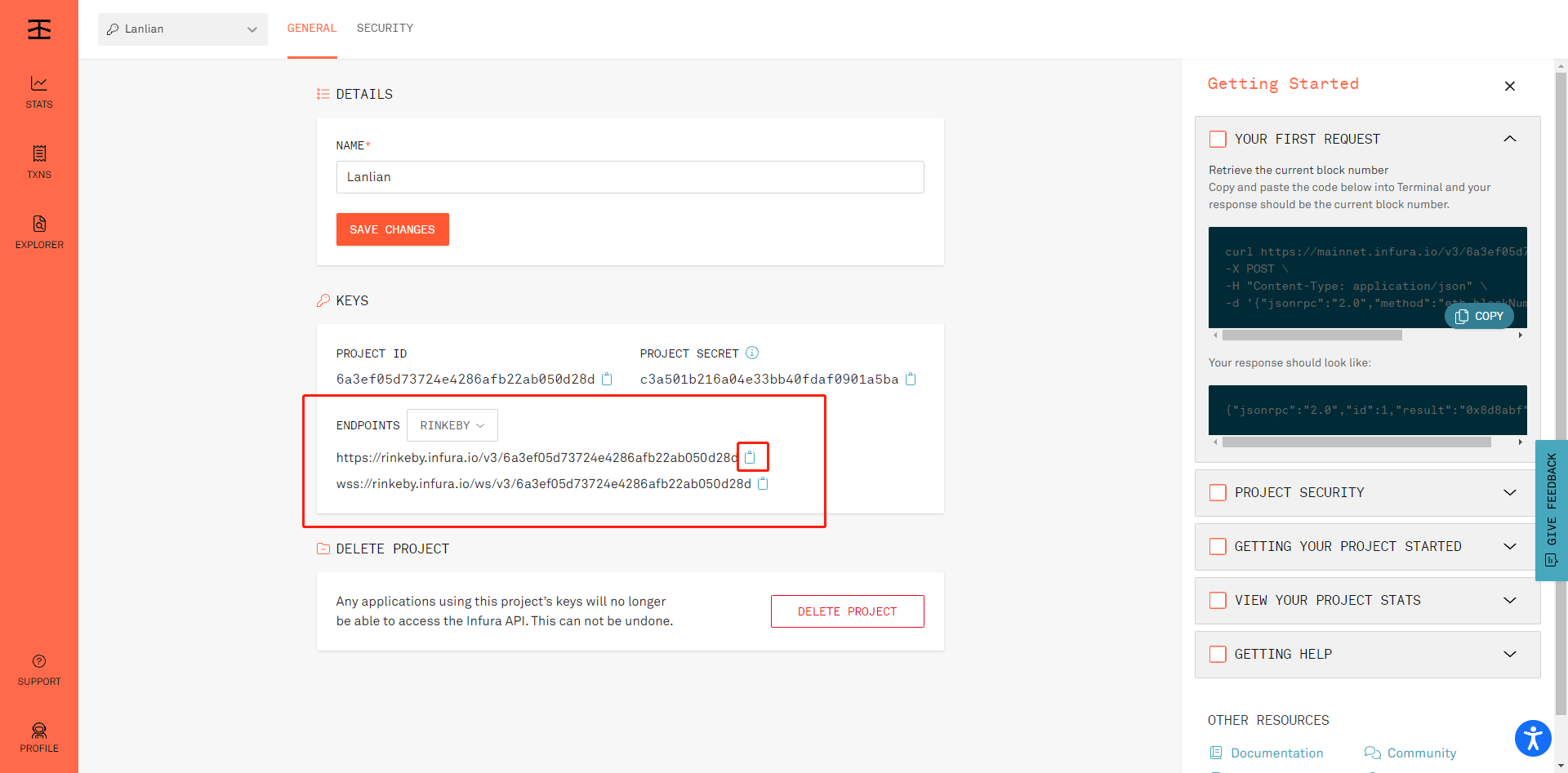
在privateKey中输入测试钱包的私钥
/** @type import('hardhat/config').HardhatUserConfig */
const privateKey = '';
require('@nomiclabs/hardhat-waffle');
module.exports = {
solidity: "0.8.4",
network: {
rinkeby: {
url: "https://rinkeby.infura.io/v3/<apiKey>",
account: [`0x${privateKey}`]
}
}
};
编写部署脚本
 mkdir scripts
 cd scripts
编写deploy.js
/** @type import('hardhat/config').HardhatUserConfig */
require("@nomiclabs/hardhat-waffle");
const PRIVATE_KEY = "";
module.exports = {
solidity: "0.8.4",
networks: {
rinkeby: {
url: "https://rinkeby.infura.io/v3/<apiKey>",
accounts: [`0x${PRIVATE_KEY}`]
}
},
};
部署合约
npx hardhat --network rinkeby run .\scripts\deploy.js

在etherscan上查看合约
选择部署的网络

输入刚才部署的合约地址

查看合约
可以看到我们的源码并没有公布

多文件代码开源(本地)
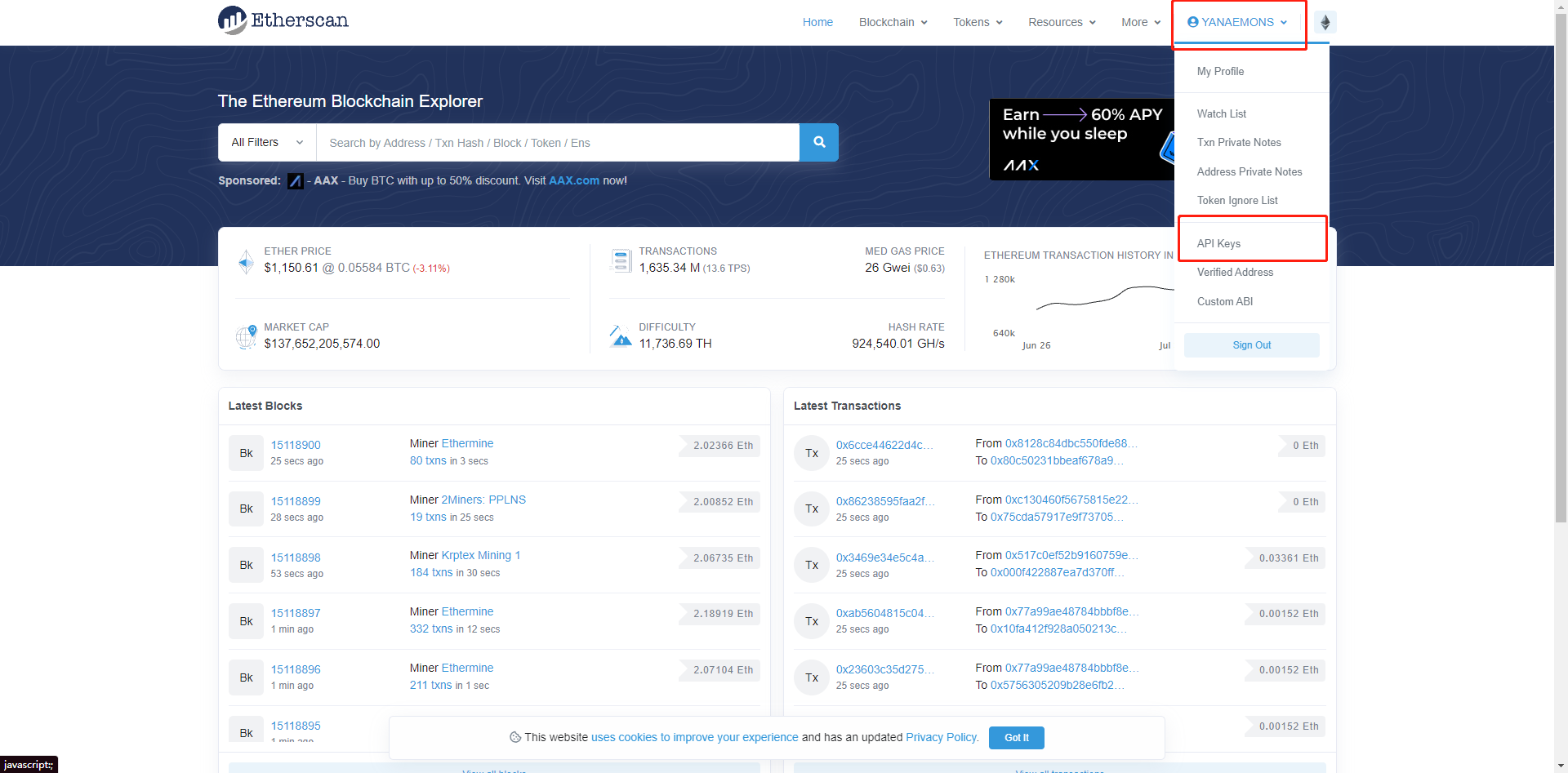
创建etherscan账户
点击api key
新建api key
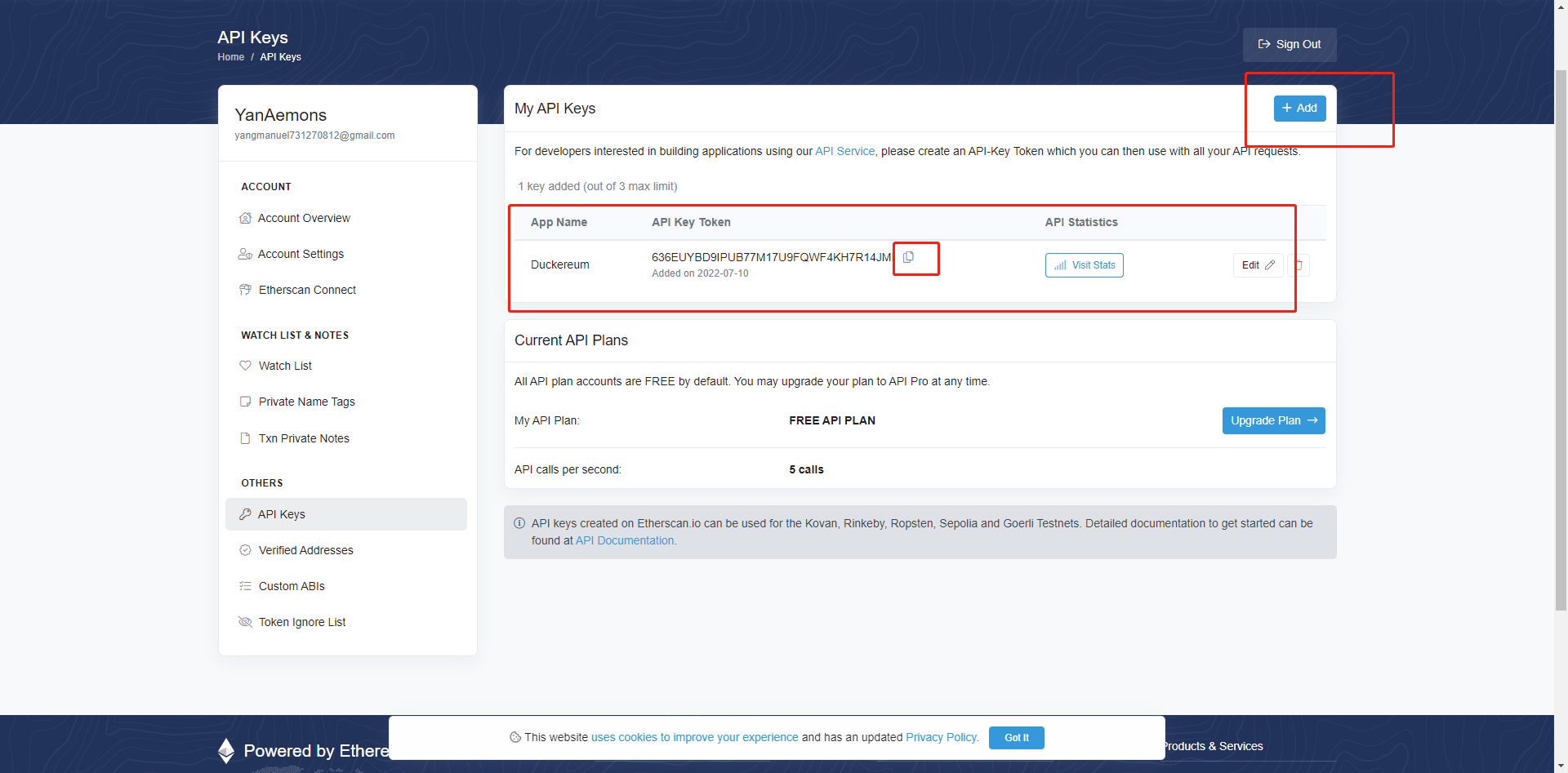
###
修改hardhat.config.js配置文件
 /** @type import('hardhat/config').HardhatUserConfig */
 require("@nomiclabs/hardhat-etherscan");
 require("@nomiclabs/hardhat-waffle");
 const PRIVATE_KEY = "";
 module.exports = {
   solidity: "0.8.4",
   networks: {
     rinkeby: {
       url: "https://rinkeby.infura.io/v3/<apiKey>",
accounts: [`0x${PRIVATE_KEY}`]
}
},
etherscan: {
// Your API key for Etherscan
// Obtain one at https://etherscan.io/
apiKey: ""
}
};
添加好自己的etherscan 的api后进行本地验证
npx hardhat verify --network rinkeby DEPLOYED_CONTRACT
将DEPLOYED_CONTRACT改为自己的合约地址
注意:本操作国内需要代理,否则回报超时操作
npx hardhat verify --network rinkeby 0x3E498e3111d13f67C3104adAFDCc23A266A408Eb
验证成功
登录etherscan查看效果

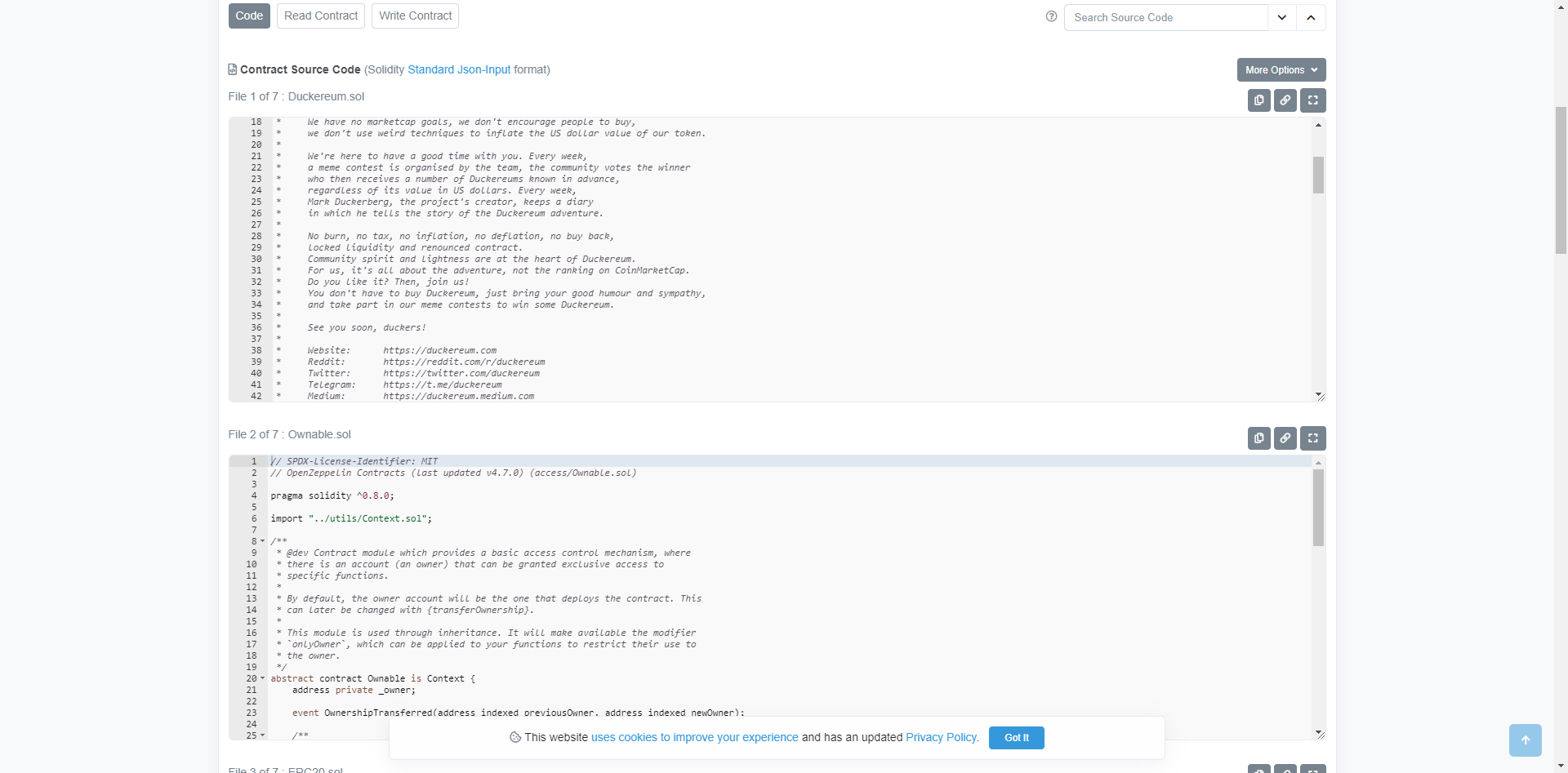
多文件合约成功开源
Etherscan本地多文件开源(VScode)的更多相关文章
- vscode断点调试本地客户端文件
一.安装chrome,安装vscode,打开vscode编辑器,安装插件Debugger for Chrome 二.新建文件 1.目录结构 . ├── index.html ├── index.js ...
- vscode编写python,引用本地py文件出现红色波浪线
前言 引用本地py文件出现红色波浪线,如下图: 原因 经过查询得知,vscode中的python插件默认使用的是pylint来做代码检查,因此需要对pylint做一些配置 解决方案 在setting. ...
- node使用xml-writer生成本地XML文件实例
npm中xml-writer文档的链接地址:https://www.npmjs.com/package/xml-writer npm中的文档比较简单,而且生成本地xml文件的demo并不正确.本篇是对 ...
- iOS从零开始学习直播之音频1.播放本地音频文件
现在直播越来越火,俨然已经成为了下一个红海.作为一个资深码农(我只喜欢这样称呼自己,不喜欢别人这样称呼我),我必须赶上时代的潮流,开始研究视频直播.发现视屏直播类的文章上来就讲拉流.推流.采集.美 ...
- iOS 学习 - 23 加载本地 txt 文件, NSMutableParagraphStyle 段落格式,缩放动画,字体间距
思路: 1.new 一个 Empty 后缀为 .txt 文件,内容随笔拷贝一段 2.用 NSString 接收本地文件,再用一个标题拼接字符串 3.创建一个 NSMutableParagraphSty ...
- UIWebView加载本地html文件
UIWebView *webView = [[UIWebView alloc] initWithFrame:CGRectMake(, , KScreenWidth, KScreenHeight-)]; ...
- 访问本地json文件因跨域导致的问题
我使用jquery的getJSON的方法获取本地的json文件,并进行操作,获取json 数据代码如下: $.getJSON("invite_panel.json",functio ...
- chrome调试本地项目, 引用本地javascript文件
chrome调试本地项目, 引用本地javascript文件 本地文件可以访问本地文件 修改快捷方式属性 C:\Users\xxx\AppData\Local\Google\Chrome\Applic ...
- 360chrome,google chrome浏览器使用jquery.ajax加载本地html文件
使用360chrome和google chrome浏览器加载本地html文件时,会报错,提示: XMLHttpRequest cannot load file:///Y:/jswg/code/html ...
- git 放弃本地某个文件的修改,或所有修改
18:57 2015/11/17git 放弃本地某个文件的修改,或所有修改git checkout 文件名git checkout // 放弃所有文件的所有修改git reset --hard 版本号 ...
随机推荐
- mysql零基础-3
第17章_触发器 在实际开发中,我们经常会遇到这样的情况:有 2 个或者多个相互关联的表,如 商品信息 和 库存信息 分 别存放在 2 个不同的数据表中,我们在添加一条新商品记录的时候,为了保证数据的 ...
- windows jetbrains toolbox 无法修改应用安装目录(应用正在运行)的解决方案
打开 jetbrains toolbook安装目录/.settings.json 添加一行 "install_location": 指定的路径地址 解决方案来自 JetBrains ...
- nohup 命令 追加输入日志或者覆盖输出日志
nohup python3 -u botxiaohui.py >> botruninfo.log 2 >&1 & >> 是追加的输出 > 单 ...
- 01. JavaScript基础知识
一.JavaScript简介 JavaScript 是一门解释型编程语言,解释型编程语言指代码不需要手动编译,而是通过解释器边解释边执行.所以,要运行 JS,我们需要在计算机中安装 JS 的解释器 ...
- 字符流 -->字符节点流 FlieWrite 用法 FileReader 用法
1创建字符输出节点流(采用的是环境默认的编码)FileWriter fw = new FileWriter("存值的路径");2输出内容fw.write(2209);可以建立数组来 ...
- Cookie会话跟踪技术
cookie是什么 cookie 也叫 HTTPCookie,是客户端与服务器端进行会话(session)使用的一个能够在浏览器本地化存储的技术. cookie就是为了存储 sessionID而诞生. ...
- Ansys经验之:杨氏模量的本质概念理解——仿真在线工作记录
Ansys经验之:什么是杨氏模量? 这是我见到的很多来培训的结构力学仿真人员的困惑,始终不能只管理解,但又是一个入门的重要概念. 本质:杨氏模量=应力/应变,即单位应变的应力.那什么叫单位应变呢,也很 ...
- 变量调用分析——这个ball到底是那个ball?
public class Ball implements Rollable{ public static void main(String[] args) { Ball ball = new Ball ...
- Edge 访问网站强制HTTPS
edge://net-internals/#hsts 1)開啟Edge chromium 瀏覽器,輸入edge://net-internals/#hsts,開啟設定介面2)找到 Delete doma ...
- 通过右键菜单生成pyd
批处理 @echo off reg add "HKCR\AllFilesystemObjects\shell\构建PYTHON\command" /ve /t REG_SZ /d ...