
[JavaScript]JS屏蔽浏览器右键菜单/粘贴/复制/剪切/选中 [转载]
前两天在解决一个项目缺陷时,突发感兴趣,了解一下~
1 JS事件
document.oncontextmenu // 右键菜单

document.onpaste //粘贴

document.oncopy //复制

document.oncut //剪切

document.onselectstart //选中开始时

+ 触发时间为目标对象被开始选中时(即选中动作刚开始,尚未实质性被选中)

+ 基本上都能支持,但不被 input 和 textarea 标签支持

+ 注意:如果想在火狐中禁用的话可以使用样式控制 div { -moz-user-select: none; }

document.onselect //选中已发生时

+ 文本框中的文本被选中时发生

+ 被 input 和 textarea 标签支持
补充: select相关API
- 取消诸多网页中选中事件对版权的保护措施,可尝试如下几种方法:
- 控制台输入:
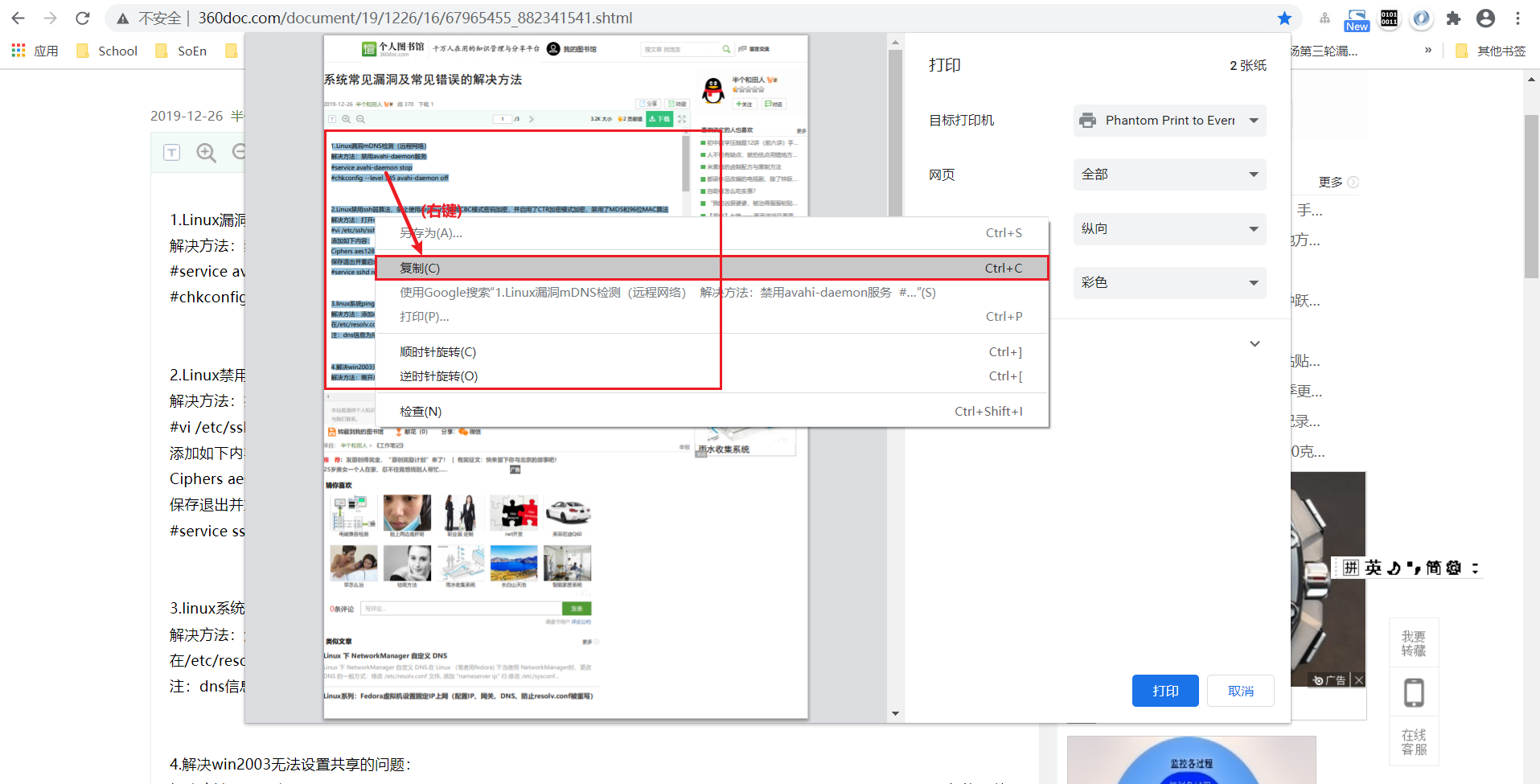
$=0 - 首先, Ctrl + P (打印当前网页) ; 然后在打印的预览界面中选中目标文本,并鼠标右键选择"复制(Ctrl+C)"拷贝之~
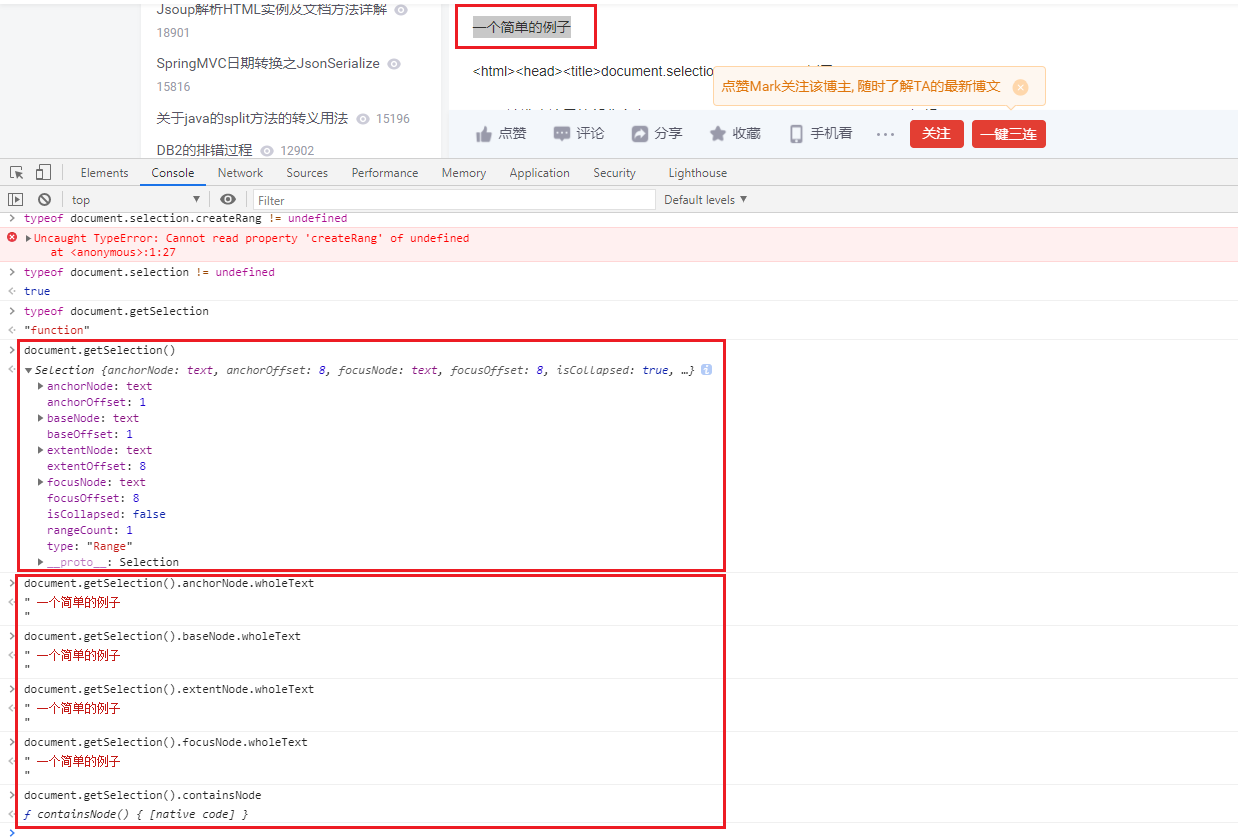
- 利用 document.getSelection()/selection的API来获取选中的文本
document.getSelection().focusNode.wholeText //选中的当前元素的文本

document.getSelection().focusNode.parentElement.parentNode.innerText

document.getSelection().focusNode.parentNode.previousElementSibling.innerText

document.getSelection().focusNode.parentElement.nextElementSibling.innerText
- document.selection / document.getSelection
IE:

    支持 document.selection

    不支持 document.getSelection

FireFox / Safari:window.getSelection

    不支持 document.selection

    支持 document.getSelection

Chrome (86.0.4240.111):

    不支持 document.selection

    支持 document.getSelection

document.selection /  document.getSelection 都不是标准语法。

--------------------------------------------------------------------------------

【 document.getSelection() 函数返回的对象 】

获取选中的文本: document.getSelection().[anchorNode/baseNode/extentNode/focusNode/].[wholeText/textContent/data/nodeValue]

【selection 对象】

代表了当前激活选中区,即高亮文本块,和/或文档中用户可执行某些操作的其它元素。

selection 对象的典型用途是作为用户的输入,以便识别正在对文档的哪一部分正在处理,或者作为某一操作的结果输出给用户。

用户和脚本都可以创建选中区。用户创建选中区的办法是拖曳文档的一部分。脚本创建选中区的办法是在文本区域或类似对象上调用 select 方法。要获取当前选中区,请对 document 对象应用 selection 关键字。要对选中区执行操作,请先用 createRange 方法从选中区创建一个文本区域对象。

一个文档同一时间只能有一个选中区。选中区的类型决定了其中为空或者包含文本和/或元素块。尽管空的选中区不包含任何内容,你仍然可以用它作为文档中的位置标志。
[选中目标DOM]
// 获取selection对象

var selection = window.getSelection();

// 清空selection对象

selection.removeAllRanges();

// 创建1个Range实例

var ele = document.getElementById('blogTitle')

var range = new Range();

range.selectNodeContents(ele);

// selection对象设置range实例

selection.addRange(range);
2 JS源码
//屏蔽右键菜单 (<input> / <textarea> / type=text 除外)

document.oncontextmenu = function (event){

    if(window.event){

        event = window.event;

    }try{

        var the = event.srcElement;

        if (!((the.tagName == "INPUT" && the.type.toLowerCase() == "text") || the.tagName == "TEXTAREA")){

            return false;

        }

        return true;

    }catch (e){

        return false;

    }

}

//屏蔽粘贴 (<input> / <textarea> / type=text 除外)

document.onpaste = function (event){

    if(window.event){

        event = window.event;

    }try{

        var the = event.srcElement;

        if (!((the.tagName == "INPUT" && the.type.toLowerCase() == "text") || the.tagName == "TEXTAREA")){

            return false; // false 表示 禁用 粘贴功能

        }

        return true;

    }catch (e){

        return false;

    }

}

//屏蔽复制 (<input> / <textarea> / type=text 除外)

document.oncopy = function (event){

    if(window.event){

        event = window.event;

    }try{

        var the = event.srcElement;

        if(!((the.tagName == "INPUT" && the.type.toLowerCase() == "text") || the.tagName == "TEXTAREA")){

            return false;

        }

        return true;

    }catch (e){

        return false;

    }

}

//屏蔽剪切 (<input> / <textarea> / type=text 除外)

document.oncut = function (event){

    if(window.event){

        event = window.event;

    }try{

        var the = event.srcElement;

        if(!((the.tagName == "INPUT" && the.type.toLowerCase() == "text") || the.tagName == "TEXTAREA")){

            return false;

        }

        return true;

    }catch (e){

        return false;

    }

}

//屏蔽(文本)选中 (<input> / <textarea> / type=text 除外)

document.onselectstart = function (event){

    if(window.event){

        event = window.event;

    }try{

        var the = event.srcElement;

        if (!((the.tagName == "INPUT" && the.type.toLowerCase() == "text") || the.tagName == "TEXTAREA")){

            return false;

        }

        return true;

    } catch (e) {

        return false;

    }

}
3 附件: 完整源码
展开查看
<!DOCTYPE html PUBLIC "-//W3C//DTD XHTML 1.0 Transitional//EN" "http://www.w3.org/TR/xhtml1/DTD/xhtml1-transitional.dtd">


<html xmlns="http://www.w3.org/1999/xhtml">


<head>


<meta http-equiv="Content-Type" content="text/html; charset=utf-8" />


<title>js屏蔽浏览器右键菜单,粘贴,复制,剪切,选中</title>


<meta name="description" content="js代码制作屏蔽浏览器右键菜单,屏蔽浏览器粘贴,屏蔽浏览器复制,屏蔽浏览器剪切,屏蔽浏览器选中,不会屏蔽搜索引擎蜘蛛抓取页面,不影响seo优化。可以设置网页内容代码不被用户随意下载等。" />


</head>

<body>

<input type="input" />

<script type="text/javascript">

//屏蔽右键菜单 (<input> / <textarea> / type=text 除外)


document.oncontextmenu = function (event){


if(window.event){


event = window.event;


}try{


var the = event.srcElement;


if (!((the.tagName == "INPUT" && the.type.toLowerCase() == "text") || the.tagName == "TEXTAREA")){


return false;


}


return true;


}catch (e){


return false;


}


}

//屏蔽粘贴 (<input> / <textarea> / type=text 除外)


document.onpaste = function (event){


if(window.event){


event = window.event;


}try{


var the = event.srcElement;


if (!((the.tagName == "INPUT" && the.type.toLowerCase() == "text") || the.tagName == "TEXTAREA")){


return false; // false 表示 禁用 粘贴功能


}


return true;


}catch (e){


return false;


}


}

//屏蔽复制 (<input> / <textarea> / type=text 除外)


document.oncopy = function (event){


if(window.event){


event = window.event;


}try{


var the = event.srcElement;


if(!((the.tagName == "INPUT" && the.type.toLowerCase() == "text") || the.tagName == "TEXTAREA")){


return false;


}


return true;


}catch (e){


return false;


}


}

//屏蔽剪切 (<input> / <textarea> / type=text 除外)

document.oncut = function (event){


if(window.event){


event = window.event;


}try{


var the = event.srcElement;


if(!((the.tagName == "INPUT" && the.type.toLowerCase() == "text") || the.tagName == "TEXTAREA")){


return false;


}


return true;


}catch (e){


return false;


}


}

//屏蔽(文本)选中 (<input> / <textarea> / type=text 除外)


document.onselectstart = function (event){


if(window.event){


event = window.event;


}try{


var the = event.srcElement;


if (!((the.tagName == "INPUT" && the.type.toLowerCase() == "text") || the.tagName == "TEXTAREA")){


return false;


}


return true;


} catch (e) {


return false;


}


}


</script>

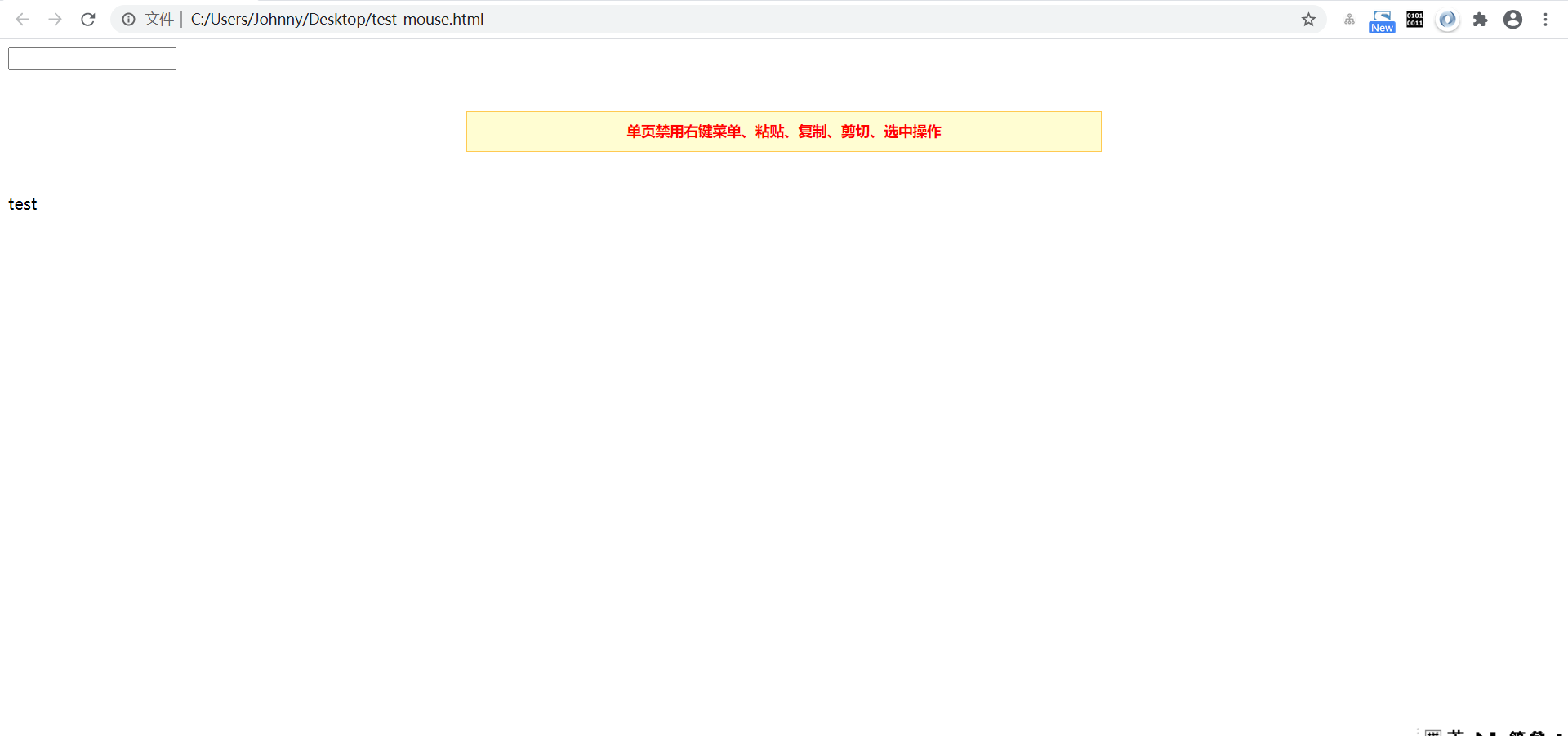
<div style="width:600px;margin:40px auto;text-align:center;border:solid 1px #FFCA52;background:#FFFDD2;height:28px;line-height:28px;font-size:14px;padding:5px 10px;color:#ff0000;font-weight:800;">单页禁用右键菜单、粘贴、复制、剪切、选中操作</div>


test


</body>


</html>
X 参考与推荐文献
- js屏蔽浏览器右键菜单,粘贴,复制,剪切,选中(转) - 博客园
- 关于markdown 折叠代码块 / Markdown显示HTML标签以及转义字符 - 博客园
- onselect 与 onselectstart - 简书
[JavaScript]JS屏蔽浏览器右键菜单/粘贴/复制/剪切/选中 [转载]的更多相关文章
- js屏蔽浏览器右键菜单,粘贴,复制,剪切,选中(转)
<!DOCTYPE html PUBLIC "-//W3C//DTD XHTML 1.0 Transitional//EN" "http://www.w3.org/ ...
- js 屏蔽浏览器右键菜单
<script type="text/javascript"> function doNothing(){ window.event.returnValue=false ...
- js屏蔽浏览器右键菜单
<script type="text/javascript"> function doNothing(){ window.event.returnValue=false ...
- 利用js代码屏蔽f12,右键,粘贴,复制,剪切,选中,操作!!秀!秀!秀!
koala 专注于个人技术分享 屏蔽f12审查 <script> document.onkeydown = function () { if (window.event && ...
- JavaScript 中禁止用户右键菜单,复制,选取,Ctrl,Alt,Shift. 获取宽高,清除浮动
//禁用右键菜单 document.oncontextmenu = function(){ event.returnValue = false; } //禁用选取内容 document.onselec ...
- JS 禁止浏览器右键菜单和刷新
<script language="javascript"> //禁止按键F5 document.onkeydown = function(e){ e = window ...
- javascript屏蔽浏览器右键功能按钮
<!DOCTYPE html PUBLIC "-//W3C//DTD XHTML 1.0 Transitional//EN" "http://www.w3.org/ ...
- 4.js屏蔽浏览器鼠标右键菜单
document.oncontextmenu = function(){return false;} 参考链接:js 屏蔽浏览器事件汇总
- javascript自定义浏览器右键菜单
javascript自定义浏览器右键菜单 在书上看到document对象还有一个contextmenu事件,但是不知为什么w3school中找不到这个耶... 利用这个特性写了个浏览器的右键菜单, ...
- js屏蔽浏览器(IE和FireFox)的刷新和右键等功能
//一.js屏蔽浏览器(IE和FireFox)的刷新功能 document.onkeydown=function() { if ((window.event.keyCode==116)|| //屏蔽 ...
随机推荐
- 熟悉Hadoop及其操作 3
启动hdfs 查看与创建hadoop用户目录. 在用户目录下创建与查看input目录. 将hadoop的配置文件上传到hdfs上的input目录下.运行MapReduce示例作业,输出结果放在ou ...
- kubeadm搭建k8s
一.kubeadm 部署 K8S 集群架构 主机名 IP地址 安装组件 master(2C/4G,cpu核心数要求大于2) 192.168.160.20 docker.kubeadm.kubelet. ...
- linux 获取文件名
https://blog.csdn.net/liuyuedechuchu/article/details/123778605
- MSSQL T-SQL 基础 (创建、增、删、改)
1.创建数据库 create database StudentAchievementMS ----创建数据库,可以只执行此行来创建数据库,但以下属性都是默认 on primary --主数据文件 ( ...
- HTML Cookie
目录 Cookie是什么 Cookie的属性 Cookie的作用域 Domain 属性 Path 属性 SameSite 属性 Cookie密码验证小案例 效果展示 代码 Cookie是什么 HTTP ...
- Nginx常用经典配置|反向代理、HTTPS重定向、端口转发
二级目录映射 目前前后端项目分离场景多了以后,一般是前端一个端口,后端一个端口. 如前端是https://example.com/index.html,调用的接口是https://example.co ...
- VisualVM无法运行,修改配置文件
在VisualVM安装位置下找到etc目录修改etc目录下的visualvm.conf文件 加入配置 参数 指定JDK或JRE路径,如 visualvm_jdkhome="C:\xxx\ ...
- spring下的restTemplate使用
首先上配置,由于restTemplate不支持一些返回格式,所以需要自己手动配置 /** * @Description : restTemplate配置类 * @Author : wzkris * @ ...
- bat将多个文件夹下内容合并到一个文件夹下
for /f "delims=" %%p in ('dir /b/ad') do copy %%p\*.* d:\all\ pause 目标文件夹 d:\all\ 最好不用中文目录
- Color与字符串相互转换
string myfontcolor; this.label1.ForeColor = System.Drawing.ColorTranslator.FromHtml(myfontcolor); my ...