
android中shape的属性
<shape>

            <!– 实心 –>

            <solid android:color=”#ff9d77″/>

            <!– 渐变 –>

            <gradient

                android:startColor=”#ff8c00″

                android:endColor=”#FFFFFF”

                android:angle=”270″ />

            <!– 描边 –>

            <stroke

                android:width=”2dp”

                android:color=”#dcdcdc” />

            <!– 圆角 –>

            <corners

                android:radius=”2dp” />

            <padding

                android:left=”10dp”

                android:top=”10dp”

                android:right=”10dp”

                android:bottom=”10dp” />

        </shape>
solid:实心,就是填充的意思
android:color指定填充的颜色
gradient:渐变
android:startColor和android:endColor分别为起始和结束颜色,ndroid:angle是渐变角度,必须为45的整数倍。
另外渐变默认的模式为android:type=”linear”,即线性渐变,可以指定渐变为径向渐变,android:type=”radial”,径向渐变需要指定半径android:gradientRadius=”50″。
stroke:描边
android:width=”2dp”
描边的宽度,android:color
描边的颜色。
我们还可以把描边弄成虚线的形式,设置方式为:
android:dashWidth=”5dp”
android:dashGap=”3dp”
其中android:dashWidth表示’-‘这样一个横线的宽度,android:dashGap表示之间隔开的距离。
corners:圆角
android:radius为角的弧度,值越大角越圆。
我们还可以把四个角设定成不同的角度,方法为:
<corners

        android:topRightRadius=”20dp”    右上角

        android:bottomLeftRadius=”20dp”    右下角

        android:topLeftRadius=”1dp”    左上角

        android:bottomRightRadius=”0dp”    左下角

 />
这里有个地方需要注意,bottomLeftRadius是右下角,而不是左下角,这个有点郁闷,不过不影响使用,记得别搞错了就行。
还有网上看到有人说设置成0dp无效,不过我在测试中发现是可以的,我用的是2.2,可能修复了这个问题吧,如果无效的话那就只能设成1dp了。
padding:间隔
这个就不用多说了,XML布局文件中经常用到。
大体的就是这样,以下是一个使用的具体示例:用在Selector中作为Button的背景,分别定义了按钮的一般状态、获得焦点状态和按下时的状态,具体代码如下:
main.xml:
<Button

    android:layout_width=”wrap_content”

    android:layout_height=”wrap_content”

    android:text=”TestShapeButton”

    android:background=”@drawable/button_selector”

    />
button_selector.xml:
<?xml version=”1.0″ encoding=”utf-8″?>

<selector

    xmlns:android=”http://schemas.android.com/apk/res/android”>

    <item android:state_pressed=”true” >

        <shape>

            <!– 渐变 –>

            <gradient

                android:startColor=”#ff8c00″

                android:endColor=”#FFFFFF”

                android:type=”radial”

                android:gradientRadius=”50″ />

            <!– 描边 –>

            <stroke

                android:width=”2dp”

                android:color=”#dcdcdc”

                android:dashWidth=”5dp”

                android:dashGap=”3dp” />

            <!– 圆角 –>

            <corners

                android:radius=”2dp” />

            <padding

                android:left=”10dp”

                android:top=”10dp”

                android:right=”10dp”

                android:bottom=”10dp” />

        </shape>

    </item>

    <item android:state_focused=”true” >

        <shape>

            <gradient

                android:startColor=”#ffc2b7″

                android:endColor=”#ffc2b7″

                android:angle=”270″ />

            <stroke

                android:width=”2dp”

                android:color=”#dcdcdc” />

            <corners

                android:radius=”2dp” />

            <padding

                android:left=”10dp”

                android:top=”10dp”

                android:right=”10dp”

                android:bottom=”10dp” />

        </shape>

    </item>

    <item>

        <shape>

            <solid android:color=”#ff9d77″/>

            <stroke

                android:width=”2dp”

                android:color=”#fad3cf” />

            <corners

                android:topRightRadius=”5dp”

                android:bottomLeftRadius=”5dp”

                android:topLeftRadius=”0dp”

                android:bottomRightRadius=”0dp”

            />

            <padding

                android:left=”10dp”

                android:top=”10dp”

                android:right=”10dp”

                android:bottom=”10dp” />

        </shape>

    </item>

</selector>
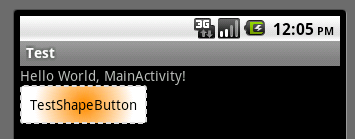
运行效果如下图:
一般状态:

获得焦点状态:
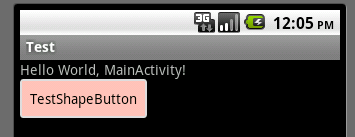
按下状态:
本文章转接于:http://kofi1122.blog.51cto.com/2815761/521605
android中shape的属性的更多相关文章
- Android中shape属性详解
一.简单使用 刚开始,就先不讲一堆标签的意义及用法,先简单看看shape标签怎么用. 1.新建shape文件 首先在res/drawable文件夹下,新建一个文件,命名为:shape_radius.x ...
- Android中的windowSoftInputMode属性详解
这篇文章主要介绍了Android中的windowSoftInputMode属性详解,本文对windowSoftInputMode的9个属性做了详细总结,需要的朋友可以参考下 在前面的一篇文章中 ...
- 【Android 界面效果19】Android中shape的使用
Android中常常使用shape来定义控件的一些显示属性,今天看了一些shape的使用,对shape有了大体的了解,稍作总结: 先看下面的代码: <shape> ...
- Android 中 shape 图形的使用
转载于:http://kofi1122.blog.51cto.com/2815761/521605 Android中常常使用shape来定义控件的一些显示属性,今天看了一些shape的使用,对shap ...
- android中xml tools属性详解
第一部分 安卓开发中,在写布局代码的时候,ide可以看到布局的预览效果. 但是有些效果则必须在运行之后才能看见,比如这种情况:TextView在xml中没有设置任何字符,而是在activity中设置了 ...
- android中xmlns:tools属性详解
今天读到一篇总结的非常棒的文章,写的逻辑很清晰也很实用,很少见到如此棒的文章了.就原文转发过来,我把格式给整理了一下,分享给园子里的各位朋友!好久没写博客了,就为2015年的11月留份纪念吧.希望对你 ...
- Android中的sharedUserId属性详解
在Android里面每个app都有一个唯一的linux user ID,则这样权限就被设置成该应用程序的文件只对该用户可见,只对该应用程序自身可见,而我们可以使他们对其他的应用程序可见,这会使我们用到 ...
- Android中Edittext的属性
//此为转载别人的,挺不错的 1.EditText输入的文字为密码形式的设置 (1)通过.xml里设置: 把该EditText设为:android:password="true" ...
- android中xml tools属性详解(转)
第一部分 安卓开发中,在写布局代码的时候,ide可以看到布局的预览效果. 但是有些效果则必须在运行之后才能看见,比如这种情况:TextView在xml中没有设置任何字符,而是在activity中设置了 ...
随机推荐
- 蒙特卡罗树搜索(MCTS)【转】
简介 最近AlphaGo Zero又火了一把,paper和各种分析文章都有了,有人看到了说不就是普通的Reinforcement learning吗,有人还没理解估值网络.快速下子网络的作用就放弃了. ...
- Libsvm在matlab环境下使用指南
一.安装 http://www.csie.ntu.edu.tw/~cjlin/libsvm/matlab/.在这个地址上可以下的包含matlab接口的源程序.下载完后可以放到放到任意的盘上解压,最好建 ...
- tomcat8.5.11的manager页面总是提示403的问题
修改conf/tomcat-users.xml加入: <role rolename="manager"/> <role rolename="manage ...
- C# W3 调试
如果在调试附加进程中 没W3进程的话, 在运行里输入 uac 设置为从不通知 即可:
- 使用PLSQL Developer和DbVisualizer、SQLDBx查询oracle数据库时出现乱码
使用PLSQL Developer和DbVisualizer查询oracle数据库时,出现查询数据中文乱码情况. 查看了一下数据库编码格式select * from v$nls_parameters; ...
- loadrunder之脚本篇——action分类
Action分类 l . Vuser_init 2. Vuser_end 3. Action 在lr中用户的初始化操作应该存放在Vuser_init中.用户的结束操作存放在Vuser_end中.因为 ...
- 函数的调用规则(__cdecl,__stdcall,__fastcall,__pascal)
关于函数的调用规则(调用约定),大多数时候是不需要了解的,但是如果需要跨语言的编程,比如VC写的dll要delphi调用,则需要了解. microsoft的vc默认的是__cdecl方式,而windo ...
- 【Head First Servlets and JSP】笔记11:cookie
容器如何知道客户是谁?(这并不是HTTP能实现的!IP地址不能唯一的标识用户,另外,非必要不采用HTTPS 继续mark孤傲苍狼的博客,百科全书 cookie——Header——字典——键值对—— 延 ...
- PHP 获取真实IP地址
function getClientIp($type = 0) { $type = $type ? 1 : 0; static $ip = NULL; if ($ip !== NULL) return ...
- jquery图片过滤归类应用
在线演示 本地下载