
【Android 界面效果19】Android中shape的使用
Android中常常使用shape来定义控件的一些显示属性,今天看了一些shape的使用,对shape有了大体的了解,稍作总结:
先看下面的代码:
<shape>
<!-- 实心 -->
<solid android:color="#ff9d77"/>
<!-- 渐变 -->
<gradient
android:startColor="#ff8c00"
android:endColor="#FFFFFF"
android:angle="270" />
<!-- 描边 -->
<stroke
android:width="2dp"
android:color="#dcdcdc" />
<!-- 圆角 -->
<corners
android:radius="2dp" />
<padding
android:left="10dp"
android:top="10dp"
android:right="10dp"
android:bottom="10dp" />
</shape>
solid:实心,就是填充的意思
android:color指定填充的颜色
gradient:渐变
android:startColor和android:endColor分别为起始和结束颜色,ndroid:angle是渐变角度,必须为45的整数倍。
另外渐变默认的模式为android:type="linear",即线性渐变,可以指定渐变为径向渐变,android:type="radial",径向渐变需要指定半径android:gradientRadius="50"。
stroke:描边
android:width="2dp" 描边的宽度,android:color 描边的颜色。
我们还可以把描边弄成虚线的形式,设置方式为:
android:dashWidth="5dp"
android:dashGap="3dp"
其中android:dashWidth表示'-'这样一个横线的宽度,android:dashGap表示之间隔开的距离。
corners:圆角
android:radius为角的弧度,值越大角越圆。
我们还可以把四个角设定成不同的角度,方法为:
<corners
android:topRightRadius="20dp" 右上角
android:bottomLeftRadius="20dp" 右下角
android:topLeftRadius="1dp" 左上角
android:bottomRightRadius="0dp" 左下角
/>
这里有个地方需要注意,bottomLeftRadius是右下角,而不是左下角,这个有点郁闷,不过不影响使用,记得别搞错了就行。
还有网上看到有人说设置成0dp无效,不过我在测试中发现是可以的,我用的是2.2,可能修复了这个问题吧,如果无效的话那就只能设成1dp了。
padding:间隔
这个就不用多说了,XML布局文件中经常用到。
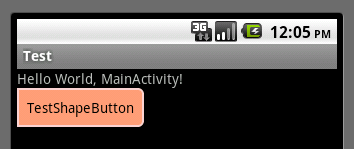
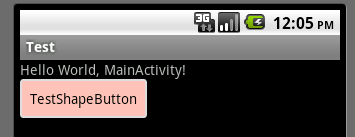
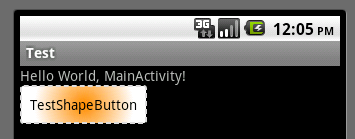
大体的就是这样,以下是一个使用的具体示例:用在Selector中作为Button的背景,分别定义了按钮的一般状态、获得焦点状态和按下时的状态,具体代码如下:
main.xml:
<Button
android:layout_width="wrap_content"
android:layout_height="wrap_content"
android:text="TestShapeButton"
android:background="@drawable/button_selector"
/>
button_selector.xml:
<?xml version="1.0" encoding="utf-8"?>
<selector
xmlns:android="http://schemas.android.com/apk/res/android">
<item android:state_pressed="true" >
<shape>
<!-- 渐变 -->
<gradient
android:startColor="#ff8c00"
android:endColor="#FFFFFF"
android:type="radial"
android:gradientRadius="50" />
<!-- 描边 -->
<stroke
android:width="2dp"
android:color="#dcdcdc"
android:dashWidth="5dp"
android:dashGap="3dp" />
<!-- 圆角 -->
<corners
android:radius="2dp" />
<padding
android:left="10dp"
android:top="10dp"
android:right="10dp"
android:bottom="10dp" />
</shape>
</item>
<item android:state_focused="true" >
<shape>
<gradient
android:startColor="#ffc2b7"
android:endColor="#ffc2b7"
android:angle="270" />
<stroke
android:width="2dp"
android:color="#dcdcdc" />
<corners
android:radius="2dp" />
<padding
android:left="10dp"
android:top="10dp"
android:right="10dp"
android:bottom="10dp" />
</shape>
</item>
<item>
<shape>
<solid android:color="#ff9d77"/>
<stroke
android:width="2dp"
android:color="#fad3cf" />
<corners
android:topRightRadius="5dp"
android:bottomLeftRadius="5dp"
android:topLeftRadius="0dp"
android:bottomRightRadius="0dp"
/>
<padding
android:left="10dp"
android:top="10dp"
android:right="10dp"
android:bottom="10dp" />
</shape>
</item>
</selector>
运行效果如下图:
一般状态:
获得焦点状态:
按下状态:
【Android 界面效果19】Android中shape的使用的更多相关文章
- 【Android 界面效果25】android中include标签的使用
在一个项目中我们可能会需要用到相同的布局设计,如果都写在一个xml文件中,代码显得很冗余,并且可读性也很差,所以我们可以把相同布局的代码单独写成一个模块,然后用到的时候可以通过<include ...
- 【Android 界面效果32】ImageView中XML属性src和background的区别
background会根据ImageView组件给定的长宽进行拉伸,而src就存放的是原图的大小,不会进行拉伸. src是图片内容(前景),bg是背景,可以同时使用. 此外:scaleType只对sr ...
- 【Android 界面效果30】Android中ImageSwitcher结合Gallery展示SD卡中的资源图片
本文主要是写关于ImageSwitcher结合Gallery组件如何展示SDCard中的资源图片,相信大家都看过API Demo 中也有关于这个例子的,但API Demo 中的例子是展示工程中Draw ...
- 【Android 界面效果12】EditText中的多行输入问题
------- 源自梦想.永远是你IT事业的好友.只是勇敢地说出我学到! ---------- 我们在使用EditText进行多行输入的时候,通常的写法如下: <EditText android ...
- 【Android 界面效果31】Android--侧滑菜单应用的实现
侧滑菜单应用现在非常多,而且实现方式也多种多样.通过在网上的多方查找,我找到郭霖少侠的这篇文章:http://blog.csdn.net/guolin_blog/article/details/874 ...
- 【Android 界面效果21】Android ViewPager使用详解
这是谷歌官方给我们提供的一个兼容低版本安卓设备的软件包,里面包囊了只有在安卓3.0以上可以使用的api.而viewpager就是其中之一利用它,我们可以做很多事情,从最简单的导航,到页面菜单等等.那如 ...
- 【Android 界面效果18】Android软件开发之常用系统控件界面整理
[java] view plaincopyprint? <span style="font-size:18px">1.文本框TextView TextView的作用 ...
- 【Android 界面效果17】Android手机平板两不误,使用Fragment实现兼容手机和平板的程序
记得我之前参与开发过一个华为的项目,要求程序可以支持好几种终端设备,其中就包括Android手机和Android Pad.然后为了节省人力,公司无节操地让Android手机和Android Pad都由 ...
- 【Android 界面效果39】android:inputType问题
1. 在XML代码中实现比较简单, 直接设置android:inputType="textMultiLine": [mw_shl_code=java,true]<EditT ...
随机推荐
- Liunx更新源
不同的网络状况连接以下源的速度不同, 建议在添加前手动验证以下源的连接速度(ping下就行),选择最快的源可以节省大批下载时间. 首先备份源列表: sudo cp /etc/apt/sources.l ...
- True or False
任何对象都可以被测试真值.用于if或while条件中或作为下面的布尔操作的操作数.以下值被视为假: None False 任何数值类型的零,例如,0.0.0.0j . 任何空序列,例如,". ...
- kindeditor html代码过滤不能保存
这是因为编辑器默认开启了过滤模式(filterMode:true).当filterMode为true时,编辑器会根据htmlTags设定自动过滤HTML代码,主要是为了生成干净的代码.如果想保留所有H ...
- iOS的几种定时器
//gcd的定时器timer必须先保存为一个属性或者成员变量 @property (nonatomic , assign) dispatch_source_t timer; //第一种 每一秒执行一次 ...
- Ajax.ActionLink与Ajax.BeginForm使用场所的思考
Ajax.ActionLink使用在提交参数明确的情况下,如: Ajax.ActionLink("加入购物车", "AddToCart", "Cart ...
- VC、MFC中设置控件的背景色、标题、字体颜色、字体要注意的地方[转]
在MFC中设置控件的背景色.字体.字体颜色.标题等属性主要是利用OnCtlColor函数来实现. 如: HBRUSH CAlarm::OnCtlColor(CDC* pDC, CWnd* pWnd, ...
- 更改SQL数据库的繁体数据为简体
上一篇说到,公司需要把所有的系统逐步更改为简体,一些系统可以保持原先的繁体数据,而有一些系统应使用部门的要求,必须要更改为简体,由于程序很大,报表也多,修改程序转换显示的可能性不大,故所以打算把数据库 ...
- System.Data.SQLite数据库简介
SQLite介绍 在介绍System.Data.SQLite之前需要介绍一下SQLite,SQLite是一个类似于Access的单机版数据库管理系统,它将所有数据库的定义(包括定义.表.索引和数据本身 ...
- 实用的树形菜单控件tree
jQuery plugin: Treeview 这个插件能够把无序列表转换成可展开与收缩的Tree. jQuery plugin: Treeview jQuery jstree jsTree ...
- ueditor-图片上传是报错
通过查看上面的图片中的[详细信息]可以看到是因为读取控件的路径的过程中错了导致的,因此需要用如下办法解决. 解决办法: 将ueditor.config.js中的一下代码中的路径修改为ueditor路径 ...