
Entity Framework 6.0 Tutorials(2):Async query and Save
Async query and Save:
You can take advantage of asynchronous execution of .Net 4.5 with Entity Framework. EF 6 has the ability to execute a query and command asynchronously using DbContext.
Let's see how to execute asynchronous query first and then we will see an asynchronous call to context.SaveChanges.
Asynchronous Query:
private static async Task<Student> GetStudent()

{

    Student student = null;

    using (var context = new SchoolDBEntities())

    {

        Console.WriteLine("Start GetStudent...");

        student = await (context.Students.Where(s => s.StudentID == ).FirstOrDefaultAsync<Student>());

        Console.WriteLine("Finished GetStudent...");

    }

    return student;

}
As you can see in the above code, GetStudent method is marked with async to make it asynchronous. The return type of asynchrounous method must be Task. GetStudent returns an object of Student entity so return type must be Task<Student>.
Also, query is marked with await. This frees the calling thread to do something else until it executes the query and returns the data. We have used FirstOrDefaultAsync extension method of System.Data.Entity. You may use other extension methods appropriately, such as SingleOrDefaultAsync, ToListAsyn, etc.
Asynchronous Save:
You can call context.SaveChanges asynchronously the same way as async query:
private static async Task SaveStudent(Student editedStudent)

{

    using (var context = new SchoolDBEntities())

    {

        context.Entry(editedStudent).State = EntityState.Modified;

        Console.WriteLine("Start SaveStudent...");

        int x = await (context.SaveChangesAsync());

        Console.WriteLine("Finished SaveStudent...");

    }

}
Getting async query result:
You can get the result when asynchronous using the wait method as below:
public static void AsyncQueryAndSave()

{

    var student = GetStudent();

    Console.WriteLine("Let's do something else till we get student..");

    student.Wait();

    var studentSave = SaveStudent(student.Result);

    Console.WriteLine("Let's do something else till we get student.." );

    studentSave.Wait();

}
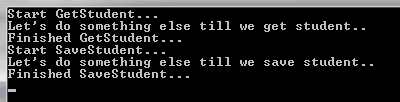
As shown in the code above, we call async method GetStudent in the usual way and store the reference in the variable student. Then, we call student.wait(). This means that the calling thread should wait until the asynchronous method completes, so we can do another process, until we get the result from the asynchronous method.
The code shown above will have the following output:
Download sample project for Async query & save demo.
Entity Framework 6.0 Tutorials(2):Async query and Save的更多相关文章
- Entity Framework 6.0 Tutorials(1):Introduction
以下系统文章为EF6.0知识的介绍,本章是第一篇 原文地址:http://www.entityframeworktutorial.net/entityframework6/introduction.a ...
- Entity Framework 6.0 Tutorials(4):Database Command Logging
Database Command Logging: In this section, you will learn how to log commands & queries sent to ...
- Entity Framework 6.0 Tutorials(11):Download Sample Project
Download Sample Project: Download a sample project for Entity Framework 6 Database-First model below ...
- Entity Framework 6.0 Tutorials(10):Index Attribute
Index Attribute: Entity Framework 6 provides Index attribute to create Index on a particular column ...
- Entity Framework 6.0 Tutorials(9):Stored Procedure Mapping
Code First - Insert, Update, Delete Stored Procedure Mapping: Entity Framework 6 Code-First provides ...
- Entity Framework 6.0 Tutorials(6):Transaction support
Transaction support: Entity Framework by default wraps Insert, Update or Delete operation in a trans ...
- Entity Framework 6.0 Tutorials(3):Code-based Configuration
Code-based Configuration: Entity Framework 6 has introduced code based configuration. Now, you can c ...
- Entity Framework 6.0 Tutorials(8):Custom Code-First Conventions
Custom Code-First Conventions: Code-First has a set of default behaviors for the models that are ref ...
- Entity Framework 6.0 Tutorials(7):DbSet.AddRange & DbSet.RemoveRange
DbSet.AddRange & DbSet.RemoveRange: DbSet in EF 6 has introduced new methods AddRange & Remo ...
随机推荐
- 转载 fpga中 restoring 和 non-restoring 除法实现。
对于non-restoring方法,主要是用rem和den移位数据比较,rem_d长度为den+nom的总长,den_d长度为den+nom的总长度,rem_d的初始值为{{d_width{1'b0} ...
- 3145 code[VS]汉诺塔游戏--递归
3145 汉诺塔游戏 题目描述 Description 汉诺塔问题(又称为河内塔问题),是一个大家熟知的问题.在A,B,C三根柱子上,有n个不同大小的圆盘(假设半径分别为1-n吧),一开始他们都叠在我 ...
- 在Spring中通过构造自动装配--constructor
在Spring中,可以使用“通过构造自动装配”,实际上是按构造函数的参数类型自动装配. 这意味着,如果一个bean的数据类型与其他bean的构造器参数的数据类型是相同的,那么将自动装配. packag ...
- C++笔记之CopyFile和MoveFile的使用
1.函数定义 CopyFile(A, B, FALSE);表示将文件A拷贝到B,如果B已经存在则覆盖(第三参数为TRUE时表示不覆盖) MoveFile(A, B);表示将文件A移动到B 2.函数原型 ...
- C#网络编程(订立协议和发送文件) - Part.4
文件传输 前面两篇文章所使用的范例都是传输字符串,有的时候我们可能会想在服务端和客户端之间传递文件.比如,考虑这样一种情况,假如客户端显示了一个菜单,当我们输入S1.S2或S3(S为Send缩写)时, ...
- Android 中jar包封装及调用-转
在android开发过程中,我们经常会有这种需求,自己开发一个类库jar包,提供给别人调用. 即把项目A封装成jar包,供项目B调用,而在项目B中调用项目A的activity的时候问题就出现了:找不到 ...
- 开启mac terminal 命令/路径自动补全功能
用惯了windows命令行工具的按Tab自动补全路径功能后,在mac terminal上敲命令很不习惯.其实mac terminal也有这个功能. 在命令行输入nano .inputrc 进入.inp ...
- laravel 中间件学习
http://blog.csdn.net/kwinh/article/details/56285204 http://blog.csdn.net/fationyyk/article/details/5 ...
- HDU 3018 Ant Trip(欧拉回路,要几笔)
Ant Trip Time Limit: 2000/1000 MS (Java/Others) Memory Limit: 32768/32768 K (Java/Others)Total Su ...
- print 函数用法总结
1. 字符串和数值类型 >>> print(1) 1 >>> print("Hello World") Hello World 2.变量无论什么 ...