
Entity Framework 6.0 Tutorials(3):Code-based Configuration
Code-based Configuration:
Entity Framework 6 has introduced code based configuration. Now, you can configure Entity Framework related settings using the code which had been previously configured in the <entityframework> section of the app.config. However, app.config takes precedence over code-based configuration. In other words, if a configuration option is set in both the code and in the config file, then the setting in the config file is used.
Let's see how to implement code-based configuration using Entity Framework 6.
First of all, you need to create a new class that derives the DbConfiguration (System.Data.Entity.DbConfiguration) class :
public class FE6CodeConfig : DbConfiguration

{

    public FE6CodeConfig()

    {

        //define configuration here

    }

}
Now, you can set codeConfigurationType in the config file as shown below:
<entityFramework codeConfigurationType="EF6DBFirstTutorials.FE6CodeConfig, EF6DBFirstTutorials">

</entityFramework>
Or you can use the DbConfigurationType attribute on the context class to set the code-based configuration class:
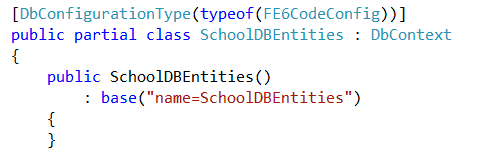
Note: EF does not support having multiple configuration classes used in the same AppDomain. If you use this attribute, to set different configuration classes for two contexts, then an exception will be thrown.
Now, you can use different methods of DbConfiguration using this in the constructor as shown below:
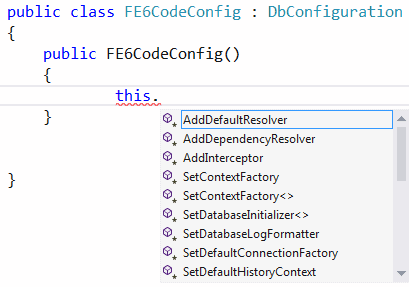
Let's see how to do different settings using code-based configuration as well as the config file.
Set default connection factory:
Code-based configuration:
public class FE6CodeConfig : DbConfiguration

    {

        public FE6CodeConfig()

        {

            this.SetDefaultConnectionFactory(new System.Data.Entity.Infrastructure.SqlConnectionFactory());

        }

}
config file:
<entityFramework>

    <defaultConnectionFactory type="System.Data.Entity.Infrastructure.SqlConnectionFactory, EntityFramework" />

</entityFramework>
Set Database Provider:
Code-based configuration:
public class FE6CodeConfig : DbConfiguration

{

    public FE6CodeConfig()

    {

    this.SetProviderServices("System.Data.SqlClient",

                System.Data.Entity.SqlServer.SqlProviderServices.Instance);

    }

}
config file:
<entityFramework>

    <providers>

        <provider invariantName="System.Data.SqlClient" type="System.Data.Entity.SqlServer.SqlProviderServices, EntityFramework.SqlServer" />

    </providers>

</entityFramework>
Set Database Initializers:
You can set database initializers (for Code-First only) using code-based configuration as shown below:
public class FE6CodeConfig : DbConfiguration

{

        public FE6CodeConfig()

        {

            this.SetDatabaseInitializer<SchoolDBEntities>(new CustomDBInitializer<SchoolDBEntities>());

        }

}
config file:
<entityFramework>

    <contexts>

        <context type="EF6DBFirstTutorials.SchoolDBEntities, EF6DBFirstTutorials"  >

        <databaseInitializer   type="EF6DBFirstTutorials.CustomDBInitializer , EF6DBFirstTutorials">

        </databaseInitializer>

        </context>

    </contexts>

</entityFramework>
Download sample project for Code-based configuration demo.
Entity Framework 6.0 Tutorials(3):Code-based Configuration的更多相关文章
- Entity Framework 6.0 Tutorials(1):Introduction
以下系统文章为EF6.0知识的介绍,本章是第一篇 原文地址:http://www.entityframeworktutorial.net/entityframework6/introduction.a ...
- Entity Framework 6.0 Tutorials(4):Database Command Logging
Database Command Logging: In this section, you will learn how to log commands & queries sent to ...
- Entity Framework 6.0 Tutorials(11):Download Sample Project
Download Sample Project: Download a sample project for Entity Framework 6 Database-First model below ...
- Entity Framework 6.0 Tutorials(10):Index Attribute
Index Attribute: Entity Framework 6 provides Index attribute to create Index on a particular column ...
- Entity Framework 6.0 Tutorials(9):Stored Procedure Mapping
Code First - Insert, Update, Delete Stored Procedure Mapping: Entity Framework 6 Code-First provides ...
- Entity Framework 6.0 Tutorials(6):Transaction support
Transaction support: Entity Framework by default wraps Insert, Update or Delete operation in a trans ...
- Entity Framework 6.0 Tutorials(2):Async query and Save
Async query and Save: You can take advantage of asynchronous execution of .Net 4.5 with Entity Frame ...
- Entity Framework 6.0 Tutorials(8):Custom Code-First Conventions
Custom Code-First Conventions: Code-First has a set of default behaviors for the models that are ref ...
- Entity Framework 6.0 Tutorials(7):DbSet.AddRange & DbSet.RemoveRange
DbSet.AddRange & DbSet.RemoveRange: DbSet in EF 6 has introduced new methods AddRange & Remo ...
随机推荐
- 关于使用modelsim的一点感想
使用modelsim的过程中工程结构是这样的 testbench中例化了一个模块a,模块a中调用了模块b,中间模块a在其他工程中用了一下,改了模块名字,同时内容也稍微修改了一下,用完之后复制回来覆盖了 ...
- devops 几个方便的工具
1. fake API [canned](https://github.com/sideshowcoder/canned ) fake API. [wiremock](ht ...
- Python函数 help()
**help() 功能: help() 函数用于查看函数或模块用途的详细说明.object -- 对象:返回对象帮助信息. 语法: help([object]) 实例: >>>hel ...
- gen_fsm的学习笔记
网上搜索gen_fsm的例子,90%都是code_lock,依葫芦画瓢弄了下,记录一些学习心得 init(UnLockCode) -> process_flag(trap_exit,true), ...
- SpringMvc入门四----rest风格Url
知识点: REST风格URL简介 SpringMvc对rest风格的支持 @PathVariable 获取 Url 变量 SpringMvc对静态资源的处理 REST风格URL简介: 我们平时看到的s ...
- FPGA市场潜力有几多?
FPGA市场未来成长潜力 本文来源:DIGITIMES 2014年FPGA市场规模为52.7亿美元,据Green Mountain Outlook报导,研调机构Global Market Insigh ...
- php.ini修改php上传文件大小限制
打开php.ini,首先找到file_uploads = on ;是否允许通过HTTP上传文件的开关.默认为ON即是开upload_tmp_dir ;文件上传至服务器上存储临时文件的地方,如果没指定就 ...
- 微信小程序之表单提交
页面绑定很多事件! <view class="content"> <view class="user personal_func_list"& ...
- SQL2008R转SQL2005
1.SQL2008R生成 任务--生成脚本 “为服务器版本编写脚本”:SQL Server 2005 “要编写脚本的数据类型”:架构和数据 2.SQL2005还原超大sql语句文件 运行-cmd: o ...
- DEV CheckComboboxEdit、CheckedListBoxControl(转)
CheckComboboxEdit //先清空所有,若在窗体Load事件中,也可以不清空 //cbRWYs.Properties.Items.Clear(); var RwyList = tspro. ...