
SpringSecurity权限管理系统实战—七、处理一些问题
目录
SpringSecurity权限管理系统实战—一、项目简介和开发环境准备
SpringSecurity权限管理系统实战—二、日志、接口文档等实现
SpringSecurity权限管理系统实战—三、主要页面及接口实现
SpringSecurity权限管理系统实战—四、整合SpringSecurity(上)
SpringSecurity权限管理系统实战—五、整合SpringSecurity(下)
SpringSecurity权限管理系统实战—六、SpringSecurity整合jwt
SpringSecurity权限管理系统实战—七、处理一些问题
SpringSecurity权限管理系统实战—八、AOP 记录用户日志、异常日志
前言
在写完上一篇文章之后,我又研究了很久。最终我发现似乎我们这个项目不太适合用jwt。layui不像vue那样可以通过axios 全局设置token(或许是我因为我菜,不知道怎么设置,如果有小伙伴有好的办法,欢迎留言告诉我)。
这里稍微介绍下前端怎么操作(vue为例),主要就是拿到token以后将其存储在localstorage或者cookies中,再从localstorage或者cookies中拿到token设置全局的请求头,就可以了。
但是前一篇文章关于jwt的内容是没有问题的,正常的使用也是那样的步骤。
具体内容
去除JWT
那么既然不打算再用jwt了,就要老老实实的回去用cookies和session。那么我们需要把我们的项目还原成实战五结束时候的样子。
这里不是很好解释了,就是把与jwt相关的删除就行了,需要修改的地方有MyAuthenticationSuccessHandler,JwtAuthenticationTokenFilter,SpringSecurityConfig三处,删去有关jwt的内容即可。(不多费篇幅)
前端提示信息
我这里修改了一下登录页面,让其能够在登录失败时,给出提示信息
<!DOCTYPE html>

<html  xmlns:th="http://www.thymeleaf.org">

	<head>

		<meta charset="utf-8">

		<title></title>

		<link rel="stylesheet" href="/PearAdmin/admin/css/pearForm.css" />

		<link rel="stylesheet" href="/PearAdmin/component/layui/css/layui.css" />

		<link rel="stylesheet" href="/PearAdmin/admin/css/pearButton.css" />

		<link rel="stylesheet" href="/PearAdmin/assets/login.css" />

	</head>

	<body background="PearAdmin/admin/images/background.svg" >

	    <form class="layui-form" method="get">

			<div class="layui-form-item">

				<img class="logo" src="PearAdmin/admin/images/logo.png" />

				<div class="title">M-S-P Admin</div>

				<div class="desc">

					Spring Security 权 限 管 理 系 统 实 战

				</div>

			</div>

            <div class="layui-form-item">

				<input id="username" name="username" placeholder="用 户 名 : " type="text" hover class="layui-input" required lay-verify="username"/>

			</div>

			<div class="layui-form-item">

				<input id="password" name="password" placeholder="密 码 : " type="password"  hover class="layui-input" required lay-verify="password"/>

			</div>

            <div class="layui-form-item">

                <input id="captcha" name="captcha" placeholder="验 证 码:" type="text"  hover class="layui-verify" style="border: 1px solid #dcdfe6;" required lay-verify="captcha">

                <img id="captchaImg" src="/captcha" width="130px" height="44px" onclick="this.src=this.src+'?'+Math.random()" title="点击刷新"/>

            </div>

			<div class="layui-form-item">

				<input type="checkbox" id="rememberme" name="rememberme" title="记住密码" lay-skin="primary" checked>

			</div>

            <div class="layui-form-item">

				<button style="background-color: #5FB878!important;" class="pear-btn pear-btn-primary login" lay-submit lay-filter="formLogin">

					登 入

				</button>

			</div>

		</form>

		<script src="/PearAdmin/component/layui/layui.js" charset="utf-8"></script>

		<script>

			layui.use(['form', 'element','jquery'], function() {

				var form = layui.form;

				var element = layui.element;

				var $ = layui.jquery;

				// $("body").on("click",".login",function(obj){

				// 	location.href="/api/admin"

				// })

				form.verify({

					username: function(value) {

						if (value.length <= 0 ) {

							return '用户名不能为空';

						}

					},

					password: function (value) {

						if (value.length <= 0) {

							return '密码不能为空';

						}

					},

					captcha: function (value) {

						if (value.length <= 0) {

							return '验证码不能为空';

						}

						if (value.length !== 4) {

							return '请输入正确格式的验证码';

						}

					}

				})

				form.on('submit(formLogin)', function() {

					$.ajax({

						url:'/login',

						type:'post',

						dataType:'text',

						data:{

							username:$('#username').val(),

							password:$('#password').val(),

							captcha:$('#captcha').val(),

							rememberme:$('#rememberme').val()

						},

						success:function(result){

							var restjson = JSON.parse(result)

							if (restjson.success) {

								// layui.data("token", {

								// 	key: "Authorization",

								// 	value: "Bearer "+ restjson.jwt

								// });

								layer.msg(restjson.msg,{icon:1,time:1000},function () {

									location.href = "/";

								});

							}else {

								layer.msg(restjson.msg,{icon:2,time:1000},function () {

									$("#captchaImg").attr("src","/captcha" + "?" + Math.random());

								});

								return false;

							}

						}

					})

					return false;

				});

			})

		</script>

	</body>

</html>
后端也做了登录失败的处理器
/**

 * @author codermy

 * @createTime 2020/8/2

 */

@Component

public class MyAuthenticationFailureHandler implements AuthenticationFailureHandler {

    @Override

    public void onAuthenticationFailure(HttpServletRequest httpServletRequest, HttpServletResponse httpServletResponse, AuthenticationException e) throws IOException, ServletException {

        httpServletResponse.setCharacterEncoding("utf-8");//修改编码格式

        httpServletResponse.setContentType("application/json");

        httpServletResponse.getWriter().write(JSON.toJSONString(Result.error().message(e.getMessage())));//返回信息

    }

}
AuthenticationFailureHandler是一个抽象的异常类,他的常见子类为
UsernameNotFoundException 用户找不到

BadCredentialsException 坏的凭据

AccountStatusException 用户状态异常它包含如下子类

AccountExpiredException 账户过期

LockedException 账户锁定

DisabledException 账户不可用

CredentialsExpiredException 证书过期
都是在用户登录时可能会遇到的异常
修改后完整的SpringSecurityConfig
/**

 * @author codermy

 * @createTime 2020/7/15

 */

@EnableWebSecurity

@EnableGlobalMethodSecurity(prePostEnabled = true)

public class SpringSecurityConfig extends WebSecurityConfigurerAdapter {

    @Autowired

    private UserDetailsServiceImpl userDetailsService;

    @Autowired

    private VerifyCodeFilter verifyCodeFilter;//验证码拦截器

    @Autowired

    MyAuthenticationSuccessHandler authenticationSuccessHandler;//登录成功逻辑

    @Autowired

    private MyAuthenticationFailureHandler authenticationFailureHandler;//登录失败逻辑

    @Autowired

    private JwtAuthenticationTokenFilter jwtAuthenticationTokenFilter;//jwt拦截器

    @Autowired

    private RestAuthenticationEntryPoint restAuthenticationEntryPoint;//无权限拦截器

    @Autowired

    private RestfulAccessDeniedHandler accessDeniedHandler;// 无权访问 JSON 格式的数据

    @Override

    public void configure(WebSecurity web) throws Exception {

        web.ignoring()

                .antMatchers(HttpMethod.GET,

                        "/swagger-resources/**",

                        "/PearAdmin/**",

                        "/**/*.html",

                        "/**/*.css",

                        "/**/*.js",

                        "/swagger-ui.html",

                        "/webjars/**",

                        "/v2/**");//放行静态资源

    }

    /**

     * anyRequest          |   匹配所有请求路径

     * access              |   SpringEl表达式结果为true时可以访问

     * anonymous           |   匿名可以访问

     * denyAll             |   用户不能访问

     * fullyAuthenticated  |   用户完全认证可以访问(非remember-me下自动登录)

     * hasAnyAuthority     |   如果有参数,参数表示权限,则其中任何一个权限可以访问

     * hasAnyRole          |   如果有参数,参数表示角色,则其中任何一个角色可以访问

     * hasAuthority        |   如果有参数,参数表示权限,则其权限可以访问

     * hasIpAddress        |   如果有参数,参数表示IP地址,如果用户IP和参数匹配,则可以访问

     * hasRole             |   如果有参数,参数表示角色,则其角色可以访问

     * permitAll           |   用户可以任意访问

     * rememberMe          |   允许通过remember-me登录的用户访问

     * authenticated       |   用户登录后可访问

     */

    @Override

    protected void configure(HttpSecurity http) throws Exception {

        http.addFilterBefore(verifyCodeFilter, UsernamePasswordAuthenticationFilter.class);

        http.csrf().disable()//关闭csrf

                // .sessionManagement()// 基于token,所以不需要session

                // .sessionCreationPolicy(SessionCreationPolicy.STATELESS)

                // .and()

                .httpBasic().authenticationEntryPoint(restAuthenticationEntryPoint)//未登陆时返回 JSON 格式的数据给前端

                .and()

                .authorizeRequests()

                .antMatchers("/captcha").permitAll()//任何人都能访问这个请求

                .anyRequest().authenticated()

                .and()

                .formLogin()

                .loginPage("/login.html")//登录页面 不设限访问

                .loginProcessingUrl("/login")//拦截的请求

                .successHandler(authenticationSuccessHandler) // 登录成功

                .failureHandler(authenticationFailureHandler) // 登录失败

                .permitAll()

                .and()

                .rememberMe().rememberMeParameter("rememberme")

                // 防止iframe 造成跨域

                .and()

                .headers()

                .frameOptions()

                .disable()

                .and();

        // 禁用缓存

        http.headers().cacheControl();

        // 添加JWT拦截器

        // http.addFilterBefore(jwtAuthenticationTokenFilter, UsernamePasswordAuthenticationFilter.class);

        http.exceptionHandling().accessDeniedHandler(accessDeniedHandler); // 无权访问返回JSON 格式的数据

    }

    @Bean

    public PasswordEncoder passwordEncoder() {

        return new BCryptPasswordEncoder(12);

    }

    /**

     * 身份认证接口

     */

    @Override

    protected void configure(AuthenticationManagerBuilder auth) throws Exception {

        auth.userDetailsService(userDetailsService).passwordEncoder(passwordEncoder());

    }

}
遇到的问题
一、Springsecurity中的UsernameNotFoundException异常无法被正常捕获
具体的解释可以看这篇文章(非常详细,包括解决方案)
简而言之,就是我抛出了UsernameNotFoundException异常但是最后会被转换为BadCredentialsException异常。我这里不多做介绍了,上面那篇文章说的非常详细。
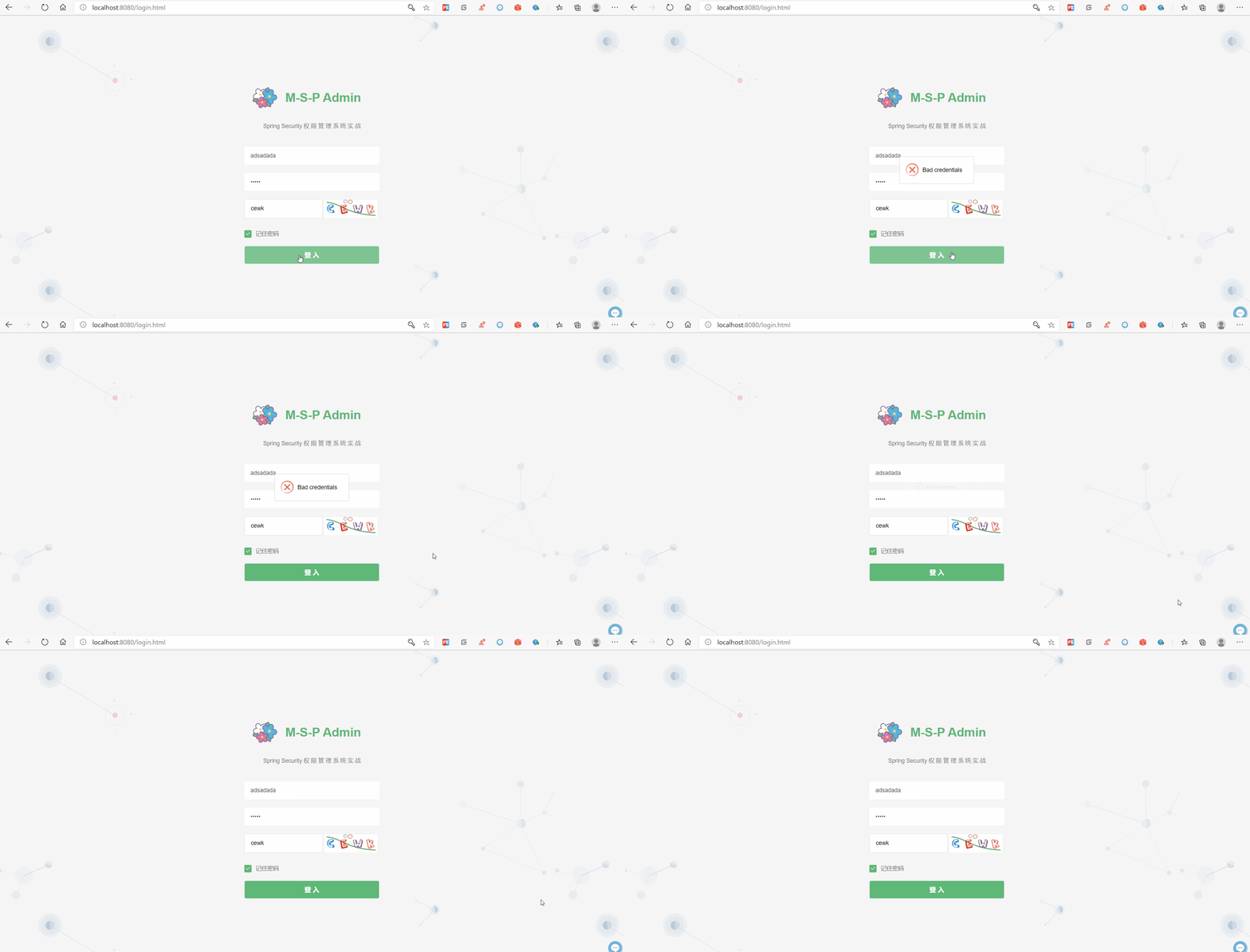
如何解决也请参照那篇文章。我所使用的是取巧的方法,就是直接抛出BadCredentialsException异常而不是UsernameNotFoundException异常。因为毕竟最后给出的提示信息是模糊的“用户名或密码错误”,而不是具体到哪个错误了。
二、无法统一处理filter中抛出的异常
这个问题主要是和验证码的拦截器有关,前端拿不到验证码错误的提示信息。这里我们可以不用拦截器来处理验证码,可以自定义一个login请求来避开这个问题。
这个问题也是原本的写法问题吧,其实原本需要用抛这个异常,直接向页面输出提示信息就好了。
我在找处理方法时找到有两种方法供大家参考
后叙
这篇文章有点乱,博主的文笔真的不太行,所以在描述一些问题的时候可能会有点难以理解。如果小伙伴们在学习过程中有什么问题,欢迎大家加我的qq(在我的码云主页有)我们一起探讨学习。
下一篇文章我们实现用户的操作日志和异常日志功能
在gitee和github中可获取源代码,与本系列文章同步更新
SpringSecurity权限管理系统实战—七、处理一些问题的更多相关文章
- SpringSecurity权限管理系统实战—一、项目简介和开发环境准备
目录 SpringSecurity权限管理系统实战-一.项目简介和开发环境准备 SpringSecurity权限管理系统实战-二.日志.接口文档等实现 SpringSecurity权限管理系统实战-三 ...
- SpringSecurity权限管理系统实战—二、日志、接口文档等实现
系列目录 SpringSecurity权限管理系统实战-一.项目简介和开发环境准备 SpringSecurity权限管理系统实战-二.日志.接口文档等实现 SpringSecurity权限管理系统实战 ...
- SpringSecurity权限管理系统实战—四、整合SpringSecurity(上)
目录 SpringSecurity权限管理系统实战-一.项目简介和开发环境准备 SpringSecurity权限管理系统实战-二.日志.接口文档等实现 SpringSecurity权限管理系统实战-三 ...
- SpringSecurity权限管理系统实战—六、SpringSecurity整合jwt
目录 SpringSecurity权限管理系统实战-一.项目简介和开发环境准备 SpringSecurity权限管理系统实战-二.日志.接口文档等实现 SpringSecurity权限管理系统实战-三 ...
- SpringSecurity权限管理系统实战—八、AOP 记录用户、异常日志
目录 SpringSecurity权限管理系统实战-一.项目简介和开发环境准备 SpringSecurity权限管理系统实战-二.日志.接口文档等实现 SpringSecurity权限管理系统实战-三 ...
- SpringSecurity权限管理系统实战—九、数据权限的配置
目录 SpringSecurity权限管理系统实战-一.项目简介和开发环境准备 SpringSecurity权限管理系统实战-二.日志.接口文档等实现 SpringSecurity权限管理系统实战-三 ...
- SpringSecurity权限管理系统实战—五、整合SpringSecurity(下)
系列目录 前言 上篇文章SpringSecurity整合了一半,这次把另一半整完,所以本篇的序号接着上一篇. 七.自定义用户信息 前面我们登录都是用的指定的用户名和密码或者是springsecurit ...
- SpringSecurity权限管理系统实战—三、主要页面及接口实现
系列目录 前言 后端五分钟,前端半小时.. 每次写js都头疼. 自己写前端是不可能的,这辈子不可能自己写前端的,只能找找别人的模板才能维持的了生存这样子.github,gitee上的模板又多,帮助文档 ...
- ABP+AdminLTE+Bootstrap Table权限管理系统第七节--登录逻辑及abp封装的Javascript函数库
经过前几节,我们已经解决数据库,模型,DTO,控制器和注入等问题.那么再来看一下登录逻辑.这里算是前面几节的一个初次试水. 首先我们数据库已经有的相应的数据. 模型和DTO已经建好,所以我们直接在服务 ...
随机推荐
- python-多任务编程04-生成器(generator)
生成器是一类特殊的迭代器,创建方法比自定迭代器类更加简单 使用()创建生成器 把列表生成式的 [ ] 改成 ( ) In [15]: L = [ x*2 for x in range(5)] In [ ...
- 深入理解golang:sync.map
疑惑开篇 有了map为什么还要搞个sync.map 呢?它们之间有什么区别? 答:重要的一点是,map并发不是安全的. 在Go 1.6之前, 内置的map类型是部分goroutine安全的,并发的读没 ...
- asp.net core 动态更新 appsetting.json方法
如何将值更新到appsetting.json? 我正在使用官方文档中IOptions描述的模式. 当我从中读取值时appsetting.json,这可以正常工作,但是如何更新值并将更改保存回来apps ...
- Flutter学习笔记(41)--自定义Dialog实现版本更新弹窗
如需转载,请注明出处:Flutter学习笔记(41)--自定义Dialog实现版本更新弹窗 功能点: 1.更新弹窗UI 2.强更与非强更且别控制 3.屏蔽物理返回键(因为强更的时候点击返回键,弹窗会消 ...
- jmeter接口测试 -- 设置跨线程组的全局变量
一.操作步骤 1.先提取被设置的变量 2.再用 [线程组] - [后置处理] - [BeanShell PostProcessor]来设置跨线程的全局变量:${__setProperty(新变量名,$ ...
- SAS X option
1. SAS X选项就是调用DOS命令. 例子: option noxwait;/*黑窗口执行完命令后自动关闭*/ %let path =.; %let filter=*.lst; X “ dir & ...
- form表单两种提交方式的不同
我们在使用<Form>表单的时候,最常用的提交方式就是Get和Post.我们都知道这两种方式最大的差别就是安全性,除此之外,它们还有哪些其他的区别,你知道吗? 在<Form& ...
- c++ string类型举例(递归预习的边界)
#include <iostream> #include <string> using namespace std; int main ( ) { string str; // ...
- Day13_Thymeleaf简介
学于黑马和传智播客联合做的教学项目 感谢 黑马官网 传智播客官网 微信搜索"艺术行者",关注并回复关键词"乐优商城"获取视频和教程资料! b站在线视频 1.Th ...
- 美团Leaf——全局序列生成器
Leaf的Github地址: https://github.com/Meituan-Dianping/Leaf Leaf美团技术团队博客地址: https://tech.meituan.com/201 ...