
SpringSecurity权限管理系统实战—八、AOP 记录用户、异常日志
目录
SpringSecurity权限管理系统实战—一、项目简介和开发环境准备
SpringSecurity权限管理系统实战—二、日志、接口文档等实现
SpringSecurity权限管理系统实战—三、主要页面及接口实现
SpringSecurity权限管理系统实战—四、整合SpringSecurity(上)
SpringSecurity权限管理系统实战—五、整合SpringSecurity(下)
SpringSecurity权限管理系统实战—六、SpringSecurity整合jwt
SpringSecurity权限管理系统实战—七、处理一些问题
SpringSecurity权限管理系统实战—八、AOP 记录用户日志、异常日志
前言
日志功能在二的时候其实简单实现了一下,但是有时我们需要对一些重要功能操作记录日志,或是在操作时发生异常,需要记录异常日志。但是之前每次发生异常要定位原因我们都要到服务器去查询日志才能找到,或许是搭建一个日志收集系统(但是本项目中暂不考虑)。那么我们可以专门做个功能来记录用户操作日志和异常日志,在把日志存入数据库,方便查询。
一、最终效果


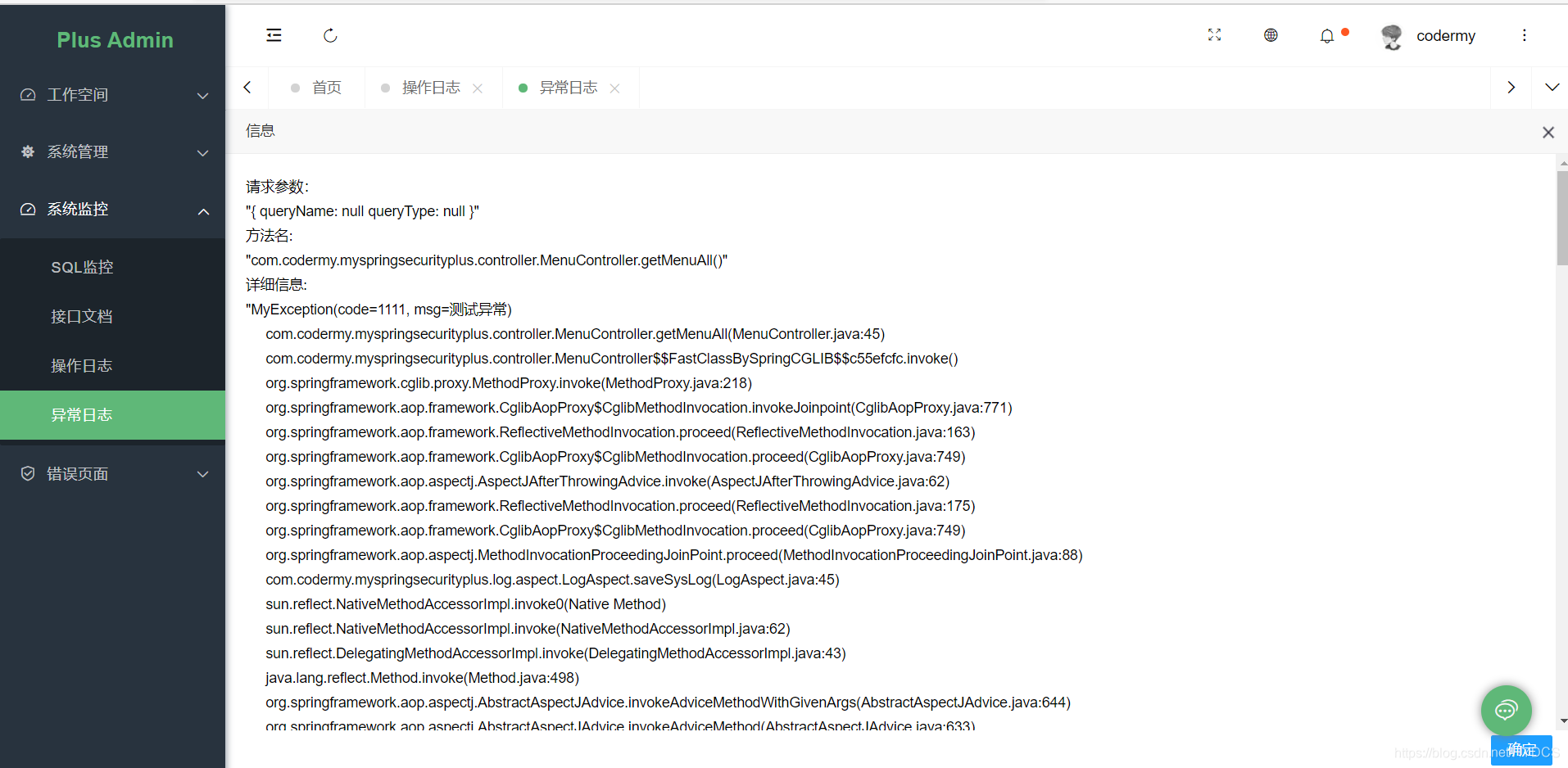
二、新建my_log表

相应字段都有注释,很好理解,用户日志、异常日志都存放在这一张表中,通过type来区分,当然也可以拆分成两张表。
三、添加依赖
 		<!--aop-->

        <dependency>

            <groupId>org.springframework.boot</groupId>

            <artifactId>spring-boot-starter-aop</artifactId>

        </dependency>

        <!--   UserAgentUtils,浏览器信息工具类   -->

        <dependency>

            <groupId>eu.bitwalker</groupId>

            <artifactId>UserAgentUtils</artifactId>

            <version>1.21</version>

        </dependency>

        <!--ip2region,这是根据ip查地址的工具,有兴趣自己可以了解-->

        <!-- <dependency>-->

        <!-- <groupId>org.lionsoul</groupId>-->

        <!-- <artifactId>ip2region</artifactId>-->

        <!-- <version>1.7.2</version>-->

        <!-- </dependency>-->

		<!--分页工具-->

        <dependency>

            <groupId>com.github.pagehelper</groupId>

            <artifactId>pagehelper-spring-boot-starter</artifactId>

            <version>1.2.13</version>

        </dependency>

        <!--hutool工具-->

        <dependency>

            <groupId>cn.hutool</groupId>

            <artifactId>hutool-all</artifactId>

            <version>5.1.4</version>

        </dependency>
四、需要用到的工具类
SecurityUtils
/**

 * @author codermy

 * @createTime 2020/8/4

 */

public class SecurityUtils {

    /**

     * 获取系统用户名称

     *

     * @return 系统用户名称

     */

    public static String getCurrentUsername() {

        final Authentication authentication = SecurityContextHolder.getContext().getAuthentication();

        if (authentication == null) {

            throw new MyException(ResultCode.UNAUTHORIZED, "当前登录状态过期");

        }

        UserDetails userDetails = (UserDetails) authentication.getPrincipal();

        return userDetails.getUsername();

    }

    /**

     * 取得当前用户登录IP, 如果当前用户未登录则返回空字符串.

     * 此方法无用

     */

    public static String getCurrentUserIp() {

        final Authentication authentication = SecurityContextHolder.getContext().getAuthentication();

        if (authentication == null) {

            throw new MyException(ResultCode.UNAUTHORIZED, "当前登录状态过期");

        }

        Object details = authentication.getDetails();

        if (!(details instanceof WebAuthenticationDetails)) {

            return "";

        }

        WebAuthenticationDetails webDetails = (WebAuthenticationDetails) details;

        return webDetails.getRemoteAddress();

    }

}
LogUtils
/**

 * @author codermy

 * @createTime 2020/8/7

 */

public class LogUtils {

    private static final char SEPARATOR = '_';

    private static final String UNKNOWN = "unknown";

    /**

     * 获取ip地址

     */

    public static String getIp(HttpServletRequest request) {

        String ip = request.getHeader("x-forwarded-for");

        if (ip == null || ip.length() == 0 || UNKNOWN.equalsIgnoreCase(ip)) {

            ip = request.getHeader("Proxy-Client-IP");

        }

        if (ip == null || ip.length() == 0 || UNKNOWN.equalsIgnoreCase(ip)) {

            ip = request.getHeader("WL-Proxy-Client-IP");

        }

        if (ip == null || ip.length() == 0 || UNKNOWN.equalsIgnoreCase(ip)) {

            ip = request.getRemoteAddr();

        }

        String comma = ",";

        String localhost = "127.0.0.1";

        if (ip.contains(comma)) {

            ip = ip.split(",")[0];

        }

        if  (localhost.equals(ip))  {

            // 获取本机真正的ip地址

            try {

                ip = InetAddress.getLocalHost().getHostAddress();

            } catch (UnknownHostException e) {

                e.printStackTrace();

            }

        }

        return ip;

    }

    /**

     * 获取浏览器信息

     * @param request

     * @return

     */

    public static String getBrowser(HttpServletRequest request){

        UserAgent userAgent = UserAgent.parseUserAgentString(request.getHeader("User-Agent"));

        Browser browser = userAgent.getBrowser();

        return browser.getName();

    }

    /**

     * 获取堆栈信息

     */

    public static String getStackTrace(Throwable throwable){

        StringWriter sw = new StringWriter();

        try (PrintWriter pw = new PrintWriter(sw)) {

            throwable.printStackTrace(pw);

            return sw.toString();

        }

    }

}
RequestHolder
/**

 * @author codermy

 * @createTime 2020/8/4

 */

public class RequestHolder {

    /**

     * 获取HttpServletRequest对象

     * @return

     */

    public static HttpServletRequest getHttpServletRequest() {

        return ((ServletRequestAttributes) Objects.requireNonNull(RequestContextHolder.getRequestAttributes())).getRequest();

    }

}
五、相应实体类
这个部分省略,没有什么技术含量,根据数据库来就行
六、自定义操作日志的注解类
/**

 * @author codermy

 * @createTime 2020/8/4

 */

@Target(ElementType.METHOD)//注解放置的目标位置,METHOD是可注解在方法级别上

@Retention(RetentionPolicy.RUNTIME)//注解在哪个阶段执行

public @interface MyLog {

    String value() default "";

}
关于java自定义注解可以看看这篇文章
七、新建切面类
这其实很好理解,就是我们学习spring时,aop的几种通知。
/**

 * @author codermy

 * @createTime 2020/8/4

 */

@Component

@Aspect

@Slf4j

public class LogAspect {

    //注入logService用于将日志存入数据库

    @Autowired

    private MyLogService logService;

    ThreadLocal<Long> currentTime = new ThreadLocal<>();

    /**

     * 设置操作日志切入点 记录操作日志 在注解的位置切入代码

     */

    @Pointcut("@annotation(com.codermy.myspringsecurityplus.log.aop.MyLog)")

    public void logPoinCut() {

    }

    /**

     * 配置环绕通知,使用在方法logPointcut()上注册的切入点

     *

     * @param joinPoint join point for advice

     */

    @Around("logPoinCut()")

    public Object saveSysLog(ProceedingJoinPoint joinPoint)throws Throwable{

        Object result;

        currentTime.set(System.currentTimeMillis());//记录方法的执行时间

        result = joinPoint.proceed();

        MyLog log = new MyLog("INFO",System.currentTimeMillis() - currentTime.get());//定义日志类型

        currentTime.remove();

        HttpServletRequest request = RequestHolder.getHttpServletRequest();

        logService.save(SecurityUtils.getCurrentUsername(), LogUtils.getBrowser(request), LogUtils.getIp(request),joinPoint, log);

        return result;

    }

    /**

     * 配置异常通知

     *

     * @param joinPoint join point for advice

     * @param e exception

     */

    @AfterThrowing(pointcut = "logPoinCut()", throwing = "e")

    public void logAfterThrowing(JoinPoint joinPoint, Throwable e) {

        MyLog log = new MyLog("ERROR",System.currentTimeMillis() - currentTime.get());

        currentTime.remove();

        log.setExceptionDetail(LogUtils.getStackTrace(e));

        HttpServletRequest request = RequestHolder.getHttpServletRequest();

        logService.save(SecurityUtils.getCurrentUsername(), LogUtils.getBrowser(request), LogUtils.getIp(request), (ProceedingJoinPoint)joinPoint, log);

    }

}
八、相应方法及接口
dao
/**

 * @author codermy

 * @createTime 2020/8/8

 */

@Mapper

public interface LogDao {

    /**

     * 保存日志

     * @param log

     */

    @Insert("insert into my_log(user_name,ip,description,params,type,exception_detail,browser,method,time,create_time)values(#{userName},#{ip},#{description},#{params},#{type},#{exceptionDetail},#{browser},#{method},#{time},now())")

    void save(MyLog log);

    /**

     * 分页返回所有用户日志

     * @param logQuery 查询条件

     * @return

     */

    List<LogDto> getFuzzyLogByPage( @Param("logQuery") LogQuery logQuery);

    /**

     * 分页返回所有错误日志

     * @param logQuery 查询条件

     * @return

     */

    List<ErrorLogDto> getFuzzyErrorLogByPage(@Param("logQuery") LogQuery logQuery);

    /**

     * 删除所有日志

     * @param type 日志类型

     */

    @Delete("delete from my_log where type = #{type}")

    void delAllByInfo(String type);

}
LogMapper.xml
<mapper namespace="com.codermy.myspringsecurityplus.log.dao.LogDao">

    <select id="getFuzzyLogByPage" resultType="com.codermy.myspringsecurityplus.log.dto.LogDto">

        SELECT t.user_name,t.ip,t.params,t.description,t.browser,t.time,t.method,t.create_time

        FROM my_log t

        <where>

            <if test="logQuery.logType != null and logQuery.logType  != ''">

                AND t.type = #{logQuery.logType}

            </if>

            <if test="logQuery.userName != null and logQuery.userName != ''">

                AND t.user_name like CONCAT('%', #{logQuery.userName}, '%')

            </if>

        </where>

        ORDER BY t.create_time desc

    </select>

    <select id="getFuzzyErrorLogByPage" resultType="com.codermy.myspringsecurityplus.log.dto.ErrorLogDto">

        SELECT t.user_name,t.ip,t.params,t.description,t.browser,t.exception_detail,t.method,t.create_time

        FROM my_log t

        <where>

            <if test="logQuery.logType != null and logQuery.logType  != ''">

                AND t.type = #{logQuery.logType}

            </if>

            <if test="logQuery.userName != null and logQuery.userName != ''">

                AND t.user_name like CONCAT('%', #{logQuery.userName}, '%')

            </if>

        </where>

        ORDER BY t.create_time desc

    </select>

</mapper>
MyLogServiceImpl
/**

 * @author codermy

 * @createTime 2020/8/4

 */

@Service

public class MyLogServiceImpl implements MyLogService {

    @Autowired

    private LogDao logDao;

	//返回用户日志

    @Override

    public Result<LogDto> getFuzzyInfoLogByPage(Integer offectPosition, Integer limit, LogQuery logQuery) {

        Page page = PageHelper.offsetPage(offectPosition,limit);

        List<LogDto> fuzzyLogByPage = logDao.getFuzzyLogByPage(logQuery);

        return Result.ok().count(page.getTotal()).data(fuzzyLogByPage).code(ResultCode.TABLE_SUCCESS);

    }

	//返回异常日志

    @Override

    public Result<ErrorLogDto> getFuzzyErrorLogByPage(Integer offectPosition, Integer limit, LogQuery logQuery) {

        Page page = PageHelper.offsetPage(offectPosition,limit);

        List<ErrorLogDto> fuzzyErrorLogByPage = logDao.getFuzzyErrorLogByPage(logQuery);

        return Result.ok().count(page.getTotal()).data(fuzzyErrorLogByPage).code(ResultCode.TABLE_SUCCESS);

    }

	//保存日志到数据库

    @Override

    @Transactional(rollbackFor = Exception.class)

    public void save(String userName, String browser, String ip, ProceedingJoinPoint joinPoint, MyLog log) {

        MethodSignature signature = (MethodSignature) joinPoint.getSignature();

        Method method = signature.getMethod();

        com.codermy.myspringsecurityplus.log.aop.MyLog myLog = method.getAnnotation(com.codermy.myspringsecurityplus.log.aop.MyLog.class);

        // 方法路径

        String methodName = joinPoint.getTarget().getClass().getName()+"."+signature.getName()+"()";

        StringBuilder params = new StringBuilder("{");

        //参数值

        Object[] argValues = joinPoint.getArgs();

        //参数名称

        String[] argNames = ((MethodSignature)joinPoint.getSignature()).getParameterNames();

        if(argValues != null){

            for (int i = 0; i < argValues.length; i++) {

                params.append(" ").append(argNames[i]).append(": ").append(argValues[i]);

            }

        }

        // 描述

        if (log != null) {

            log.setDescription(myLog.value());

        }

        assert log != null;

        log.setIp(ip);

        String loginPath = "login";

        if(loginPath.equals(signature.getName())){

            try {

                assert argValues != null;

                userName = new JSONObject(argValues[0]).get("userName").toString();

            }catch (Exception e){

                e.printStackTrace();

            }

        }

        log.setMethod(methodName);

        log.setUserName(userName);

        log.setParams(params.toString() + " }");

        log.setBrowser(browser);

        logDao.save(log);

    }

	//删除异常日志

    @Override

    @Transactional(rollbackFor = Exception.class)

    public void delAllByError() {

        logDao.delAllByInfo("ERROR");

    }

	//删除用户日志

    @Override

    @Transactional(rollbackFor = Exception.class)

    public void delAllByInfo() {

        logDao.delAllByInfo("INFO");

    }

}
LogController
/**

 * @author codermy

 * @createTime 2020/8/8

 */

@Controller

@RequestMapping("/api")

@Api(tags = "系统:日志管理")

public class LogController {

    @Autowired

    private MyLogService logService;

    @GetMapping("/log/index")

    public String logIndex(){

        return "system/log/log";

    }

    @GetMapping("/log")

    @ResponseBody

    @ApiOperation(value = "日志列表")

    @PreAuthorize("hasAnyAuthority('log:list')")

    public Result<LogDto> logList(PageTableRequest pageTableRequest, LogQuery logQuery){

        pageTableRequest.countOffset();

        logQuery.setLogType("INFO");

        return logService.getFuzzyInfoLogByPage(pageTableRequest.getOffset(),pageTableRequest.getLimit(),logQuery);

    }

    @DeleteMapping("/log")

    @MyLog("删除所有INFO日志")

    @ResponseBody

    @ApiOperation("删除所有INFO日志")

    @PreAuthorize("hasAnyAuthority('log:del')")

    public Result<Object> delAllByInfo(){

        logService.delAllByInfo();

        return Result.ok().message("删除成功");

    }

    @GetMapping("/log/error/index")

    public String errorLogIndex(){

        return "system/log/errorLog";

    }

    @GetMapping("/error/log")

    @ResponseBody

    @ApiOperation(value = "错误日志")

    @PreAuthorize("hasAnyAuthority('errorLog:list')")

    public Result<ErrorLogDto> errorLogList(PageTableRequest pageTableRequest, LogQuery logQuery){

        pageTableRequest.countOffset();

        logQuery.setLogType("ERROR");

        return logService.getFuzzyErrorLogByPage(pageTableRequest.getOffset(),pageTableRequest.getLimit(),logQuery);

  }

    @DeleteMapping("/error/log")

    @MyLog("删除所有ERROR日志")

    @ResponseBody

    @ApiOperation("删除所有ERROR日志")

    @PreAuthorize("hasAnyAuthority('errorLog:del')")

    public Result<Object> delAllByError(){

        logService.delAllByError();

        return Result.ok().message("删除成功");

    }

}
相应的前端页面就不贴出来了,有需要可以在我的gitee和github中获取
九、使用
我们只需要在相应的接口上添加上@MyLog注解即可
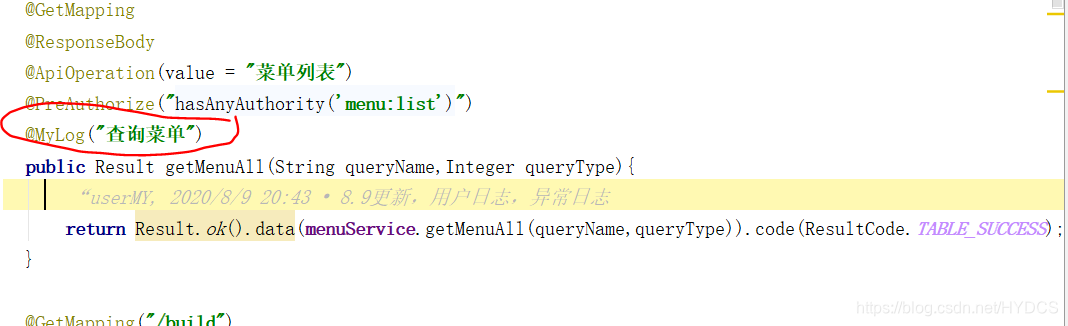
我们可以自己先造一个异常来测试异常的收集

十、启动测试
启动项目,正常访问测试即可,会自动收集日志。
SpringSecurity权限管理系统实战—八、AOP 记录用户、异常日志的更多相关文章
- SpringSecurity权限管理系统实战—四、整合SpringSecurity(上)
目录 SpringSecurity权限管理系统实战-一.项目简介和开发环境准备 SpringSecurity权限管理系统实战-二.日志.接口文档等实现 SpringSecurity权限管理系统实战-三 ...
- SpringSecurity权限管理系统实战—六、SpringSecurity整合jwt
目录 SpringSecurity权限管理系统实战-一.项目简介和开发环境准备 SpringSecurity权限管理系统实战-二.日志.接口文档等实现 SpringSecurity权限管理系统实战-三 ...
- SpringSecurity权限管理系统实战—七、处理一些问题
目录 SpringSecurity权限管理系统实战-一.项目简介和开发环境准备 SpringSecurity权限管理系统实战-二.日志.接口文档等实现 SpringSecurity权限管理系统实战-三 ...
- SpringSecurity权限管理系统实战—九、数据权限的配置
目录 SpringSecurity权限管理系统实战-一.项目简介和开发环境准备 SpringSecurity权限管理系统实战-二.日志.接口文档等实现 SpringSecurity权限管理系统实战-三 ...
- SpringSecurity权限管理系统实战—一、项目简介和开发环境准备
目录 SpringSecurity权限管理系统实战-一.项目简介和开发环境准备 SpringSecurity权限管理系统实战-二.日志.接口文档等实现 SpringSecurity权限管理系统实战-三 ...
- SpringSecurity权限管理系统实战—二、日志、接口文档等实现
系列目录 SpringSecurity权限管理系统实战-一.项目简介和开发环境准备 SpringSecurity权限管理系统实战-二.日志.接口文档等实现 SpringSecurity权限管理系统实战 ...
- SpringSecurity权限管理系统实战—五、整合SpringSecurity(下)
系列目录 前言 上篇文章SpringSecurity整合了一半,这次把另一半整完,所以本篇的序号接着上一篇. 七.自定义用户信息 前面我们登录都是用的指定的用户名和密码或者是springsecurit ...
- SpringSecurity权限管理系统实战—三、主要页面及接口实现
系列目录 前言 后端五分钟,前端半小时.. 每次写js都头疼. 自己写前端是不可能的,这辈子不可能自己写前端的,只能找找别人的模板才能维持的了生存这样子.github,gitee上的模板又多,帮助文档 ...
- RabbitMQ实战场景(一):异步记录用户操作日志
传统的项目开发中业务流程以串行方式,执行了模块1—>模块2–>模块3 而我们知道,这个执行流程其实对于整个程序来讲是有一定的弊端的,主要有几点: (1)整个流程的执行响应等待时间比较长; ...
随机推荐
- 基于Scrapy的B站爬虫
基于Scrapy的B站爬虫 最近又被叫去做爬虫了,不得不拾起两年前搞的东西. 说起来那时也是突发奇想,想到做一个B站的爬虫,然后用的都是最基本的Python的各种库. 不过确实,实现起来还是有点麻烦的 ...
- web自动化 -- HTMLreport(四)测试报告默认不展开输出内容
一.需求痛点 1.默认展开输出内容,很不好查看每条用例的状态,而且也很丑 2.希望默认不展开输出内容 3.痛点截图 二.解决步骤 1.直接修改成这样子 三.效果
- 今天上午完成了devicescan,发送了rar包到yzx3233@sina.com
今天上午完成了devicescan,发送了rar包到yzx3233@sina.com 可以正常扫描和输入了. 还有一个最后的问题,就是选择退出后,程序还在后台
- 注册中心Eureka、Zookeeper、Consul的异同点
先上结论: 基于CAP理论介绍: C:Consistency (强一致性)A:Available (可用性)P:Partition tolerance (分区容错性) 最多只能同时较好的满足两个 CA ...
- Python break语句
Python break语句:当运行到 break 语句时,终止包含 break 的循环语句. 注:无论判断条件是否达到 False 或 序列是否遍历完都会停止执行循环语句和该 break 下的所有语 ...
- JVM详解之:HotSpot VM中的Intrinsic methods
目录 简介 什么是Intrinsic Methods 内置方法的特点 多样性 兼容性 java语义的扩展 Hotspot VM中的内置方法 intrinsic方法和内联方法 intrinsic方法的实 ...
- 中国剩余定理(CRT)及其扩展(EXCRT)详解
问题背景 孙子定理是中国古代求解一次同余式方程组的方法.是数论中一个重要定理.又称中国余数定理.一元线性同余方程组问题最早可见于中国南北朝时期(公元5世纪)的数学著作<孙子算经>卷下第 ...
- 加载Properties文件工具类:LoadConfig
import javax.servlet.http.HttpServletRequest; import javax.ws.rs.GET; import javax.ws.rs.Path; impor ...
- MySQL的utf8问题
作者:brightwang 原文:https://www.jianshu.com/p/ab9aa8d4df7d 有时候用MySQL存储一些特殊字符时,有出现乱码问题. 我用的是UTF-8编码的客户端, ...
- 【FZYZOJ】细菌 题解(最短路)
题目描述 为了研究一种新型细菌(称它为S型细菌)的性质,Q博士将S型细菌放在了一个犹如迷宫一般的通道面前,迷宫中N个站点,每个站点之间以一种单向通道的形式连接,当然,也有可能某两个站点之间是互不联通的 ...