
git push bug
git push bug
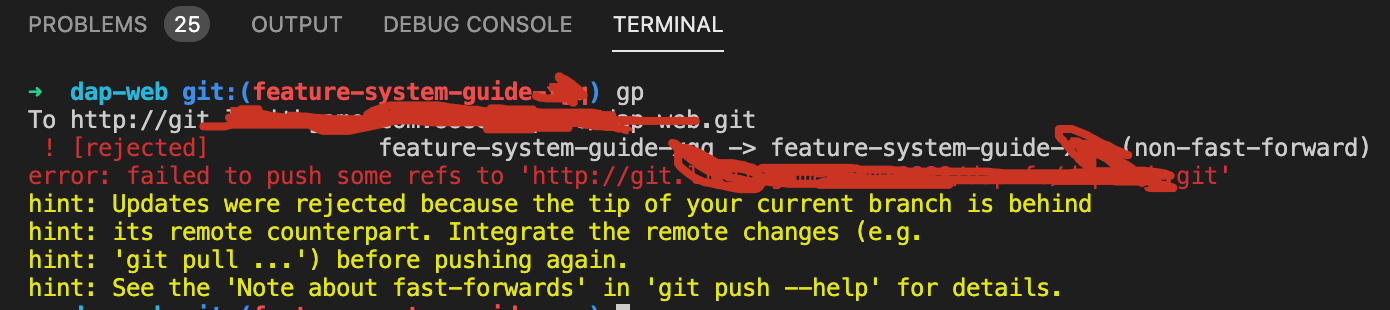
fast-forwards
$ git push

$ git push --help
# git pull

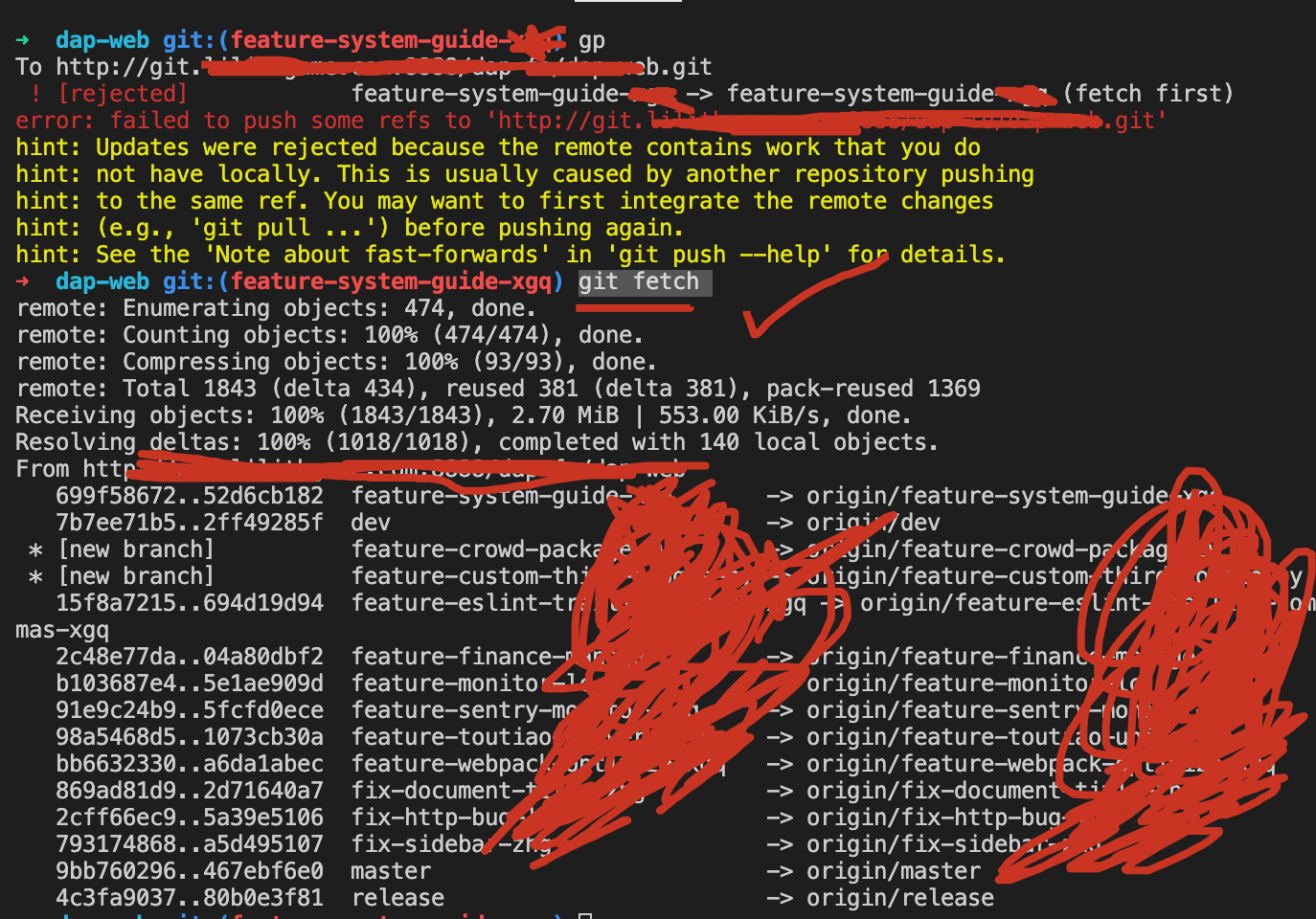
$  gp

To http://git.xgqfrms.xyz:8888/fe/web.git

 ! [rejected]            feature-system-guide-> feature-system-guide (fetch first)

error: failed to push some refs to 'http://git.xgqfrms.xyz:8888/fe/web.git'

hint: Updates were rejected because the remote contains work that you do

hint: not have locally. This is usually caused by another repository pushing

hint: to the same ref. You may want to first integrate the remote changes

hint: (e.g., 'git pull ...') before pushing again.

hint: See the 'Note about fast-forwards' in 'git push --help' for details.
$ git push

Enumerating objects: 4, done.

Counting objects: 100% (4/4), done.

Delta compression using up to 8 threads

Compressing objects: 100% (3/3), done.

Writing objects: 100% (3/3), 1.90 KiB | 1.90 MiB/s, done.

Total 3 (delta 1), reused 0 (delta 0)

remote: error executing git hook

To http://git.xgqfrms.xyz:8888/eric/test.git

 ! [remote rejected] abc -> abc (pre-receive hook declined)

error: failed to push some refs to 'http://git.xgqfrms.xyz:8888/eric/test.git'
git pull origin <your-branch>

git push origin <your-branch>
solutions
git fetch
$ git fetch
rm -rf .git/gc.log
$ git pull origin abc

From http://git.xgqfrms.xyz:8888/eric/test

 * branch            abc        -> FETCH_HEAD

Auto packing the repository in background for optimum performance.

See "git help gc" for manual housekeeping.

warning: The last gc run reported the following. Please correct the root cause

and remove .git/gc.log.

Automatic cleanup will not be performed until the file is removed.

warning: There are too many unreachable loose objects; run 'git prune' to remove them.

Already up to date.
$ rm -rf .git/gc.log
refs
xgqfrms 2012-2020
www.cnblogs.com 发布文章使用:只允许注册用户才可以访问!
git push bug的更多相关文章
- git push ERROR: missing Change-Id in commit message footer
今天上传代码时候报告错误:$ git push origin HEAD:refs/for/branch*Counting objects: 7, done.Delta compression usin ...
- git push失败的解决办法(2)
错误一:Cannot rebase: You have unstaged changes 解决办法: Cannot rebase: You have unstaged changes. 那说明有修改过 ...
- git push 时发生 error: failed to push some refs to 错误 (解决办法)
出现问题的原因:在github上更新了README.md,没有更新到本地仓库.而在本地git仓库又修改了文件,这时使用 git push origin master 推送到远程仓库后就出现了下面的问题 ...
- Git 的BUG小结
Git 的BUG小结 Git 在push的时候出现了: fatal: The remote end hung up unexpectedly 在网上找了非常多 发现出现了下面错误提示也可能是同样的问 ...
- git push和pull如何解决冲突!!!精品
多人合作完成项目时,git push 和 pull经常会发生冲突,根本原因就是远程的东西和本地的东西长的不一样,以下步骤能完美解决所有冲突!(先查看一下分支(git branch),确认没错再进行下面 ...
- git merge bug
git merge bug 本地分支 dev commit 后, 直接 pull 远程 dev 分支, 导致远程 dev 分支 merge 到本地 dev 分支了, 取消本次 merge 操作? Re ...
- 执行git push出现"Everything up-to-date"
在github上git clone一个项目,在里面创建一个目录,然后git push的时候,出现报错"Everything up-to-date" 原因:1)没有git add . ...
- git push不用重复输入用户名和密码(解决方案)
每次git push都要输入用户名和密码,有点麻烦,就上网搜了下解决方案. 网上的解决方案有的讲得不清晰,逐个试了后,总结下两种有效的解决方案. 方案一: 1.在计算机安装盘(即一般为C盘)下找到 ...
- git push 报错!!!!
[root@NB sh]# git push To git@x0.xx.xxx.x1:yanjing_chenl/IT-DOC.git ! [rejected] master -> master ...
随机推荐
- uni-app 开发随笔(踩坑记录)
这里总结一些uni-app开发时我遇到的坑 uni-app获取元素高度及屏幕高度(uni-app不可使用document) uni.getSystemInfo({ success: function( ...
- 亲测可用!免费下载QQ音乐大部分资源!
优化后亲测可用!免费下载QQ音乐大部分资源 通知 时间问题 博客园这边暂时停更要下载的去GitHub或者90盘 GitHub项目地址 https://github.com/TotoWang-hhh/m ...
- 将汉字取模软件中的汉字放到keil5中显示
最近因为要使用STM32做毕业设计,需要用LCD显示中文,STM32开发板用的是原子的战舰STM32开发板,给的LCD显示例程里貌似没有中文显示,那么需要自己去编写中文显示程序. 软件编写对我来说并不 ...
- Centos 7 Redis 安装并开机启动
一.下载并编译 cd /usr/local/bin目录可以自己选,我将redis安装到/usr/local/bin目录下.wget http://download.redis.io/releases/ ...
- Codeforces 1437F Emotional Fishermen(思维,dp)
题意 给出数列\(a_i\),求排列\(p_i\)的数量满足 \[\frac{a_{p_i}}{max_{j=1}^{i-1}a_{p_j}} \notin (\frac{1}{2},2) \] 思路 ...
- 回归(Regression)
回归(Regression) 生活中的很多事物之间是相互影响的,如商品的质量跟用户的满意度密切相关.而回归分析是要分析两个事物间的因果关系,即哪一个是自变量和因变量,以及自变量和因变量之间的关系:回归 ...
- yuan先生博客地址
1 Web应用 https://www.cnblogs.com/yuanchenqi/articles/8869302.html2 http协议 https://www.cnblogs.com/yu ...
- 学习笔记 Hadoop的job提交过程,shuffle过程以及HA机制的实现
一,在hadoop中的mapreduce的job提交过程比较繁琐,但掌握job的提交过程是我们进入深入学习的必要. 二,mapreduce的shuffle机制 三,Hadoop的HA机制.
- 34.vsftpd服务程序--虚拟用户模式
1.创建用于进行FTP 认证的用户数据库文件,其中奇数行为账户名,偶数行为密码. [root@localhost ~]# cd /etc/vsftpd/ [root@localhost vsftpd] ...
- 用到的API整理
时间 淘宝 http://api.m.taobao.com/rest/api3.do?api=mtop.common.getTimestamp 获取时间戳,调用效果 { "api" ...