
CentOS 7 最小化安装及优化
CentOS 7 最小化安装及优化
一、下载镜像文件
官方网站
新版本下载链接:https://wiki.centos.org/Download
旧版本下载链接:http://vault.centos.org/
CentO S7.6 :http://vault.centos.org/7.6.1810/isos/x86_64/
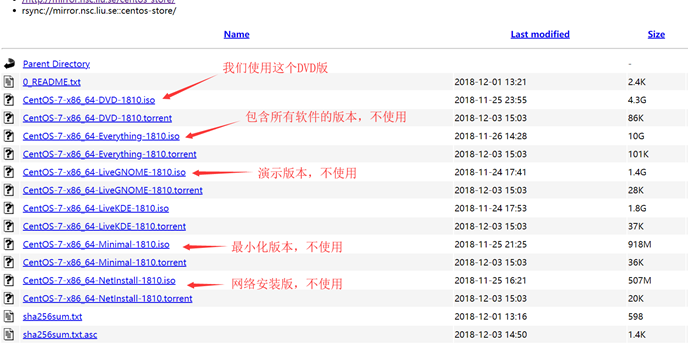
国内镜像源
阿里云镜像:https://opsx.alibaba.com/mirror
科技大学:http://mirrors.ustc.edu.cn/
清华大学:https://mirrors.tuna.tsinghua.edu.cn/
一、VMware 配置虚拟网络
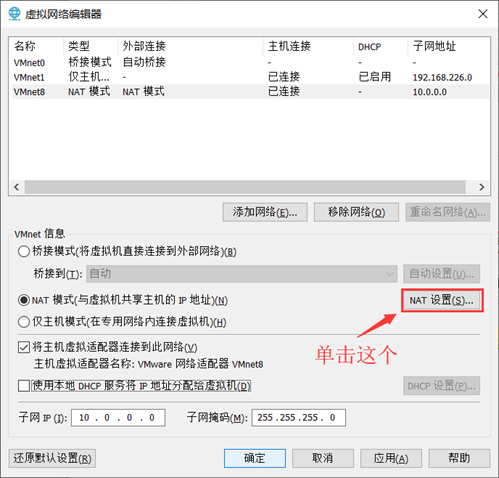
配置虚拟网络编辑器
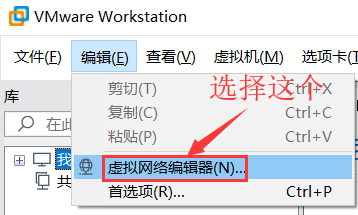
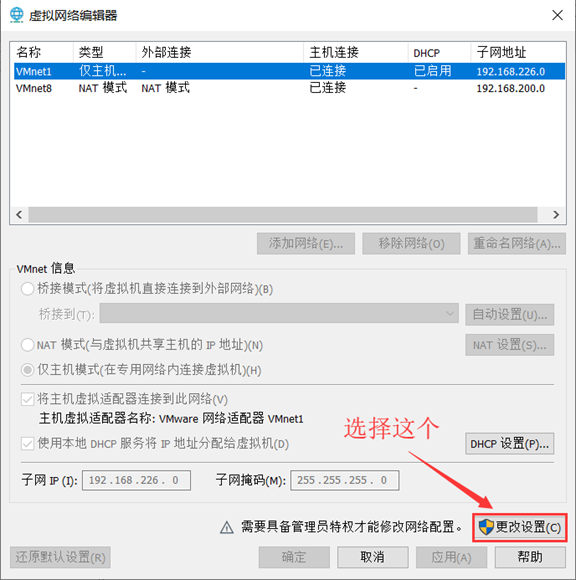
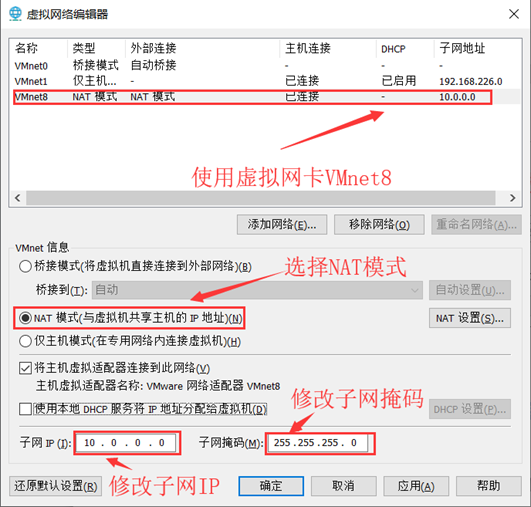
- 选择VMnet8使用NAT模式
- 子网IP:10.0.0.0
- 子网掩码:255.255.255.0
- NAT设置:
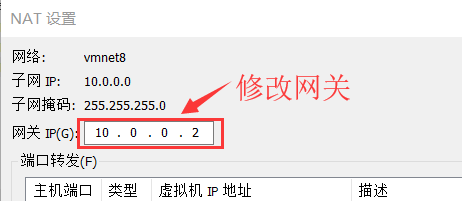
网关IP:10.0.0.2
完成后确定两次即可。
二、VMware 新建虚拟机
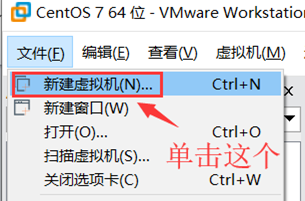
- 自定义模式
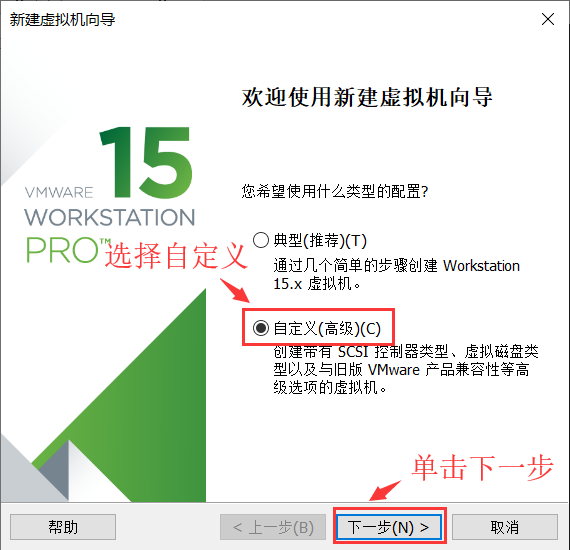
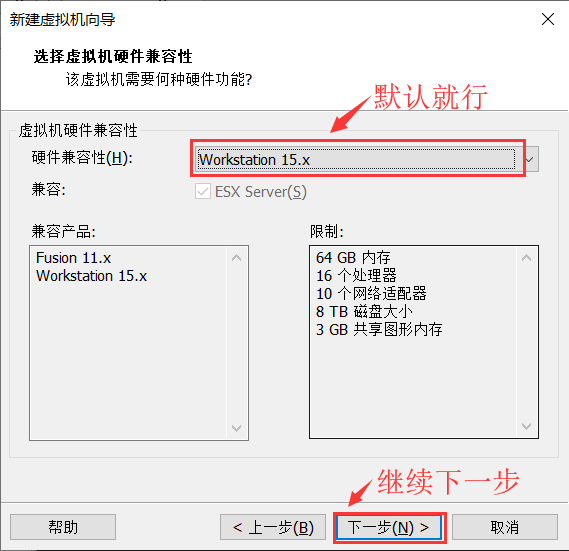
- 硬件兼容性:默认
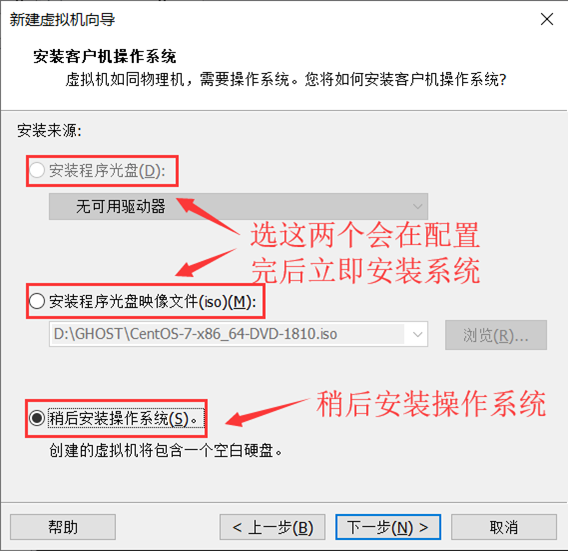
- 安装来源:稍后安装操作系统
- 客户机操作系统:Linux;版本:CentOS7 64 位

- 虚拟机名称:Linux运维模版机;位置:不要放在C盘

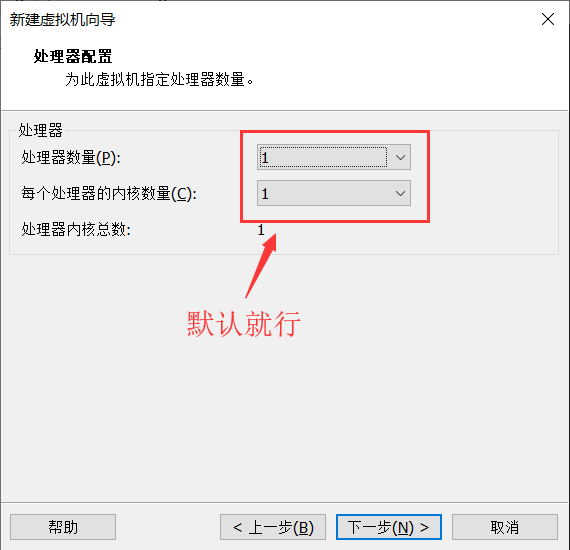
- 处理器:默认
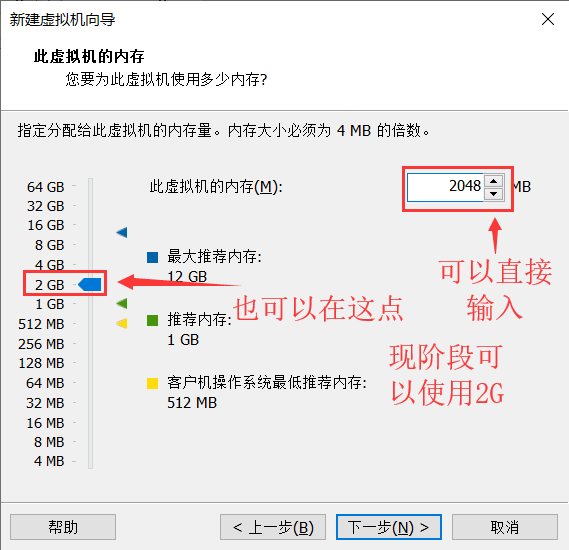
- 内存:2G
- 网络:NAT
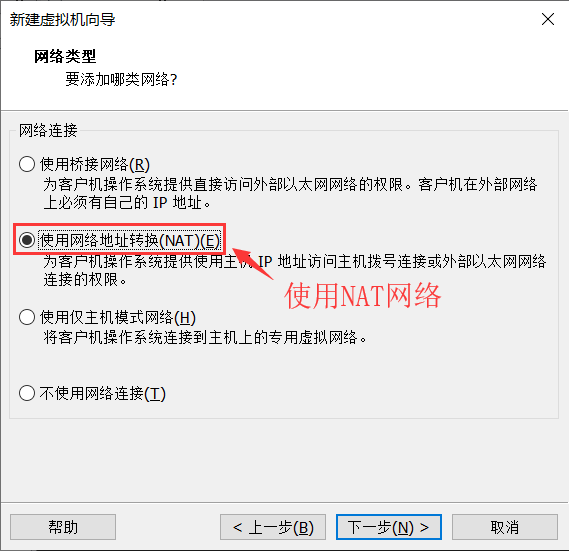
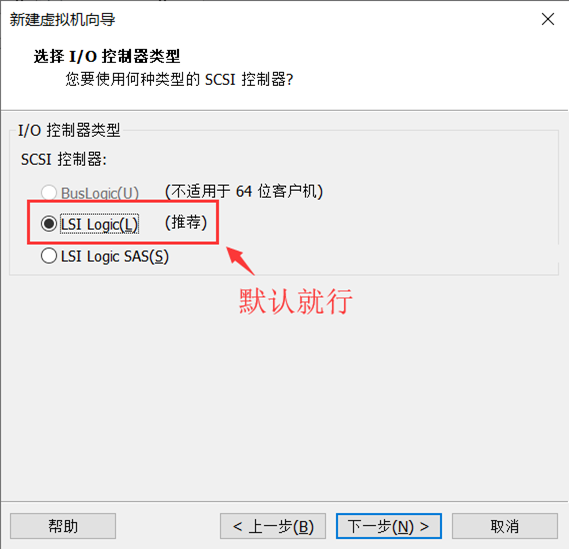
- 选择I/O控制器类型:默认
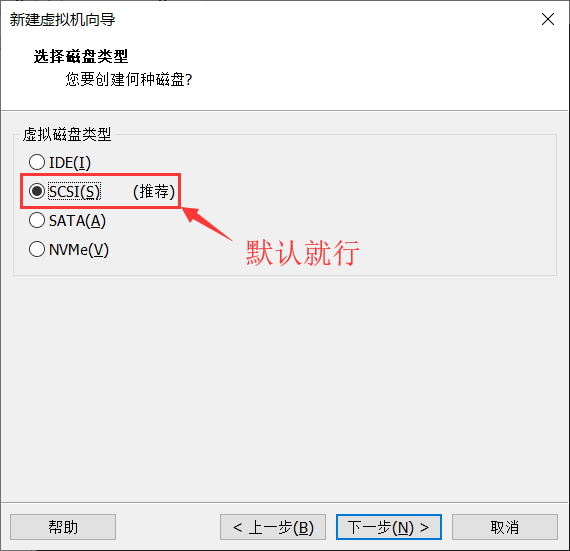
- 虚拟磁盘类型:默认
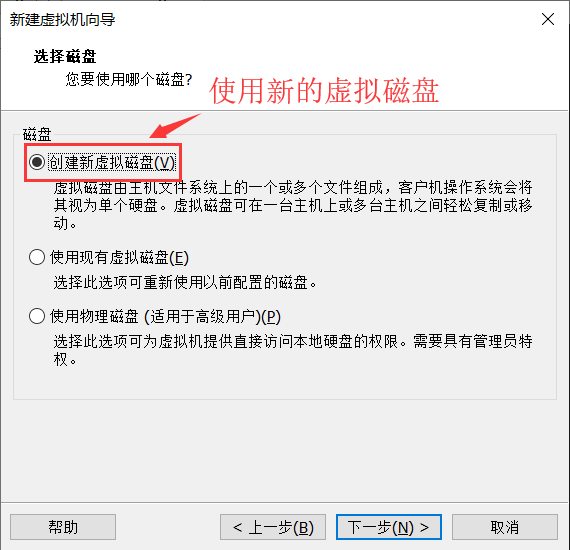
- 选择磁盘:创建新虚拟磁盘
- 指定磁盘容量:20G 将虚拟磁盘拆分为多个文件
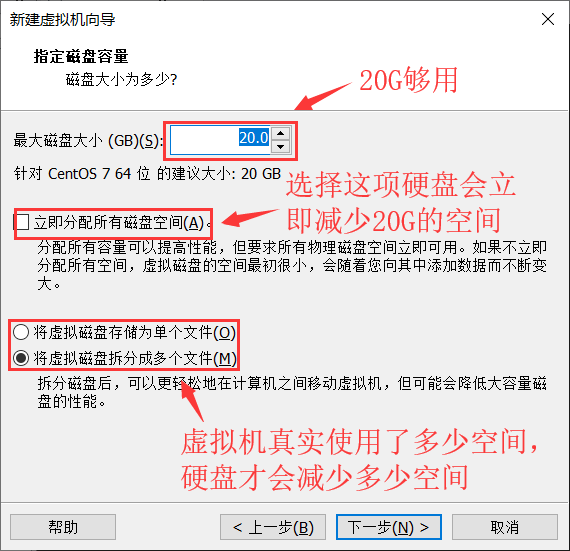
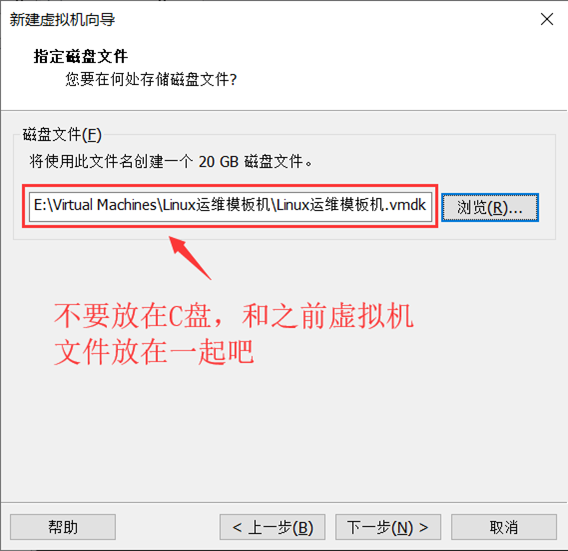
- 指定磁盘文件储存路径:不要放在C盘!
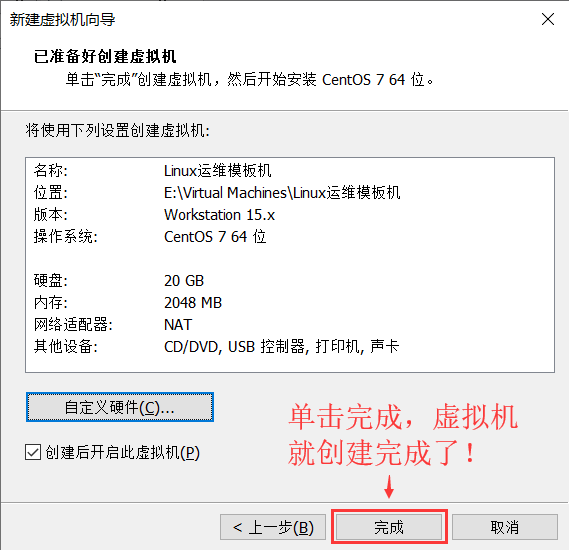
- 完成
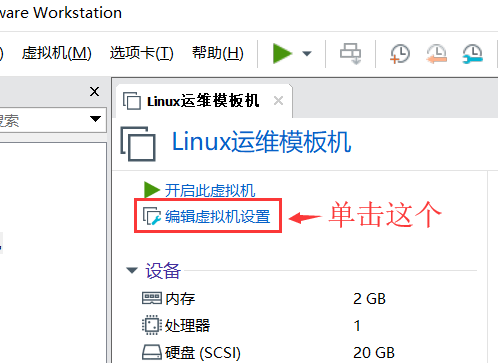
- 挂载镜像文件

三、CentOS 7 最小化安装
- 开启虚拟机
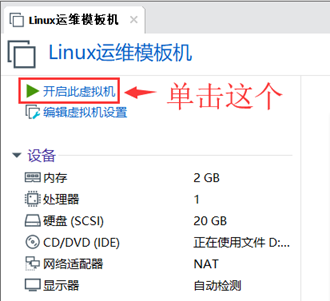
- 进入虚拟机界面
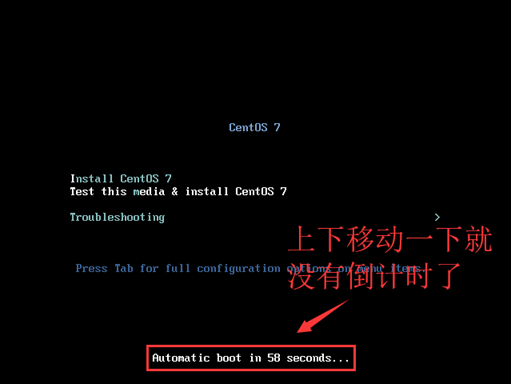
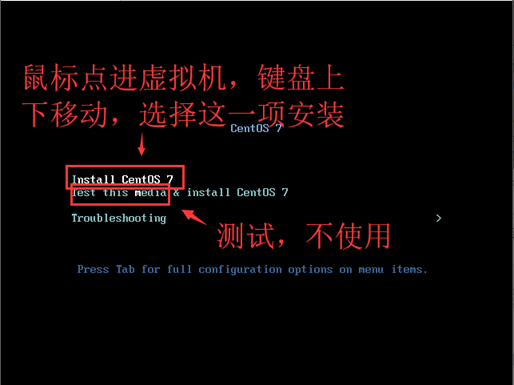
- 安装选择
4. 修改网卡名称为ethX
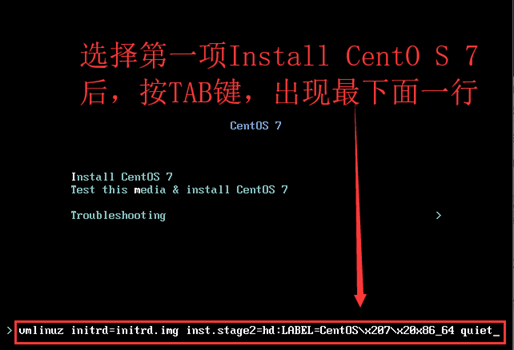
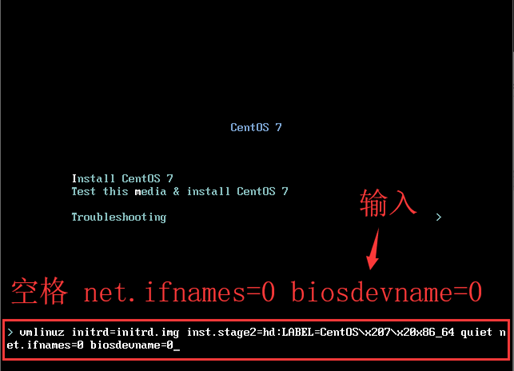
1、传递内核参数 net.ifnames=0 biosdevname=0 以 更改 网卡名称为 ethX
- 出现安装界面时,使用键盘 上下键 移动到第一行,即 Install Centos Linux 7
- 然后按 tab 键,即可出现 传递 参数界面。
- 在最后输入:空格 net.ifnames=0 biosdevname-0
- 修改完成后,回车!
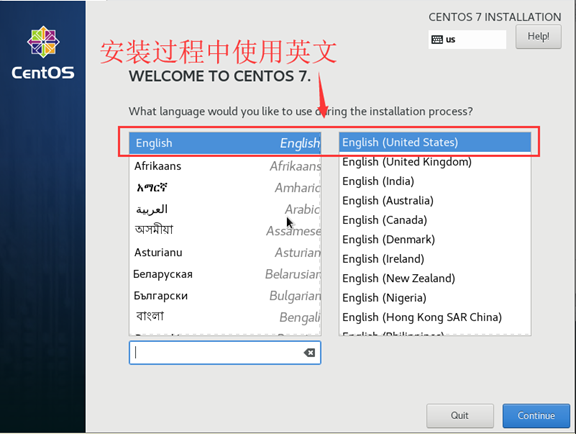
- 选择安装过程中使用的语言
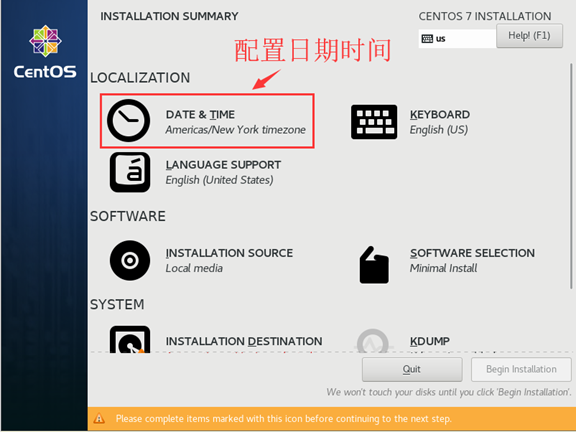
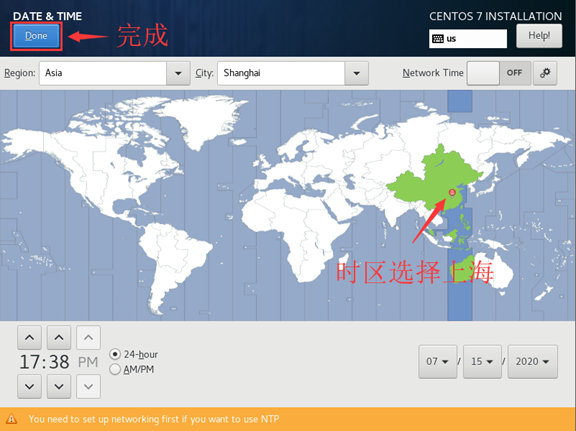
- 配置日期时间
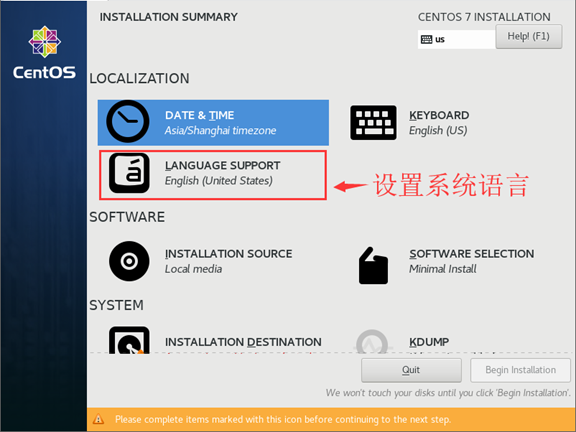
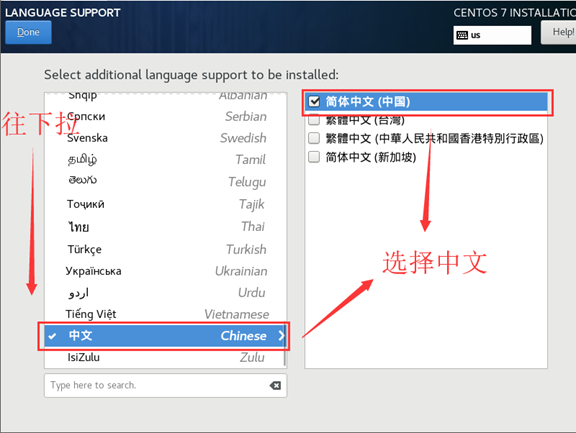
- 设置系统语言
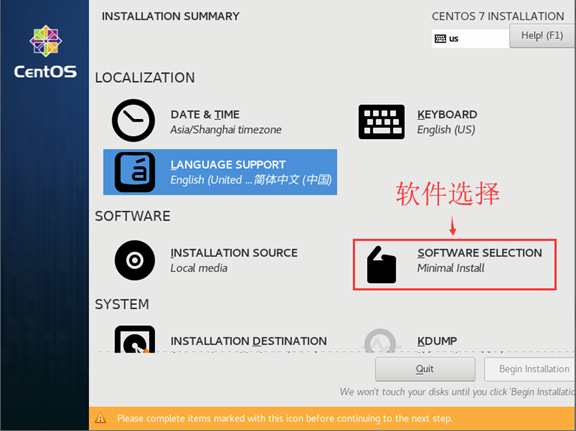
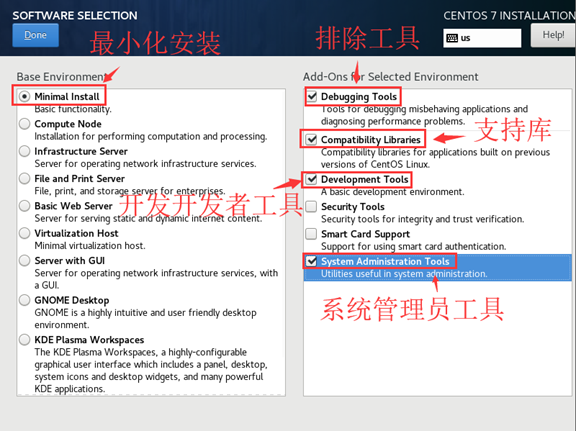
- 软件选择
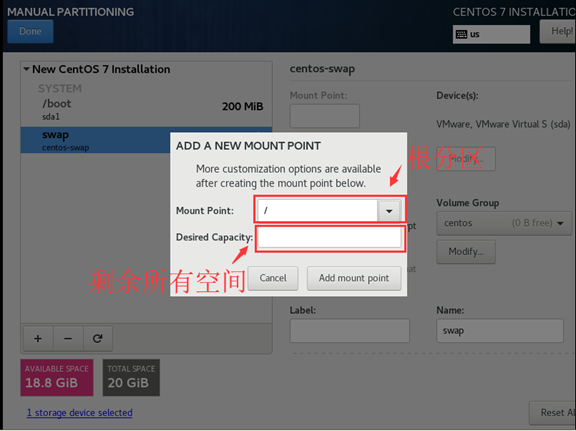
10. 安装磁盘选择(分区)
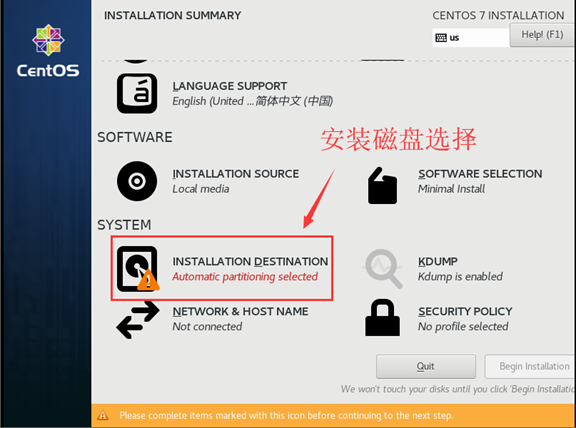

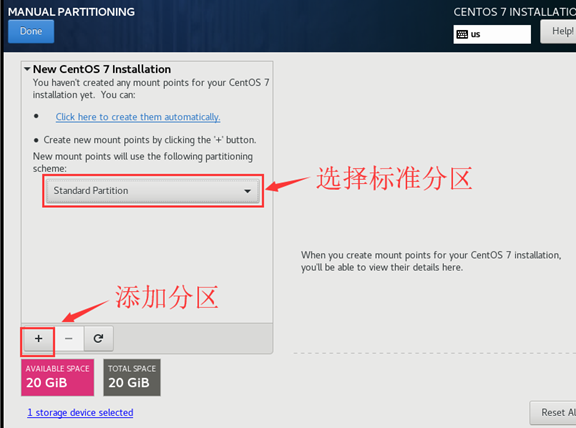
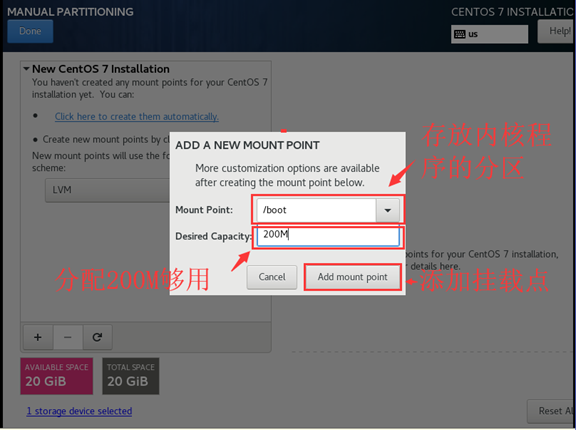
/boot 分区 200M 存放系统内核及引导程序
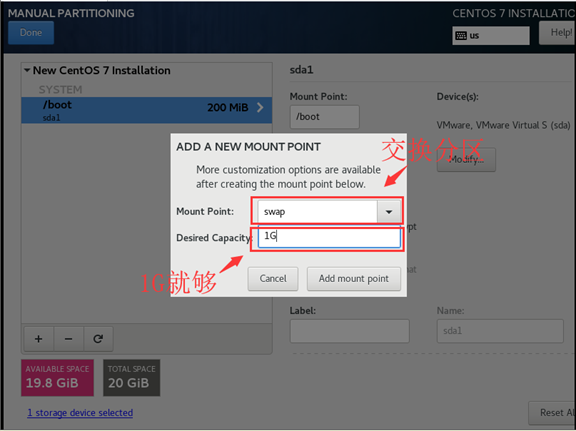
swap 分区 1G 交换分区 把磁盘空间临时充当内存使用
- 一般设为内存的1-1.5倍,内存大于8G的设为8G
- 可以在安装系统时进行分配,也可以在系统中进行分配
/ 其他所有剩余分区 根分区
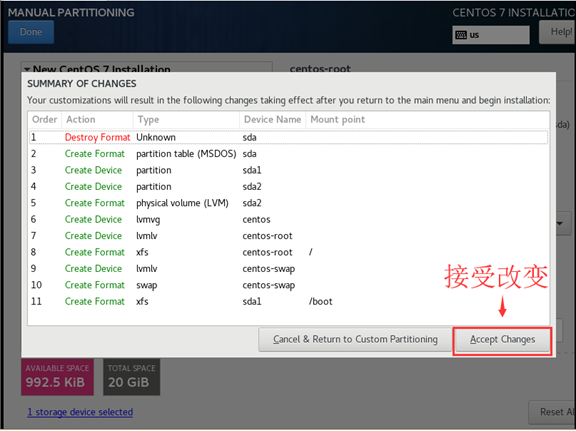
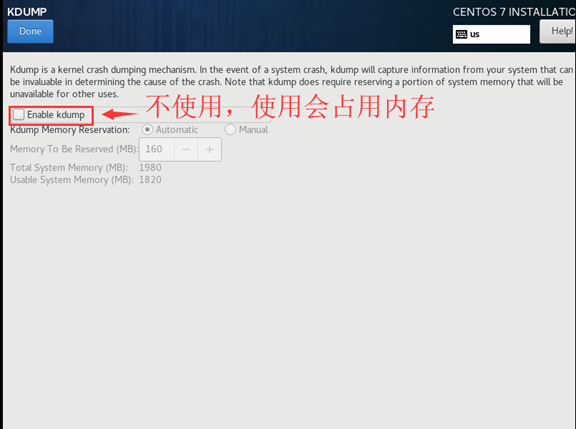
- KDUPB:不使用

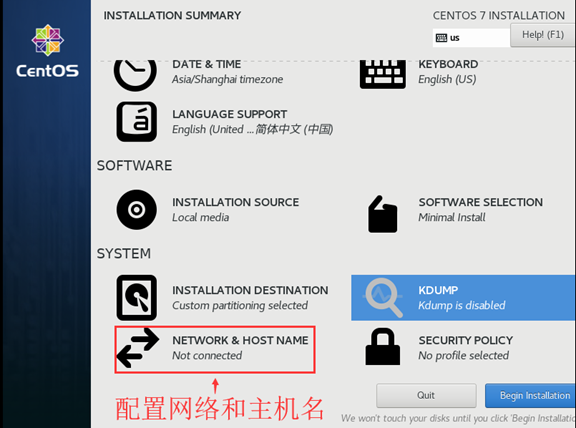
12. 配置网络和主机名
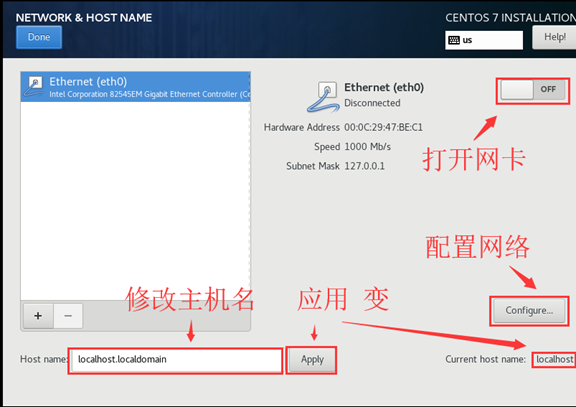
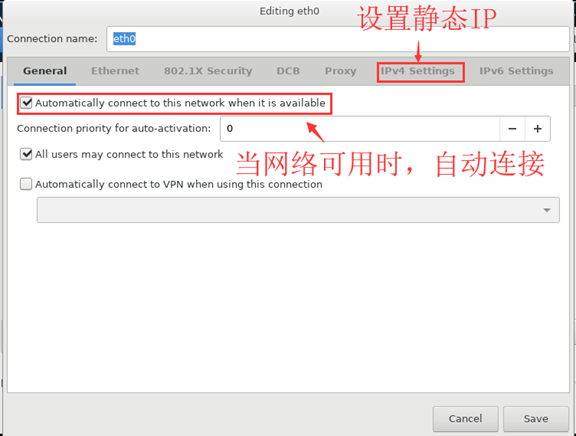
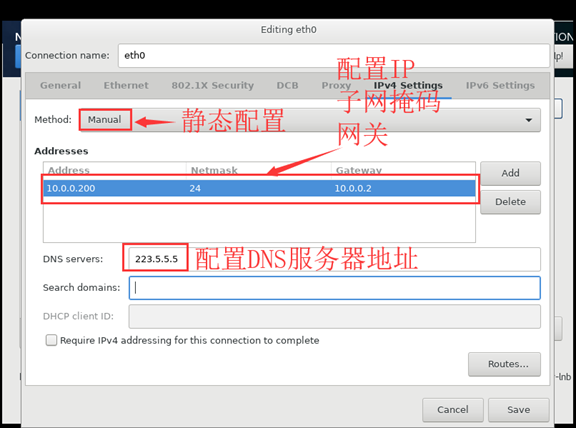
- 开始安装
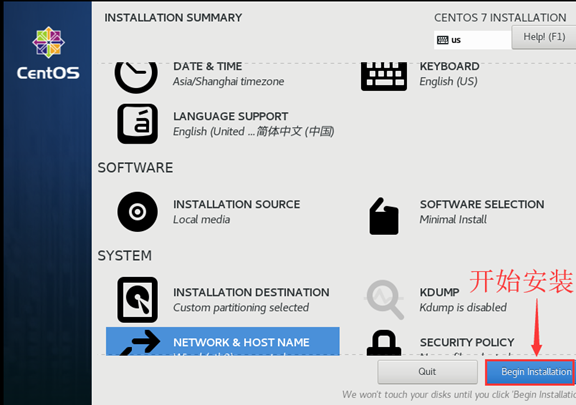
14. 用户配置
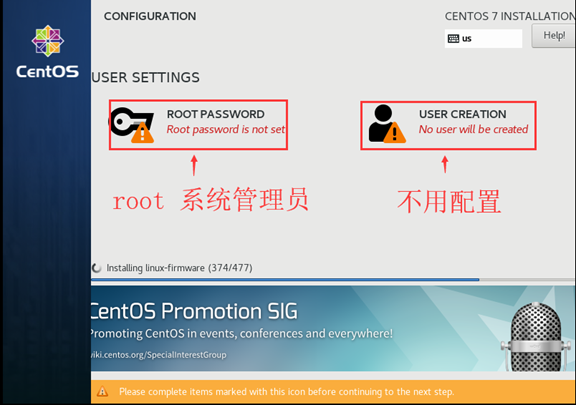
接下来就等待吧!
- 完成
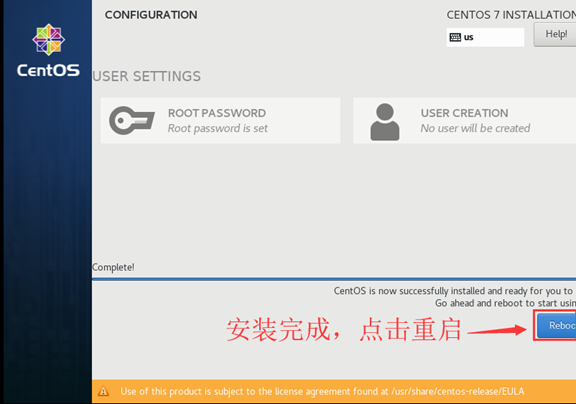
四、优化
- 修改yum源
sudo mv /etc/yum.repos.d/CentOS-Base.repo /etc/yum.repos.d/CentOS-Base.repo.backup

curl -o /etc/yum.repos.d/CentOS-Base.repo https://mirrors.aliyun.com/repo/Centos-7.repo
- 安装常用软件
yum -y install wget make automake cmake gcc gcc-c++ kernel-devel pcre pcre-devel zlib-devel \

openssl openssl-devel patch libffi-devel python-devel bzip2-devel ncurses-devel \

sqlite-devel readline-devel tk-devel gdbm-devel db4-devel libpcap-devel xz-devel \

glibc glibc-devel systemd-devel libevent libevent-devel ntpdate yum-utils lrzsz \

net-tools sysstat htop nc iotop iftop lsof nmap glances nethogs bind-utils nfs-utils \

tcpdump vim mtr traceroute quagga bc tree telnet screen dos2unix mlocate ncompress \

psmisc zip unzip bash-completion bash-completion-extras
- yum更新、清理、缓存
yum -y update

yum clean all

yum makecache
- 关闭防火墙
firewalld,并设置为开机不启动
systemctl stop firewalld

systemctl disable firewalld
- 关闭网络管理
NetworkManager,避免和network服务冲突,导致网络不通,或者网卡启动不成功等
systemctl stop NetworkManager

systemctl disable NetworkManager
- 关闭
selinux,修改配置文件
[root@openstack network-scripts]# cat /etc/sysconfig/selinux

# This file controls the state of SELinux on the system.

# SELINUX= can take one of these three values:

#     enforcing - SELinux security policy is enforced.

#     permissive - SELinux prints warnings instead of enforcing.

#     disabled - No SELinux policy is loaded.

SELINUX=disabled

# SELINUXTYPE= can take one of three values:

#     targeted - Targeted processes are protected,

#     minimum - Modification of targeted policy. Only selected processes are protected.

#     mls - Multi Level Security protection.

SELINUXTYPE=targeted
- 配置内核参数优化
[root@openstack network-scripts]# cat /etc/sysctl.conf

# Controls source route verification

net.ipv4.conf.default.rp_filter = 1

net.ipv4.ip_nonlocal_bind = 1

net.ipv4.ip_forward = 1

# Do not accept source routing

net.ipv4.conf.default.accept_source_route = 0

# Controls the System Request debugging functionality of the kernel

kernel.sysrq = 0

# Controls whether core dumps will append the PID to the core filename.

# Useful for debugging multi-threaded applications.

kernel.core_uses_pid = 1

# Controls the use of TCP syncookies

net.ipv4.tcp_syncookies = 1

# Disable netfilter on bridges.

net.bridge.bridge-nf-call-ip6tables = 0

net.bridge.bridge-nf-call-iptables = 0

net.bridge.bridge-nf-call-arptables = 0

# Controls the default maxmimum size of a mesage queue

kernel.msgmnb = 65536

# Controls the maximum size of a message, in bytes

kernel.msgmax = 65536

# Controls the maximum shared segment size, in bytes

kernel.shmmax = 68719476736

# Controls the maximum number of shared memory segments, in pages

kernel.shmall = 4294967296

# TCP kernel paramater

net.ipv4.tcp_mem = 786432 1048576 1572864

net.ipv4.tcp_rmem = 4096        87380   4194304

net.ipv4.tcp_wmem = 4096        16384   4194304

net.ipv4.tcp_window_scaling = 1

net.ipv4.tcp_sack = 1

# socket buffer

net.core.wmem_default = 8388608

net.core.rmem_default = 8388608

net.core.rmem_max = 16777216

net.core.wmem_max = 16777216

net.core.netdev_max_backlog = 262144

net.core.somaxconn = 20480

net.core.optmem_max = 81920

# TCP conn

net.ipv4.tcp_max_syn_backlog = 262144

net.ipv4.tcp_syn_retries = 3

net.ipv4.tcp_retries1 = 3

net.ipv4.tcp_retries2 = 15

# tcp conn reuse

net.ipv4.tcp_tw_reuse = 1

net.ipv4.tcp_tw_recycle = 1

net.ipv4.tcp_fin_timeout = 1

net.ipv4.tcp_max_tw_buckets = 20000

net.ipv4.tcp_max_orphans = 3276800

net.ipv4.tcp_timestamps = 1 #?

net.ipv4.tcp_synack_retries = 1

net.ipv4.tcp_syncookies = 1

# keepalive conn

net.ipv4.tcp_keepalive_time = 300

net.ipv4.tcp_keepalive_intvl = 30

net.ipv4.tcp_keepalive_probes = 3

net.ipv4.ip_local_port_range = 10001    65000

# swap

vm.overcommit_memory = 0

vm.swappiness = 10

#net.ipv4.conf.eth1.rp_filter = 0

#net.ipv4.conf.lo.arp_ignore = 1

#net.ipv4.conf.lo.arp_announce = 2

#net.ipv4.conf.all.arp_ignore = 1

#net.ipv4.conf.all.arp_announce = 2
- 配置资源控制,每个用户可以同时打开的最大文件数nofile、最大进程数nproc ... ....
[root@openstack network-scripts]# cat /etc/security/limits.conf

... ...

*                soft    core          unlimited

*                hard    core          unlimited

*                soft    nproc         1000000

*                hard    nproc         1000000

*                soft    nofile        100000

*                hard    nofile        100000

*                soft    memlock       32000

*                hard    memlock       32000

*                soft    msgqueue      8192000

*                hard    msgqueue      8192000
- poweroff关机,保存快照,此时centos7整个系统安装配置完成,可以使用了。
CentOS 7 最小化安装及优化的更多相关文章
- RHEL/CentOS 7最小化安装后需做的30件事情
导读 CentOS是一个工业标准的Linux发行版,是红帽企业版 Linux 的衍生版本.你安装完后马上就可以使用,但是为了更好地使用你的系统,你需要进行一些升级.安装新的软件包.配置特定服务和应用程 ...
- CentOS 7 最小化安装的网络配置
默认的最小化安装CentOS 7系统以后,是没有ipconfig这个命令的,依赖于net-tools工具包. 一.nmtui 这是一个类似于图形化的命令(和setup类似) 通过这个组件窗口可以设置各 ...
- CentOS 7 - 最小化安装后,解决无法使用yum命令问题!!
刚刚最小化方式安装了CentOS 7 后,说实话,真不习惯也不喜欢纯shell方式工作,使用root账号登入后,马上想安装GNOME,但是发现yum不能正常工作!!! 一,输入安装X Window命令 ...
- CentOS 7 - 最小化安装后,安装GNOME!!
CentOS 7的最小化安装,并没有安装任何X Window,GNOME是比较好的一个X Window,我决定安装GNOME! 通过yum grouplist命令,我发现GNOME已经处于可以安装列表 ...
- CentOS 7 - 最小化安装以及引发的问题!
一,操作系统和虚拟机 操作系统:CentOS 7 官方网站:https://www.centos.org 下载地址:https://www.centos.org/download/ 下载版本分三个:D ...
- CentOS系统最小化安装没有wget解决方案
-bash: wget: command not found的两种解决方法 今天给服务器安装新LNMP环境时,wget 时提示 -bash:wget command not found,很明显没有安装 ...
- 【深入学习linux】CentOS 7 最小化安装后的注意事项及一些必备组件的安装
转载:https://blog.csdn.net/F_Srion/article/details/54910943 在VM虚拟机中安装CentOS 7 时 有时候顾虑到电脑硬件性能,我们需要最小化安装 ...
- CentOS 7 最小化安装后的注意事项
http://blog.csdn.net/f_srion/article/details/54910943 在VM虚拟机中安装CentOS 7 时 有时候顾虑到电脑硬件性能,我们需要最小化安装,而最小 ...
- 【CentOS如何最小化安装】
近来发现越来越多的运维小伙伴们都有最小化安装系统的洁癖,因此,找老男孩来咨询,这个"洁癖"好习惯啊,必须支持,,因此发布本文和大家分享下. (1)系统安装类型选择及自定义额外包组 ...
随机推荐
- IAR编译错误Error[e16]: Segment ISTACK (size: 0xc0 align: 0) is too long for segment definition. At least 0x8 more bytes needed. The problem occurred while processing the segment
问题:个人使用的是IARV9.10编译CC2541的工程,没有做任何修改,直接编译出现如下错误 Error[e16]: Segment ISTACK (size: 0xc0 align: 0) is ...
- Kafak探究之路- 内部结构小结
1.框架与工作流 2 内部结构 kafka的每个主题分区的数据在 first-0(主题名-分区号)文件夹下,保存 n组xxx.log文件与xxx.index文件.log文件存发送消息的元数据,每个大小 ...
- 关于缓存的一些重要概念(Redis 前置菜)
1. 缓存的基本思想 很多朋友,只知道缓存可以提高系统性能以及减少请求相应时间,但是,不太清楚缓存的本质思想是什么. 缓存的基本思想其实很简单,就是我们非常熟悉的空间换时间.不要把缓存想的太高大上,虽 ...
- 第二十六章、containers容器类部件QToolBox工具箱详解
老猿Python博文目录 专栏:使用PyQt开发图形界面Python应用 老猿Python博客地址 一.概述 容器部件就是可以在部件内放置其他部件的部件,在Qt Designer中可以使用的容器部件有 ...
- PyQt(Python+Qt)学习随笔:toolButton的autoRaise和arrowType属性
autoRaise属性 autoRaise属性表示toolButton按钮是否自动凸出,类型为布尔类型.默认值为False,可以通过autoRaise().setAutoRaise(bool enab ...
- python接口自动化测试框架(post提交添加变量)
1.python接口测试框架包含哪几部分 数据源-> GET/POST 发送请求->接收返回结果->断言测试结果->生成测试报告(html报告)->网页报告 2.pyth ...
- Robot framework 环境搭建+图标处理
场景:随着现在项目各种赶工,很多时候界面上的功能还没有实现,这时就可以先对接口进行验证,提早发现一些和预期不一致的错误. Robot framework需要的几个知识点: 测试库:RF是大树,测试库就 ...
- DVWA SQL Injection Medium
Mdeium 基本的步骤及知识点在上节已经提到过这里不再赘述:https://blog.csdn.net/WQ_BCJ/article/details/84554777 1)与low级别不同,本次采用 ...
- Boost UDP Transaction Performance
提高UDP交互性能 这是一篇个人认为非常非常厉害的文章,取自这里.讲述了如何提升UDP流的处理速率,但实际涉及的技术点不仅仅限于UDP.这篇文章中涉及的技术正好可以把前段时间了解的知识串联起来.作者: ...
- [从源码学设计]蚂蚁金服SOFARegistry之推拉模型
[从源码学设计]蚂蚁金服SOFARegistry之推拉模型 目录 [从源码学设计]蚂蚁金服SOFARegistry之推拉模型 0x00 摘要 0x01 相关概念 1.1 推模型和拉模型 1.1.1 推 ...