
Solon rpc 1.2.18 发布,突出Rpc特性
Solon 是一个微型的Java RPC开发框架。项目从2018年启动以来,参考过大量前人作品;历时两年,3500多次的commit;内核保持0.1m的身材,超高的跑分,良好的使用体验。支持:Rpc、Rest api、Mvc 多种开发模式。
Solon 强调:克制 + 简洁 + 开放的原则;力求:更小、更快、更自由的体验。
所谓更小:
内核0.1m,最小开发单位0.2m(相比Dubbo、Springboot项目包,小到可以乎略不计)
所谓更快:
本机helloworld测试,Qps可达12万之多。可参考:《helloworld_wrk_test》
所谓更自由:(代码操控自由)
// 除了注入模式之外,还可以按需手动

//

//手动获取配置

Map<String,String> db = Solon.cfg().getMap("db");

//手动获取容器里的Bean

UserService userService = Aop.get(UserService.class);

//手动监听http post请求

Solon.global().post("/user/update", x-> userService.updateById(x.paramMap()));
本次版本重大变更:
一、突出Rpc 的特性
Solonn rpc 框架分为两部分:Nami 承载客户端的工作;Solon.boot 承载服务端的工作;Solon 做为容器贯穿前后
架构示意图
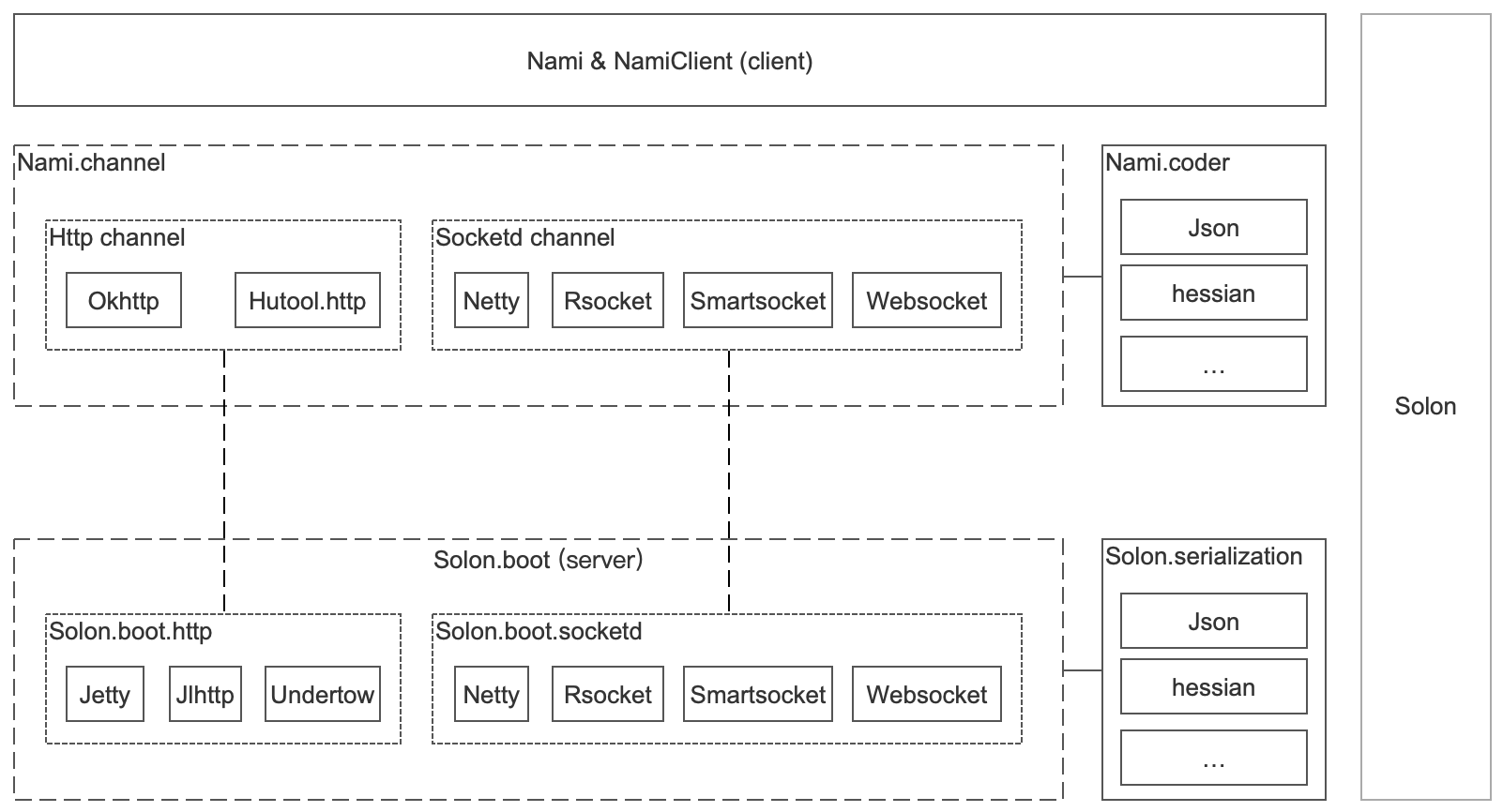
二、将Nami 分解为:内核、通道、编解码三块
使用时须引入有通道和编码包;也可根据需求定制自己的通道与编码方案
- 内核:org.noear:nami
- 通道:org.noear:nami.channel.* (支持http、 socket、websocket)
- 编码:org.noear:nami.coder.*
(一)已适配通道包
- org.noear:nami.channel.http.hutool
- org.noear:nami.channel.http.okhttp
- org.noear:nami.channel.socketd.jdksocket
- org.noear:nami.channel.socketd.netty
- org.noear:nami.channel.socketd.rsocket
- org.noear:nami.channel.socketd.smartsocket
- org.noear:nami.channel.socketd.websocket
(二)已适配解码包
- org.noear:nami.coder.fastjson
- org.noear:nami.coder.hessian
- org.noear:nami.coder.snack3
(三)支持Springboot集成
- org.noear:nami-springboot-starter (客户端集成)
- org.noear:springboot-solon-plugin(服务端集成)
Springboot 客户端集成示例 demo10.client_springboot
三、将集成包的打包方式由pom改为jar
- org.noear:solon-rpc 改为 jar
- org.noear:solon-web 改为 jar
附1:包引用使用示例
(一)http + json
- 客户端
<parent>

    <groupId>org.noear</groupId>

    <artifactId>solon-parent</artifactId>

    <version>1.2.18</version>

</parent>

<dependencies>

    <dependency>

        <groupId>org.noear</groupId>

        <artifactId>nami.coder.snack3</artifactId>

    </dependency>

    <dependency>

        <groupId>org.noear</groupId>

        <artifactId>nami.channel.http.okhttp</artifactId>

    </dependency>

</dependencies>
public class ClientApp {

    public static void main(String[] args) {

        Solon.start(ClientApp.class, args);

        //

        // 默认使用json解码

        //

        HelloService helloService = Nami.builder()

                .upstream(() -> "http://localhost:8080").create(HelloService.class);

        String result = helloService.hello("noear");

        System.out.println("Rpc result: " + result);

    }

}
- 服务端
<parent>

    <groupId>org.noear</groupId>

    <artifactId>solon-parent</artifactId>

    <version>1.2.18</version>

</parent>

<dependencies>

    <dependency>

        <groupId>org.noear</groupId>

        <artifactId>solon.serialization.snack3</artifactId>

    </dependency>

    <dependency>

        <groupId>org.noear</groupId>

        <artifactId>solon.boot.jlhttp</artifactId>

    </dependency>

</dependencies>
public class ServerApp {

    public static void main(String[] args) {

        Solon.start(ServerApp.class, args);

    }

}

@Mapping("/")

@Component(remoting = true)

public class HelloServiceImpl implements HelloService {

    @Override

    public String hello(String name) {

        return "hello: " + name;

    }

}
(二)sockted + json
- 客户端
<parent>

    <groupId>org.noear</groupId>

    <artifactId>solon-parent</artifactId>

    <version>1.2.18</version>

</parent>

<dependencies>

    <dependency>

        <groupId>org.noear</groupId>

        <artifactId>nami.coder.hessian</artifactId>

    </dependency>

    <dependency>

        <groupId>org.noear</groupId>

        <artifactId>nami.channel.socketd.smartsocket</artifactId>

    </dependency>

</dependencies>
public class ClientApp {

    public static void main(String[] args) {

        Solon.start(ClientApp.class, args);

        //

        // 默认使用json解码

        //

        HelloService helloService = Nami.builder()

                .upstream(() -> "http://localhost:8080").decoder(HessianDecoder.instance).create(HelloService.class);

        String result = helloService.hello("noear");

        System.out.println("Rpc result: " + result);

    }

}
- 服务端
<parent>

    <groupId>org.noear</groupId>

    <artifactId>solon-parent</artifactId>

    <version>1.2.18</version>

</parent>

<dependencies>

    <dependency>

        <groupId>org.noear</groupId>

        <artifactId>solon.serialization.hession</artifactId>

    </dependency>

    <dependency>

        <groupId>org.noear</groupId>

        <artifactId>solon.boot.socketd.smartsocket</artifactId>

    </dependency>

</dependencies>
public class ServerApp {

    public static void main(String[] args) {

        Solon.start(ServerApp.class, args);

    }

}

@Mapping(value = "/",method = MethodType.SOCKET)

@Component(remoting = true)

public class HelloServiceImpl implements HelloService {

    @Override

    public String hello(String name) {

        return "hello: " + name;

    }

}
附2:更多示例
Solon rpc 1.2.18 发布,突出Rpc特性的更多相关文章
- cocoapods导入第三方库提示RPC failed curl 18 transfer
错误提示: error: RPC failed; curl 18 transfer closed with outstanding read data remaining fatal: The rem ...
- git clone时RPC failed; curl 18 transfer closed with outstanding read data remaining
git clone时报RPC failed; curl 18 transfer closed with outstanding read data remaining 错误 原因1:缓存区溢出 解决方 ...
- Git 报错:git - error: RPC failed; curl 18 transfer closed with outstanding read data remaining 解决方案
error: RPC failed; curl 18 transfer closed with outstanding read data remaining because have error w ...
- git报错--RPC failed; curl 18 transfer closed with outstanding read data remaining
遇到的问题一: error: RPC failed; curl 18 transfer closed with outstanding read data remaining fata ...
- (转)git clone: error: RPC failed; result=18, HTTP code = 200 解决办法
git clone: error: RPC failed; result=18, HTTP code = 200 解决办法 分类: git2013-09-01 17:03 10753人阅读 评论(2) ...
- pod update更新error: RPC failed; curl 18 transfer closed with outstanding read data remaining
1. pod update 的时候出现下边的错误 error: RPC failed; curl 18 transfer closed with outstanding read data remai ...
- error: RPC failed; curl 18 transfer closed with outstanding read data remaining
报错: error: RPC failed; curl 18 transfer closed with outstanding read data remaining fatal: The remot ...
- git clone报错error: RPC failed; curl 18 transfer closed with outstanding read data remaining
具体错误信息如下图: error: RPC failed; curl 18 transfer closed with outstanding read data remaining fatal: ...
- 解决git报错:error: RPC failed; curl 18 transfer closed with outstanding read data remaining 的方法
报错信息: error: RPC failed; curl 18 transfer closed with outstanding read data remainingfatal: the remo ...
随机推荐
- PyQt(Python+Qt)学习随笔:QListWidget获取指定项对应行的row方法
老猿Python博文目录 专栏:使用PyQt开发图形界面Python应用 老猿Python博客地址 QListWidget的row方法通过项作为参数,获取到对应项所在行的行号,语法如下: int ro ...
- JMeter断言/检查点
断言就类似LoadRunner中的检查点.对上一个请求返回的信息,获取部分字符串.图片等做判断,确保返回的信息的准确性. 右键点击"HTTP请求" -> "添加&q ...
- 剑指offer二刷——数组专题——数字在升序数组中出现的次数
题目描述 统计一个数字在升序数组中出现的次数. 我的想法 完整的解法我只想到了遍历数组然后依次统计,但这是不聪明的解法,而且没有利用上"升序数组"的这个条件. 题目标签有提醒可以用 ...
- 介质访问控制子层-Medium Access Control Sublayer:多路访问协议、以太网、无线局域网
第四章 介质访问控制子层-Medium Access Control Sub-layer 4.1介质访问控制子层概述 MAC子层不属于之前提到的OSI或TCP/IP架构的任何一层,这也是为什么这一层被 ...
- 算法——1~n 整数中 1 出现的次数
输入一个整数 n ,求1-n这n个整数的十进制表示中1出现的次数. 例如,输入12,1-12这些整数中包含1 的数字有1.10.11和12,1一共出现了5次. leetcode 解题思路:依次遍历每一 ...
- uni-app全局属性和方法
全局变量和全局方法是软件开发中常用的技术点! 实现方式大致分为: 1.vuex实现,值变动灵活 2.建立js文件,页面内引用 3.挂载vue实例后使用 4.小程序中的globalData 5.本地存储 ...
- 恕我直言,你可能连 GitHub 搜索都不会用 - 如何精准搜索的神仙技巧
大家好,我是你们的 前端章鱼猫,一个不喜欢喵.又不喜欢吃鱼的超级猫 ~ 今天给大家带来的是 在 GitHub 上如何精准搜索的神仙技巧. [前端GitHub:https://github.com/bi ...
- JavaSE25-Junit&注解
1.Junit单元测试 1.1 测试分类 1. 黑盒测试:不需要写代码,给输入值,看程序是否能够输出期望的值. 2. 白盒测试:需要写代码的.关注程序具体的执行流程. Junit使用:白盒测试 步骤: ...
- 精尽Spring MVC源码分析 - HandlerMapping 组件(三)之 AbstractHandlerMethodMapping
该系列文档是本人在学习 Spring MVC 的源码过程中总结下来的,可能对读者不太友好,请结合我的源码注释 Spring MVC 源码分析 GitHub 地址 进行阅读 Spring 版本:5.2. ...
- mybatis默认返回类型
在mybatis中,无论你指定还是不指定返回类型,mybatis都会默认的先将查询回的值放入一个hashMap中(如果返回的值不止一条就是一个包含hashMap的list).这其中的区别在于,如果你指 ...