
asynchronous-logging-with-log4j-2--转
原文地址:https://dzone.com/articles/asynchronous-logging-with-log4j-2
Log4J 2 is a logging framework designed to address the logging requirements of enterprise applications. If you are new to Log4J2, I suggest going through my introductory post on Log4J 2, Introducing Log4J 2 – Enterprise Class Logging.
Log4J 2 introduces configuration support via JSON and YAML in addition to properties file and XML. I’ve written about the different Log4J 2 configuration options in the following posts:
- Log4J 2 Configuration: Using Properties File
- Log4J 2 Configuration: Using XML
- Log4J 2 Configuration: Using JSON
- Log4J 2 Configuration: Using YAML
In this post, we’ll take a look at asynchronous loggers (async loggers) introduced in Log4J 2.
Asynchronous Logging: Introduction
Performance is critical for enterprise applications and nobody wants the underlying logging framework to become a bottleneck. In small programs with little volume, the overhead of logging is rarely an issue. However, enterprise services can see significant volume. If the service is getting invoked hundreds or even thousands of times per second, the overhead of logging can become significant. In such scenarios, two fundamental performance-related concepts are:
- Latency: Time required to perform some action or to produce some result. Time of a transaction, or service invocation.
- Throughput: The number of some actions executed or results produced per unit of time.
For increased logging performance, we want lower logging latency and higher throughput. The asynchronous logger in Log4J 2 does this by decoupling the logging overhead from the thread executing your code. An async logger has consistently lower latency than a synchronous logger and high throughput of logging messages at 6 – 68 times the rate of a synchronous logger.
I/O operations are notorious performance killers. This is because of locks and waits which are typical when dealing with I/O operations. I/O operations can be executed in a separate thread, thereby freeing the main thread to perform other tasks. With the multicore architectures of modern CPUs, multithreaded operations are an ideal way to improve application performance.
Multi-threaded logging was present prior to Log4J 2 through asynchronous appenders, and its support still exist. The new asynchronous logger differs from asynchronous appender in how work is passed by the main thread to a different thread. Async appender uses an ArrayBlockingQueue– A first-in-first-out (FIFO) queue to hand off the messages to the thread which performs the I/O operations. The ArrayBlockingQueue class internally uses locks to ensure data integrity and data visibility between threads. As locks introduce latency, ArrayBlockingQueue is not the most optimal data structure to pass information between threads. Async logger is designed to optimize this area by replacing the blocking queue with LMAX Disruptor – a lock-free inter-thread communication library. The use of Disruptor results in higher throughput and lower latency in Log4J 2 logging. Martin Fowler has written an excellent article on the architecture of LMAX Disruptor here.
Maven Dependencies
To use async logger in your application, you need to add dependency of LMAX Disruptor in addition to the required Log4J 2 libraries to your Maven POM, like this.
. . .
<dependency>
<groupId>org.springframework.boot</groupId>
<artifactId>spring-boot-starter</artifactId>
<exclusions>
<exclusion>
<groupId>org.springframework.boot</groupId>
<artifactId>spring-boot-starter-logging</artifactId>
</exclusion>
</exclusions>
</dependency>
<dependency>
<groupId>org.apache.logging.log4j</groupId>
<artifactId>log4j-api</artifactId>
<version>2.5</version>
</dependency>
<dependency>
<groupId>org.apache.logging.log4j</groupId>
<artifactId>log4j-core</artifactId>
<version>2.5</version>
</dependency>
<dependency>
<groupId>com.lmax</groupId>
<artifactId>disruptor</artifactId>
<version>3.3.4</version>
</dependency>
. . .
Configuring Log4J 2
Before we configure Log4J 2 async loggers, lets create a logger class that uses the Log4J 2 API to log messages.
Log4J2AsyncLogger.java
package guru.springframework.blog.log4j2async;
import org.apache.logging.log4j.LogManager;
import org.apache.logging.log4j.Logger;
public class Log4J2AsyncLogger {
private static Logger logger = LogManager.getLogger();
public void performSomeTask(){
logger.debug("This is a debug message.");
logger.info("This is an info message.");
logger.warn("This is a warn message.");
logger.error("This is an error message.");
logger.fatal("This is a fatal message.");
}
}
To test the preceding class, we will use JUnit.
Log4J2AsyncLoggerTest.java
package guru.springframework.blog.log4j2async;
import org.junit.Test;
public class Log4J2AsyncLoggerTest {
@Test
public void testPerformSomeTask() throws Exception {
Log4J2AsyncLogger log4J2AsyncLogger=new Log4J2AsyncLogger();
log4J2AsyncLogger.performSomeTask();
}
}
Next, we will use XML to configure Log4J2. The log4j2.xml file is this.
<?xml version="1.0" encoding="UTF-8"?>
<Configuration status="debug">
<Appenders>
<Console name="Console-Appender" target="SYSTEM_OUT">
<PatternLayout>
<pattern>
[%-5level] %d{yyyy-MM-dd HH:mm:ss.SSS} [%t] %c{1} - %msg%n
</pattern>>
</PatternLayout>
</Console>
<File name="File-Appender" fileName="logs/xmlfilelog.log" >
<PatternLayout>
<pattern>
[%-5level] %d{yyyy-MM-dd HH:mm:ss.SSS} [%t] %c{1} - %msg%n
</pattern>
</PatternLayout>
</File>
</Appenders>
<Loggers>
<Logger name="guru.springframework.blog.log4j2async" level="debug">
<AppenderRef ref="File-Appender"/>he preceding c
</Logger>
<Root level="debug">
<AppenderRef ref="Console-Appender"/>
</Root>
</Loggers>
</Configuration>
In the code above, we added the status="debug" attribute to the <configuration> tag to output internal Log4J 2 log messages. This is required to verify that log messages are indeed getting logged asynchronously. We then configured a console and a file appender. We also configured an application-specific logger and the root logger to use the file and console appenders respectively. Notice that we haven’t written any asynchronous logging configuration code as of yet.
All Async Loggers
The simplest way to enable asynchronous logging in Log4J 2 is to make all loggers async. This involves setting the Log4jContextSelector system property. On the command line, you can set it like this.
-DLog4jContextSelector=org.apache.logging.log4j.core.async.AsyncLoggerContextSelector
To set the Log4jContextSelector system property in IntelliJ, you need to perform the following steps.
- Click Run->Edit Configurations from the IntelliJ main menu.
- Expand the JUnit node on the left pane of the Run/Debug Configurations window that appears, and select the test class.
- Type -DLog4jContextSelector=org.apache.logging.log4j.core.async.AsyncLoggerContextSelector in the Vm options text field.

- Click the OK button.
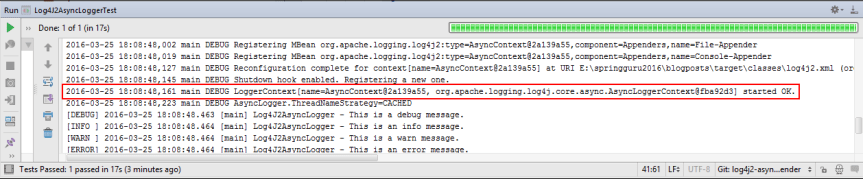
When you run the Log4J2AsyncLoggerTest test class, the configured loggers will start logging messages asynchronously. You can confirm this in the internal Log4J 2 output, as shown in this figure.
Mixed Sync and Async Loggers
A Log4J 2 configuration can contain a mix of sync and async loggers. You specify application-specific async loggers as <AsyncLogger>, like this.
. . .
<Loggers>
<AsyncLogger name="guru.springframework.blog.log4j2async" level="debug">
<AppenderRef ref="File-Appender"/>
</AsyncLogger>
<Root level="debug">
<AppenderRef ref="Console-Appender"/>
</Root>
</Loggers>
. . .
In the preceding configuration code, the application-specific logger will asynchronously log messages to the file, while the root logger will synchronously log messages to console.
To make the root logger async, use <AsyncRoot>.
Random Access File Appender
A discussion on asynchronous logging won’t be complete without the mention of the random access file appender. A random access file is similar to the file appender we used, except it’s always buffered with a default buffer size of 256 * 1024 bytes. The buffer size, as of the current release, is not configurable. This means that once the buffer is pre-allocated with a size at first use, it will never grow or shrink during the life of the system. You can override the default size with the AsyncLoggerConfig.RingBufferSize system property. The random access file appender internally uses a ByteBuffer with RandomAccessFile instead of aBufferedOutputStream. This results in significant performance improvement. It is reported to have 20-200% more performance gain as compared to file appender.
Log4J 2 also provides the rolling random access file appender for high performance rolling files. This appender, similar to random access file, is always buffered with the default size of 256 * 1024 bytes, which is not configurable.
I have discussed configuring rolling files here, and also here. To configure a similar rolling random access file appender, replace the <RollingFile> tag with <RollingRandomAccessFile>.
The code to configure a rolling random access file appender, is this.
. . .
<RollingRandomAccessFile name="Rolling-Random-Access-File-Appender"
fileName="logs/rollingrandomaccessfile.log"
filePattern="archive/logs/rollingrandomaccessfile.log.%d{yyyy-MM-dd-hh-mm}.gz">
<PatternLayout pattern="[%-5level] %d{yyyy-MM-dd HH:mm:ss.SSS} [%t] %c{1} - %msg%n"/>
<Policies>
<SizeBasedTriggeringPolicy size="1 KB"/>
</Policies>
<DefaultRolloverStrategy max="30"/>
</RollingRandomAccessFile >
. . .
You can access the above configured appender from an asynchronous logger, like this.
. . .
<Loggers>
<AsyncLogger name="guru.springframework.blog.log4j2async" level="debug">
<AppenderRef ref="Rolling-Random-Access-File-Appender"/>
</AsyncLogger>
<Root level="debug">
<AppenderRef ref="Console-Appender"/>
</Root>
</Loggers>
. . .
The complete XML code of configuring an async logger to use a rolling random access file appender, is this.
log4j2.xml
<?xml version="1.0" encoding="UTF-8"?>
<Configuration status="debug">
<Appenders>
<Console name="Console-Appender" target="SYSTEM_OUT">
<PatternLayout>
<pattern>
[%-5level] %d{yyyy-MM-dd HH:mm:ss.SSS} [%t] %c{1} - %msg%n
</pattern>>
</PatternLayout>
</Console>
<RollingRandomAccessFile name="Rolling-Random-Access-File-Appender"
fileName="logs/rollingrandomaccessfile.log"
filePattern="archive/logs/rollingrandomaccessfile.log.%d{yyyy-MM-dd-hh-mm}.gz">
<PatternLayout pattern="[%-5level] %d{yyyy-MM-dd HH:mm:ss.SSS} [%t] %c{1} - %msg%n"/>
<Policies>
<SizeBasedTriggeringPolicy size="1 KB"/>
</Policies>
<DefaultRolloverStrategy max="30"/>
</RollingRandomAccessFile>
</Appenders>
<Loggers>
<AsyncLogger name="guru.springframework.blog.log4j2async" level="debug">
<AppenderRef ref="Rolling-Random-Access-File-Appender"/>
</AsyncLogger>
<Root level="debug">
<AppenderRef ref="Console-Appender"/>
</Root>
</Loggers>
</Configuration>
Conclusion
In this post, I’ve discussed configuring asynchronous logging in Log4j 2 using the Log4jContextSelectorsystem property (for all async loggers) and through <AsyncLogger> and <AsyncRoot> (For mix of sync and async loggers). One common mistakes that programmers make is to mix both of them. Although it works, you will end up with two background threads – an unnecessary thread in the middle that passes a log message from your application to the thread that finally logs the message to disk.
The average Java application will not need the performance benefits of Log4J 2’s asynchronous logging. In many cases, it would simply be overkill. However, Java and the Spring Framework are often used for highly scalable applications processing enormous amounts of information. When you’re developing enterprise class applications, optimal performance does become critical. The option for asynchronous in Log4J 2 is a tool you can use to optimize the performance of your Java and Spring Applications.
asynchronous-logging-with-log4j-2--转的更多相关文章
- Java中的日志——Java.util.logging、log4j、commons-logging
Java中给项目程序添加log主要有三种方式,一使用JDK中的java.util.logging包,一种是log4j,一种是commons-logging.其中log4j和commons-loggin ...
- log4j2笔记 #02# 启用异步日志
索引 参考 Making All Loggers Asynchronous 第一步,添加相应的disruptor库 第二步,设置系统属性log4j2.contextSelector 第三步,检验! 参 ...
- Log4j 2翻译 Garbage-free Steady State Logging(稳定的以不会生成垃圾的状态来记录日志)
本人菜鸟,在学习Log4j 2 的时候做的一些笔记---对"官方网站"的翻译,部分内容自己也不懂,希望大家指点 Garbage collection pauses are a co ...
- 跨过slf4j和logback,直接晋级log4j 2
今年一直关注log4j 2,但至今还没有出正式版.等不及了,今天正式向大家介绍一下log4j的升级框架,log4j 2. log4j,相信大家都熟悉,至今对java影响最大的logging系统,至今仍 ...
- log4j平稳升级到log4j2
一.前言 公司中的项目虽然已经用了很多的新技术了,但是日志的底层框架还是log4j,个人还是不喜欢用这个的.最近项目再生产环境上由于log4j引起了一场血案,于是决定升级到log4j2. 二.现象 虽 ...
- Hive日志(Hive Logging)--hive GettingStarted翻译
Hive uses log4j for logging. By default logs are not emitted to the console by the CLI. The default ...
- Log4j 2
Log4j – Apache Log4j 2 - Apache Log4j 2 http://logging.apache.org/log4j/2.x/ Apache Log4j 2 Apache L ...
- Apache Log4j 2 is Coming
刚刚从同事那里得知,log4j 2 出beta版本了. 有啥提升呢? Improved PerformanceLog4j 2 contains next-generation Asynchronous ...
- log4j+mybatis打印数据库日志
参考文献:一:http://blog.csdn.net/rangqiwei/article/details/50825090 二:http://www.mybatis.org/mybatis-3/zh ...
随机推荐
- dom4j 读取xml
package core.util; import java.io.File; import java.util.Iterator; import java.util.List; import org ...
- [3].jekyll的基础
一.创建新项目 以下是一个获取最简单 Jekyll 模板并生成静态页面的方法.: Administrator@FANGPENG /e $ jekyll new myblog # 创建名为 myblog ...
- 报错:LINQ to Entities 不识别方法
大致是: var products = db.Products.Select(new ProductVm{Name=SomeMethod() }); 针对IQueryable集合的查询操作会被LINQ ...
- (转)create table #temptable 临时表 和 declare @bianliang table ()表变量
在开发过程中,经常会遇到使用表变量和本地临时表的情况.下面是对二者的一个介绍: 1. 为什么要使用表变量 表变量是从2000开始引入的,微软认为与本地临时表相比,表变量具有如下优点: a.与其他变量 ...
- 用thinkphp将网络上的图片下载到本地服务器
我用的thinkphp版本是3.2.3,这个版本的跟更早些版本的调用方法不太一样,正确的调用方法是: Demo3Controller.class <?php namespace Home\Con ...
- android TypedValue.applyDimension()的作用
这个方法是转变为标准尺寸的一个函数,例如 int size = (int)TypedValue.applyDimension(TypedValue.COMPLEX_UNIT_DIP, 20, cont ...
- 用 Jenkins 打包 iOS
需要安装插件: 1.GIT plugin 2.Xcode integration 1.新建 Job 填入“Item名称”,选择“构建一个自由风格的软件项目”,OK: 2.填入“项目名称” ...
- C#导出Excel,并且设置Excel单元格格式,合并单元格.
注:要添加COM组件 Microsoft Excel 11.0 Object Library 引用. 具体代码如下: using System; using System.Collections.G ...
- Android Studio通过JNI调用NDK程序
NDK开发,其实是为了项目需要调用底层的一些C/C++的一些东西:另外就是为了效率更加高些,安全性更高. 如果你在Eclipse+ADT下开发过NDK就能体会到要么是配置NDK还要下载Cygwin,配 ...
- CodeBlocks16.01+wxWidgets3.0.2
[环境] windows7 x64,CodeBlocks16.01,wxWidgets3.0.2 [步骤] 一.下载所需的文件: 1.codeblocks官网:http://www.codeblock ...