
CSS3 Media Queries在iPhone4和iPad上的运用
CSS3 Media Queries的介绍在W3CPlus上的介绍已有好几篇文章了,但自己碰到的问题与解决的文章还是相对的较少。前几天在《修复iPhone上submit按钮bug》上介绍了修复form中sumit按钮的bug。同一个项目,为了实现iPhone和iPad横板与竖板的风格,让我还是头疼了一翻。
一开始按照CSS3 Media Queries模板中的介绍来运用,虽然帮我解决了iPad的横板与竖板的风格渲染问题,但在iPhone4上还是存在问题的。后来结过网上的查找,总算是问题解决了,下面就来看看问题是如何解决的。
在具体开始之前,先来看看他的源码:
	<!DOCTYPE HTML>

<html lang="en-US">

<head>

	<meta charset="UTF-8">

	<meta name="viewport" content="width=device-width, initial-scale=1, maximum-scale=1">

	<title>login form</title>

	<style type="text/css" media="screen">

		button,

		input{

		  margin: 0;

		  font-size: 100%;

		  vertical-align: middle;

		  *overflow: visible;

		  line-height: normal;

		}

		button::-moz-focus-inner,

		input::-moz-focus-inner {

		  padding: 0;

		  border: 0;

		}

		button,

		input[type="button"],

		input[type="reset"],

		input[type="submit"] {

		  cursor: pointer;

		  -webkit-appearance: button;

		}

		body {

			margin: 0;

			padding: 58px 2% 2%;

		  background: -webkit-gradient(

		  	linear,

		  	left top,

		  	left bottom,

		  	color-stop(0%,rgba(61,157,179,1)),

		  	color-stop(15%,rgba(61,157,179,0.3)),

		  	color-stop(40%,rgba(61,157,179,.5)),

		  	color-stop(70%,rgba(239,239,239,.4)),

		  	color-stop(100%,rgba(239,239,239,0.3)));

			background: -webkit-linear-gradient(

				top,

				rgba(61,157,179,1) 0%,

				rgba(61,157,179,0.8) 15%,

				rgba(61,157,179,.5) 40%,

				rgba(239,239,239,.4) 70%,

				rgba(239,239,239,0.3) 100%);

		  	background-repeat: no-repeat;

				background-attachment: fixed;

		}

		form {

			margin: 0;

			padding: 0;

		}

		form fieldset {

			border: none;

			border-radius: 10px;

			box-shadow: inset 0 0 2px rgba(0,0,0,0.3),0 0 5px rgba(0,0,0,0.13);

			background-color: rgba(255,255,255,0.8);

		  background-image: -webkit-gradient(linear, 0 0, 0 100%, from(rgba(255,255,255,0.8)), to(rgba(216,216,216,0.8)));

		  background-image: -webkit-linear-gradient(top,rgba(255,255,255,0.8), rgba(216,216,216,0.8));

		  background-repeat: repeat-x;

		  padding:20px 5%;

		  margin: 0;

		  position: relative;

		  border: 1px solid rgba(216,216,216,0.8);

		}

		.control-group {

			margin-bottom: 15px;

		}

		.control-label {

			color: #405c60;

			display:block;

			line-height: 18px;

			font-weight: normal;

			font-size: 16px;

			display:inline-block;

			min-width: 80px;

			max-width: 80px;

			text-align: right;

			margin-top: 12px;

			vertical-align: top;

		}

		.controls {

			display: inline-block;

			vertical-align: top;

			width: 65%;

		}

		input {

    	outline: medium none;

		}

	input:not([type="checkbox"]){

		width: 90%;

		margin-top: 4px;

		padding: 10px;

		border: 1px solid rgb(178, 178, 178);

		-webkit-appearance: textfield;

		-webkit-box-sizing: content-box;

	       box-sizing : content-box;

       border-radius: 3px;

	        box-shadow: 0px 1px 4px 0px rgba(168, 168, 168, 0.6) inset;

		-webkit-transition: all 0.2s linear;

	        transition: all 0.2s linear;

		}

		input:not([type="checkbox"]):active,

		input:not([type="checkbox"]):focus{

			border: 1px solid rgba(91, 90, 90, 0.7);

			background: rgba(238, 236, 240, 0.2);

 			box-shadow: 0px 1px 4px 0px rgba(168, 168, 168, 0.9) inset;

		}

		.form-actions {

			text-align: center;

		}

		.form-actions input{

			width: 30%;

			cursor: pointer;

			background: rgb(61, 157, 179);

			padding: 8px 5px;

			font-family: 'BebasNeueRegular','Arial Narrow',Arial,sans-serif;

			color: #fff;

			font-size: 24px;

			margin: 5px;

			border: 1px solid rgb(28, 108, 122);

			margin-bottom: 10px;

			text-shadow: 0 1px 1px rgba(0, 0, 0, 0.5);

			border-radius: 3px;

			box-shadow:0px 1px 6px 4px rgba(0, 0, 0, 0.07) inset,

	        0px 0px 0px 3px rgb(254, 254, 254),

	        0px 5px 3px 3px rgb(210, 210, 210);

		 -webkit-transition: all 0.2s linear;

	        transition: all 0.2s linear;

	   -webkit-appearance: none;

		}

		.form-actions input:hover{

			background: rgb(74, 179, 198);

		}

		.form-actions input:active,

		.form-actions input:focus{

			background: rgb(40, 137, 154);

			position: relative;

			top: 1px;

			border: 1px solid rgb(12, 76, 87);

		  box-shadow: 0px 1px 6px 4px rgba(0, 0, 0, 0.2) inset;

		}

	</style>

    </head>

    <body>

        <form name="form1" method="post" action="2.html" onsubmit="return check()" class="form-horizontal">

					<fieldset>

						<div class="control-group">

							<label for="text1" class="control-label">用户名:</label>

							<div class="controls">

								<input id="username_reg" type="text" name="text1" onblur="check()" required="required" />

								<div class="help-inline" id="div1"></div>

							</div>

						</div>

						<div class="control-group">

							<label for="text2" class="control-label">密码:</label>

							<div class="controls">

								<input id="password_reg" type="password" name="text2" onblur="check()" required="required">

								<div class="help-inline" id="div2"></div>

							</div>

						</div>

						<div class="control-group">

							<label for="text3" class="control-label">确认密码:</label>

							<div class="controls">

								<input id="confirm_reg" type="password" name="text3" onblur="check()" required="required" />

								<div class="help-inline" id="div3"></div>

							</div>

						</div>

						<div class="form-actions">

							<input type="button" value="提交" name="tect6" class="btn btn-primary" onclick="reg()" />

							<input type="reset" value="重置" name="text7" class="btn" />

						</div>

					</fieldset>

        </form>

    </body>

</html>
现在在iPhone4竖板是OK的,如下图所示
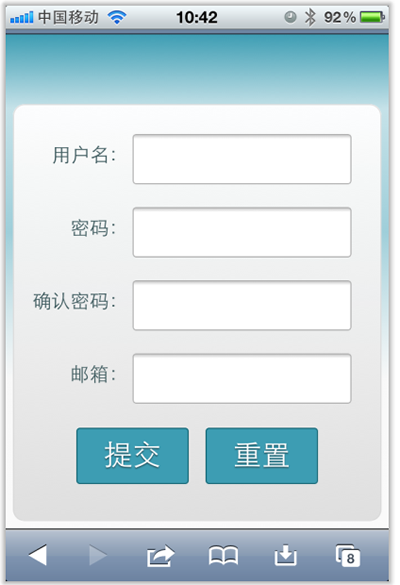
但现在需求是,在iPhone4的横板以及iPad的横板与竖板下,也需要让表单居中显示:
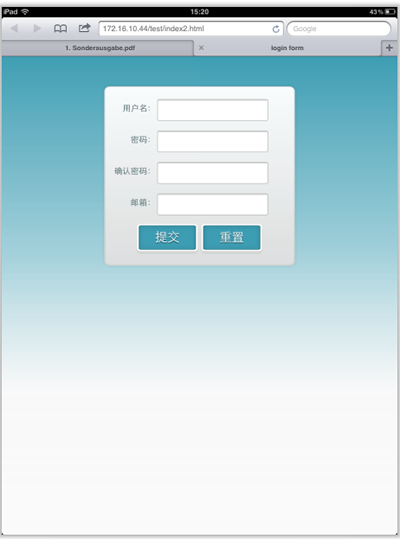
上图显示的是iPad竖板下的需求,横板下也需要类似的效果。
需求明确,做法也是有思路的,首先我按照:CSS3 Media Queries模板中的模板在样式中增加了代码:
	/*iPad竖板*/

	@media screen and (max-device-width: 768px) and (orientation: portrait) {

    form {

      margin: 0 25%;

    }

  }

	/*iPad横板*/

	@media screen and (max-device-width: 1024px) and (orientation: landscape) {

    form {

      margin: 0 25%;

    }

  }

	/*iPhone4*/

	@media only screen and (max-device-width: 480px),

    only screen and (-webkit-min-device-pixel-ratio: 2) {

			form {

        margin: 0 ;

			}

      .controls {

        width: 68%;

      }

	}
加上上面代码后在iPad下是正常了,而且不会有什么问题存在。但在iPhone4上依然存在一个怪异的现象:当你iPhone4加载页面是用横板加载,再旋转到竖板,不会存在任何问题,而且显示也是蛮正常的。但是初始加载页面是竖板,然后在旋转到横板,就有问题了,表单给放大了
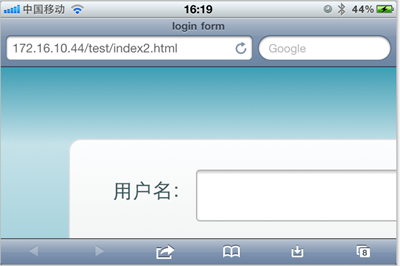
初步给我感觉就是放大了,但具体是不是因为这个原因,我也不太清楚,查找了一些资料,也尝试了无解决办法。最后也从横板竖板的思路出发查找资料,经过一试,给解决了,下面来看看这段代码:
	/* iPhone 4 竖板 */

@media

only screen and (-webkit-min-device-pixel-ratio : 1.5) and (orientation:portrait),

only screen and (min-device-pixel-ratio : 1.5)  and (orientation:portrait){

    form {

      margin:0;

    }

		.controls {

			width: 68%;

		}

}

/* iPhone 4 横板 */

@media

only screen and (-webkit-min-device-pixel-ratio : 1.5) and (orientation:landscape),

only screen and (min-device-pixel-ratio : 1.5)  and (orientation:landscape){

    form {

        margin:0 10%;

    }

		.controls {

			width: 68%;

		}

}
这样一来就OK了。在iPhone4和iPad的横竖板下都能正常让表单居中显示。

那么以后大家在iPhone4和iPad设备上,就可以按照横竖板来定样式了:
1、iPhone4竖板
	@media

	only screen and (-webkit-min-device-pixel-ratio : 1.5) and (orientation:portrait),

	only screen and (min-device-pixel-ratio : 1.5)  and (orientation:portrait){

		/*你的样式写在这里*/

	}
2、iPhone横板
@media

		only screen and (-webkit-min-device-pixel-ratio : 1.5) and (orientation:landscape),

		only screen and (min-device-pixel-ratio : 1.5)  and (orientation:landscape){

			/*你的样式写在这里*/

		}
3、iPad竖板
	@media screen and (max-device-width: 768px) and (orientation: portrait) {

		/*你的样式写在这里*/

  }
4、iPad横板
	@media screen and (max-device-width: 1024px) and (orientation: landscape) {

		/*你样式写在这里*/

  }
上面四种CSS3 Media Queries就是用来对付iPhone4和iPad的,至于其他的运用,大家参考下面我重新整理的CSS3 Media Queries模板:
CSS3 Media Queries 模板:
1、Smartphones (竖板和横板)
		@media only screen and (min-device-width : 320px) and (max-device-width : 480px) {

			/* 你的样式写在这里 */

		}

		//===或者====//

		< link rel="stylesheet" href="smartphones.css" media="only screen and (min-device-width : 320px) and (max-device-width : 480px)" />
2、Smartphones (横板)
		@media only screen and (min-width : 321px) {

			/* 你的样式写在这里 */

		}

		//===或者====//

		< link rel="stylesheet" href="smartphones-landscape.css" media="only screen and (min-width : 321px)" />
3、Smartphones (竖板)
		@media only screen and (max-width : 320px) {

			/* 你的样式写在这里 */

		}

		//===或者====//

		< link rel="stylesheet" href="smartphones-portrait.css" media="only screen and (max-width : 320px)" />
4、iPad(竖板和横板)
		@media only screen and (min-device-width : 768px) and (max-device-width : 1024px) {

			/* 你的样式写在这里 */

		}

		//===或者====//

		< link rel="stylesheet" href="ipad.css" media="only screen and (min-device-width : 768px) and (max-device-width : 1024px)" />
5、iPad横板
@media only screen and (min-device-width : 768px) and (max-device-width : 1024px)	and (orientation : landscape) {

			/* 你的样式写在这里 */

		}

		//===或者====//

		< link rel="stylesheet" href="ipad-landscape.css" media="only screen and (min-device-width : 768px) and (max-device-width : 1024px)	and (orientation : landscape)" />
6、iPad的竖板
@media only screen and (min-device-width : 768px) and (max-device-width : 1024px) and (orientation : portrait) {

			/* 你的样式写在这里 */

		}

		//===或者====//

		< link rel="stylesheet" href="ipad-portrait.css" media="only screen and (min-device-width : 768px) and (max-device-width : 1024px) and (orientation : portrait)" />
7、Desktops and laptops
		@media only screen and (min-width : 1224px) {

			/* 你的样式写在这里 */

		}

		//===或者====//

		< link rel="stylesheet" href="desktops-and-laptops.css" media="only screen and (min-width : 1224px)" />
8、Large screens
		@media only screen and (min-width : 1824px) {

			/* 你的样式写在这里 */

		}

		//===或者====//

		< link rel="stylesheet" href="large-screens.css" media="only screen and (min-width : 1824px)" />
9、iPone4
		@media only screen and (-webkit-min-device-pixel-ratio : 1.5),only screen and (min-device-pixel-ratio : 1.5) {

			/* 你的样式写在这里 */

		}

		//===或者====//

		< link rel="stylesheet" href="iphone4.css" media="only screen and (-webkit-min-device-pixel-ratio : 1.5),only screen and (min-device-pixel-ratio : 1.5)" />
10、iPhone4竖板
	@media only screen and (-webkit-min-device-pixel-ratio : 1.5) and (orientation:portrait),	only screen and (min-device-pixel-ratio : 1.5)  and (orientation:portrait){

		/*你的样式写在这里*/

	}

	//===或者====//

		< link rel="stylesheet" href="iphone4-portrait.css" media="only screen and (-webkit-min-device-pixel-ratio : 1.5) and (orientation:portrait),	only screen and (min-device-pixel-ratio : 1.5)  and (orientation:portrait)" />
11、iPhone4横板
@media only screen and (-webkit-min-device-pixel-ratio : 1.5) and (orientation:landscape),only screen and (min-device-pixel-ratio : 1.5)  and (orientation:landscape){

			/*你的样式写在这里*/

		}

		//===或者====//

		< link rel="stylesheet" href="iphone4-landscape.css" media="only screen and (-webkit-min-device-pixel-ratio : 1.5) and (orientation:landscape),only screen and (min-device-pixel-ratio : 1.5)  and (orientation:landscape)" />
上面罗列了常用的CSS3 Media Queries模板,特别是在移动设备上的几种,希望对大家在今后的移动开发端上的运用有所帮助。当然CSS3 Media Queries的运用条件往往不只这些,大家完全可以根据自己的需求去定义不同的条件,但个人建议,使用CSS3 Media Queries采用主流就Ok了。随着潮流走嘛。那么今天就扯到这了。如果大家有更好的经验,可以通过下面的评论与我们一起分享。
CSS3 Media Queries在iPhone4和iPad上的运用的更多相关文章
- [转]How To Use CSS3 Media Queries To Create a Mobile Version of Your Website
CSS3 continues to both excite and frustrate web designers and developers. We are excited about the p ...
- CSS3 Media Queries 实现响应式设计
在 CSS2 中,你可以为不同的媒介设备(如屏幕.打印机)指定专用的样式表,而现在借助 CSS3 的 Media Queries 特性,可以更为有效的实现这个功能.你可以为媒介类型添加某些条件,检测设 ...
- 【CSS3 入门教程系列】CSS3 Media Queries 实现响应式设计
在 CSS2 中,你可以为不同的媒介设备(如屏幕.打印机)指定专用的样式表,而现在借助 CSS3 的 Media Queries 特性,可以更为有效的实现这个功能.你可以为媒介类型添加某些条件,检测设 ...
- CSS3 Media Queries 片段
CSS3 Media Queries片段 在这里主要分成三类:移动端.PC端以及一些常见的响应式框架的Media Queries片段. 移动端Media Queries片段 iPhone5 @medi ...
- HTML5实践 -- 使用CSS3 Media Queries实现响应式设计
CSS3 Media用法介绍:http://www.w3cplus.com/content/css3-media-queries 转载请注明原创地址:http://www.cnblogs.com/so ...
- CSS3 Media Queries模板
使用max-width @media screen and (max-width: 600px) { //你的样式放在这里.... } 使用min-width @media screen and (m ...
- CSS3 Media Queries 详解
说起CSS3的新特性,就不得不提到 Media Queries .最近 Max Design 更新的一个泛读列表里,赫然就有关于 Media Queries 的文章.同时位列其中的也有前天我刚刚翻译的 ...
- 【css】CSS3 Media Queries 详解【转】
说起CSS3的新特性,就不得不提到 Media Queries .最近 Max Design 更新的一个泛读列表里,赫然就有关于 Media Queries 的文章.同时位列其中的也有前天我刚刚翻译的 ...
- CSS3 Media Queries模板:max-width和min-width
CSS3 Media Queries模板 CSS3 Media Queries一般都是使用“max-width”和“min-width”两个属性来检查各种设备的分辨大小与样式表所设条件是否满足,如果满 ...
随机推荐
- 【转】php json_encode中文为空的解决办法
转自:http://www.cnblogs.com/oldphper/p/4123415.html 本文列举3个方法,实现json_encode()后的string显示中文问题. 做接口时不需要,但存 ...
- 分页管理的JSTL实现
userMgr.jsp <%@ page language="java" import="java.util.*" pageEncoding=" ...
- 注意padding-top 百分比定义基于父元素宽度的百分比上内边距!!是基于宽度
定义和用法 padding-top 属性设置元素的上内边距(空间). 说明 该属性设置元素上内边距的宽度.行内非替换元素上设置的上内边距不会影响行高计算,因此,如果一个元素既有内边距又有背景,从视觉上 ...
- 如何开启PostGreSQL的远程访问端口?
用以下办法即可: postgresql默认情况下,远程访问不能成功,如果需要允许远程访问,需要修改两个配置文件,说明如下: 1.postgresql.conf 将该文件中的listen_address ...
- PHP+socket+SMTP、POP3协议发送、接收邮件
.实现SMTP协议的类dsmtp.cls.php:<?php , $webname=).); } } .实现POP3协议的类dpop3.cls.php: <? ...
- hdu 4640(状压dp)
题目链接:http://acm.hdu.edu.cn/showproblem.php?pid=4640 思路:f[i][j]表示一个人状态i下走到j的最小花费,dp[i][j]表示i个人在状态j下的最 ...
- JAVA中操作符的优先级
一元数学比较有逻辑 三元赋值就可以! 一元操作符 数学操作符 比较操作符 逻辑操作符 三元操作符 赋值操作符
- TabLayout
效果图: 标题和fragment联动效果已经封装好了,非常方便 <android.support.design.widget.TabLayout android:id="@+id/ta ...
- 状压DP POJ 2411 Mondriaan'sDream
题目传送门 /* 题意:一个h*w的矩阵(1<=h,w<=11),只能放1*2的模块,问完全覆盖的不同放发有多少种? 状态压缩DP第一道:dp[i][j] 代表第i行的j状态下的种数(状态 ...
- DP VK Cup 2012 Qualification Round D. Palindrome pairs
题目地址:http://blog.csdn.net/shiyuankongbu/article/details/10004443 /* 题意:在i前面找回文子串,在i后面找回文子串相互配对,问有几对 ...