
[Xamarin] 簡單使用AlertDialog (转帖)
這東西跟Toast 很像,有方便提示的作用
像是Windows 上面的MessageBox 或是 Javascript 的 Alert 會先阻斷使用者並且下一個決定
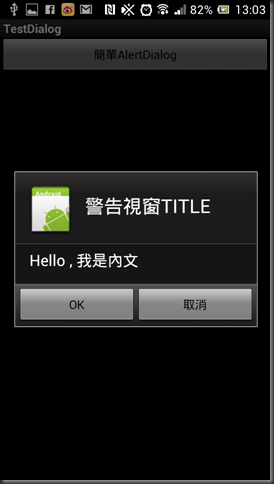
很簡單我就不贅述,基本上透過 AlertDialog 就可以輕鬆叫起來
using System;
using Android.App;
using Android.Content;
using Android.Runtime;
using Android.Views;
using Android.Widget;
using Android.OS;
namespace TestDialog
{
[Activity(Label = "TestDialog", MainLauncher = true, Icon = "@drawable/icon")]
public class Activity1 : Activity
{
int count = 1;
protected override void OnCreate(Bundle bundle)
{
base.OnCreate(bundle);
// Set our view from the "main" layout resource
SetContentView(Resource.Layout.Main);
var btn1 = FindViewById<Button>(Resource.Id.btn1);
btn1.Click += delegate
{
var alertDialog1 = new AlertDialog.Builder(this).Create();
// 設定Title
alertDialog1.SetTitle("警告視窗TITLE");
// 內文
alertDialog1.SetMessage("Hello , 我是內文");
alertDialog1.SetIcon(Resource.Drawable.Icon);
//第一顆按鈕
alertDialog1.SetButton("OK", (sender, args) => Toast.MakeText(this, "OK被按下了", ToastLength.Short).Show());
//第二顆按鈕
alertDialog1.SetButton2("取消", (sender, args) => Toast.MakeText(this, "取消被按下了", ToastLength.Short).Show());
alertDialog1.Show();
};
}
}
}
因為很簡單所以就沒多加解釋了.. reference: http://developer.android.com/guide/topics/ui/dialogs.html
http://developer.android.com/reference/android/app/AlertDialog.html
[Xamarin] 簡單使用AlertDialog (转帖)的更多相关文章
- [Xamarin] 簡單使用Fragment 靜態篇 (转帖)
新的Android 開發,非常會使用到Fragment,不過官方範例有點小複雜,對初學者來說有點難消化,所以就記錄一下心得,這邊部落格將使用靜態的方法使用Fragment,Fragment 有自己的生 ...
- [Xamarin] 簡單實作ListActivity (转帖)
但是文中案例因為是用事先設好的Layout 但是如果需要被選擇的東西很多時該怎麼辦 我們討論一下,如何製作很簡單的List . 首先我們得先參考一下再android 思維下要製作一個List 需要的架 ...
- 簡單工廠模式-之-什麼是產品線 And 抽象工廠模式-之-什麼是產品族
簡單工廠模式-之-什麼是產品線 簡單工廠模式中,有一個概念就是使用了多層次的產品結構,那麼什麼是產品結構或者說什麼是產品線? 假定我們有一個基準的產品標準Product,那麼所有繼承該基類或者傳遞基類 ...
- 簡單SQL存儲過程實例
簡單SQL存儲過程實例 摘自:http://blog.csdn.net/libra6956/article/details/5589173 实例1:只返回单一记录集的存储过程. 银行存款表(bankM ...
- 转:[ASP.NET]重構之路系列v4 – 簡單使用interface之『你也會IoC』
前言 上次v3版本,我們將Entity, Service, Dao, Utility都放到了類別庫裡面,讓我們可以輕鬆的在不同專案中用同一份組件.雖然文章沒有獲得太多的讚賞,不過相信那一定是太多人會這 ...
- COB(Chip On Board)的製程簡單介紹
前面提及 COB 的生產與 IC 的封裝製程幾乎是一致的,除了把 leadframe 改成了 PCB,把封膠由 molding 改成 dispensing,少了 triming & marki ...
- 【转】簡單講講 USB Human Interface Device
原地址http://213style.blogspot.com/2013/09/usb-human-interface-device.html 恩,發本文的原因是看到了以前畢業的朋友在旁邊的對話框問了 ...
- HTML Agility Pack:簡單好用的快速 HTML Parser
HTML Agility Pack:簡單好用的快速 HTML Parser Codeplex 軟體套件(Package)資訊 套件名稱 HTML Agility Pack 作者 Simon Mouri ...
- [SharePoint 2010] Visual Studio 2010內撰寫視覺化WebPart超簡單
新一代的Visual Studio 2010對於SharePoint 2010的專案撰寫,有非常另人讚賞的改進. 以往寫一個WebPart要搞好多雜七雜八的步驟,也要硬寫HTML輸出,當然有人說可以寫 ...
随机推荐
- 移动端自动化环境搭建-Appium for Windows的安装
安装Appium for Windows版 A.安装依赖 appium就是我们做移动端自动化测试主要的软件 B.安装过程
- Study Emgu VoteForUniqueness
Recently i was studying Emgu, but find there is a bug in the VoteForUniqueness function in class Fea ...
- ComponentCount 与 ControlCount 区别
ShowMessage(panel.ComponentCount.ToString); ShowMessage(panel.ControlCount.ToString);componetcou ...
- 特殊的Josn格式
static void Main(string[] args) { YtRequest<RequestHead, RequestBody> Ytrequ ...
- angularjs 延迟更新和angularjsUI
angularjsUI库https://material.angularjs.org/latest/ ng-model-options="{ updateOn: 'blur' }" ...
- Web前端之CSS_day3-4
1.行高 1.1 初始行高 行高=文字大小+上间距+下间距 默认文字大小:16px 默认文字行高:18px 注意:行高=盒子的高度,可以让文字垂直居中显示 1.2 行高单位 a. px 行高设置多少就 ...
- IIS中使用LocalDB遇到错误:error 50,Local Database Runtime error occurred.的解决办法
参见: [1] http://www.cnblogs.com/yjmyzz/archive/2009/10/26/1590033.html [2] http://blogs.msdn.com/b/sq ...
- flex中通过sprite在地图上画柱状图主要代码
1.主要代码: var sprite:Sprite = new Sprite(); var columnSys:ColumnSymbol = new ColumnSymbol(); v ...
- LZW压缩算法
转载自http://www.cnblogs.com/jillzhang/archive/2006/11/06/551298.html 记录此处仅自己供学习之用 lzw解压缩算法: 用单个字符初始化字符 ...
- asp.net TreeView控件绑定数据库显示信息
using System; using System.Collections.Generic; using System.Linq; using System.Web; using System.We ...