
[Xamarin] 簡單使用Fragment 靜態篇 (转帖)
新的Android 開發,非常會使用到Fragment,不過官方範例有點小複雜,對初學者來說有點難消化,所以就記錄一下心得,這邊部落格將使用靜態的方法使用Fragment,Fragment 有自己的生命周期,如果之後有機會再說到,這邊文章只有簡單講解使用。之前有篇文章提到 使用LayoutInflater.Inflate載入預先設計好的Layout並使用 說到將一個畫面給打氣給呼叫起來,但是因為這樣就必須要在主要的MainActivity中控制每一個被呼叫起的Layout元件,在Android 3.0 之後,很多開發元件的廠商都改版了,並且都採用Fragmnet的方式包裝,因為他對於螢幕解析度的議題會有比較好的解決方法,當然這就不是此篇的重點了,現在我們來看看今天案例。
我設計了一個Layout名為 Fragment1 ,我希望由MainActivity 給愈一個DisplayContext 然後 該Fragment中的按鈕按下後會顯示在TextView上面 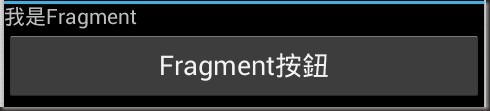
我希望這我設計的元件,能夠在主要的Activity 中可以載入 預覽:
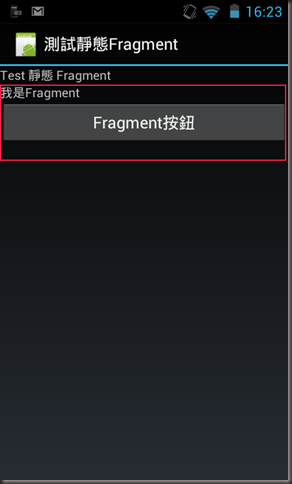
1.首先,因為這是Android 3.0 才加入的東西,基本上2.x 要支援要用其他方法這邊就先不提了,重點就先把專案調整成為4.0以上版本吧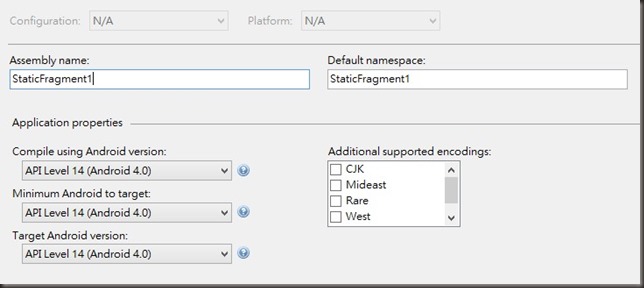
2.建立一個要被當做元件的Layout 在此範例為 \Resources\Layout\Fragment1.axml
<?xml version="1.0" encoding="utf-8"?>
<LinearLayout xmlns:android="http://schemas.android.com/apk/res/android"
android:layout_width="match_parent"
android:layout_height="match_parent"
android:orientation="vertical">
<TextView
android:id="@+id/textView1"
android:layout_width="wrap_content"
android:layout_height="wrap_content"
android:text="我是Fragment" />
<Button
android:text="Fragment按鈕"
android:layout_width="fill_parent"
android:layout_height="wrap_content"
android:id="@+id/btnChangeText" />
</LinearLayout>
3.接下來就是先給予這隻程式一些靈魂可以操控這Layout 檔案位置為 \Fragment1.cs
using Android.App;
using Android.OS;
using Android.Views;
using Android.Widget;
namespace StaticFragment1
{
public class Fragment1 : Fragment
{
/// <summary>
/// Poroperty DisplayContext
/// 欲呈現的文字
/// </summary>
public string DisplayContext { get; set; }
public override View OnCreateView(LayoutInflater inflater, ViewGroup container, Bundle savedInstanceState)
{
View v = inflater.Inflate(Resource.Layout.Fragment1, container, false);
var btnChangeText = v.FindViewById<Button>(Resource.Id.btnChangeText);
//設定 btnChangeText 點擊後將 textView1 的內容設為 DisplayContext
btnChangeText.Click += delegate
{
var textView1 = v.FindViewById<TextView>(Resource.Id.textView1);
textView1.Text = DisplayContext;
};
return v;
}
}
}
4. 主要的MainActivity Layout 位於 \Resources\Layout\Main.axml
<?xml version="1.0" encoding="utf-8"?>
<LinearLayout xmlns:android="http://schemas.android.com/apk/res/android"
xmlns:tools="http://schemas.android.com/tools"
android:layout_width="fill_parent"
android:orientation="vertical"
android:layout_height="fill_parent">
<TextView
android:id="@+id/textView1"
android:layout_width="fill_parent"
android:layout_height="wrap_content"
android:text="Test 靜態 Fragment" />
<fragment
android:id="@+id/fragmentFirst"
android:name="StaticFragment1.Fragment1"
android:layout_width="fill_parent"
android:layout_height="wrap_content" />
</LinearLayout>
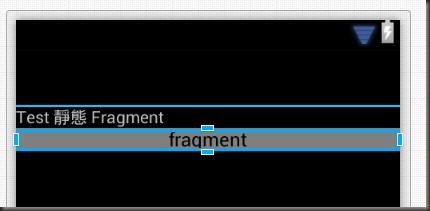
其中注意, 在 fragment 中的name 我是設 [成專案名稱].[Fragment名稱] 許多範例是寫packagename 全名,但是我這邊是跑不起來的,所以應該是直接對應你在寫Fragment 程式端可被呼叫到的物件實體全名,並非package 之下,畢竟你現在是在xamarin. Design View :
5.接下來就是在 MainActivity 中C# 的部分 位置於 \Activity1.cs
using Android.App;
using Android.OS;
namespace StaticFragment1
{
[Activity(Label = "測試靜態Fragment", MainLauncher = true, Icon = "@drawable/icon")]
public class Activity1 :Activity
{
protected override void OnCreate(Bundle bundle)
{
base.OnCreate(bundle);
// Set our view from the "main" layout resource
SetContentView(Resource.Layout.Main);
//取得該Fragment 因為在Layout那邊就已經指定他是Fragment1
var fragment1 = FragmentManager.FindFragmentById<Fragment1>(Resource.Id.fragmentFirst);|
//直接設定他的Peoperty
fragment1.DisplayContext = "Test 許噹噹";
}
}
}
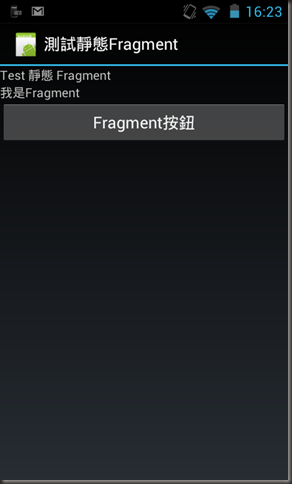
結果:
執行起來
- 
點擊後-
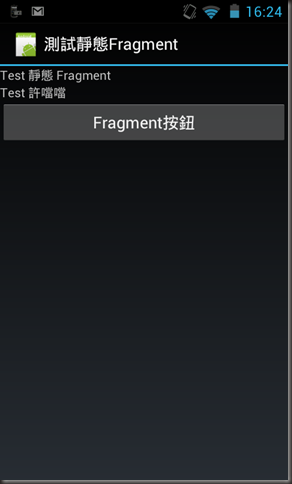
因為官方寫的有點複雜,所以整理比較簡單的版本,這方法比單傳把畫面inflate 起來好管理多了
Reference: http://docs.xamarin.com/guides/android/platform_features/fragments
http://blog.kenyang.net/2013/03/android-fragment-activity.html
[Xamarin] 簡單使用Fragment 靜態篇 (转帖)的更多相关文章
- [Xamarin] 簡單實作ListActivity (转帖)
但是文中案例因為是用事先設好的Layout 但是如果需要被選擇的東西很多時該怎麼辦 我們討論一下,如何製作很簡單的List . 首先我們得先參考一下再android 思維下要製作一個List 需要的架 ...
- [Xamarin] 簡單使用AlertDialog (转帖)
這東西跟Toast 很像,有方便提示的作用 像是Windows 上面的MessageBox 或是 Javascript 的 Alert 會先阻斷使用者並且下一個決定 很簡單我就不贅述,基本上透過 Al ...
- [Xamarin] 從Xamarin中呼叫 *.jar 的 library - 呼叫篇 (转帖)
上篇文章我們建立一個很簡單的Library : com.example.blackfactory.UtilFunc 現在我們要在Xamarin 中呼叫囉! 首先我們要先成立一個橋接的專案 JARBri ...
- [Xamarin] 關於發出Notification 的大小事 (转帖)
關於Anroid 的使用者來說,Notification 是一個非常會看到且用到的功能 他可以提醒使用者甚麼東西需要待處理,像是郵件或是會議的提醒等.. 甚至有些APP ,直接使用Notificati ...
- COB(Chip On Board)的製程簡單介紹
前面提及 COB 的生產與 IC 的封裝製程幾乎是一致的,除了把 leadframe 改成了 PCB,把封膠由 molding 改成 dispensing,少了 triming & marki ...
- 转:[ASP.NET]重構之路系列v4 – 簡單使用interface之『你也會IoC』
前言 上次v3版本,我們將Entity, Service, Dao, Utility都放到了類別庫裡面,讓我們可以輕鬆的在不同專案中用同一份組件.雖然文章沒有獲得太多的讚賞,不過相信那一定是太多人會這 ...
- 【转】簡單講講 USB Human Interface Device
原地址http://213style.blogspot.com/2013/09/usb-human-interface-device.html 恩,發本文的原因是看到了以前畢業的朋友在旁邊的對話框問了 ...
- jQuery無刷新上傳之uploadify簡單試用
先簡單的侃兩句:貌似已經有兩個月的時間沒有寫過文章了,不過仍會像以前那样每天至少有一至兩個小時是泡在园子裏看各位大神的文章.前些天在研究“ajax無刷新上傳”方面的一些插件,用SWFUpload實現了 ...
- 簡單工廠模式-之-什麼是產品線 And 抽象工廠模式-之-什麼是產品族
簡單工廠模式-之-什麼是產品線 簡單工廠模式中,有一個概念就是使用了多層次的產品結構,那麼什麼是產品結構或者說什麼是產品線? 假定我們有一個基準的產品標準Product,那麼所有繼承該基類或者傳遞基類 ...
随机推荐
- tomcat 内存问题 xms xmx permsize maxPermsize
转自:http://www.cnblogs.com/koik/p/4452029.html tomcat -Xms -Xmx -XX:PermSize -XX:MaxPermSize 在做ja ...
- 《CODE》读后笔记——第21~25章
21.总线连接 总线是提供给计算机中每块电路板的数字信号的集合,这些信号可以分为4类:地址信号,数据输入信号,数据输出信号,控制信号.另外,总线给计算机中的各个电路板提供电源. S-100总线:早期流 ...
- win7 64的系统安装。net4.0总是提示安装未成功
主要原因是Windows update的临时文件损坏,建议重命名该文件夹. 1. 开始——运行——cmd——键入net stop WuAuServ回车(停止windows update服务): 2. ...
- C语言之数组,字符串,指针
一. 数组的定义 1. 数组初始化 初始化方式 int a[3] = {10, 9, 6}; int a[3] = {10,9}; int a[] = {11, 7, 6}; int a[4] = ...
- while语句
<?php $num=10;//被除数 $cs=2; $str=""; while ($num !=0) { $ys=$num % $cs ...
- Java程序员从笨鸟到菜鸟之(一百零二)sql注入攻击详解(三)sql注入解决办法
sql注入攻击详解(二)sql注入过程详解 sql注入攻击详解(一)sql注入原理详解 我们了解了sql注入原理和sql注入过程,今天我们就来了解一下sql注入的解决办法.怎么来解决和防范sql注入, ...
- hadoop显示ConnectionrRefused
产生原因重启了服务器 (1)在安装目录/root/cloud/hadoop-2.2.0/ 重新hdfs namenode -format (2) 目录/root/cloud/hadoop-2.2.0/ ...
- css3 2D动画的基本用法和介绍
<style> body{height:400px;border:1px solid #000;} .box{width:90px;height:30px;border:1px solid ...
- java 线程安全不线程不安全
经常看到一些类,有的说线程安全,有的说线程不安全,顿时懵逼. 线程安全不安全,主要是在多线程执行的情况下,如果由于线程之间抢占资源而造成程序的bug即为线程不安全,下面就拿arraylist 和Vec ...
- PHPstudy 无法启动Apache
今天打安装完phpstudy的时候,启动Apache发现端口被占用,这个端口也就是system端口.如果想要启动服务器必须关掉这个,但是会导致系统无法正常显示. 后来我就在网上搜各种办法,依然没成功. ...