
MVC4+WebApi+Redis Session共享练习(下)
上一篇文章我们主要讲解了一些webApi和redis缓存操作,这篇文章我们主要说一些MVC相关的知识(过滤器和错误处理),及采用ajax调用webApi服务。
本篇例子采用的开发环境为:VS2010(sp1)、MVC4,所有的数据都是与webApi服务进行交互。
1、先来一张项目结构图
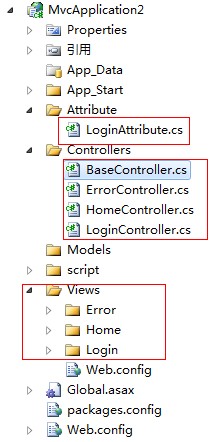
- LoginAttribute.cs为我们定义的Action过滤器,主要检测是否登陆。因为我们要测试sessioin共享,就做了一个登陆界面,存储用户名。
- BaseController.cs 公共控制器,主要重写OnException方法对错误捕捉。HomeController继承BaseController。
- ErrorController.cs 错误控制器
- LoginController.cs登陆控制器。
1.1、LoginAttribute.cs 过滤器
LoginAttribute继承ActionFilterAttribute并重写了OnActionExecuting方法,OnActionExecuting方法会先与控制器Action执行,因此我们可以在该方法中判断session是否为空。我们打开ActionFilterAttribute发现里面有四个方法OnActionExecuted、OnActionExecuting、OnResultExecuted、OnResultExecuting,不清楚其执行顺序的童鞋可以百度一下,这里就不用介绍了,下面直接看代码。
using System;

using System.Collections.Generic;

using System.Linq;

using System.Web;

using System.Web.Mvc;

using Common;

namespace MvcApplication2.Attribute

{

    public class LoginAttribute : ActionFilterAttribute

    {

        public override void OnActionExecuting(ActionExecutingContext filterContext)

        {

            SessionHelper session = new SessionHelper();

            if (session["user"] == null)

            {

                filterContext.Result = new RedirectResult("~/Login/index");

            }

            base.OnActionExecuting(filterContext);

        }

    }

}
1.2、BaseController.cs 控制器基类
BaseController继承MVC的Controller,在BaseController.cs中我们重写OnException方法进行异常处理,我们可以记录日志,跳转错误页面等,这也我们就不用每个页面写自己的异常处理了,在BaseController中我们定义了一个SessionHelper session的变量,SessionHelper为上一篇文章介绍的基于Redis的session共享,这样只要继承BaseController的页面都可以只用该变量。
using System;

using System.Collections.Generic;

using System.Linq;

using System.Web;

using System.Web.Mvc;

using Common;

namespace MvcApplication2.Controllers

{

    public class BaseController : Controller

    {

        protected SessionHelper session = new SessionHelper();

        public BaseController()

        {

        }

         /// <summary>

        /// 异常处理

         /// </summary>

         /// <param name="filterContext"></param>

        protected override void OnException(ExceptionContext filterContext)

        {

            if (filterContext.HttpContext.Request.IsAjaxRequest())

            {

                JsonResult result = new JsonResult();

                result.Data = new { type = "error", data = "请求异常" };

                filterContext.Result = result;

            }

            else

            {

                filterContext.Result = new RedirectResult("~/error/index");

            }

            filterContext.ExceptionHandled = true;

            base.OnException(filterContext);

        }

    }

}
1.3、LoginController.cs 为登陆控制器
该页面值需要填写用户名,然后把该用户名存到session中,这样webAPi项目中的Get方法也会获取到该session值(详细看上一篇博文)
using System;

using System.Collections.Generic;

using System.Linq;

using System.Web;

using System.Web.Mvc;

using Common;

namespace MvcApplication2.Controllers

{

    public class LoginController : Controller

    {

        //

        // GET: /Login/

        public ActionResult Index()

        {

            return View();

        }

        [HttpPost]

        public ActionResult LoginIn(string user)

        {

            SessionHelper session = new SessionHelper();

            user = Request.Form["user"];

            if (!string.IsNullOrWhiteSpace(user))

            {

                session["user"]=user.ToString();

                return RedirectToAction("index", "Home");

            }

            return RedirectToAction("LoginIn", "Login");

        }

    }

}
1.4、HomeController.cs 展示数据控制器
HomeController继承BaseController,并且在用[Login]过滤器作用在HomeController上,这样每一个Action前都会执行LoginAttribute,判断session值是否为空,
HomeController也继承了BaseController中的错误处理,具体看代码
using System;

using System.Collections.Generic;

using System.Linq;

using System.Web;

using System.Web.Mvc;

using Common;

using MvcApplication2.Attribute;

namespace MvcApplication2.Controllers

{

    [Login]

    public class HomeController : BaseController

    {

        //

        // GET: /Home/

        public ActionResult Index()

        {

            ViewBag.User = session["user"].ToString();

            return View();

        }

        public ViewResult Add()

        {

            return View();

        }

        public ViewResult edit(string id)

        {

            ViewBag.id = id;

            return View();

        }

        public ActionResult LogOut()

        {

            session["user"] = null;

            return RedirectToAction("index", "Login");

        }

    }

}
视图页面就不介绍了,感兴趣的童鞋可以下载源代码查看。
1.5、ErrorController.cs 错误页面,这里就不介绍了
2、测试
2.1、MVC项目和WebApi部署

- webApi为上一篇介绍的webApi程序。
- webApiTest为本片介绍的MVC项目。
- 域名都是localhost,不牵扯跨域问题
2.2、上几张图片
1、登陆界面
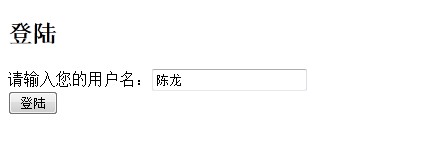
2、点击登陆,进入首页面,记得打开Redis缓存服务
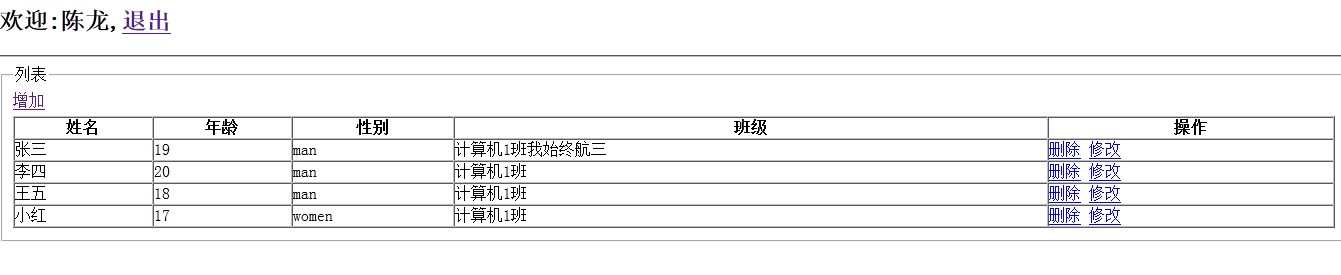
我们发现我们获取登陆页面的session值,并取到webApi服务中的数据,说明webApi项目的session也有值了,因为webApi项目的HttpResponseMessage Get()方法也做session值是否为空的判断,详见上一篇博客的说明。
好了项目就写到这里吧,我只实现了数据的获取和数据修改功能,增加和删除没有实现。如果你感兴趣欢迎交流学习。
点击下载源代码
每天学习一点点,每天进步一点点。
MVC4+WebApi+Redis Session共享练习(下)的更多相关文章
- MVC4+WebApi+Redis Session共享练习(上)
这几天生病了,也没有心情写博客,北京医院真心伤不起呀,钱不少花,病没治好,还增加了新病,哎不说了,周末还得去大医院检查一下,趁女盆友还没有回来,把前几天写的东西总结一下.本文也会接触一点webApi的 ...
- nginx tomcat负载均衡 使用redis session共享
环境准备 1.准备一台nginx服务器 ip192.168.1.133 端口81 安装过程: #首先安装依赖: yum -y install gcc-c++ yum -y install pcre p ...
- Nginx反向代理,负载均衡,redis session共享,keepalived高可用
相关知识自行搜索,直接上干货... 使用的资源: nginx主服务器一台,nginx备服务器一台,使用keepalived进行宕机切换. tomcat服务器两台,由nginx进行反向代理和负载均衡,此 ...
- Tomcat 集群 + Redis Session 共享出现 Session 瞬间失效问题
写在前面的话 写这篇博客出于公司最近要迁移到新的云上面且对之前的资源,架构做一个升级. 本来是一个不大的项目,旧环境旧一个 TOMCAT 跑起来,不过出于高可用考虑,新环境决定使用 TOMCAT 集群 ...
- tomcat redis session共享
编译redis所需要的序列化包 安装 gradle Linux & MacOS users Configure your PATH environment variable to includ ...
- redis session 共享 测试案列
下载 spring redis session demo 2.分别在不同的服务器上启动 3.nginx 安装 测试
- springboot-不同名称项目的 redis session共享
引入JAR <dependency> <groupId>org.springframework.session</groupId> <artifactId&g ...
- redis session共享中的序列化问题
今天在做session对象存入redis(set方法)时,碰到一个空指针异常,代码如下: public class CheckAccount extends HttpServlet { public ...
- Tomcat7 Redis Session共享
1.环境 服务器 centos7 tomcat 7 redis nginx 2.配置tomcat配置文件context.xml <Valve className="com.orange ...
随机推荐
- DataAdapter与DataSet的使用
1.创建数据库连接: 2.创建数据适配器(Adapter); 3.创建容器数据集(DataSet); 4.从数据集中取出指定表: 5.遍历表数据并输出: using System; using Sys ...
- 【转载】理解GL_TRIANGLE_STRIP等绘制三角形序列的三种方式
GL_TRIANGLE_STRIP绘制三角形方式很多时候令人疑惑,在这里对其运作机理进行解释. 一般情况下有三种绘制一系列三角形的方式,分别是GL_TRIANGLES.GL_TRIANGLE_STRI ...
- javascript generate a guid
function Guid() { var random = (((1 + Math.random()) * 0x10000) | 0).toString(16).substring(1); retu ...
- pcm跟.wav文件的关系
PCM(Pulse Code Modulation----脉码调制录音).所谓PCM录音就是将声音等模拟信号变成符号化的脉冲列,再予以记录.PCM信号是由[1].[0]等符号构成的数字信号,而未经过任 ...
- 关于“ora-01483:DATE或NUMBER赋值变量的长度无效”的问题
关于“ora-01483:DATE或NUMBER赋值变量的长度无效”的问题 出现这样的问题,一般都是驱动不匹配的原因导致的
- python 基础理解...
class obj(object): def __getattribute__(self, *args, **kwargs): # 访问属性就会被调用 print("__getattribu ...
- HTTP协议-引自孤傲苍狼博客
一.什么是HTTP协议 HTTP是hypertext transfer protocol(超文本传输协议)的简写,它是TCP/IP协议的一个应用层协议,用于定义WEB浏览器与WEB服务器之间交换数据的 ...
- 【随笔】ssh登录时如何直接在参数中加入登录密码
如同apt-get安装程序时会有-y参数来避免交互输入一样,我也希望在ssh登录时能够直接附加登录密码以避免交互式输入密码这一步,网上找了找,方法很多. 比如直接通过密钥免密码登录,不过需要改动很多, ...
- iOS.StaticLibrary.1-avoid-duplicate-symbol-in-static-library[draft]
Avoid duplicate symbol in static library and its customer 发布static library给使用者使用.在实际的工程实践中,iOS静态库一般会 ...
- jzoj[1438]NOIP2013火柴排队
读题: 相邻两个火柴可以交换?两个火柴序列?嗅到了归并排序的味道. 读完题目之后,我们可以知道,如果想要交换次数最少,可以先固定一个序列不变,比如说a序列不变,变b序列 样例是 4 2 3 1 4 3 ...