
从零开始学习Node.js例子九 设置HTTP头
server.js
//basic server的配置文件

var port = ;

var server = require('./basicserver').createServer();

server.useFavIcon("localhost", "./docroot/favicon.png");

server.addContainer(".*", "/l/(.*)$", require('./redirector'), {})

server.docroot("localhost", "/", "./docroot");

//server.useFavIcon("127.0.0.1", "./docroot/favicon.png");

//server.docroot("127.0.0.1", "/", "./docroot");

server.listen(port);
basicserver.js
|
Response Header 服务器发送到客户端 对于某些应用,特别是一些处理固定数据的小型应用,我们可以精准的知道该使用哪一种Content-Type头,因为应用发送的数据是特定已知的。然而staticHandler能发送任何文件,通常不知道该使用哪种Content-Type。通过匹配文件扩展名列表和Content-Type可以解决这个问题,但是这个方案不完美。最好的实践方案是使用一个外部的配置文件,它通常由操作系统提供。 MIME npm包使用了Apache项目的mime.types文件,该文件包含超过600个Content-Type的有关数据,如果有需要,mime模块也支持添加自定义的MIME类型。 npm install mime var mime = require('mime'); 一些相关的HTTP头: HTTP协议是无状态的,意味着web服务器不能辨认不同的请求发送端。现在普遍的做法是,服务器发送cookie到客户端浏览器,cookie中定义了登陆用户的身份,对于每一次请求,web浏览器都会发送对应所访问网站的cookie。 发送cookie时,我们应以如下方式为Set-Cookie或Set-Cookie2头设一个值: |
/*

 Basic Server的核心模块会创建一个HTTP服务器对象,附加Basic Server上用于检查请求,然后给予适当响应的功能

 Basic Server可以通过判断Host头部匹配的容器对象响应来自多个域名的请求

 */

var http = require('http');

var url = require('url');

exports.createServer = function(){

    var htserver = http.createServer(function(req, res){

        req.basicServer = {urlparsed: url.parse(req.url, true)};

        processHeaders(req, res);

        dispatchToContainer(htserver, req, res);

    });

    htserver.basicServer = {containers: []};

    htserver.addContainer = function(host, path, module, options){

        if (lookupContainer(htserver, host, path) != undefined){

            throw new Error("Already mapped " + host + "/" + path);

        }

        htserver.basicServer.containers.push({host: host, path: path, module: module, options: options});

        return this;

    }

    htserver.useFavIcon = function(host, path){

        return this.addContainer(host, "/favicon.ico", require('./faviconHandler'), {iconPath: path});

    }

    htserver.docroot = function(host, path, rootPath){

        return this.addContainer(host, path, require('./staticHandler'), {docroot: rootPath});

    }

    return htserver;

}

var lookupContainer = function(htserver, host, path){

    for (var i = ; i < htserver.basicServer.containers.length; i++){

        var container = htserver.basicServer.containers[i];

        var hostMatches = host.toLowerCase().match(container.host);

        var pathMatches = path.match(container.path);

        if (hostMatches !== null && pathMatches !== null){

            return {container: container, host: hostMatches, path: pathMatches};

        }

    }

    return undefined;

}

//用于搜索req.headers数组以查找cookie和host头部,因为这两个字段对请求的分派都很重要

//这个函数在每一个HTTP请求到达时都会被调用

//还有很多其他的HTTP头部字段(Accept Accept-Encoding Accept-Language User-Agent)

var processHeaders = function(req, res){

    req.basicServer.cookies = [];

    var keys = Object.keys(req.headers);

    for (var i = ; i < keys.length; i++){

        var hname = keys[i];

        var hval = req.headers[hname];

        if (hname.toLowerCase() === "host"){

            req.basicServer.host = hval;

        }

        //提取浏览器发送的cookie

        if (hname.toLowerCase() === "cookie"){

            req.basicServer.cookies.push(hval);

        }

    }

}

//查找匹配的容器,分派请求到对应的容器中

//这个函数在每一个HTTP请求到达时都会被调用

var dispatchToContainer = function(htserver, req, res){

    var container = lookupContainer(htserver, req.basicServer.host, req.basicServer.urlparsed.pathname);

    if (container !== undefined){

        req.basicServer.hostMatches = container.host;

        req.basicServer.pathMatches = container.path;

        req.basicServer.container = container.container;

        container.container.module.handle(req, res);

    }else {

        res.writeHead(, {'Content-Type': 'text/plain'});

        res.end("no handler found for " + req.basicServer.host + "/" + req.basicServer.urlparsed);

    }

}
staticHandler.js
//用于处理文件系统内的文件,docroot选项指被存放文件所在文件夹的路径,读取该目录下的指定文件

var fs = require('fs');

var mime = require('mime');

var sys = require('sys');

exports.handle = function(req, res){

    if (req.method !== "GET"){

        res.writeHead(, {'Content-Type': 'text/plain'});

        res.end("invalid method " + req.method);

    } else {

        var fname = req.basicServer.container.options.docroot + req.basicServer.urlparsed.pathname;

        if (fname.match(/\/$/)) fname += "index.html";  //如果URL以/结尾

        fs.stat(fname, function(err, stats){

            if (err){

                res.writeHead(, {'Content-Type': 'text/plain'});

                res.end("file " + fname + " not found " + err);

            } else {

                fs.readFile(fname, function(err, buf){

                    if (err){

                        res.writeHead(, {'Content-Type': 'text/plain'});

                        res.end("file " + fname + " not readable " + err);

                    } else {

                        res.writeHead(, {'Content-Type': mime.lookup(fname),

                            'Content-Length': buf.length});

                        res.end(buf);

                    }

                });

            }

        });

    }

}
faviconHandler.js
//这个处理函数处理对favicon.ico的请求

//MIME模块根据给出的图标文件确定正确的MIME类型,网站图标favicon可以是任何类型的图片,但是我们必须要告诉浏览器是哪个类型

//MIME模块,用于生成正确的Content-Type头

var fs = require('fs');

var mime = require('mime');

exports.handle = function(req, res){

    if (req.method !== "GET"){

        res.writeHead(, {'Content-Type': 'text/plain'});

        res.end("invalid method " + req.method);

    } else if (req.basicServer.container.options.iconPath !== undefined){

        fs.readFile(req.basicServer.container.options.iconPath, function(err, buf){

            if (err){

                res.writeHead(, {'Content-Type': 'text/plain'});

                res.end(req.basicServer.container.options.iconPath + "not found");

            } else {

                res.writeHead(, {'Content-Type': mime.lookup(req.basicServer.container.options.iconPath),

                'Content-Length': buf.length});

                res.end(buf);

            }

        });

    } else {

        res.writeHead(, {'Content-Type': 'text/plain'});

        res.end("no favicon");

    }

}
redirector.js
/*

 把一个域的请求重定向到另一个上,例如将www.example.com重定向到example.com上,或者使用简短的URL跳转到较长的URL

 实现这两种情况,我们需要在HTTP响应中发送301(永久移除)或者302(临时移除)状态码,并且指定location头信息。有了这个组合

 信号,web浏览器就知道要跳转到另一个web位置了

 */

//地址http://localhost:3000/l/ex1 会跳转到http://example1.com

var util = require('util');

var code2url = {'ex1': 'http://example1.com', 'ex2': "http://example2.com"};

var notFound = function(req, res){

    res.writeHead(, {'Content-Type': 'text/plain'});

    res.end("no matching redirect code found for " + req.basicServer.host + "/" + req.basicServer.urlparsed.pathname);

}

exports.handle = function(req, res){

    if (req.basicServer.pathMatches[]){

        var code = req.basicServer.pathMatches[];

        if (code2url[code]){

            var url = code2url[code];

            res.writeHead(, {'Location': url});

            res.end();

        } else {

            notFound(req, res);

        }

    } else {

        notFound(req, res);

    }

}
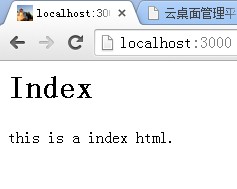
docroot目录下:有favicon.png
index.html
<html>

<head>

</head>

<body>

    <h1>Index</h1>

    <p>this is a index html.</p>

</body>

</html>
从零开始学习Node.js例子九 设置HTTP头的更多相关文章
- 从零开始学习Node.js例子三 图片上传和显示
index.js var server = require("./server"); var router = require("./router"); var ...
- 从零开始学习Node.js例子一 http get和post
httpserverrequestget.js /* 获取GET请求内容 由于GET请求直接被嵌入在路径中,URL是完整的请求路径,包括了?后面的部分,因此你可以手动解析后面的内容作为GET请求的参数 ...
- 从零开始学习Node.js例子七 发送HTTP客户端请求并显示响应结果
wget.js:发送HTTP客户端请求并显示响应的各种结果 options对象描述了将要发出的请求.data事件在数据到达时被触发,error事件在发生错误时被触发.HTTP请求中的数据格式通过MIM ...
- 从零开始学习Node.js例子八 使用SQLite3和MongoDB
setup.js:初始化数据库 var util = require('util'); var async = require('async'); //npm install async var no ...
- 从零开始学习Node.js例子六 EventEmitter发送和接收事件
pulser.js /* EventEmitter发送和接收事件 HTTPServer和HTTPClient类,它们都继承自EventEmitter EventEmitter被定义在Node的事件(e ...
- 从零开始学习Node.js例子五 服务器监听
httpsnifferInvoke.js var http = require('http'); var sniffer = require('./httpsniffer'); var server ...
- 从零开始学习Node.js例子四 多页面实现数学运算 续二(client端和server端)
1.server端 支持数学运算的服务器,服务器的返回结果用json对象表示. math-server.js //通过监听3000端口使其作为Math Wizard的后台程序 var math = r ...
- 从零开始学习Node.js例子四 多页面实现数学运算 续一(使用connect和express框架)
1.使用connect框架 .use方法用于绑定中间件到connect服务器,它会配置一系列在接到请求时调用的中间件模块,此例中我们要配置的中间件有favicon logger static rout ...
- 从零开始学习Node.js例子四 多页面实现数学运算
app-node.js ; var http = require('http'); var htutil = require('./htutil'); var server = http.create ...
随机推荐
- JavaScript的面向对象编程(OOP)(二)——原型
关于JavaScript的原型模式,下面的是学习后的个人理解,若是有偏差,还请指出,谢谢 JavaScript原型模式 1.什么是原型? 原型是一个对象,其他的对象可以通过它实现属性的继承,所有的对象 ...
- <context:component-scan>使用说明
Spring组件扫描<context:component-scan/>使用详解 在xml配置了这个标签后,spring可以自动去扫描base-pack下面或者子包下面的java文件,如果扫 ...
- c#实现远程操作svn
/// <summary> /// 本地svn服务器地址 /// </summary> private static string localSVN = Configurati ...
- sphinx全文检索功能 | windows下测试 (一)
前一阵子尝试使用了一下Sphinx,一个能够被各种语言(PHP/Python/Ruby/etc)方便调用的全文检索系统.网上的资料大多是在linux环境下的安装使用,当然,作为生产环境很有必要部署在* ...
- telnet 使用
Telnet协议是TCP/IP协议族中的一员,是Internet远程登陆服务的标准协议和主要方式.它为用户提供了在本地计算机上完成远程主机工作的能力.在终端使用者的电脑上使用telnet程序,用它连接 ...
- PHP注册审核做法
1.注册页面 <!DOCTYPE html PUBLIC "-//W3C//DTD XHTML 1.0 Transitional//EN" "http://www. ...
- js实现图片预览
<%@ page language="java" contentType="text/html; charset=UTF-8" pageEncoding= ...
- java基础之 GC
Java程序员在编码过程中通常不需要考虑内存问题,JVM经过高度优化的GC机制大部分情况下都能够很好地处理堆(Heap)的清理问题.以至于许多Java程序员认为,我只需要关心何时创建对象,而回收对象, ...
- my vim
set nu set cindent set smartindent set cursorline set showcmd set completeopt=preview,menu set autow ...
- Unreal Engine Plugin management
Be aware to remove any dependencies to any modules related to Editor, or else it will end up with fa ...