
AWT布局管理器
布局管理器
容器内可以存放各种组件,而组件的位置和大小是由容器内的布局管理器来决定的。在AWT中为我们提供了以下5种布局管理器:
① FlowLayout 流式布局管理器
② BorderLayout 边界布局管理器
③ GridLayout 网格布局管理器
④ CradLayout 卡片布局管理器
⑤ GridBagLayout 网格包布局管理器
容器中组件的布局通常由布局管理器控制。每个Container(比如一个Panel或一个Frame)都有一个与他相关的缺省布局管理器,Panel容器默认的是FlowLayout,Frame容器默认的是BorderLayout,我们可以通过调用setLayout()来改变布局管理器;
可以通过设置空布局管理器,来控制组件的大小金和位置。可以调用setLayout(null)。
在设置空布局管理器后,必须对所有的组件调用setLocation(),setSize()或setBounds(),将它们定位在容器中。
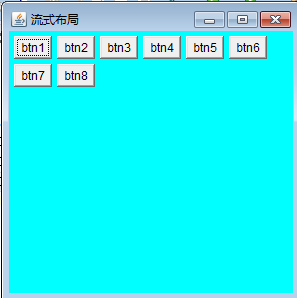
流式布局管理器
 class MyFrame3 extends Frame {

     public MyFrame3(String title) {

         super(title);

     }

     public void init() {

         FlowLayout layout=new FlowLayout(FlowLayout.LEFT);//设置左对齐

         this.setLayout(layout);

         this.setBackground(Color.CYAN);

         this.add(new Button("btn1"));

         this.add(new Button("btn2"));

         this.add(new Button("btn3"));

         this.add(new Button("btn4"));

         this.add(new Button("btn5"));

         this.add(new Button("btn6"));

         this.add(new Button("btn7"));

         this.add(new Button("btn8"));

         this.setSize(300, 300);

         this.setVisible(true);

     }

 }
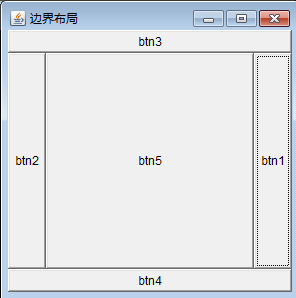
边界布局管理器
 class MyFrame4 extends Frame {

     public MyFrame4(String title) {

         super(title);

     }

     public void init() {

         this.setBackground(Color.CYAN);

         this.add(new Button("btn1"),BorderLayout.EAST);

         this.add(new Button("btn2"),BorderLayout.WEST);

         this.add(new Button("btn3"),BorderLayout.NORTH);

         this.add(new Button("btn4"),BorderLayout.SOUTH);

         this.add(new Button("btn5"),BorderLayout.CENTER);

         this.setSize(300, 300);

         this.setVisible(true);

     }

 }
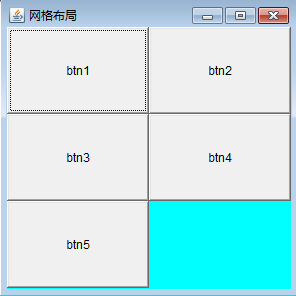
网格布局管理器
 class MyFrame5 extends Frame {

     public MyFrame5(String title) {

         super(title);

     }

     public void init() {

         GridLayout layout=new GridLayout(3,2);//创建一个3行2列的网格

         this.setLayout(layout);

         this.setBackground(Color.CYAN);

         this.add(new Button("btn1"));

         this.add(new Button("btn2"));

         this.add(new Button("btn3"));

         this.add(new Button("btn4"));

         this.add(new Button("btn5"));

         this.setSize(300, 300);

         this.setVisible(true);

     }

 }
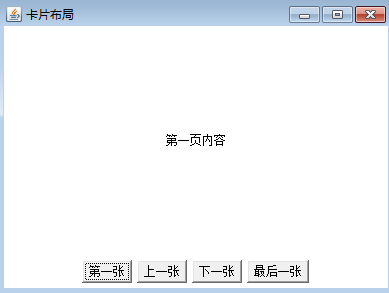
卡片布局管理器
 class MyFrame6 extends Frame {

     private Panel cardPanel=null;

     private Panel ctrolPanel=null;

     private CardLayout cardLayout=null;

     private FlowLayout flowLayout=null;

     private Label lb1,lb2,lb3,lb4;

     private Button btnFirst,btnPrevious,btnNext,btnLast;

     private TextField txtContent;

     public MyFrame6(String title) {

         super(title);

     }

     public void init() {

         //创建2个面板容器

         cardPanel=new Panel();

         ctrolPanel=new Panel();

         //创建2个布局管理器

         cardLayout=new CardLayout();

         flowLayout=new FlowLayout();

         //给容器设置指定的布局管理器

         cardPanel.setLayout(cardLayout);//卡片容器中放置卡片布局

         ctrolPanel.setLayout(flowLayout);//控制容器放置流式布局

         //声明创建4个标签控件和一个文本框控件

         lb1=new Label("第一页内容",Label.CENTER);

         lb2=new Label("第二页内容",Label.CENTER);

         txtContent=new TextField();//编辑文本框

         lb3=new Label("第四页内容",Label.CENTER);

         lb4=new Label("第五页内容",Label.CENTER);

         //构建四个按钮对象

         btnFirst=new Button("第一张");

         btnPrevious=new Button("上一张");

         btnNext=new Button("下一张");

         btnLast=new Button("最后一张");

         ctrolPanel.add(btnFirst);

         ctrolPanel.add(btnPrevious);

         ctrolPanel.add(btnNext);

         ctrolPanel.add(btnLast);

         //把四个标签控件和一个文本框控件添加到卡片容器中

         cardPanel.add(lb1);

         cardPanel.add(lb2);

         cardPanel.add(txtContent);

         cardPanel.add(lb3);

         cardPanel.add(lb4);

         this.add(cardPanel,BorderLayout.CENTER);//将卡片容器放在中部

         this.add(ctrolPanel,BorderLayout.SOUTH);//将控制容器放在南部

         this.setSize(400, 300);

         this.setVisible(true);

     }

 }
按钮事件的实现请查看下一篇...
AWT布局管理器的更多相关文章
- learning java AWT 布局管理器 GridBagLayout
在GridBagLayout布局管理器中,一个组件可以跨越一个或多个网格,并可以设置各网格的大小互不相关. import java.awt.*; public class GridBagTest { ...
- learning java AWT 布局管理器 GridLayout
GridLayout布局管理器将容器分割成纵横线分格的网格,每个网格所占的区域大小相同. import java.awt.*; public class GridLayoutTest { public ...
- learning java AWT 布局管理器CardLayout
import javax.swing.*; import java.awt.*; import java.awt.event.ActionListener; public class CardLayo ...
- learning java AWT 布局管理器FlowLayout
AWT提供了FlowLayout 从左到右排列所有组件,遇到边界就会折回下一行重新开始. import java.awt.*; public class FlowLayoutTest { publ ...
- learning java AWT 布局管理器BorderLayout
BorderLayout 将容器分为EAST, SOUTH, WEST,NORTH,CENTER五个区域. public class BorderLayoutTest { public static ...
- Swing布局管理器介绍
创作品,允许转载,转载时请务必以超链接形式标明文章 原始出处 .作者信息和本声明.否则将追究法律责任.http://zhangjunhd.blog.51cto.com/113473/128174 当选 ...
- AWT和布局管理器
AWT(Abstract Window Toolkit)抽象窗口开发包 component:可以显示出来的与用户进行交互的图形元素 container:容纳其他component元素的容器:conti ...
- java基础 布局管理器
概念: 组建在容器(比如JFrame)中的位置和 大小 是由布局管理器来决定的.所有的容器都会使用一个布局管理器,通过它来自动进行组建的布局管理. 种类: java共提供了物种布局管理器:流式布局管理 ...
- Java Swing 第03记 布局管理器
几种Swing常用的布局管理器 BorderLaout 它将容器分为5个部分,即东.南.西.北.中,每一个区域可以容纳一个组件,使用的时候也是通过BorderLayout中5个方位常量来确定组件所在的 ...
随机推荐
- [HDU 4336] Card Collector (状态压缩概率dp)
题目链接:http://acm.hdu.edu.cn/showproblem.php?pid=4336 题目大意:有n种卡片,需要吃零食收集,打开零食,出现第i种卡片的概率是p[i],也有可能不出现卡 ...
- 没想到cnblog也有月经贴,其实C#值不值钱不重要。
呵呵,就不倚老卖老了,从basic走过来,一路经历vb,vf,delphi,C#,php,asp,html,js,css,太多太多的开发语言,包括面向对象编程思想,语义化页面结构等等,除了高级的编程技 ...
- AutoCAD系统变量一览表
p.MsoNormal,li.MsoNormal,div.MsoNormal { margin: 0cm; margin-bottom: .0001pt; text-align: justify; t ...
- ubuntu 14.04 compiz的ALT + TAB切换程序
安装完ubuntu,发现不能使用ALT + TAB切换应用程序,翻遍所有百度结果,没有可行,都是拷这个拷那个...真实无语...FQgoogle,看的第一个就完美解决.记录下来,方便国人少走弯路. 首 ...
- 在 Typescript 2.0 中使用 @types 类型定义
在 Typescript 2.0 中使用 @type 类型定义 基于 Typescript 开发的时候,很麻烦的一个问题就是类型定义.导致在编译的时候,经常会看到一连串的找不到类型的提示.解决的方式经 ...
- python 面试必读
总结了10道题的考试侧重点,供参考: 1.How are arguments passed – by reference of by value? 考的是语法,基本功,虽说python程序员可以不用关 ...
- Java笔记(一)
Java语言特征 Java之父:詹姆斯,格斯林 跨平台:一次编译,到处运行write once,run everywhere! Java是一种面向对象的编程语言(OOP)面向对象(OO -- Orie ...
- ajax和json对象
二维数组 首先是输出json字符串的php文件 header("Content-type: text/html; charset=utf-8"); //json设置utf-8 $a ...
- java 工具类
首先把构造函数设置为私有.然后方法都改为静态.
- 向IPython Notebook中导入.py文件
IPython Notebook使用起来简洁方便,但是有时候如果需要导入一个现有的.py文件,则需要注意选择导入的方法以达到不同的效果.目前遇到3种方法. (1) 将文件保存为.ipynb格式,直接拖 ...